BAPI returned without an exception: Check RETURN before committing
A manufacturer's integration imports more than one intended business object and receives mixed return messages.

Source review:
START HERE · NO PRIOR TOPIC KNOWLEDGE NEEDED
What it is. Why it matters.
A BAPI is an SAP interface for a business operation. Its response can contain business errors, and the transaction’s save boundary determines whether changes are actually committed.
Completely new to SAP?
Manufacturers use SAP to connect work such as buying components, recording inventory, planning production, shipping equipment and accounting for costs. SAP S/4HANA is an enterprise resource planning system: it connects these activities through shared business data.
ABAP is SAP’s programming language for business applications. A program reads data, applies rules and produces a result. Start with the objects involved before investigating code.
A transaction code, or t-code, is a shortcut to a task in classic SAP GUI. Fiori apps provide another way to work. Names and screens depend on the product and release; you do not need a live system to learn the concepts in this guide.

Scope and source-review notes
Scope and evidence
Source review by FAST SAP SOLUTIONS® editorial. This badge describes our editorial review; it does not represent SAP certification or independent endorsement.
Classic BAPI RETURN and transaction model; each BAPI and integration stack can impose additional or legacy completion requirements.
Primary documentation reviewed on 14 November 2026 using readable full text. Official classic BAPI guide pages reviewed in full. Specific business BAPI payloads, RFC session behavior and posting outcomes require target-system validation; the sample only inspects messages.
A MANUFACTURING EXAMPLE
Protect the transaction boundary of a plant import
Delivery is not business success
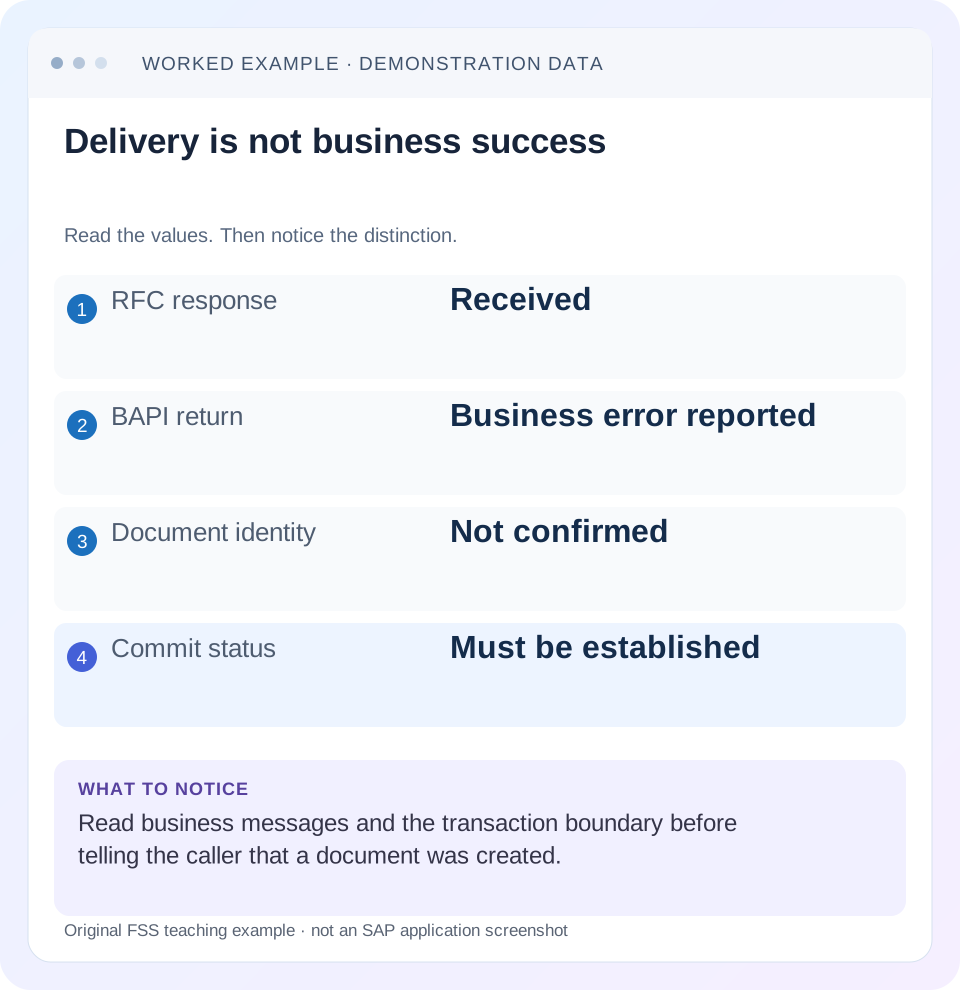
Read the example values
- RFC response
- Received
- BAPI return
- Business error reported
- Document identity
- Not confirmed
- Commit status
- Must be established
A REAL SCREEN TO RECOGNIZE
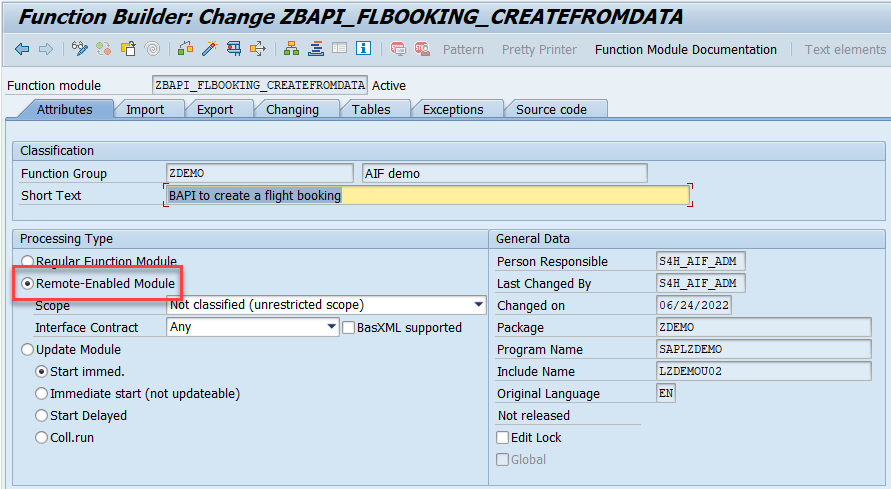
SE37 Function Builder in SAP’s RFC tutorial. The Attributes tab identifies the module and processing type; the parameter tabs describe a different part of its contract.
© 2024 SAP SE or an SAP affiliate company. All rights reserved. Reproduced unchanged for educational commentary. This is a source example, not a capture of your system.A REAL SCREEN TO RECOGNIZE
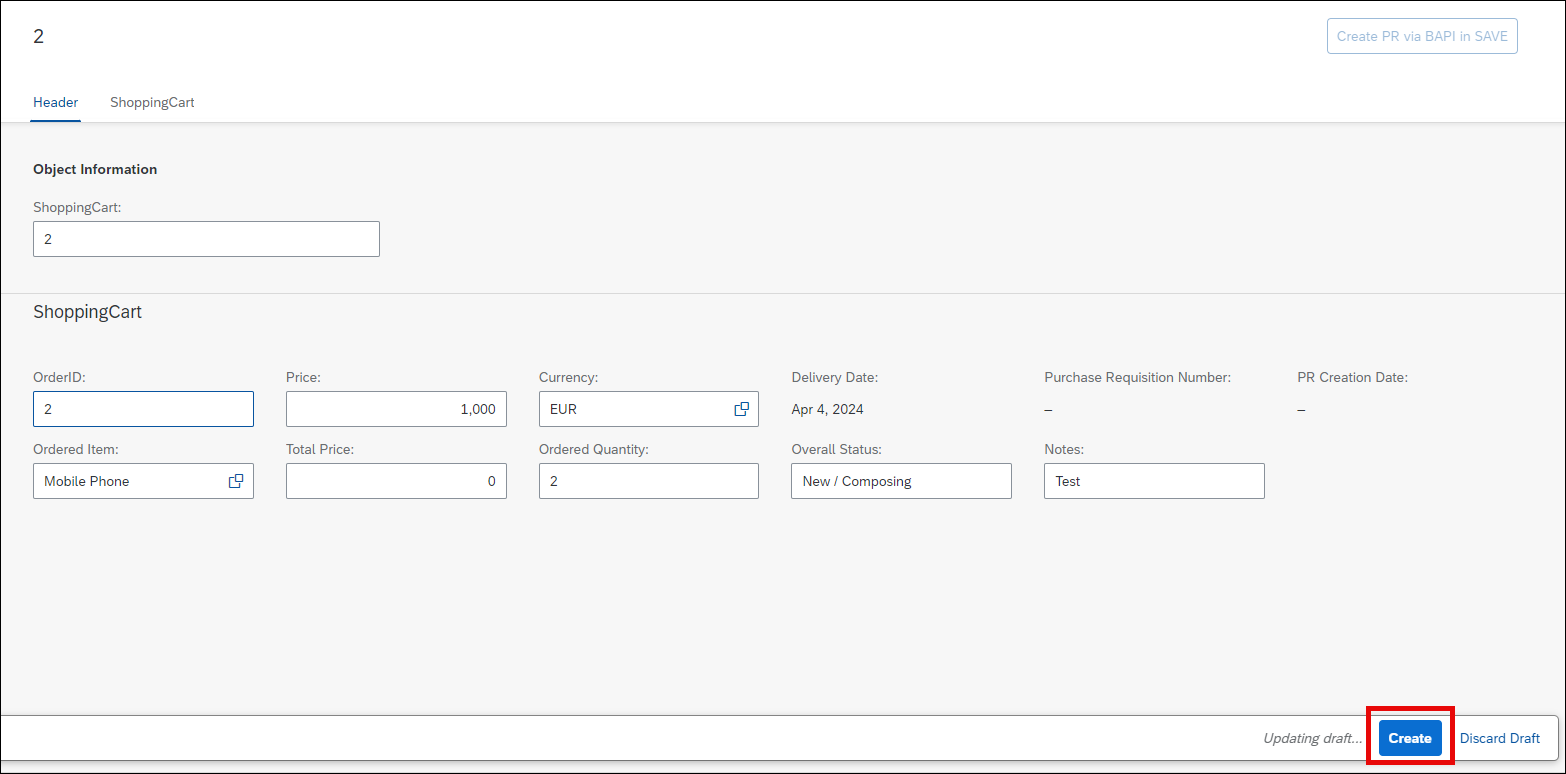
SAP’s RAP workshop shopping-cart application illustrates requests for purchasing. This is a custom workshop app, not the classic ME53N screen. Recognize the requested items and actions; creating a request and creating a supplier order are separate business stages.
© 2025 SAP SE or an SAP affiliate company and abap-platform-rap110 contributors. Apache-2.0 (repository REUSE annotation). Reproduced unchanged for educational commentary. This is a source example, not a capture of your system.Words you’ll meet in this guide
- Program
- A set of instructions executed by a computer.
- Class
- A reusable unit that groups data with operations called methods.
- Database
- Organized information kept beyond one program execution.
- Internal table
- A list of rows held temporarily in an ABAP program’s memory.
- Key
- One or more fields used to identify or find a record.
- ABAP
- SAP’s programming language for business applications.
- API
- A defined interface through which programs exchange data or request actions.
- RFC
- Remote Function Call: a way for one system to call functions in another.
- BAPI
- Business Application Programming Interface: an SAP interface for a business operation.
- LUW
- Logical unit of work: a group of related changes considered together by the relevant transaction model.
Preview the practical steps
SEE THE CONNECTION
See it in a simple example.
A small example to make the idea concrete.
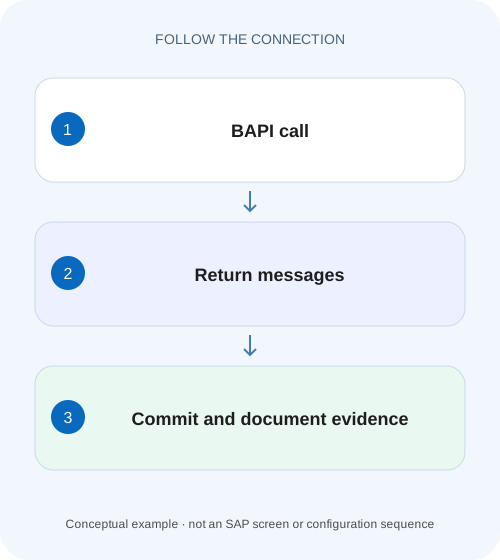
Protect the transaction boundary of a plant import
A manufacturer's integration imports more than one intended business object and receives mixed return messages.
A normal call return does not prove business acceptance or persistence
When a BAPI call completes without a technical communication exception, inspect its documented RETURN structure or table before reporting success.
Scope and prerequisites
The guide covers classic BAPI error reporting and caller-controlled transaction concepts.
Read the complete structured message contract
The reviewed BAPI programming guide documents message types S, I, W, E and A for success, information, warning, error and termination.
Protect the transaction boundary of a plant import
A manufacturer's integration imports more than one intended business object and receives mixed return messages.
Check the operation's documented commit ownership and every relevant return message before reporting the whole import as persisted.
| Reader | Business question | Evidence to carry forward |
|---|---|---|
| SAP developers and application teams supporting manufacturers | Protect the transaction boundary of a plant import | Check the operation's documented commit ownership and every relevant return message before reporting the whole import as persisted. |
01 A normal call return does not prove business acceptance or persistence
When a BAPI call completes without a technical communication exception, inspect its documented RETURN structure or table before reporting success. Business errors can be delivered as structured messages. Then establish the transaction outcome: an accepted operation may still require the caller's supported commit step before it becomes durable. [1] [2]
Keep transport completion, business acceptance, transaction completion and verified document identity separate. This tutorial develops a fictional two-operation import and shows why checking only the first RETURN row or committing inside a helper can produce misleading or partial outcomes.
02 Scope and prerequisites
The guide covers classic BAPI error reporting and caller-controlled transaction concepts. Individual BAPIs can have legacy behavior, special preconditions or documented internal commits. Read the specific function documentation and installed release before choosing transaction handling. ABAP Cloud consumption and remote integration also require supported API and connection contracts.
You should understand a logical unit of work, a function call and structured messages. The code below scans an illustrative BAPIRET2 table; it does not create a business document. Transaction pseudocode intentionally leaves out a particular posting BAPI because a valid payload and sequence are business-object-specific. No SAP posting was executed for this article.
03 Read the complete structured message contract
The reviewed BAPI programming guide documents message types S, I, W, E and A for success, information, warning, error and termination. BAPIRET2 also provides message class/number and context such as parameter, row and field. Retain these identifiers because a localized message text alone is a weak diagnostic key. [1]
A RETURN table can contain several messages. A success-like informational row followed by an error is not a successful business operation. Inspect every relevant message and the BAPI's documented acceptance rule. Warnings need a policy: some may be acceptable with acknowledgment, while another business process may require user review. Do not assume that any nonempty RETURN means failure or any first S means success.
04 Worked case: two independent objects in one intended import unit
Imagine an import that creates two fictional business objects, A and B, intended to be accepted together under a supported transaction sequence. A's call reports no blocking message and returns provisional identity A500. B's call returns an E message for item 2: required account assignment missing. If the helper for A committed immediately, A500 may remain even though the overall import reports failure.
The transaction owner must decide whether this process is atomic across these operations and whether the actual BAPIs support combination in one LUW. The classic model documents restrictions, including repeated writes to the same instance. The example uses two different objects to avoid suggesting that create-then-change of the same instance is generally supported before commit. [2]
| Step | Observed result | Transaction implication |
|---|---|---|
| Call A | No blocking RETURN; identity A500 | Accepted is not yet verified persisted |
| Hidden helper commit | A is finalized early | Can break intended combined outcome |
| Call B | E message for item 2 | Business rejection requires handling |
| Overall response | Import failed | Must explain whether A exists |
| Correct ownership | One documented completion boundary | Caller can apply intended supported policy |
05 Scan every message before deciding
The sample explicitly examines all rows for the blocking types chosen in this illustrative caller policy. It preserves the messages for presentation or controlled logging and does not base acceptance on the message text being blank. Adapt the blocking rule to the actual BAPI contract; this is not a universal substitute for that documentation.
Technical call failures also need a separate path. A network failure can prevent receiving RETURN, leaving the business outcome uncertain. An ABAP/RFC communication error is therefore different from a well-formed E message that explicitly rejects the business input. Report those states differently and avoid immediately resubmitting an uncertain create operation.
DATA messages TYPE STANDARD TABLE OF bapiret2 WITH EMPTY KEY.
DATA has_blocking_message TYPE abap_bool VALUE abap_false.

" Populate messages from the specific BAPI's documented RETURN.
LOOP AT messages INTO DATA(message).
  IF message-type = 'E' OR message-type = 'A'.
    has_blocking_message = abap_true.
  ENDIF.
  " Retain ID, NUMBER, PARAMETER, ROW and FIELD as appropriate.
  " Sanitize MESSAGE and MESSAGE_V1..V4 before external logging.
ENDLOOP.

IF has_blocking_message = abap_true.
  " Return rejected outcome to the transaction owner.
ELSE.
  " Apply the BAPI-specific warning/acceptance policy.
  " Do not COMMIT here merely because this helper finished.
ENDIF.
06 Identify the transaction owner and preserve connection context
The component orchestrating the business unit should own its completion boundary. A reusable helper normally returns outcome and messages rather than committing unrelated work invisibly. Confirm the specific BAPI's documented commit/rollback mechanism and any exception for legacy internal commits. [2]
For remote orchestration, connection/session context matters. A commit issued on an unrelated connection cannot be assumed to complete pending work on the original context. Use the supported stateful/session handling provided by the actual integration stack. Do not close a connection after an accepted write and then create a new one to issue a hopeful commit without checking that contract.
07 A transaction sequence that is concrete without inventing a BAPI payload
For the intended combined import, write down the allowed calls, complete message checks and final completion decision before implementation. If the specific APIs cannot participate in one supported transaction, redesign the process as multiple explicit units with reconciliation rather than claiming atomicity the platform does not supply.
The pseudocode illustrates the states. A rollback belongs to the transaction owner and only affects work within its supported uncommitted boundary. It does not reverse a remote email, an already committed prior unit or another system's successful request. Those effects need an explicit compensation or reconciliation process.
begin supported transaction context
call operation A
inspect complete A RETURN and technical outcome
if rejected: end by supported rollback; report rejected
call operation B in the same supported context
inspect complete B RETURN and technical outcome
if rejected: end by supported rollback; report rejected
if any outcome uncertain: reconcile before resubmission
if both accepted: perform documented commit/completion
inspect completion outcome
read resulting identities through supported read path
report committed only when supported evidence establishes it
08 Do not confuse a returned document number with a durable document
Some interfaces return an identity before the caller completes the transaction. Treat it as an important correlation reference, not automatic proof that the document is durably available. After successful completion, use the supported read/display path and business reference to verify the intended object and relevant values.
The classic BAPI transaction documentation also explains visibility restrictions for reads following writes before commit. A missing read in the wrong stage may reflect transaction behavior rather than a failed create. Follow the specific supported sequence instead of adding multiple commits until the read becomes convenient. Verify quantities, organization and dates, not only that some object with a plausible number exists. [2]
09 Troubleshooting accepted, rejected and uncertain outcomes
A robust client preserves enough state to choose the next action. Collapsing every result into a boolean “success” loses the difference between a known rejection and an unknown persistence outcome.
| Observation | Interpretation to establish | Next action |
|---|---|---|
| RFC returned normally; E message | Business rejection | Fix documented input; do not report success |
| RETURN has W only | Warning-policy decision | Apply specific BAPI/business rules |
| Identity returned; no completion evidence | Accepted/provisional outcome | Inspect transaction boundary and completion |
| Timeout after write request | Outcome uncertain | Reconcile by business reference before retry |
| One object exists after overall failure | Possible early commit or separate unit | Reconstruct exact completion sequence |
| Commit sent on another session | Context may not match | Inspect integration session handling |
| Read before commit sees old state | Documented visibility boundary | Follow supported sequence |
10 Verification should include failure between operations
A positive case uses valid inputs for A and B, inspects all messages, completes the supported transaction and reads both resulting objects. A negative case makes B fail after A was accepted; verify the intended rollback/partial-outcome contract using actual persisted state. Do not assert rollback solely because a rollback function was called.
A boundary case uses no messages or warning-only messages according to the specific BAPI's documented behavior. Another simulates a lost response after completion and tests reconciliation without a duplicate create. Include a table where an S message precedes E to expose first-row-only parsing. These are proposed acceptance tests, not claims of execution in a SAP landscape.
11 Preserve diagnostic detail without exposing payloads
A useful record contains BAPI name, system/client, business request reference, call/completion timestamps, returned identity and structured message identifiers. Include row/field context for the failed item. Protect customer, supplier, account and token values in message variables before sharing evidence outside the authorized support channel.
Keep the caller's state transition visible: requested, business rejected, accepted awaiting completion, committed verified or uncertain. If a later correction succeeds, link it to the original request rather than overwriting the history with a generic success. This makes duplicate prevention and support diagnosis easier without storing an unrestricted raw RFC session.
12 Frequently asked questions
Can I commit whenever RETURN is empty? Only after the specific BAPI's acceptance and transaction contract is satisfied and the transaction owner decides to complete the intended unit.
Does every warning block posting? No. Use the documented behavior and business policy rather than a blanket rule.
Does rollback undo an earlier committed operation? No. It cannot rewind a completed independent transaction or an external side effect.
What should I inspect if a document is missing? Confirm complete RETURN, technical outcome, connection context, completion result and supported read evidence. The related SE24/SE37 lesson helps inspect the actual interface, while the exception lesson helps keep uncertain technical failures distinct from explicit business rejection.
Related services and next steps
Primary sources
Found this useful?
Share this guide with your network, or leave a like.
Your like is saved in this browser.