ABAP READ TABLE failed: Do not reuse an old work-area value
A plant purchasing report finds one requested record and then fails to find the next, but reused state could make the old result appear current.

Source review:
START HERE · NO PRIOR TOPIC KNOWLEDGE NEEDED
What it is. Why it matters.
READ TABLE searches an ABAP internal table. A work area holds a row’s values; if a lookup fails, code must not assume those values now belong to the missing row.
Completely new to SAP?
Manufacturers use SAP to connect work such as buying components, recording inventory, planning production, shipping equipment and accounting for costs. SAP S/4HANA is an enterprise resource planning system: it connects these activities through shared business data.
ABAP is SAP’s programming language for business applications. A program reads data, applies rules and produces a result. Start with the objects involved before investigating code.
A transaction code, or t-code, is a shortcut to a task in classic SAP GUI. Fiori apps provide another way to work. Names and screens depend on the product and release; you do not need a live system to learn the concepts in this guide.

Scope and source-review notes
Scope and evidence
Source review by FAST SAP SOLUTIONS® editorial. This badge describes our editorial review; it does not represent SAP certification or independent endorsement.
READ TABLE INTO result handling in compatible ABAP releases; COMPARING, TRANSPORTING and other result forms need their own documented interpretation.
Primary documentation reviewed on 14 November 2026 using official indexed excerpts. Documentation review only; authored examples were not compiled or executed in an SAP system.
A MANUFACTURING EXAMPLE
Avoid a stale component lookup result
Check the second lookup
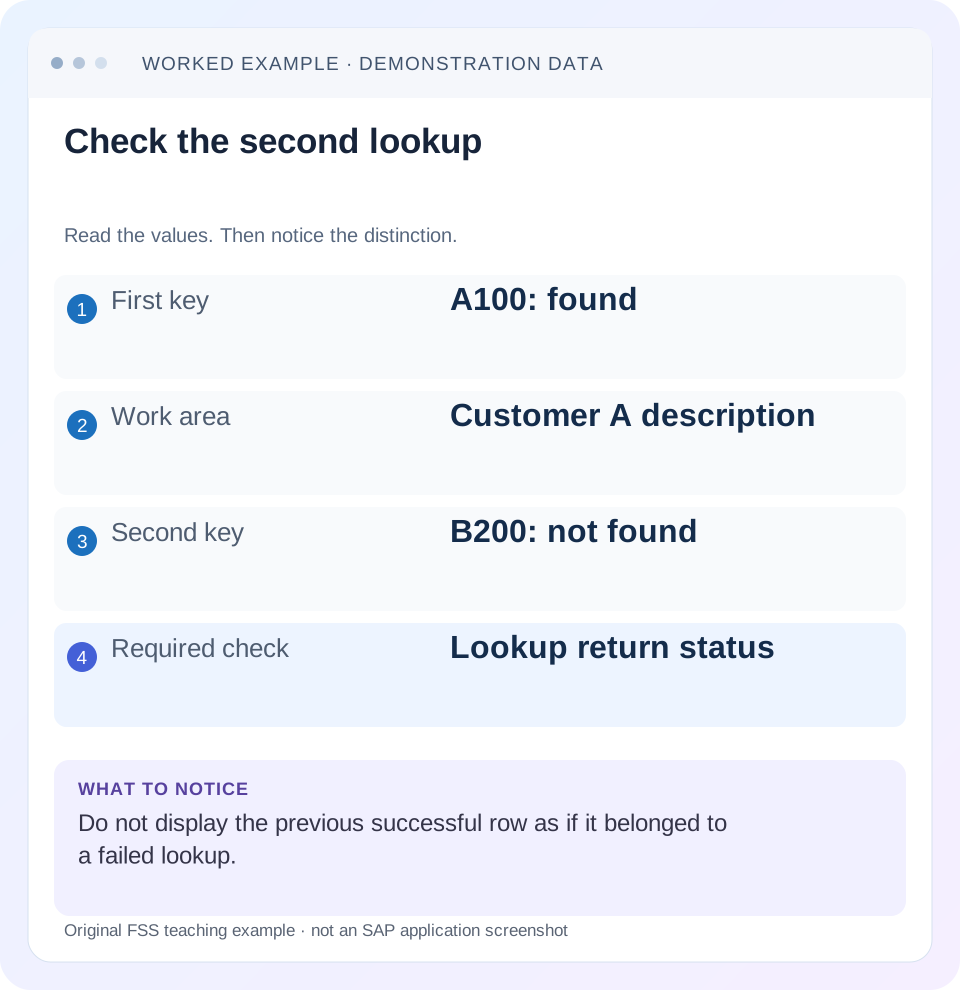
Read the example values
- First key
- A100: found
- Work area
- Customer A description
- Second key
- B200: not found
- Required check
- Lookup return status
Words you’ll meet in this guide
- Program
- A set of instructions executed by a computer.
- Class
- A reusable unit that groups data with operations called methods.
- Database
- Organized information kept beyond one program execution.
- Internal table
- A list of rows held temporarily in an ABAP program’s memory.
- Key
- One or more fields used to identify or find a record.
- ABAP
- SAP’s programming language for business applications.
Preview the practical steps
SEE THE CONNECTION
See it in a simple example.
A small example to make the idea concrete.
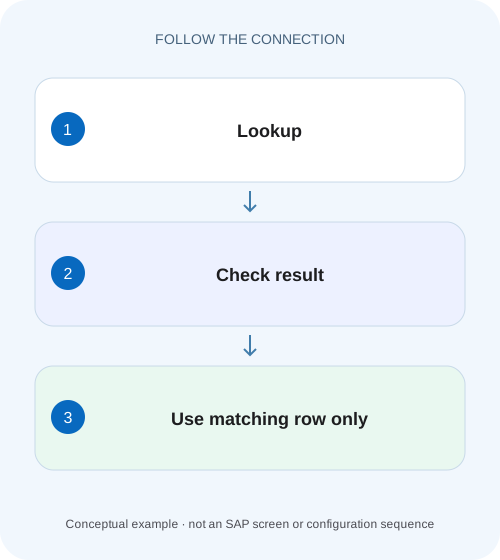
Avoid a stale component lookup result
A plant purchasing report finds one requested record and then fails to find the next, but reused state could make the old result appear current.
Check the read result before using the work area
If a successful READ TABLE INTO is followed by a lookup that finds no row, the target can still contain values from the earlier lookup.
Scope: READ TABLE INTO, not every read expression
This tutorial covers ABAP internal-table lookups using INTO and the statement's documented return codes.
Why the wrong value looks plausible
A work area is a data object with a lifetime.
Avoid a stale component lookup result
A plant purchasing report finds one requested record and then fails to find the next, but reused state could make the old result appear current.
Check the read outcome and result initialization before accepting a value as evidence for the current component or document.
| Reader | Business question | Evidence to carry forward |
|---|---|---|
| SAP developers and application teams supporting manufacturers | Avoid a stale component lookup result | Check the read outcome and result initialization before accepting a value as evidence for the current component or document. |
01 Check the read result before using the work area
If a successful READ TABLE INTO is followed by a lookup that finds no row, the target can still contain values from the earlier lookup. Treat the return status of the current statement as the evidence of a match. The presence of a customer name or account number in a work area does not establish that it belongs to the key just requested. [1]
The correction has two parts: use the target only in the branch that means a row was found, and define the missing-value outcome for the current business record. Clearing a target can make stale state easier to spot, but clearing alone does not decide whether the operation should continue, display a blank or reject the record.
02 Scope: READ TABLE INTO, not every read expression
This tutorial covers ABAP internal-table lookups using INTO and the statement's documented return codes. ASSIGNING, REFERENCE INTO, table expressions and VALUE ... OPTIONAL have different result and failure contracts. Check those forms independently instead of transferring assumptions from a work-area example.
The local fixture uses modern declarations and constructor expressions on a compatible ABAP release. It needs no business database table. Developers should understand internal-table rows, work areas, loops and sy-subrc. The example is authored teaching code and has not been compiled in a customer system. The same reasoning can be verified with the small dataset on paper before any runtime exercise.
03 Why the wrong value looks plausible
A work area is a data object with a lifetime. It is not a live statement-result indicator. On the first successful lookup, READ TABLE copies the requested row into it. On a later miss, the program must not assume the previous contents have become a valid representation of the missing row. If downstream code unconditionally copies the description, stale data crosses into the output.
This defect often escapes a single-row test because the first successful lookup looks correct. It depends on sequence: a hit establishes a plausible value, and a subsequent miss exposes incorrect reuse. Sorting the input can appear to move the problem between records without changing the root cause. The bug follows the successful value retained before the miss.
04 Worked case: A100 exists and B200 does not
Assume a lookup with one row: key A100, description Customer Alpha. The input list contains order O001 for A100 followed by order O002 for B200. The expected output is Customer Alpha for O001 and an explicit missing-description outcome for O002. There is no B200 source row in this fixture.
With unconditional copying, the first read fills the work area with A100/Customer Alpha. The second read misses, but the later assignment can still copy Customer Alpha into O002. A user may then blame a duplicate source record even though the source contains only A100. Inspecting only the output loses the distinction; capture requested key, sy-subrc and target content at the lookup boundary.
| Iteration | Requested key | Read outcome | Unsafe output |
|---|---|---|---|
| 1 | A100 | Found; target Alpha | O001 = Alpha |
| 2 | B200 | Not found; earlier target may remain | O002 = Alpha, incorrectly |
05 Implement the success branch and a deliberate fallback
In the example, descriptions are optional display enrichment, so a missing match leaves the output label blank. The output component is cleared for each input item, independently of the lookup work area. This prevents both stale lookup data and preexisting output labels from leaking into the new result.
For a mandatory account assignment or tax reference, use a rejecting path instead. A blank may itself be invalid. Keep that business decision close enough to the lookup that reviewers can see the whole contract. The branch below uses an ordinary read without COMPARING, for which sy-subrc zero identifies the match that can be consumed.
TYPES: BEGIN OF ty_lookup,
         key TYPE c LENGTH 4,
         description TYPE string,
       END OF ty_lookup,
       BEGIN OF ty_order,
         id TYPE c LENGTH 4,
         customer TYPE c LENGTH 4,
         description TYPE string,
       END OF ty_order.
DATA lookup TYPE HASHED TABLE OF ty_lookup WITH UNIQUE KEY key.
DATA orders TYPE STANDARD TABLE OF ty_order WITH EMPTY KEY.
lookup = VALUE #( ( key = 'A100' description = 'Customer Alpha' ) ).
orders = VALUE #(
  ( id = 'O001' customer = 'A100' )
  ( id = 'O002' customer = 'B200' ) ).
LOOP AT orders ASSIGNING FIELD-SYMBOL(<order>).
  CLEAR <order>-description.
  READ TABLE lookup INTO DATA(found)
    WITH TABLE KEY key = <order>-customer.
  IF sy-subrc = 0.
    <order>-description = found-description.
  ELSE.
    " Optional display enrichment: retain blank description.
    " A mandatory reference requires an explicit rejection here.
  ENDIF.
ENDLOOP.
06 Read sy-subrc immediately and understand the additions
Many ABAP statements set sy-subrc. A later check may therefore be inspecting another operation's outcome. Keep the decision directly after READ TABLE or copy the result into a deliberately named local status before executing another status-setting statement. Debugging evidence should identify which statement produced the value. [1]
Do not generalize “every nonzero value means not found” across all READ forms. With COMPARING, a found row whose compared components differ can produce sy-subrc 2; the documented transport still occurs for a found row. Values 4 and 8 describe not-found cases with differing index implications in applicable searches. Interpret the exact variant rather than copying a simplistic branch into comparison logic. [1] [2]
07 TRANSPORTING can leave a mixed work area
TRANSPORTING limits the components copied from a found row. A successful read can therefore leave unspecified target fields unchanged by design. If the work area contains A100's name and a later read transports only an amount from another row, the result can combine fields from different origins. A zero return code does not mean every target component was refreshed. [2]
Inspect the complete statement and every later target use. Where only one component is needed, consume that component deliberately and avoid treating the work area as a complete business record. Where a complete record is required, use an appropriate full-row result or initialize and populate the contract explicitly. TRANSPORTING NO FIELDS is an existence/index inquiry; it does not supply a row to consume. [2]
08 Debug the first incorrect iteration
Choose the smallest input sequence that reproduces the issue. Break immediately before the lookup for O002 and record B200, the current target and the expected missing behavior. Step over the read and observe the new return code before executing anything else. Then follow the exact assignment that puts a description into O002.
If the read reports success for B200, the explanation is different: inspect key values, conversions, table contents and duplicate rules. If the read misses and O002 is blank in ABAP but Alpha appears on screen, follow the returned result into the UI or cache. Do not rewrite the lookup table merely because the final screen is wrong.
Establish the current identity
Record order ID, requested lookup key and relevant business context.
Expected observation: O002 requests B200, not A100.
Observe status and target together
Inspect sy-subrc immediately after the exact READ statement.
Expected observation: The miss is separated from retained target content.
Trace output consumption
Follow the branch and any later unconditional assignment or cached result.
Expected observation: The first incorrect propagation is identified.
Compare the intended missing policy
Decide blank, warning or rejection from the business requirement.
Expected observation: The correction has a testable output contract.
09 Troubleshooting branches
A stale-work-area correction should be small and specific, but the surrounding investigation must distinguish similar symptoms. The table below keeps each branch tied to observable evidence.
| Observation | Question | Next action |
|---|---|---|
| Miss after a successful read | Is target consumed unconditionally? | Guard use and define fallback |
| Status unexpectedly zero | Was sy-subrc overwritten? | Move inspection next to READ |
| Found row contains wrong identity | Is the requested key complete and typed correctly? | Compare source row and key components |
| Only some fields are wrong | Does TRANSPORTING omit those fields? | Review partial-result contract |
| sy-subrc is 2 | Is COMPARING in use? | Interpret found-but-different semantics |
| ABAP result right; screen wrong | Does a consumer retain old state? | Trace model assignment and refresh |
10 Regression checks that expose sequence dependence
The essential test is hit followed by miss. Assert not only that the second read fails, but that O002 cannot contain Alpha. Reverse the order to miss followed by hit; both records must still have their defined outcomes. Then use two different successful keys so that a constant or uncleared output is easier to notice.
Test an empty lookup, an empty order list and repeated calls of the enrichment method in the same session. For a mandatory-reference version, assert rejection and absence of downstream posting. For an optional-label version, assert a blank without changing item identity. Counts alone are weak evidence here: the defective program can return exactly two rows while assigning the wrong name to one.
11 Alternative syntax must keep the same business decision
A table expression can make a lookup concise, but a missing row normally has its own exception behavior unless a supported optional/default form changes it. Replacing READ TABLE with shorter syntax does not remove the need to decide what missing data means. Review the actual language construct and caller contract before refactoring.
An existence test followed by a second read can also do unnecessary repeated work. If you need the row, retrieve it through a suitable supported form and handle the result once. Keep table category and key design separate from stale-state handling: a hashed lookup can be fast and still leak the previous value if the success branch is ignored.
12 Frequently asked questions
Does CLEAR before READ fix everything? It prevents one stale target value, but does not establish whether a row was found or whether a blank is acceptable. Keep the result check and business fallback.
Is an inline DATA declaration new on every loop iteration? Do not use the visual location of an inline declaration as a substitute for understanding ABAP variable lifetime. Test the actual read status and target behavior.
Why does the bug disappear when I test B200 alone? The preceding success that supplied Alpha is absent. Sequence tests reproduce the retained-state condition.
Can I use a default description? Yes, if the requirement explicitly accepts it and it cannot be mistaken for a valid master-data match. Preserve enough state to distinguish “not found” from a real description that happens to contain the default text.
Related services and next steps
Primary sources
Found this useful?
Share this guide with your network, or leave a like.
Your like is saved in this browser.