SAP Ariba guided buying: A buying experience still depends on procurement controls
A maintenance team requests three workshop devices through guided buying, while purchasing must retain the appropriate sourcing and approval controls.

Source review:
START HERE · NO PRIOR TOPIC KNOWLEDGE NEEDED
What it is. Why it matters.
Guided buying is a user-friendly SAP Ariba buying experience. It helps employees request purchases while the company’s sourcing, approval and receiving rules still apply.
Completely new to SAP?
Manufacturers use SAP to connect work such as buying components, recording inventory, planning production, shipping equipment and accounting for costs. SAP S/4HANA is an enterprise resource planning system: it connects these activities through shared business data.
SAP Ariba supports purchasing collaboration and buying experiences. Requests, approvals, supplier communication and receipt of goods remain distinct parts of the buying process.
A transaction code, or t-code, is a shortcut to a task in classic SAP GUI. Fiori apps provide another way to work. Names and screens depend on the product and release; you do not need a live system to learn the concepts in this guide.

Scope and source-review notes
Scope and evidence
Source review by FAST SAP SOLUTIONS® editorial. This badge describes our editorial review; it does not represent SAP certification or independent endorsement.
Guided buying with Ariba Buying/Buying and Invoicing using 2605/2608 references. Tenant catalogs, forms, team features, permissions, policy rules and ERP integration vary; guided and Procurement teams are separate.
Reviewed the cited official SAP indexed documentation excerpts on 14 November 2026. Direct Help Portal opens did not consistently expose readable page text. This is documentation-based teaching, not customer-system execution. All document identifiers, quantities and outcomes in the worked case are illustrative; installed release, edition, configuration and authorizations require local verification.
A MANUFACTURING EXAMPLE
Guide a workshop supply request
Simple buying, separate controls
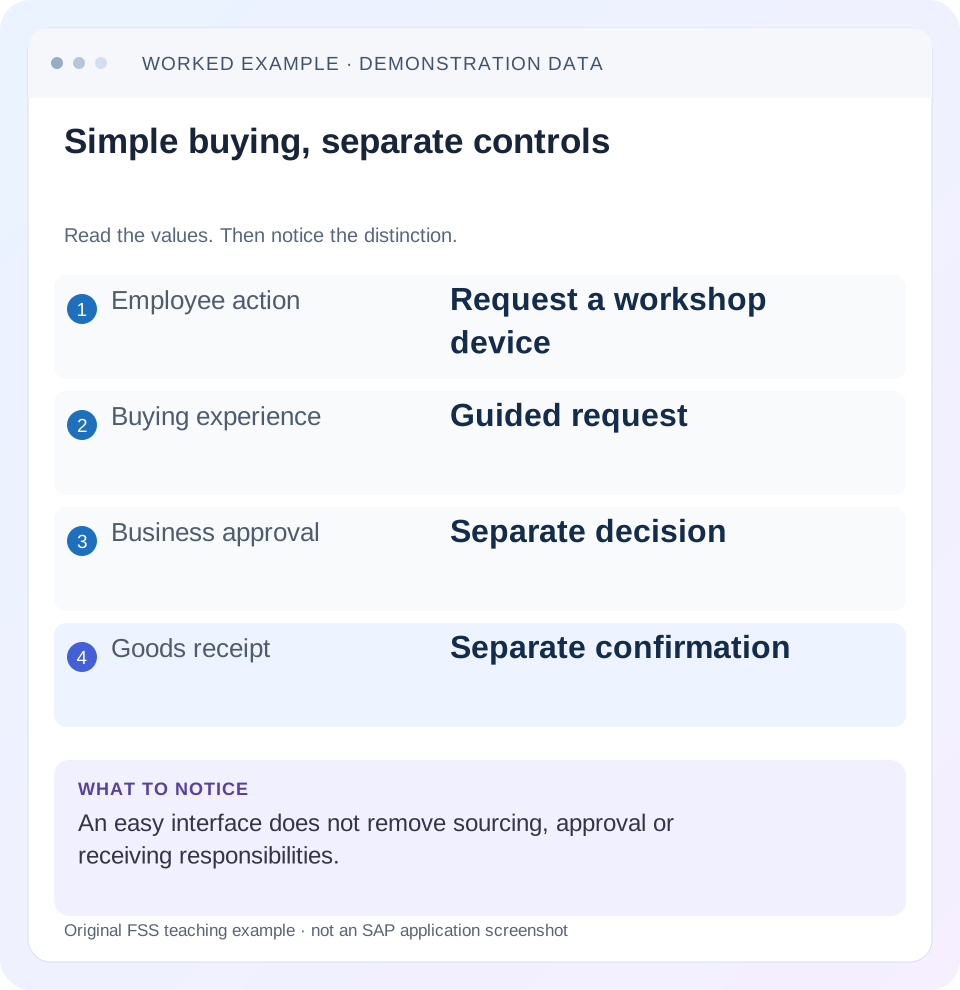
Read the example values
- Employee action
- Request a workshop device
- Buying experience
- Guided request
- Business approval
- Separate decision
- Goods receipt
- Separate confirmation
Words you’ll meet in this guide
- Requisition
- An internal request to purchase goods or services.
- Approver
- A person responsible for a required decision.
- Supplier
- The organization providing goods or services.
Preview the practical steps
SEE THE CONNECTION
See it in a simple example.
A small example to make the idea concrete.
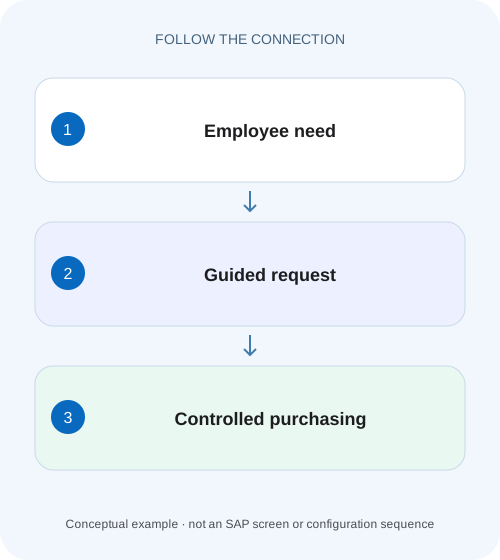
Guide a workshop supply request
A maintenance team requests three workshop devices through guided buying, while purchasing must retain the appropriate sourcing and approval controls.
An easier request experience still has several business milestones
SAP Ariba guided buying helps employees find and request goods or services through the tenant’s configured purchasing experience.
Scope and prerequisites
The guide concerns the guided buying capability with SAP Ariba Buying or Buying and Invoicing, using current 2605/2608 user and administration references.
Understand discovery, request, approval, ordering and receiving
Search results and landing tiles help a user choose a purchasing route.
Guide a workshop supply request
A maintenance team requests three workshop devices through guided buying, while purchasing must retain the appropriate sourcing and approval controls.
Follow the request, approval and receipt as separate responsibilities even when the buying interface makes the first step simple.
| Reader | Business question | Evidence to carry forward |
|---|---|---|
| Manufacturing buyers and purchasing managers | Guide a workshop supply request | Follow the request, approval and receipt as separate responsibilities even when the buying interface makes the first step simple. |
01 An easier request experience still has several business milestones
SAP Ariba guided buying helps employees find and request goods or services through the tenant’s configured purchasing experience. Submitting a request, completing approval, creating/communicating an order and recording receipt remain different events. A convenient interface does not make one status prove all of them. [1] [2]
This tutorial follows a team’s three-device request, including a missing-project policy message, approval and a partial receipt. It also explains why buying with a team can change organizational context. The practical outcome is a request that uses the intended source, policy, owner and receiving evidence, rather than merely a successful checkout.
02 Scope and prerequisites
The guide concerns the guided buying capability with SAP Ariba Buying or Buying and Invoicing, using current 2605/2608 user and administration references. Features, catalogs, forms, team creation and ERP integration depend on the tenant. SAP Ariba Procurement teams and guided-buying teams are explicitly separate concepts in the cited documentation.
Obtain an authorized requester role and the relevant organizational context, delivery address, account assignment, commodity and any required project. For team work, confirm owner/contributor status and the approved responsibility model. Administrative policy tests require the appropriate role and a test tenant; ordinary requesters should follow visible guidance rather than edit configuration.
Use the actual request and follow-on IDs in an investigation. The lesson does not assume every tenant exposes the same tiles, forms or automatic order process.
03 Understand discovery, request, approval, ordering and receiving
Search results and landing tiles help a user choose a purchasing route. The resulting request captures goods/service details and business context. Validation policies can request information or prevent submission for the configured conditions. Approval then records required decisions for the actual approvable.
An order and its supplier communication are later evidence. Receipt records what the recipient actually confirms as delivered or performed in the supported process. An invoice and its settlement/payment are another chain. Keep these transitions explicit in training and support messages.
For a workshop device, a catalog offer can supply useful commercial data, but the requester still needs the correct quantity, organizational assignment and delivery requirement. A displayed item is not proof that every user, plant or purchasing unit may use it under the same conditions.
04 Worked case: three workshop devices at eight hundred each
The fictional project team needs three workshop devices at 800 currency units each, giving 2,400 before taxes, freight and other charges. Team owner O100 belongs to the intended company/purchasing-unit/plant context. Contributor U200 helps prepare the request because the owner will be unavailable during delivery.
The tenant’s illustrative policy requires a procurement workspace project for this computer request. No project is initially assigned, so the supported validation message asks the user to add one. Selecting the approved project resolves that data requirement; it does not automatically approve the purchase.
After the actual approval and order process, two workshop devices arrive first and one later. The receipt evidence should represent two plus one, not three merely because the order quantity was three. The combined request/order amount and the physical receiving timeline answer different questions.
| Milestone | Evidence | What remains separate |
|---|---|---|
| Need | 3 workshop devices ×800 =2,400 | Source/policy and business approval |
| Request preparation | Team context and project | Submission is not supplier order |
| Policy validation | Required project supplied | Does not replace approver decisions |
| Approved order | Actual order/output reference | Not proof of delivery |
| First receipt | 2 workshop devices | 1 still expected in fixture |
| Final receipt | 1 workshop device | Invoice/payment still separate |
05 Choose the intended buying route
Start from the business need and tenant guidance. A catalog item, ad hoc request, RFQ or other configured route can have different data and policy requirements. Do not choose a less-controlled-looking form simply to avoid a message on the intended route.
Compare item description, supplier, unit, price basis, delivery details and any contract context shown. Three workshop devices and three cartons of workshop devices are not the same quantity. If the needed item is absent, follow the tenant’s supported request/quote route instead of inventing a catalog equivalent with a misleading description.
For the worked case, retain the selected item and commercial basis at request time. If pricing or availability later changes, inspect the actual request/order evidence and approved change rather than assuming a search-result screenshot is the final supplier instruction.
06 Read policy messages as specific data decisions
SAP’s current example validation-policy file tests a commodity condition and missing ProjectID, then issues an error directing the user to assign a project. This is a concrete example of policy enforcing document context. Your tenant’s conditions and messages can differ. [2] [3]
For the workshop device fixture, confirm whether the message applies to the current request or a particular line, and identify the required project field/action. Enter the real approved project; a random project merely to remove the message makes the document misleading.
If the project is already present but the error persists, capture the exact message, request version, commodity and organization and ask the authorized policy owner to compare the actual expression and data. Do not repeatedly clear unrelated fields or create another request without understanding the condition.
07 Team buying changes responsibility and organizational context
SAP documents teams collaborating on RFQs, requisitions and receipts for continuity. In guided team requests, the team owner’s company code, purchasing unit and plant are used, and ordinary on-behalf-of behavior is restricted in the documented design. Review those values before submitting. [1]
Contributor U200 might normally buy in another plant. Helping O100’s team does not mean the request should silently switch to U200’s own organizational context. Confirm the team banner/mode and actual request data using the supported interface.
The source explicitly distinguishes guided-buying teams from teams in SAP Ariba Procurement solutions and notes that other document types such as non-PO invoices are outside the same team scope. Do not assume team membership grants every procurement or invoice action.
08 Prepare and verify the request in sequence
The following sequence combines ordinary requester checks with the team and policy boundaries in the fixture.
Confirm need and actor
Establish three workshop devices, intended delivery context and whether U200 is acting as an approved team contributor for O100.
Expected observation: The organizational owner is explicit.
Select the supported source/route
Review item, supplier, unit and 800-per-workshop device basis in the configured experience.
Expected observation: The 2,400 simplified request has a traceable commercial basis.
Resolve policy data
Read the missing-project message and assign the actual approved project through the supported action.
Expected observation: The requested context satisfies the intended validation, not a placeholder.
Submit and follow approval
Retain the request ID and inspect required nodes/state rather than assuming checkout completes approval.
Expected observation: The pending decision owner can be identified.
Follow ordering and receipt
Verify actual order/output, then record two and later one workshop device only when physically confirmed under the permitted process.
Expected observation: Request, supplier instruction and delivery evidence are separate and coherent.
09 The owner’s absence is not a reason to bypass approval
Team collaboration can provide continuity when a requester is unavailable. It should use the documented owner/contributor and receiving design, not shared credentials or an assumption that any team member may approve every decision.
If Finance or another required node is pending, inspect the actual approval flow and eligible actor. A contributor being able to prepare or receive does not prove they own that approval. Use the tenant’s supported delegation/reassignment where appropriate.
For an unavailable receiver, confirm who can record the receipt and how responsibility appears in history. The physical evidence should still identify two delivered workshop devices at the first event. Convenience does not justify confirming all three before the third arrives.
10 ERP integration adds a document-mapping boundary
In an integrated landscape, the guided request and backend requisition/order can have different identifiers and processing times. Retain both references and integration evidence. A local approved state does not prove the backend created or communicated the intended order.
Compare organizational data, quantity/unit, project/account assignment and attachments where relevant to the installed scenario. A backend rejection can reflect mapping or missing master data even when guided buying validation completed.
Do not resubmit the whole request after an ambiguous integration response until existing backend documents are reconciled. Duplicate demand can arise if creation succeeded but the acknowledgement was delayed. The supported monitoring and recovery process should establish the actual result.
11 Troubleshooting decisions
Find the current document and first unproven transition. A simple user interface can still expose a problem in a later purchasing or integration stage.
| Observation | Question | Next evidence |
|---|---|---|
| Item missing from search | Is route/catalog/context correct? | Tenant content and organizational eligibility |
| Project error at checkout | Does actual policy condition lack project? | Message, commodity, ProjectID/context |
| Wrong plant in team request | Which owner/mode supplies organization? | Team owner and request organizational data |
| Submitted but no supplier order | Which approval/order/integration step is pending? | Flow and backend/order references |
| Team member cannot process invoice | Is that document in team scope? | Document type and actual permissions |
| Three ordered, two delivered | Was receipt based on actual delivery? | Receiving evidence and remaining expectation |
12 Verification exercises
For the positive worksheet check, calculate three times 800 equals 2,400, retain O100’s intended organizational context, satisfy the real project requirement and follow the actual approval/order references. Reconcile receipt two plus one to three.
For the negative check, select an unrelated project merely to pass validation and explain why submission success is not correct business data. Then confirm three received after only two arrived and identify the false inventory/receiving claim.
For boundary checks, compare team and individual mode, a contributor from another plant, an already assigned project, a request edit after approval and an integration acknowledgement delay. Test only enabled features in an authorized tenant and record actual statuses; no execution is claimed here.
13 Questions and the handover
Does checkout mean approved? Read the actual approval state. Does team buying cover every document? The documented team scope is specific, and guided/Procurement team concepts are separate. Does a policy message mean the software is broken? It can be enforcing an intended data requirement; compare condition and actual content first.
A useful result names the request/team owner, three-device/2,400 basis, required project, current approval, actual backend/order/output reference and two/one receipt timeline. If something fails, identify the stage and exact message rather than advising another checkout.
Continue with approval flows, PR-versus-PO and service acceptance to distinguish request preparation, supplier instruction and accepted receiving evidence.
Related services and next steps
Primary sources
Found this useful?
Share this guide with your network, or leave a like.
Your like is saved in this browser.