SE11 versus SE14: Dictionary definition and database adjustment are different
A manufacturer adds an external reference to a custom operational record and must distinguish its Dictionary definition from the database state.

Source review:
START HERE · NO PRIOR TOPIC KNOWLEDGE NEEDED
What it is. Why it matters.
SE11 displays definitions of ABAP data objects. SE14 deals with database-related management tasks; a data definition and its physical database state are related but different.
Completely new to SAP?
Manufacturers use SAP to connect work such as buying components, recording inventory, planning production, shipping equipment and accounting for costs. SAP S/4HANA is an enterprise resource planning system: it connects these activities through shared business data.
ABAP is SAP’s programming language for business applications. A program reads data, applies rules and produces a result. Start with the objects involved before investigating code.
A transaction code, or t-code, is a shortcut to a task in classic SAP GUI. Fiori apps provide another way to work. Names and screens depend on the product and release; you do not need a live system to learn the concepts in this guide.

Scope and source-review notes
Scope and evidence
Source review by FAST SAP SOLUTIONS® editorial. This badge describes our editorial review; it does not represent SAP certification or independent endorsement.
Classic ABAP Dictionary and Database Utility for applicable database objects; current product, database and managed upgrade procedures take precedence.
Primary documentation reviewed on 14 November 2026 using readable full text. Historical official SAP Library text reviewed; current platform-specific adjustment and upgrade procedures were not executed. All tables, values and verification steps are illustrative.
A MANUFACTURING EXAMPLE
Understand a plant reference-field change
Definition and database state
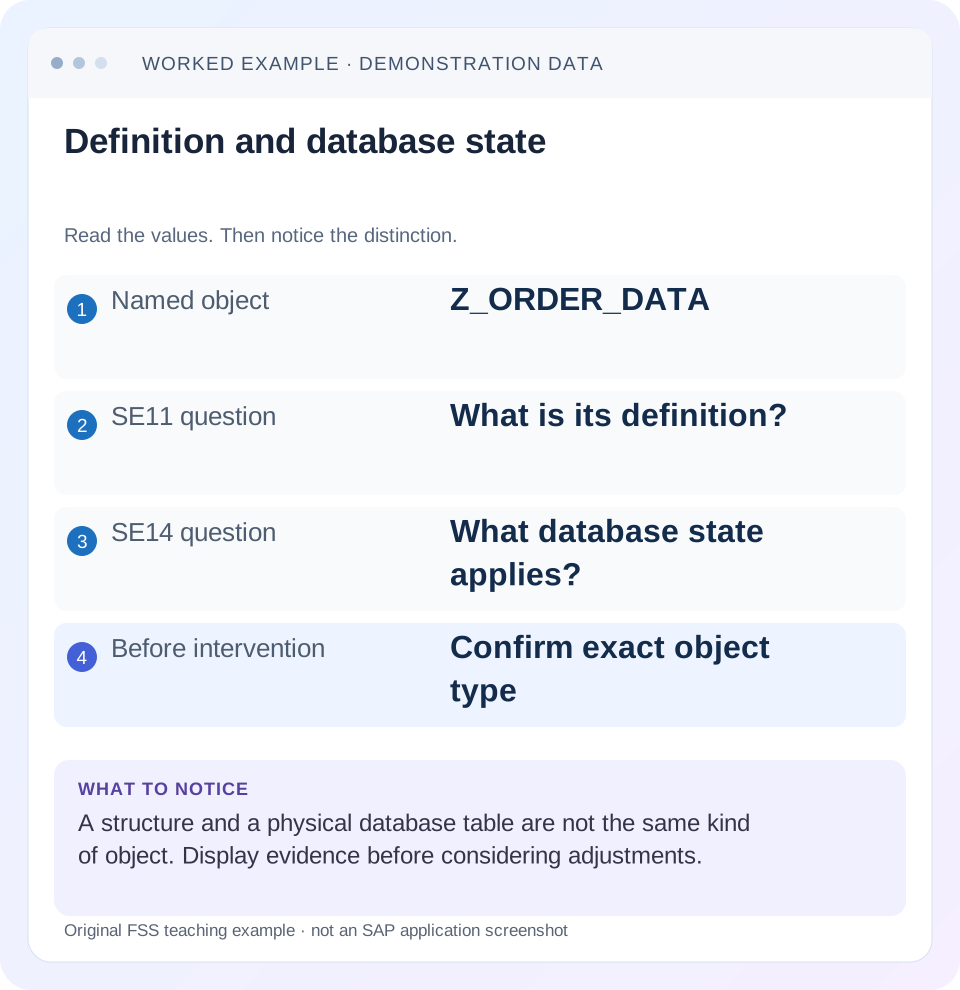
Read the example values
- Named object
- Z_ORDER_DATA
- SE11 question
- What is its definition?
- SE14 question
- What database state applies?
- Before intervention
- Confirm exact object type
Words you’ll meet in this guide
- Program
- A set of instructions executed by a computer.
- Class
- A reusable unit that groups data with operations called methods.
- Database
- Organized information kept beyond one program execution.
- Internal table
- A list of rows held temporarily in an ABAP program’s memory.
- Key
- One or more fields used to identify or find a record.
- ABAP
- SAP’s programming language for business applications.
- CDS
- Core Data Services: reusable definitions of business data and relationships.
- SQL
- A language used to read and work with database data.
Preview the practical steps
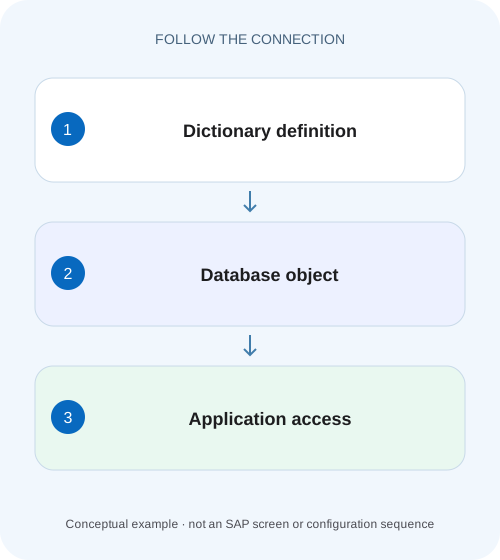
SEE THE CONNECTION
See it in a simple example.
A small example to make the idea concrete.
Understand a plant reference-field change
A manufacturer adds an external reference to a custom operational record and must distinguish its Dictionary definition from the database state.
SE11 describes the object; SE14 manages its database representation
Use SE11 to inspect the ABAP Dictionary definition and activation context.
Scope and prerequisite knowledge
The guide applies to classic ABAP Dictionary tables and the documented Database Utility.
Three layers explain why “the field exists” can be ambiguous
The Dictionary source contains the maintained design: fields, types, keys and related settings.
Understand a plant reference-field change
A manufacturer adds an external reference to a custom operational record and must distinguish its Dictionary definition from the database state.
Compare the activated type and persistence evidence before attempting a database adjustment or assuming a structural change converted existing values.
| Reader | Business question | Evidence to carry forward |
|---|---|---|
| SAP developers and application teams supporting manufacturers | Understand a plant reference-field change | Compare the activated type and persistence evidence before attempting a database adjustment or assuming a structural change converted existing values. |
01 SE11 describes the object; SE14 manages its database representation
Use SE11 to inspect the ABAP Dictionary definition and activation context. Use the Database Utility, entered through SE14 in classic ABAP landscapes, to inspect or manage applicable generated database objects. A source definition, an activated runtime object and a physical database table are related artifacts with different roles. [1] [2]
When a transport leaves an application unable to read a field, establish which of those artifacts differs before considering an adjustment. A familiar “activate and adjust” button is not a harmless cache refresh. This tutorial develops a read-first investigation of a fictional customer table, including how to prepare a concrete correction plan and verify data preservation.
02 Scope and prerequisite knowledge
The guide applies to classic ABAP Dictionary tables and the documented Database Utility. CDS view entities, newer development objects, cloud editions and managed upgrade phases can have different supported procedures. Identify product, release, database platform and the exact operation in progress before adapting historical SAP Library steps.
You need authorized display access to the Dictionary, relevant activation/transport logs and database-object diagnostics. Any operational adjustment requires the organization's controlled change process and the correct release-specific recovery procedure. This article performs no adjustment and supplies no customer-system evidence. Its practical value is an evidence chain that distinguishes a definition problem from a database inconsistency without guessing.
03 Three layers explain why “the field exists” can be ambiguous
The Dictionary source contains the maintained design: fields, types, keys and related settings. Activation produces runtime metadata used by ABAP and may trigger corresponding database changes for applicable objects. The physical database representation stores rows and indexes according to its actual structure. Seeing a new field in an inactive source version does not prove the active runtime or database structure already includes it. [1] [2]
Object type matters before any comparison. A structure defines a data shape but is not a persistent table of business rows. A transparent table has a corresponding database table. A database view has a different generated object and lifecycle. Never apply a table-recreation idea to an object merely because SE11 can display its name.
04 Worked case: adding an external reference field
Imagine customer transparent table Z_ORDER_DATA with client, order_id and status. A planned transport adds external_ref as a character field. In development, the definition activates. In quality assurance, an application read reports a structural inconsistency after import. The fact that the source editor shows external_ref is only the first observation.
Create a worksheet with the transported source version, active Dictionary/runtime representation and actual database columns in the affected system. If the active definition lacks external_ref, the next question concerns activation or import. If the active/runtime definition contains it but the database does not, the database-adjustment evidence becomes relevant. If all three agree, investigate application code, target structures and the exact SQL error instead of repeatedly adjusting the table.
| Layer | Expected after approved change | Evidence to preserve |
|---|---|---|
| Dictionary source | external_ref included | Version and transport reference |
| Active/runtime metadata | external_ref with intended type | Activation and runtime-object display |
| Database table | Matching physical column | Database-object display/check result |
| Application consumer | Compatible field access and result shape | Exact error, program and active source |
05 Collect the error and import sequence first
Record the exact object, system/client, error time and technical error text. Distinguish a runtime application failure from a transport activation message. They can occur at different times and identify different stages. Retain the relevant import and activation logs, including earlier dependency failures that may explain why the table did not activate.
Check dependent types and objects. A missing data element or incompatible dependent definition can prevent a coherent activation even when the table source looks complete. Compare the intended transport sequence with what actually arrived. Do not transport an arbitrary local correction merely to force one system to resemble another; establish which definition is intended and why the current chain failed.
06 Compare definitions with documented checks
The Database Utility documentation describes comparisons between database definition and runtime object, and between runtime metadata and Dictionary maintenance information. Use the supported display and consistency-check functions for the installed release. Save the differences rather than relying on a general red status or a verbal report that “the table is inconsistent.” [2]
A displayed mismatch is a finding, not yet the repair plan. Determine whether an adjustment is pending, a conversion terminated, a wrong version was imported or the application points to another object. During upgrade or conversion tooling, follow that tool's specific phase instructions; a generic SE14 recovery procedure may be inappropriate in a managed phase.
Identify the object category
Confirm transparent table, structure, view or another supported object type in the affected system.
Expected observation: The comparison is appropriate to the object.
Compare active and intended definitions
Match fields, key, types and relevant settings to the approved transport.
Expected observation: The intended target state is explicit.
Inspect runtime/database differences
Use documented display/check functions and retain exact deltas.
Expected observation: The inconsistent layer is identified.
Read the operation logs
Correlate import, activation and conversion messages in time order.
Expected observation: The failed stage and its cause are supported by evidence.
07 Understand adjustment and conversion before choosing either
For applicable tables, SAP documents that a data-preserving adjustment first attempts an ALTER TABLE approach where possible; otherwise a conversion can be triggered. That is different from a delete-data path that recreates a table and loses its rows. The exact implementation and available operations depend on object and platform. [2]
A field addition and a type change can have different consequences. Adding external_ref may be structurally straightforward in a supported context, while changing a character field containing mixed values into a numeric field introduces data-conversion questions. Even a path labeled to save data cannot make invalid character values convertible by wish. Review row compatibility, volume, downtime and recovery evidence before execution.
08 A second scenario: a type change exposes bad values
Suppose a separate proposal changes legacy_code from character to a decimal type. Fictional existing values are 00012, 00450 and A17. The first two have an obvious numeric interpretation; A17 does not. The design must explain whether A17 is valid business data that the numeric type would destroy or invalid data requiring an approved correction before conversion.
Inspect real value distributions through an authorized, bounded analysis. Do not edit stored values directly just to get past a conversion error. A sustainable correction can mean retaining a character identifier, separating numeric and alphanumeric concepts, or correcting invalid source data through the supported business process. The data model decision precedes the database operation.
| Existing value | Proposed numeric interpretation | Design implication |
|---|---|---|
| 00012 | 12 | Leading zeros may have business significance |
| 00450 | 450 | Confirm identifier versus quantity meaning |
| A17 | No direct decimal interpretation | Requires a business/data-model decision |
| Blank | Depends on conversion and initial-value rules | Verify the documented target behavior |
09 Troubleshooting without destructive guessing
Use each observation to choose a bounded next check. Deleting and recreating a table can remove data while leaving Dictionary source intact, so it can make one structural symptom disappear while creating a far larger business problem.
| Observation | Question | Next evidence |
|---|---|---|
| Field in source only | Is that source active? | Active version and activation log |
| Runtime differs from database | Was adjustment completed? | Consistency delta and adjustment log |
| Conversion terminated | What exact stage and value failed? | Conversion log and release-specific continuation procedure |
| All structures match; application fails | Wrong consumer or incompatible result shape? | Active program, SQL error and target types |
| Only one system affected | Transport sequence or local difference? | Version and import comparison |
| Object is a structure | Is persistence being assumed incorrectly? | Find the actual table/service consumer |
10 Prepare a correction that is reviewable before execution
The correction record should identify intended definition, observed mismatch, cause, exact supported operation and required safeguards for the actual data. Include ownership of backups or recovery, expected interruption, dependent jobs and how completion will be recognized. These details are useful because database adjustment changes physical state, not merely an editor view.
For a terminated conversion, preserve its logs and follow the documented continuation procedure after correcting the cause. Removing a lock entry or restarting an operation without understanding the stage can discard useful state or repeat the same failure. Keep platform-specific recovery decisions with the qualified owners and applicable documentation, while completing the diagnostic worksheet first.
11 Verify structure, existing rows and application behavior
A positive verification confirms that the approved field exists consistently in active metadata and the database, with the intended type and key. Check that representative existing orders remain readable and that a supported application write can populate external_ref in an authorized test environment. Compare row identity and business totals where those are meaningful to the table.
A negative check attempts invalid input through the normal application interface and confirms an appropriate rejection. A boundary check reads old rows whose new field is initial and tests the largest permitted value. Structural consistency alone does not prove that old data and new application behavior are correct. Record actual results and distinguish them from this article's proposed checks.
12 Frequently asked questions
Is SE14 a repair for every SE11 error? No. First identify object type, active state, dependencies and operation context. Some failures need a definition or transport correction rather than database adjustment.
Does “save data” guarantee the proposed model is valid? No. Data compatibility and the supported conversion path still require investigation.
Can a table definition remain after its database table is deleted? In the documented utility behavior, deleting the database table does not remove all Dictionary source/runtime artifacts. That is exactly why source presence is not enough to prove persistence exists. [2]
What should a support handoff include? Provide the object, versions, layer-by-layer comparison, logs, data-compatibility finding, proposed supported correction and verification plan. That evidence makes the next action concrete without treating an operational button as a diagnosis.
Related services and next steps
Primary sources
Found this useful?
Share this guide with your network, or leave a like.
Your like is saved in this browser.