SAP BTP service instance versus binding: Provisioning and application access
A manufacturer's deployed extension starts without the intended data-service binding and cannot execute its operational request.

Source review:
START HERE · NO PRIOR TOPIC KNOWLEDGE NEEDED
What it is. Why it matters.
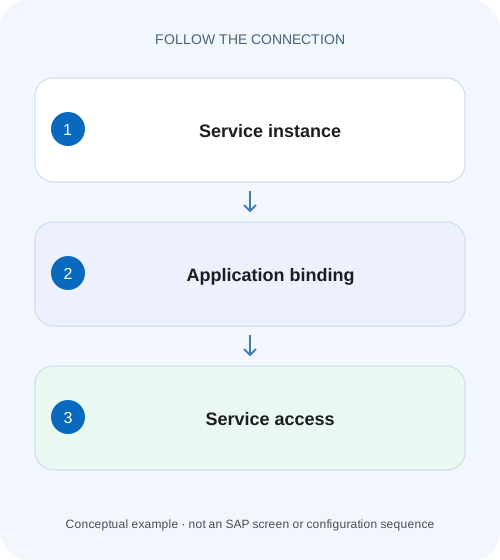
A service instance is a provisioned cloud resource. A service binding connects an application to that resource and supplies supported connection information.
Completely new to SAP?
Manufacturers use SAP to connect work such as buying components, recording inventory, planning production, shipping equipment and accounting for costs. SAP S/4HANA is an enterprise resource planning system: it connects these activities through shared business data.
SAP Business Technology Platform, or BTP, provides cloud services for applications, data and integration. A connection needs a route, an identity and permission to perform the intended task.
A transaction code, or t-code, is a shortcut to a task in classic SAP GUI. Fiori apps provide another way to work. Names and screens depend on the product and release; you do not need a live system to learn the concepts in this guide.

Scope and source-review notes
Scope and evidence
Source review by FAST SAP SOLUTIONS® editorial. This badge describes our editorial review; it does not represent SAP certification or independent endorsement.
SAP BTP Cloud Foundry service instances and application bindings. Credential delivery and restart/restage requirements depend on the service, application and buildpack; Kyma binding procedures are outside the worked case.
Documentation review on 14 November 2026 using official SAP sources and indexed official excerpts where full Help text was unavailable. Scope and service or release differences are explained in the lesson. All datasets, requests and checks are illustrative; no customer SAP runtime execution or measured results are claimed.
A MANUFACTURING EXAMPLE
Check the data service bound to a factory app
Provisioning versus connection
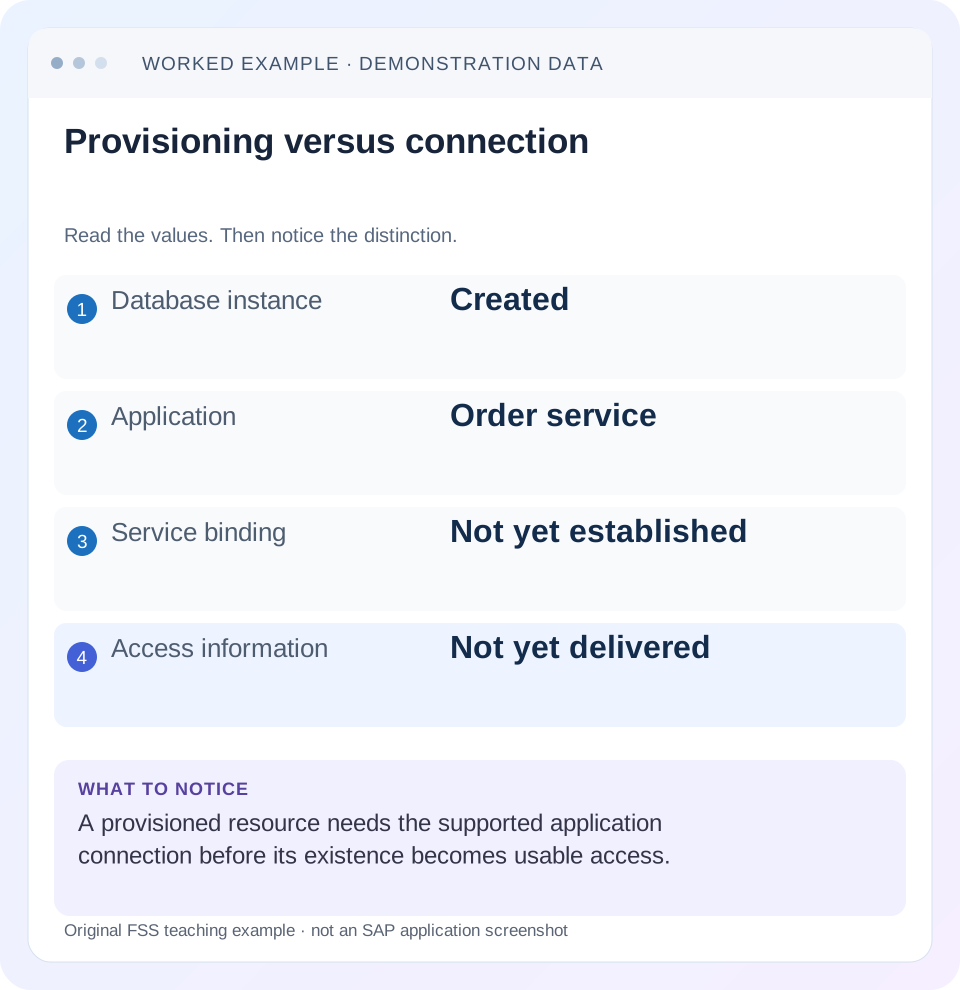
Read the example values
- Database instance
- Created
- Application
- Order service
- Service binding
- Not yet established
- Access information
- Not yet delivered
Words you’ll meet in this guide
- Backend
- The service or system doing the work behind an interface.
- Destination
- Named connection settings for another service.
- Credential
- Access information used to prove an identity.
- Subaccount
- A BTP scope for applications, services and access settings.
- BTP
- SAP Business Technology Platform: cloud services for applications, data and integration.
- API
- A defined interface through which programs exchange data or request actions.
- HTTP
- The request-and-response protocol used by web applications and APIs.
Preview the practical steps
SEE THE CONNECTION
See it in a simple example.
A small example to make the idea concrete.
Check the data service bound to a factory app
A manufacturer's deployed extension starts without the intended data-service binding and cannot execute its operational request.
Provision the resource, then establish the consumer connection
A service instance is a provisioned resource; a service binding connects an application to that resource and delivers the supported access information.
What the broker, platform and application each do
The service broker handles service-specific provisioning and binding operations.
Worked case: order-api has no binding to orders-store
Imagine application order-api in organization acme-dev, space integration.
Check the data service bound to a factory app
A manufacturer's deployed extension starts without the intended data-service binding and cannot execute its operational request.
Inspect the application binding and configuration evidence before treating service-instance existence as proof that the app can use it.
| Reader | Business question | Evidence to carry forward |
|---|---|---|
| SAP developers and application teams supporting manufacturers | Check the data service bound to a factory app | Inspect the application binding and configuration evidence before treating service-instance existence as proof that the app can use it. |
01 Provision the resource, then establish the consumer connection
A service instance is a provisioned resource; a service binding connects an application to that resource and delivers the supported access information. An instance being ready does not mean an application has credentials for it. A binding existing does not mean the application has loaded those credentials or can perform its intended business operation. Diagnose those states separately. [1]
This tutorial is for developers using service instances with applications in SAP BTP Cloud Foundry. You need the correct organization and space, a deployed application, read access to the instance and binding state, and the service’s consumption documentation. Kyma service bindings and cross-environment Service Manager patterns have different mechanics. Examples here use fictional service and application names, not a promise that every marketplace service offers the same credential fields.
02 What the broker, platform and application each do
The service broker handles service-specific provisioning and binding operations. The platform tracks the resulting instance and application relationship. For supported application bindings, Cloud Foundry makes service configuration available to the application, commonly through VCAP_SERVICES. The application’s framework or connection library must then select the intended service and interpret its supported credentials. [1] [2]
Those responsibilities explain why several different failures can follow a successful creation. Provisioning may be incomplete; a binding operation may fail; the process may still run with earlier environment state; the application may select a different service; or the service may reject the requested operation. Do not collapse all five into “the database is down.” Compare evidence at each boundary.
03 Worked case: order-api has no binding to orders-store
Imagine application order-api in organization acme-dev, space integration. A service instance orders-store is ready in the same supported scope. The application starts and answers /health but returns an application error when it tries to read an order. Its sanitized startup log says that its configured persistence service was not found. The instance list alone looks healthy.
The expected relationship is order-api → binding → orders-store. Inspecting the application shows no such binding. Creating another orders-store instance would not fix that missing relationship and could create data confusion. First establish the supported binding to the existing intended resource, then apply the service’s required application lifecycle step and test a harmless read.
| Stage | Evidence | Still unproven |
|---|---|---|
| Instance ready | orders-store last operation succeeded | Application is connected |
| Binding created | order-api associated with orders-store | Process has loaded current config |
| Application running | Startup completes | Intended service and authorization work |
| Order read succeeds | Known test order returned | Every future operation or instance is healthy |
04 Inspect scope and service identity before changing anything
Run read-only observations in the intended Cloud Foundry target. The commands below show application and service state; inspect the installed CLI help for output details. Record the organization, space, service offering and plan alongside the instance name. Identical instance names can exist elsewhere, so names without context are weak evidence.
If the service is absent, stop the binding investigation and reconcile provisioning or target scope. If it exists but its last operation is not successful, inspect that operation before attempting consumption. If a binding already exists, compare its intended application and instance identity; do not delete it merely to recreate the same screenshot.
cf target
cf app order-api
cf service orders-store
cf services
05 Create the supported relationship and refresh the application correctly
For ordinary supported Cloud Foundry application binding, cf bind-service <app> <instance> is the familiar operation. Binding parameters and service support are broker-specific, so use the relevant service guide. Keep provisioning credentials out of shell history, source control and incident output. A binding command completing is a platform event, not an end-to-end application result. [1]
Next follow the service and application instructions for restart, restage or another lifecycle action. Do not declare one universal rule. SAP’s service-specific documentation includes cases requiring restart and cases requiring restage; some bindings such as log drains can take effect without rebuilding the application. Restaging rebuilds the runnable application artifact, while restarting reuses its staged artifact. Choose based on when your application and buildpack consume configuration. [2] [3]
06 Check configuration shape without disclosing its secrets
Confirm that the expected service entry is present in the application’s supported configuration view. VCAP_SERVICES can contain sensitive credentials. Do not paste its complete value into a ticket. Instead record non-secret service labels, instance names, binding presence and whether required fields exist. If a secure inspection is necessary, use the authorized tool without exporting the contents.
An application may choose a service by label, name, tag or explicit framework configuration. Two similar bindings can therefore produce a selection ambiguity. In the worked case, if order-api also has an old test store, establish which one its connection code resolves. A successful query against the wrong store is a more subtle failure than a missing binding. Verify the identity of a known harmless fixture record.
A useful startup diagnostic reports the selected non-secret instance name and whether configuration was found, while masking every credential value. In the worked case that distinction lets an operator see orders-store was selected instead of an old test store. Keep this logging separate from dumping the complete environment. If the runtime cannot safely expose such metadata, record the selection through approved configuration inspection and a known fixture read.
07 Separate service authentication from business authorization
Binding credentials establish whatever access the service broker grants. That may not equal permission for every business action. A database binding can identify a technical database user with defined privileges. An API-related service may require a token exchange and scopes. Read the actual service contract instead of assuming a binding grants administrative access.
If credentials are delivered but the service rejects a read, capture the sanitized status, error and operation. Compare the endpoint, client or user identity and required privilege. If authentication succeeds and a particular table or API action is denied, the issue is later than credential delivery. Grant the narrow intended permission through the supported mechanism; broad access is not evidence that the original configuration was correct.
08 Troubleshoot the first boundary that does not match
Use the failing operation to decide what to inspect next. One green dashboard tile should not override an explicit error at a later layer. Conversely, an application error should not cause the team to recreate a ready resource that contains valuable data.
| Observation | Boundary | Next check |
|---|---|---|
| Instance creation failed | Provisioning | Broker last operation and exact plan |
| Ready instance, no app binding | Association | Correct app/instance and supported bind procedure |
| Binding present, config missing at process | Application lifecycle | Required restart/restage and running version |
| Config present, connection rejected | Endpoint or authentication | Supported credential fields and service error |
| Connection succeeds, wrong data | Service selection | Resolved instance and known fixture identity |
| Read works, write denied | Operation authorization | Required privilege for the intended action |
09 Recover from partial deployment without replacing the data store
A multitarget deployment can create a service instance and then fail while binding or starting an application. Preserve that instance identity and inspect the deployment’s failed phase. A failed release does not necessarily mean every created service was rolled back. Re-running a deployment with a changed name may create a second store instead of reconnecting to the original one.
Document the intended lifecycle of the service separately from the application package. For persistent resources, understand how deployment descriptors reference or create them and how undeployment handles them. This tutorial does not prescribe an MTA resource type for every service. It teaches the investigation: identify what was created, what remains referenced and which operation failed before choosing a supported retry.
If the application has never accessed the service, a binding correction can be straightforward. If it has written to a second accidental store, reconcile those business records before switching it back. Connectivity repair alone does not resolve divergent data.
In the order-api fixture, name the existing store identifier in the deployment review before retrying. If the next run references orders-store-2, investigate why the name changed. A successful bind to that second resource can make the application appear repaired while returning an empty dataset. Use the same known order fixture to distinguish a newly provisioned empty store from the original intended store.
10 Verify the binding with a small acceptance set
For the positive case, start order-api using the documented lifecycle and read one known test order from orders-store. Record the application version, instance identity and sanitized response. Check every application instance relevant to the deployment rather than proving only that one process received new configuration.
For a negative case in an isolated test application, omit the intended binding and confirm the application reports the missing configuration clearly. The test should not connect silently to a local fallback or an unrelated store. For a boundary case, supply two candidate services and confirm that explicit selection chooses the intended one or fails with a useful ambiguity message.
Also distinguish liveness from readiness. The /health path in the fictional incident only proves the process answered that endpoint. If the real service contract requires persistence for readiness, implement or use the application’s documented readiness behavior. Do not label any HTTP 200 as proof that the service binding works.
11 Questions that keep provisioning and consumption separate
Is a service key the same as an application binding? Both can provide access information in supported scenarios, but their lifecycle and consumer setup differ. Application bindings support automatic delivery to an application; keys are often used for consumers configured outside that relationship. Use the service’s documented approach.
Will rebinding always rotate credentials? Credential generation and revocation are service-specific. Inspect the service’s supported rotation procedure rather than deleting a working binding as an experiment.
What proves completion? A clear record should state instance readiness, correct binding, loaded application configuration and an authorized operation against the intended resource. The related rotation lesson explains how to preserve that proof when access material changes later.
Related services and next steps
Primary sources
Found this useful?
Share this guide with your network, or leave a like.
Your like is saved in this browser.