SAP BTP login works for one user type only? Check trust scope and origin
A manufacturer's user can sign in through one identity context but cannot reach the same BTP application through another.

Source review:
START HERE · NO PRIOR TOPIC KNOWLEDGE NEEDED
What it is. Why it matters.
Trust configuration tells an application which identity provider to accept. The identity provider verifies a user; the provider’s origin helps distinguish where that identity comes from.
Completely new to SAP?
Manufacturers use SAP to connect work such as buying components, recording inventory, planning production, shipping equipment and accounting for costs. SAP S/4HANA is an enterprise resource planning system: it connects these activities through shared business data.
Security separates verifying an identity from granting permission to perform business actions. A role groups relevant access, while restrictions define the allowed data and activities.
A transaction code, or t-code, is a shortcut to a task in classic SAP GUI. Fiori apps provide another way to work. Names and screens depend on the product and release; you do not need a live system to learn the concepts in this guide.

Scope and source-review notes
Scope and evidence
Source review by FAST SAP SOLUTIONS® editorial. This badge describes our editorial review; it does not represent SAP certification or independent endorsement.
SAP BTP platform and business-user trust; origin examples are specifically SAP BTP XS Advanced UAA in Cloud Foundry. Kyma, ABAP, database and service-specific authentication require their own documentation.
Reviewed relevant official SAP indexed documentation excerpts on 14 November 2026. Examples, identifiers, amounts and expected observations are illustrative; no customer SAP execution was performed. Official indexed excerpts reviewed; no live BTP tenant, sign-in, provisioning job or trust change. Connector-specific origin examples do not establish universal BTP defaults; tool support and environment configuration must be checked locally.
A MANUFACTURING EXAMPLE
Compare employee login contexts for a factory app
Compare the same sign-in path
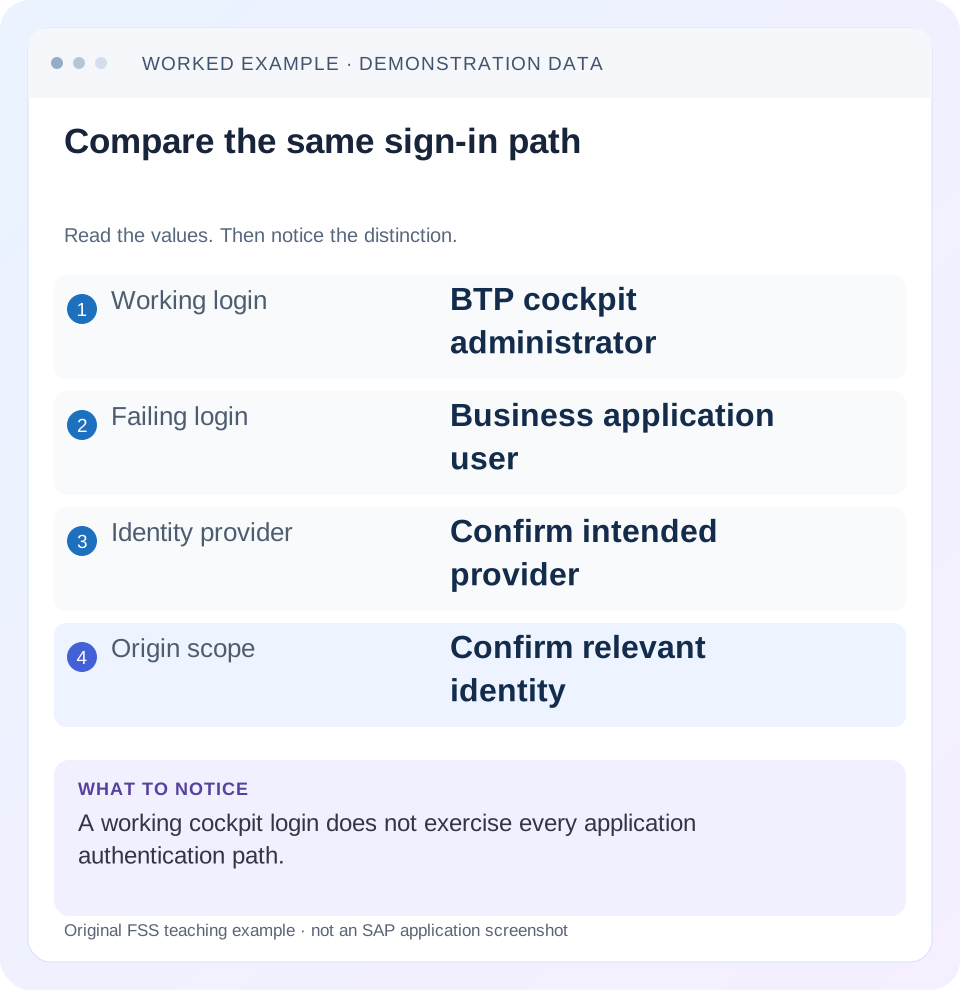
Read the example values
- Working login
- BTP cockpit administrator
- Failing login
- Business application user
- Identity provider
- Confirm intended provider
- Origin scope
- Confirm relevant identity
Words you’ll meet in this guide
- Authentication
- Checking who an identity belongs to.
- Authorization
- Permission for an action on particular data.
- PFCG
- The classic ABAP Role Maintenance transaction for organizing roles.
- Role
- A grouping of intended tasks and associated permissions.
- Authorization object
- A grouping of related permission fields checked by relevant SAP application logic.
- ABAP
- SAP’s programming language for business applications.
- BTP
- SAP Business Technology Platform: cloud services for applications, data and integration.
- HANA
- SAP’s database platform.
- HTTP
- The request-and-response protocol used by web applications and APIs.
Preview the practical steps
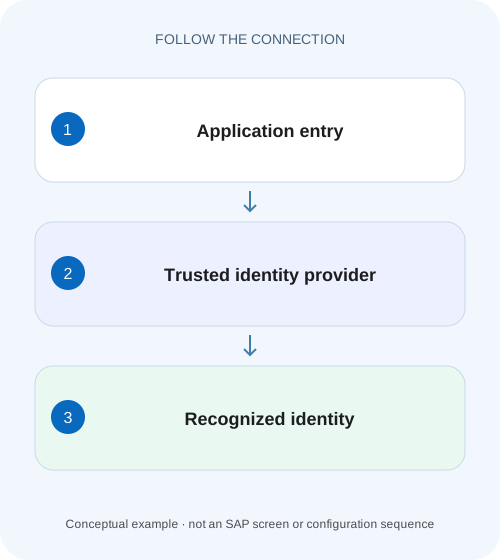
SEE THE CONNECTION
See it in a simple example.
A small example to make the idea concrete.
Compare employee login contexts for a factory app
A manufacturer's user can sign in through one identity context but cannot reach the same BTP application through another.
Start with the failing sign-in route
A successful SAP BTP cockpit login proves that one platform sign-in path worked for that identity.
Scope and prerequisites for this investigation
The main case concerns SAP BTP platform and business-user trust, with origin examples specifically grounded in SAP BTP XS Advanced UAA in Cloud Foundry.
Map platform and business-user trust separately
SAP describes platform identity-provider trust at global-account level, applying to the relevant lower account and environment levels.
Compare employee login contexts for a factory app
A manufacturer's user can sign in through one identity context but cannot reach the same BTP application through another.
Compare trust origin and the actual application login flow before changing unrelated backend permissions.
| Reader | Business question | Evidence to carry forward |
|---|---|---|
| SAP developers and application teams supporting manufacturers | Compare employee login contexts for a factory app | Compare trust origin and the actual application login flow before changing unrelated backend permissions. |
01 Start with the failing sign-in route
A successful SAP BTP cockpit login proves that one platform sign-in path worked for that identity. It does not prove that a business application accepts the same identity provider or recognizes the same user. When an administrator can enter the cockpit but an invoice approver cannot enter an app, first compare the entry points, account scope, user population and identity-provider context. [1]
This tutorial builds an investigation record for that situation. The useful outcome is a precise statement such as “the application in subaccount S1 receives the user from the unintended business origin,” or “authentication succeeds through the intended origin, but the application permission is absent.” Those findings lead to different corrections. Adding a role collection before identifying which identity signed in can leave the original failure unresolved.
02 Scope and prerequisites for this investigation
The main case concerns SAP BTP platform and business-user trust, with origin examples specifically grounded in SAP BTP XS Advanced UAA in Cloud Foundry. You need the actual application URL, relevant global account and subaccount identifiers, the expected identity provider, and permission to inspect the relevant configuration and diagnostic records. Screens, labels and supported login options depend on the tool and deployed service. [2]
Do not extend the Cloud Foundry origin example into a universal identity model. SAP documents separate considerations for Kyma trust, ABAP business users and SAP HANA database users. A tenant administrator should consult the documentation for the actual environment before applying a correction. The identities, origin names and observations below are illustrative; no customer login or trust change was executed.
03 Map platform and business-user trust separately
SAP describes platform identity-provider trust at global-account level, applying to the relevant lower account and environment levels. Business-user identity-provider trust is configured for each subaccount. Therefore, record both trust scopes even if the same Identity Authentication tenant participates in both. A shared provider does not make the two access investigations interchangeable. [1]
For the worked case, draw two paths: UADMIN enters the cockpit through global account G1, while U100 enters InvoiceHub deployed for subaccount S1. Write the intended provider alongside each path before inspecting any assignment. This small map prevents a screenshot of a working global-account trust from being accepted as evidence for the application route.
| Observation | Platform route | Business application route |
|---|---|---|
| Entry point | BTP cockpit for G1 | InvoiceHub for S1 |
| Illustrative user | UADMIN | U100 |
| Trust scope to inspect | Global-account platform trust | S1 business-user trust |
| Question answered | Can this administrator enter this platform context? | Can this app authenticate this business identity? |
04 Treat origin as part of the identity context
In the documented XS Advanced UAA Cloud Foundry context, an origin identifies the user’s identity provider. SAP exposes its Origin Key in trust configuration. Use the actual recorded key; do not derive it from an email domain or guess that two similar provider display names represent the same origin. [3] [4]
The provisioning documentation illustrates separate entries with the same username and email address but different origins. Accordingly, “learner@example.invalid has a role” is incomplete evidence if the sign-in uses another origin. In the case below, corp-platform and corp-business are teaching labels, not SAP defaults or required naming conventions. Compare the exact assignment identity and actual login context before concluding that a permission was lost.
05 Worked case: cockpit success and application failure
UADMIN can administer G1 through the intended platform provider. U100 should use InvoiceHub in S1 through the intended business provider corp-business. The application’s access record contains a collection assignment for learner@example.invalid in corp-business, but the failing attempt is associated with a different configured provider, legacy-business. The identical email address initially hides the mismatch.
This is a hypothesis supported only when the actual sign-in and assignment records show those contexts. If the application instead authenticates U100 through corp-business and denies invoice approval, the hypothesis is disproved and the next investigation concerns application authorization. Keep both branches visible in the case record so the team does not force every denial into a trust explanation.
| Evidence item | Observed value | Meaning |
|---|---|---|
| Working route | UADMIN → cockpit G1 | Platform route works for UADMIN |
| Intended app identity | learner@example.invalid / corp-business | Expected assignment context |
| Failing app attempt | learner@example.invalid / legacy-business | Candidate identity mismatch |
| Needed next observation | Actual accepted identity and app error | Distinguishes login from permission failure |
06 Capture the attempt before changing configuration
Reproduce the user’s exact application entry point with an authorized test identity and record time, time zone, application host, account context, selected provider and the sanitized error or correlation identifier. A copied bookmark can lead to another landscape or provider-specific route. A generic statement that “BTP login failed” omits the facts needed to compare the attempt with server-side diagnostics.
Preserve the sequence: application entry, provider selection or redirect, authentication outcome and first application response. Ask the diagnostic owner which stage issued the error. HTTP status alone is insufficient to identify the responsible layer, because a router, identity service or application can produce a denial. Keep credentials, session cookies, assertions and bearer tokens out of the investigation record.
Identify the resource
Record the exact app and S1, plus its expected business provider.
Expected observation: The failing request can be tied to one application context.
Observe the route
Use the supported sign-in flow and record the provider actually selected.
Expected observation: The attempt can be compared with the intended trust.
Correlate the failure
Match the timestamp and sanitized identifier to available service/application diagnostics.
Expected observation: The record identifies the stage that rejected access.
07 Compare the relevant trust and identity records
For U100, inspect S1 business-user trust and the intended provider with an authorized security administrator. For the working cockpit comparison, inspect G1 platform trust separately. SAP’s XS Advanced UAA connector documentation explicitly distinguishes where to obtain platform and business-user origin keys. Check the actual keys rather than copying one from the other scope. [5]
Then compare the user identifier used in the assignment or mapping with the identifier recognized by the relevant service. Record whether access is direct or comes through a group mapping. If two identities share an email address, retain enough context to distinguish them in the review. Do not merge, delete or recreate users merely because the display names look duplicated.
08 Separate authentication, authorization and backend access
Authentication establishes the accepted identity through a trusted route. Application authorization determines what that identity may do. In SAP’s Cloud Foundry business-user model, application security artifacts underpin roles and role collections. Successful authentication therefore does not establish permission to approve an invoice, and a collection assigned to the wrong identity does not repair an unsuccessful login. [6]
A further failure can occur when an authenticated app calls a backend. Record whether the failing operation is entering InvoiceHub, viewing its invoice list or calling the backend approval action. The app may use a technical identity or propagate a business identity according to its documented design. Do not diagnose backend user mapping from cockpit sign-in success; examine the actual downstream security contract.
09 Distinguish provisioning from federation
Federation and trust determine which authentication relationship is accepted. Identity Provisioning moves or represents user and group information in connected systems. In the documented XS Advanced UAA connectors, xsuaa.origin tells provisioning which provider context to read or provision. It is not a general switch that establishes trust or grants InvoiceHub approval rights. [3] [4]
Suppose a provisioning job created learner@example.invalid for legacy-business while the intended application assignments reference corp-business. Investigate connector scope, transformation and resulting entries against that connector’s documentation. Do not paste a multiple-origin example into production to make both paths work. Multiple-origin support has connector-specific boundaries, and changing provisioning can create additional identity entries without correcting the application’s expected login route.
10 Account for tools that use different user contexts
SAP Business Application Studio is a useful counterexample to assumptions based on product names. SAP documents that its web interface authenticates with the business-user identity provider, while a Cloud Foundry CLI login from its terminal can use the platform-user identity provider. A working browser session in the development tool does not prove the terminal is authenticated as the same platform identity. [7]
Likewise, distinguish btp CLI account administration from an application URL. Record the tool, login method, selected account and provider for each observation. Consult the supported-tools matrix for restrictions in the actual service. Avoid copying login flags from another CLI or older version without checking its own help; superficially similar commands can select different contexts.
11 Use the observed symptom to choose the next check
Keep the diagnosis narrow enough that another reviewer can disprove it. If the expected provider never appears, investigate the route and applicable trust. If authentication completes and the app rejects a business operation, inspect its effective permission path. If only a backend action fails, retain the successful front-end observations and investigate the downstream call.
The table gives investigation branches, not guaranteed causes. Compare a representative working and failing identity only when they use the same app, landscape and relevant route; an administrator’s unrelated access is a weak control.
| Symptom | Evidence to compare | Next investigation |
|---|---|---|
| Cockpit works; app sign-in fails | G1 platform path versus S1 business path | App trust and chosen provider |
| Same email appears twice | Origin and user identifier in each record | Identity-specific assignments/mappings |
| Login succeeds; approval denied | Actual app identity and effective role scope | Application authorization |
| App opens; backend call fails | Failing request and downstream identity design | Backend trust/mapping/permission |
| Studio opens; CLI fails | Browser business context versus CLI platform context | Tool-specific login/provider support |
12 Choose a correction with a clear affected scope
In the illustrative mismatch, the supported correction might be using the documented application entry route for corp-business or correcting an identity-specific assignment after confirming the intended design. It is not automatically a change to trust itself. If trust is demonstrably wrong, document the exact account, provider and affected user population before applying the supported configuration procedure. [1]
Preserve a working administrative recovery path while changing shared authentication configuration. SAP recommends backup platform administrators for primary-provider failures. Deleting and rebuilding trust as an exploratory step can affect many users and makes the original evidence harder to interpret. Record the configuration difference and rollback method appropriate to the actual environment, rather than treating a successful test login as proof that every dependent application remains accessible.
13 Verify positive, negative and boundary outcomes
The positive test signs U100 into the intended S1 application through corp-business and verifies the permitted business task using its own permission rules. The negative test uses a representative identity that should remain unauthorized for that task. Successful authentication for that person may be correct; the protected application action must still be denied.
The boundary test deliberately compares the same displayed email in the two configured origins using authorized test identities and records which assignment applies. Also verify that UADMIN’s required platform route still works after any shared change. Use the service’s supported fresh-session procedure when comparing results, and record what actually happened. These are proposed checks; this article does not report executed tenant tests or a measured propagation interval.
14 Frequently asked questions
Does a working cockpit login prove the app trust is correct? Only the observed cockpit path was exercised. Is an origin simply an email domain? Use the exact origin key from the relevant documented configuration. Does provisioning a user establish application permission? Check the separate trust, recognized identity and authorization steps.
Should every BTP service use the same correction? Verify the environment and service contract, especially for Kyma, ABAP and database users. What belongs in the handover? Entry point, account scope, intended and observed provider context, sanitized diagnostic identifier, actual correction and recorded positive/negative results. Continue with role collections when authentication works and the remaining question is application permission.
Related services and next steps
Primary sources
- Setting Up Authentication | SAP Help Portal
- Security Concepts | SAP Help Portal
- Configure Single and Multiple Origins — Proxy | SAP Help Portal
- Configure Single and Multiple Origins — Target | SAP Help Portal
- SAP BTP XS Advanced UAA Cloud Foundry — Target | SAP Help Portal
- Business Users | SAP Help Portal
- Supported Tools and Services with Custom Platform Identity Providers | SAP Help Portal
Found this useful?
Share this guide with your network, or leave a like.
Your like is saved in this browser.