Cloud Foundry space roles versus application roles: Diagnose the right access layer
A manufacturer assigns platform operation, deployment and business-approval responsibilities to different people.

Source review:
START HERE · NO PRIOR TOPIC KNOWLEDGE NEEDED
What it is. Why it matters.
A Cloud Foundry space role controls platform operations, while an application role controls business actions inside an app. The two permission layers serve different users and tasks.
Completely new to SAP?
Manufacturers use SAP to connect work such as buying components, recording inventory, planning production, shipping equipment and accounting for costs. SAP S/4HANA is an enterprise resource planning system: it connects these activities through shared business data.
Security separates verifying an identity from granting permission to perform business actions. A role groups relevant access, while restrictions define the allowed data and activities.
A transaction code, or t-code, is a shortcut to a task in classic SAP GUI. Fiori apps provide another way to work. Names and screens depend on the product and release; you do not need a live system to learn the concepts in this guide.

Scope and source-review notes
Scope and evidence
Source review by FAST SAP SOLUTIONS® editorial. This badge describes our editorial review; it does not represent SAP certification or independent endorsement.
SAP BTP Cloud Foundry org/space roles versus application business-user authorization. CLI examples use official v8 reference; other BTP environments and individual service cockpit models require their own documentation.
Reviewed official SAP indexed documentation excerpts and full-text Cloud Foundry role and CLI references on 14 November 2026. All identities, company restrictions and expected observations are illustrative; no tenant login, CLI command, deployment or business transaction was executed. Platform API, version, state and feature configuration and the application’s own security model determine actual behavior.
A MANUFACTURING EXAMPLE
Separate factory app administration from business access
Two access layers
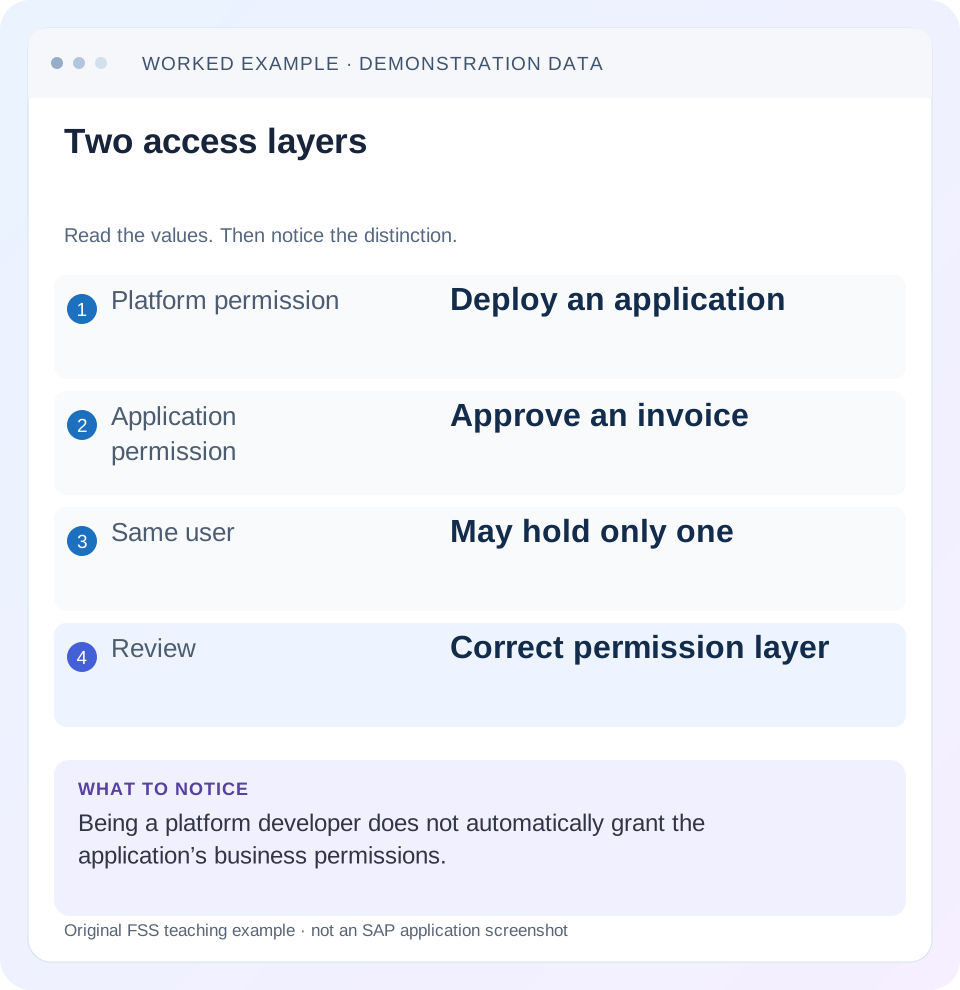
Read the example values
- Platform permission
- Deploy an application
- Application permission
- Approve an invoice
- Same user
- May hold only one
- Review
- Correct permission layer
Words you’ll meet in this guide
- Authentication
- Checking who an identity belongs to.
- Authorization
- Permission for an action on particular data.
- PFCG
- The classic ABAP Role Maintenance transaction for organizing roles.
- Role
- A grouping of intended tasks and associated permissions.
- Authorization object
- A grouping of related permission fields checked by relevant SAP application logic.
- ABAP
- SAP’s programming language for business applications.
- BTP
- SAP Business Technology Platform: cloud services for applications, data and integration.
- API
- A defined interface through which programs exchange data or request actions.
Preview the practical steps
SEE THE CONNECTION
See it in a simple example.
A small example to make the idea concrete.
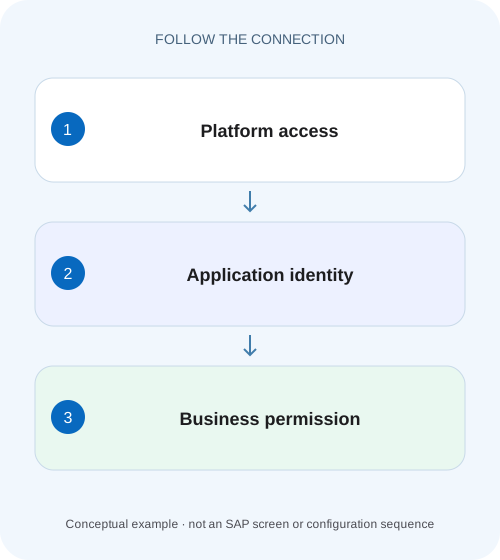
Separate factory app administration from business access
A manufacturer assigns platform operation, deployment and business-approval responsibilities to different people.
Match the permission to the task being denied
A Cloud Foundry space role controls platform operations in its assigned scope.
Scope and prerequisites
This tutorial concerns SAP BTP Cloud Foundry org/space memberships and the application business-user roles or role collections used by the relevant deployed app.
Understand org scope, space scope and application scope
SAP describes a space as a location for deploying and maintaining applications and connecting services.
Separate factory app administration from business access
A manufacturer assigns platform operation, deployment and business-approval responsibilities to different people.
Check the Cloud Foundry space role and application role at their own layers before granting platform privileges to solve a business-access issue.
| Reader | Business question | Evidence to carry forward |
|---|---|---|
| SAP developers and application teams supporting manufacturers | Separate factory app administration from business access | Check the Cloud Foundry space role and application role at their own layers before granting platform privileges to solve a business-access issue. |
01 Match the permission to the task being denied
A Cloud Foundry space role controls platform operations in its assigned scope. An application role controls the business actions that the application’s security model exposes. Being able to deploy InvoiceHub does not automatically grant its invoice-approval permission. Being an invoice approver does not automatically make its deployment space visible in the SAP BTP cockpit. [1] [2]
Start an access request with an action and resource: deploy the training application in invoice-dev, inspect runtime status in invoice-prod, or approve company 1000 invoices inside the production app. “Give me access to BTP” is too broad to diagnose or review. This guide shows how to trace those three tasks to their respective permission paths and test the intended separation using concrete identities.
02 Scope and prerequisites
This tutorial concerns SAP BTP Cloud Foundry org/space memberships and the application business-user roles or role collections used by the relevant deployed app. It assumes an identified subaccount, Cloud Foundry API endpoint, org, space, application and intended login identity. Kyma, ABAP environment and individual service dashboards have their own authorization models; consult their documentation before transferring these conclusions.
The CLI examples are read-only inspection commands from the Cloud Foundry CLI v8 reference. They require an existing supported CLI installation, a valid authorized session and sufficient visibility. They were not executed against a tenant. The org, app, role and company labels below are illustrative, and the application-specific company restriction exists only because the fictional InvoiceHub model implements it.
03 Understand org scope, space scope and application scope
SAP describes a space as a location for deploying and maintaining applications and connecting services. An org can contain several spaces. The cockpit’s Spaces page shows spaces available to the user’s platform context; SAP distinguishes Org Manager visibility from a role limited to a particular space. Seeing the org or space is an observation about platform access, not evidence of invoice approval authority. [1]
Record the complete resource path. In the case, org FSS-DEV contains invoice-dev and invoice-prod. InvoiceHub has separate deployed instances and business access configurations. A successful test against the development app cannot certify production business access. Likewise, a membership captured for invoice-dev does not establish platform permission in invoice-prod merely because both belong to FSS-DEV.
04 Read Cloud Foundry role names by their actual purpose
The upstream Cloud Foundry documentation distinguishes Space Manager administration, Space Developer management of apps and services, Space Auditor read access and Space Supporter troubleshooting. Org Manager administers the org; that role alone does not grant app deployment or modification of space contents. Check the relevant operation in the current role matrix instead of treating Manager as a universal superset of Developer. [3]
Role power also depends on platform state and supported APIs. For example, the documented Space Supporter role is available for Cloud Controller V3, and a V2 request can return 403. Feature flags and suspended resources can affect operations. A diagnosis must therefore include the attempted operation and platform response, not only a screenshot showing a familiar role name.
| Role context | Purpose to verify | Do not infer |
|---|---|---|
| Space Developer in invoice-dev | App/service operations in that space | Deployment permission in invoice-prod |
| Space Auditor in invoice-prod | Read access to that space | Invoice approval inside InvoiceHub |
| Space Manager | Space/member administration per role matrix | Every Developer operation |
| Org Manager | Org administration and documented visibility | Automatic app deployment rights |
05 Worked case: three people, three responsibilities
DEV100 is assigned Space Developer in invoice-dev for development work. OPS100 has Space Auditor in invoice-prod for operational inspection. AP100 is a production InvoiceHub business user with the application’s approval role restricted to company 1000. Assume no other grants in this training dataset; a real review must inspect all effective assignments before expecting a denial.
The desired result is specific. DEV100 can perform the permitted development deployment task but has no business approval assignment. OPS100 can inspect the production space according to its role but cannot approve an invoice. AP100 can approve invoice INV100 for company 1000 but cannot deploy apps, and must not approve INV200 for company 2000. The company boundary is enforced by the app, not by the Cloud Foundry space name.
| Identity | Platform assignment | Business assignment | Expected permitted task |
|---|---|---|---|
| DEV100 | Developer / invoice-dev | None | Development deployment |
| OPS100 | Auditor / invoice-prod | None | Permitted production inspection |
| AP100 | No space role in this case | InvoiceHub Approver1000 | Approve INV100 only |
| INV200 boundary | No platform implication | Company 2000 excluded | Approval remains denied |
06 Inspect the current CLI context before reading membership
Use cf api without a URL to view the targeted API endpoint and cf target without options to view the current org/space context. Compare those values with the account and space named in the incident. The most accurate role analysis is useless if the session points at another foundation or org with similar names. [4] [5] [6] [7]
Then inspect visible spaces and the role listing for the exact org/space. The commands below do not set a role, switch targets or deploy an app. Output still contains operational and identity information, so retain only the relevant sanitized evidence. If the inspection itself is denied, have an authorized reviewer obtain the required membership information; do not interpret missing output as proof that the user has no role.
cf api
cf target
cf spaces
cf space-users "FSS-DEV" "invoice-dev"
cf space-users "FSS-DEV" "invoice-prod"
07 Read membership as an identity-specific assignment
The Cloud Foundry role-management reference documents cf org-users and cf space-users for viewing assignments. Compare the actual user, org and space in the output with the affected session. If an identity exists in multiple origins, username alone can be ambiguous; the role-management documentation describes origin disambiguation for assignment commands. Use the supported tooling for the installed version and intended provider. [8]
For DEV100, a Developer entry under invoice-dev explains the development task. An absent production Developer assignment is consistent with the intended boundary, provided no other applicable grant exists. Capture the necessary membership evidence separately from AP100’s application roles. A person can hold both categories, but each must have a documented purpose and scope.
08 Trace the application business authorization separately
SAP’s business-user model describes developers providing application security artifacts, administrators building roles and role collections from them, and assigning collections to users or groups. For AP100, inspect the correct production application identifier, approval role template/instance, configured company attribute if supported, and effective assignment or group mapping. [2]
Do not stop at a collection named Approvers. Establish that its contents belong to the production InvoiceHub instance and that the application enforces the documented company 1000 restriction on the actual approval request. A visible button does not prove server-side permission, and a missing button alone does not identify the cause. Inspect the failing business request and resulting application state with the authorized application owner.
09 Keep platform privilege in the security review
Separating platform and business permissions does not make platform Developer access harmless. Someone who can change application code, configuration or connected service use may hold substantial operational power. The review should consider that power when deciding who can deploy or troubleshoot an application that processes sensitive invoices, even when a separate business role controls the normal approval screen.
For this case, keep development and production responsibilities explicit. An urgent approval incident is not, by itself, a reason to make AP100 a production developer. Conversely, a developer who needs a business test identity should receive the documented, scoped test access rather than assuming deployment rights substitute for business authorization. Review the combined privileges when one person legitimately performs both jobs.
10 Investigate the failure at the interface that issued it
Record whether the denial came from the cockpit, Cloud Foundry API, application router, InvoiceHub service or backend call. Capture the exact operation, resource, timestamp and sanitized diagnostic identifier. A 401 or 403 is a starting observation; the component that returned it and its diagnostic message determine the next useful check.
If DEV100 receives a deployment error in invoice-dev despite a confirmed assignment, inspect the actual failure. A quota, service plan, build or platform-state problem needs its own resolution. If AP100 opens InvoiceHub but approval fails for INV100, compare the accepted business identity and effective application role. Adding a space role does not explain a missing application approval scope.
| Symptom | First evidence | Likely investigation layer |
|---|---|---|
| Space absent from cockpit | Account, org, provider and memberships | Platform visibility/context |
| Deployment denied | Exact org/space, API operation and role | Cloud Foundry operation permission |
| App opens; INV100 approval denied | App identity, role and company restriction | Application business authorization |
| INV200 approval unexpectedly succeeds | All effective app grants and enforcement | Excessive application access |
| Deployment fails with quota message | Resource limit and requested allocation | Capacity/configuration |
| Browser works; CLI identity differs | Actual provider and session context | Authentication/origin |
11 Recognize service-specific uses of platform roles
Some service administration interfaces intentionally use Cloud Foundry memberships as part of their own access model. SAP Mobile Services is a documented example: its account setup describes access associated with space roles. That is a reason to read the service’s contract, not a reason to assume every business application accepts every space membership as its own business role. [9]
When the failing screen is a service cockpit, name the service and check its documented role requirements before requesting an application collection. When it is InvoiceHub’s invoice approval screen, follow InvoiceHub’s own model. This distinction is particularly useful when one support ticket mixes “service dashboard will not open” with “business transaction is denied”; they may require separate evidence and corrections.
12 Apply a correction to the demonstrated gap
A reviewable request says “DEV100 needs the documented deployment capability in invoice-dev,” or “AP100 needs the production InvoiceHub approval role restricted to company 1000.” Include the intended identity/provider context and the evidence that the existing grant is absent or ineffective. The authorized role owner can then apply the supported assignment procedure for that specific layer. [8]
Role-management permissions are themselves scoped. Cloud Foundry documents who may maintain org and space roles, and its current guidance requires the relevant parent-org relationship before a space assignment. Do not promote the affected user to a broad manager merely so they can assign themselves another role. After correction, read back the actual assignment and repeat the operation that originally failed.
13 Verify intended, excluded and boundary actions
Positive checks use DEV100 for the permitted training deployment or a safe equivalent, OPS100 for the required production inspection, and AP100 for approval of INV100 in a controlled test process. Record the resulting operation or business state, rather than simply that a menu became visible. This article proposes the checks and does not claim they were executed.
Negative checks confirm DEV100 lacks the excluded production deployment capability and AP100 cannot approve INV200 or perform platform operations outside the approved scope. A boundary check repeats context inspection after switching between legitimate landscapes and confirms the correct origin when usernames overlap. Also inspect combined grants for any user holding both platform and app roles; a narrow new grant does not cancel an older broad one.
14 Frequently asked questions
Does Org Manager automatically mean app deployer? Consult the operation matrix; the documented role alone does not supply deployment rights. Does a role collection automatically grant Cloud Foundry space membership? Trace the actual platform assignment separately. Can one person hold platform and business permissions? Yes, with independently justified scope and a review of their combined power.
What should the handover contain? Exact account/API/org/space, identity context, platform role evidence, application identifier and business role evidence, the original error, the scoped correction and actual test results. Continue with the role-collection tutorial for application contents, or the trust/origin tutorial when the accepted identity differs between the two routes.
Related services and next steps
Primary sources
- Managing Spaces | SAP Help Portal
- Business Users | SAP Help Portal
- Orgs, Spaces, Roles, and Permissions | Cloud Foundry Docs
- target | Cloud Foundry CLI v8 Reference
- api | Cloud Foundry CLI v8 Reference
- spaces | Cloud Foundry CLI v8 Reference
- space-users | Cloud Foundry CLI v8 Reference
- Managing Roles | Cloud Foundry Docs
- Set Up Customer Accounts — SAP Mobile Services Cloud Foundry | SAP Help Portal
Found this useful?
Share this guide with your network, or leave a like.
Your like is saved in this browser.