SAP BTP role versus role collection: Organize application access clearly
A manufacturer's BTP application lets one user view requests while approval requires a different application role.

Source review:
START HERE · NO PRIOR TOPIC KNOWLEDGE NEEDED
What it is. Why it matters.
An SAP BTP role defines application permissions. A role collection bundles roles for assignment to users or groups, making access easier to organize and review.
Completely new to SAP?
Manufacturers use SAP to connect work such as buying components, recording inventory, planning production, shipping equipment and accounting for costs. SAP S/4HANA is an enterprise resource planning system: it connects these activities through shared business data.
Security separates verifying an identity from granting permission to perform business actions. A role groups relevant access, while restrictions define the allowed data and activities.
A transaction code, or t-code, is a shortcut to a task in classic SAP GUI. Fiori apps provide another way to work. Names and screens depend on the product and release; you do not need a live system to learn the concepts in this guide.

Scope and source-review notes
Scope and evidence
Source review by FAST SAP SOLUTIONS® editorial. This badge describes our editorial review; it does not represent SAP certification or independent endorsement.
SAP BTP application roles/templates/collections, particularly Cloud Foundry/XSUAA business-user scenarios. Specific application attributes and ABAP/Kyma or other service authorization models require their own documentation.
Reviewed relevant official SAP indexed documentation excerpts on 14 November 2026. Examples, identifiers, amounts and expected observations are illustrative; no customer SAP execution was performed. Transaction availability, labels and results depend on the installed release, deployment and local configuration.
A MANUFACTURING EXAMPLE
Separate viewing from approving a plant request
Inspect what the collection holds
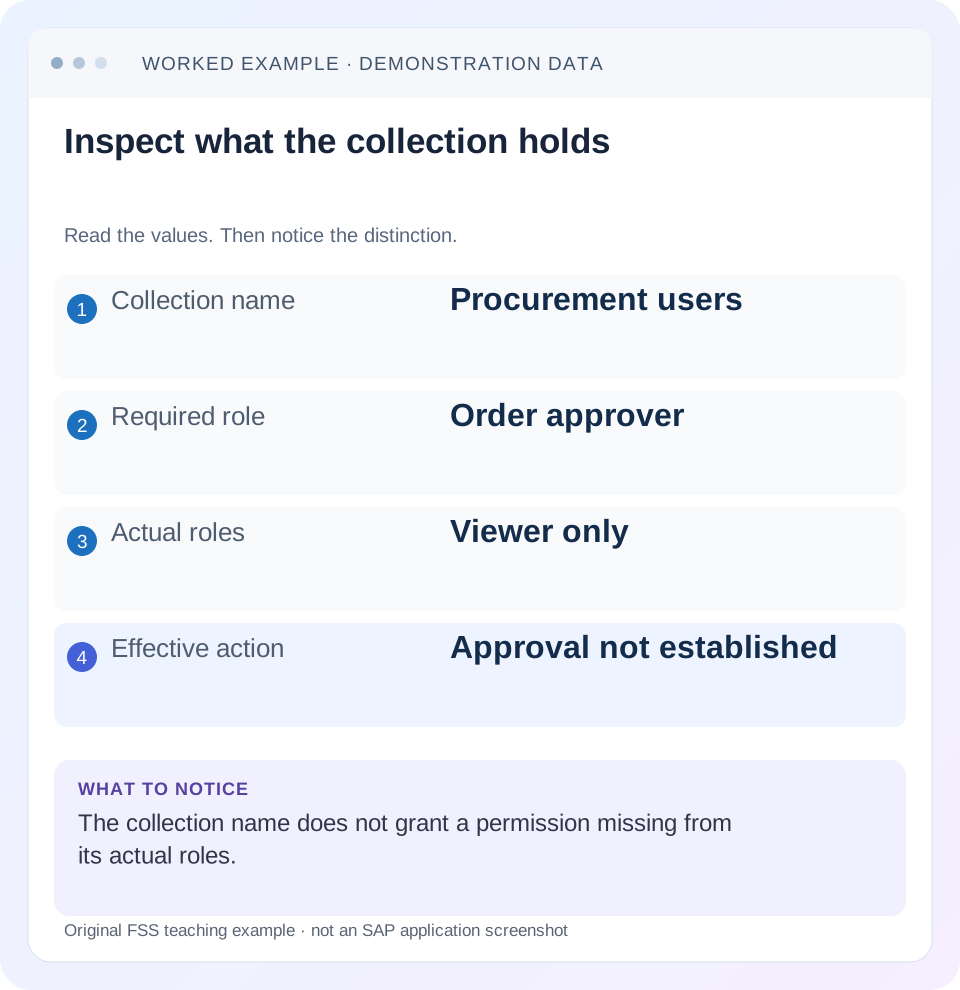
Read the example values
- Collection name
- Procurement users
- Required role
- Order approver
- Actual roles
- Viewer only
- Effective action
- Approval not established
Words you’ll meet in this guide
- Authentication
- Checking who an identity belongs to.
- Authorization
- Permission for an action on particular data.
- PFCG
- The classic ABAP Role Maintenance transaction for organizing roles.
- Role
- A grouping of intended tasks and associated permissions.
- Authorization object
- A grouping of related permission fields checked by relevant SAP application logic.
- ABAP
- SAP’s programming language for business applications.
- BTP
- SAP Business Technology Platform: cloud services for applications, data and integration.
Preview the practical steps
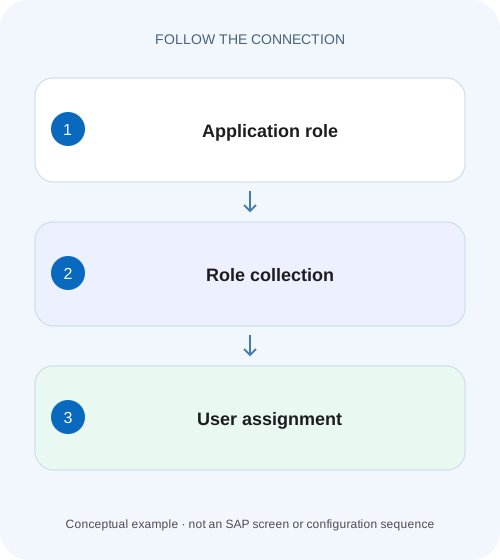
SEE THE CONNECTION
See it in a simple example.
A small example to make the idea concrete.
Separate viewing from approving a plant request
A manufacturer's BTP application lets one user view requests while approval requires a different application role.
A role collection bundles actual roles, not promises in its name
An SAP BTP role is an instance of an application role template; a role collection bundles roles for assignment.
Trace template, role, collection and assignment separately
The application defines authorization scopes and role templates in its supported security artifacts.
Worked case: a viewer collection does not authorize approval
Fictional application invoice-prod exposes Viewer and Approver templates.
Separate viewing from approving a plant request
A manufacturer's BTP application lets one user view requests while approval requires a different application role.
Read role and role-collection assignments alongside the actual application contract before treating successful login as approval permission.
| Reader | Business question | Evidence to carry forward |
|---|---|---|
| SAP developers and application teams supporting manufacturers | Separate viewing from approving a plant request | Read role and role-collection assignments alongside the actual application contract before treating successful login as approval permission. |
01 A role collection bundles actual roles, not promises in its name
An SAP BTP role is an instance of an application role template; a role collection bundles roles for assignment. A collection named Procurement Approvers can still contain only a viewer role. Inspect its actual application identifier, template, role and any attributes before concluding that the intended business action is granted. [1] [2]
This tutorial is for BTP administrators, application owners and support analysts, particularly business-user authorization in supported Cloud Foundry/XSUAA-based applications. Other services and ABAP/Kyma environments can have additional authorization models. You need authorized subaccount security display and the application’s role documentation. Names, users and company-code restrictions below are fictional and were not deployed or assigned in a tenant.
02 Trace template, role, collection and assignment separately
The application defines authorization scopes and role templates in its supported security artifacts. A role instantiates a template and can supply relevant attributes. A role collection contains roles, potentially from several applications. Assignment connects the collection to users directly or through supported identity-provider group/attribute mapping. [1] [2]
Each link can fail independently. The collection can exist without the required role; the role can belong to another application; the user can be assigned under another identity provider; the application can receive or enforce a different scope than expected. A screenshot showing one collection name does not prove the whole chain.
03 Worked case: a viewer collection does not authorize approval
Fictional application invoice-prod exposes Viewer and Approver templates. The declared Viewer role permits reading invoices; Approver1000 is a role based on Approver with a company-code restriction 1000 under the application’s supported attribute design. Collection ProcurementUsers currently contains Viewer only and is assigned to user U100 through the intended business identity.
U100 can view the permitted invoice screen but approval is not established by that collection. The approved change request is to permit the specific approval action for company 1000, not to administer the whole subaccount. Before adding anything, verify the actual application contract, required scope and restriction enforcement.
| Object | Current value | Required question |
|---|---|---|
| Application identifier | invoice-prod | Is this the application actually called? |
| Role template | Viewer | Does it include approval? No in this declared design |
| Role in collection | Viewer role only | Approver1000 is absent |
| Collection | ProcurementUsers | Name does not supply missing role |
| Assigned identity | U100/intended origin | Does login resolve to this identity? |
| Business boundary | Company1000 only | Does application enforce approved attribute scope? |
04 Application identity matters when templates look alike
Two application instances can expose templates with the same friendly names. A Viewer role for invoice-test does not automatically authorize invoice-prod. Inspect the application identifier shown with the role and compare it with the deployed service/application security context.
If an application was replaced, resubscribed or its security artifacts changed, determine which current roles and identifiers the collection contains. Do not recreate collections merely because names differ, and do not copy every role from a working development collection into production. Trace the exact missing business permission and its current application identity. Similar role labels are evidence to inspect, not proof of equivalence.
05 Attributes refine a role only when the application supports them
SAP documents roles, scopes, attributes and templates as related application-security artifacts. In the fictional example, company 1000 is an explicitly declared supported restriction. It is not a universal BTP attribute that automatically filters every application’s data. Read the application’s actual role-template attributes and enforcement behavior. [1] [2]
If the app defines no company restriction, adding a descriptive 1000 label to the collection does not create row security. If it defines one, verify the instantiated value and the application’s permitted/denied results. A role collection organizes grants; it cannot invent business-level checks that the application has not implemented. Test the actual approval request and target data, not merely the presence of an attribute field.
06 Direct users and mapped groups need different evidence
For a direct assignment, confirm user identity and identity-provider context in the correct account scope. For a group-based assignment, inspect the actual trusted provider, group/attribute mapping and user membership/claims under the supported design. Membership in a corporate group with a familiar name is not proof that the application’s login produced the expected mapping. [2] [3]
Preserve only sanitized identity and mapping evidence. Do not paste bearer tokens or complete assertions into a general support ticket. Where claim inspection is required, use the approved diagnostic process and record the relevant claim names/expected values without credentials. An email address alone may be insufficient when several trusted origins contain similar identities.
07 Inspect the collection in the correct subaccount
SAP’s documented cockpit procedure opens the relevant subaccount and Security Role Collections, where administrators can inspect included roles and assignments. Record global-account/subaccount identity and environment/application context before comparing another user’s collection. A collection in a development subaccount is not automatically a production assignment. [4]
The documented copy operation includes roles but does not copy users or user groups. A newly copied collection can therefore look complete while nobody receives it. Conversely, copying a broad role set can retain unnecessary grants. Inspect both contents and intended membership after a copy rather than assuming a new name creates a finished access design.
08 A practical role-collection diagnosis
Follow the chain from business action to actual user context. Avoid adding broader administrative access as a generic workaround.
Name the action and data scope
For U100, specify approve invoice in company 1000 using invoice-prod.
Expected observation: Read access and broad administration are separate requirements.
Inspect the application contract
Identify required role template/scope and any documented attribute restriction.
Expected observation: Approver1000 has a concrete supported meaning.
Read actual collection contents
Compare application identifier, template, role and attributes with ProcurementUsers.
Expected observation: Viewer-only contents explain missing approval in the example.
Confirm assignment and identity
Inspect direct/group mapping, correct subaccount and actual login origin.
Expected observation: The intended user receives the intended collection.
Verify the actual action
After an approved scoped change, test company 1000 approval and excluded company 2000 behavior.
Expected observation: The business outcome and boundary are both established.
09 Authentication and platform roles are different branches
A user who cannot authenticate may have a trust or identity issue before role evaluation. A user who can deploy an application may have Cloud Foundry platform permissions without the business role needed inside it. A user who can use an app may have no reason to see or manage its deployment space. [3]
For U100, distinguish login failure, app-entry failure, missing read data and denied approval. Each is a different observation. Adding Approver1000 cannot repair a broken trust exchange, and Space Developer is not a substitute for the app’s approval role. Keep the actual entry point, runtime identity and operation with the incident evidence.
10 Troubleshoot the first missing link
A useful access explanation names the failed relationship rather than reporting only that “the role is assigned.”
| Observation | Inspect | Likely branch |
|---|---|---|
| Collection assigned, action denied | Actual role/scope contents | Collection name may overstate permission |
| Same template name, different app | Application identifier | Wrong instance/security artifact |
| Direct assignment works, group does not | IdP mapping and membership | Indirect assignment path |
| Copied collection has no users | Copy semantics | Roles copied; membership not copied |
| Company2000 unexpectedly allowed | Attribute/enforcement and other grants | Data boundary not established |
| Cannot sign in at all | Trust/origin/login route | Authentication precedes business grant |
11 Review every contributing grant
A narrow role in ProcurementUsers does not prove the user lacks a broader role elsewhere. Inspect all relevant collections and application grants when testing an excluded action. If U100 can approve company 2000, identify whether another role, unrestricted template instance or application-specific rule permits it.
Do not remove Viewer or alter the narrow role until the actual granting path is known. A new collection can fix one missing task while leaving an older broad grant in place. The final review should explain both the necessary permission and every material source of excessive access for that application. Collection maintenance is easier to review when descriptions state business purpose and owner, but descriptions remain documentation rather than enforcement.
12 Verify positive, negative and boundary cases
The positive case confirms the required company 1000 approval under U100’s intended identity after an authorized scoped assignment. The negative case checks company 2000 remains denied under the complete effective grant set and that a viewer-only test identity cannot approve. Check backend/business effect as well as button visibility.
A boundary case compares the same displayed username under another origin and confirms the assignment context instead of assuming it is the same user. Another copies a collection in training and checks that roles exist but membership needs explicit review. A session/claim-refresh check uses the application’s supported fresh-login behavior and actual diagnostic evidence, without inventing a fixed propagation delay. These are proposed tests, not executed tenant changes.
13 Record a reviewable access result
A useful illustrative handover reads: “U100 is intended to authenticate through the business origin in subaccount S1. ProcurementUsers contains invoice-prod Viewer only. The proposed change supplies the documented approval role restricted to company 1000. Record the actual positive company 1000 and negative company 2000 verification results here.” State only checks actually executed when completing a real case.
If a step remains unverified, name it: collection assignment, mapped identity, received scope or business enforcement. Do not certify effective access from cockpit configuration alone. Retain the application identifier and role/attribute details so a later deployment or subscription change can be compared with the same authorization contract.
14 Frequently asked questions
Is a role collection the same as a role template? No; it bundles role instances. Does a collection name grant permissions? Only its actual contents and effective assignment contribute. Can one collection include roles from several apps? The documented model supports bundling, but review the resulting scope and ownership.
Does a business-user role grant deployment rights? Treat platform operations separately. Does assigning a collection guarantee every app action works? Verify identity, application scope, attributes and actual enforcement. Use trust/origin guidance for login identity and Cloud Foundry role guidance when the denied task is deploying or managing resources.
Related services and next steps
Primary sources
Found this useful?
Share this guide with your network, or leave a like.
Your like is saved in this browser.