SAP authorization error? Capture SU53 before requesting a role change
A manufacturing buyer cannot display an intended purchasing document in one organizational scope.

Source review:
START HERE · NO PRIOR TOPIC KNOWLEDGE NEEDED
What it is. Why it matters.
An authorization is permission to perform an action on particular data. In classic ABAP systems, roles maintained with PFCG organize permissions; SU53 helps inspect a recent failed authorization check.
Completely new to SAP?
Manufacturers use SAP to connect work such as buying components, recording inventory, planning production, shipping equipment and accounting for costs. SAP S/4HANA is an enterprise resource planning system: it connects these activities through shared business data.
Security separates verifying an identity from granting permission to perform business actions. A role groups relevant access, while restrictions define the allowed data and activities.
A transaction code, or t-code, is a shortcut to a task in classic SAP GUI. Fiori apps provide another way to work. Names and screens depend on the product and release; you do not need a live system to learn the concepts in this guide.

Scope and source-review notes
Scope and evidence
Source review by FAST SAP SOLUTIONS® editorial. This badge describes our editorial review; it does not represent SAP certification or independent endorsement.
ABAP authorization diagnosis where SU53 is available. This tutorial uses a fictional custom authorization object to teach interpretation, not a claim that one object controls every SAP transaction. Display layout, CDS/HR details, saved checks and administrator functions depend on the installed release.
Reviewed relevant official SAP documentation and available official indexed excerpts on 14 November 2026. The identifiers, requests, timelines and expected checks are original illustrative teaching material; no customer SAP execution or reproduction of an incident is claimed. Apply the documented options for the installed product, release and authentication route.
A MANUFACTURING EXAMPLE
Capture the failed plant purchasing authorization
Keep capture and review times apart
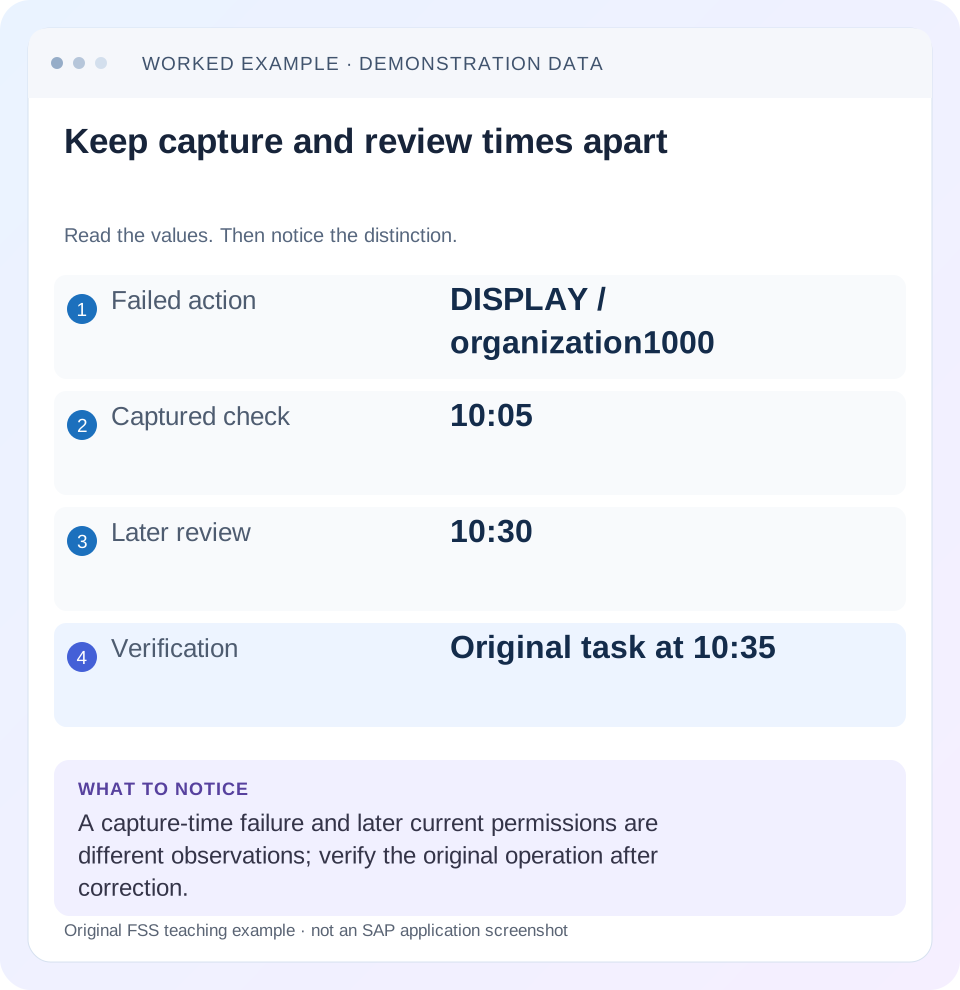
Read the example values
- Failed action
- DISPLAY / organization1000
- Captured check
- 10:05
- Later review
- 10:30
- Verification
- Original task at 10:35
A REAL SCREEN TO RECOGNIZE
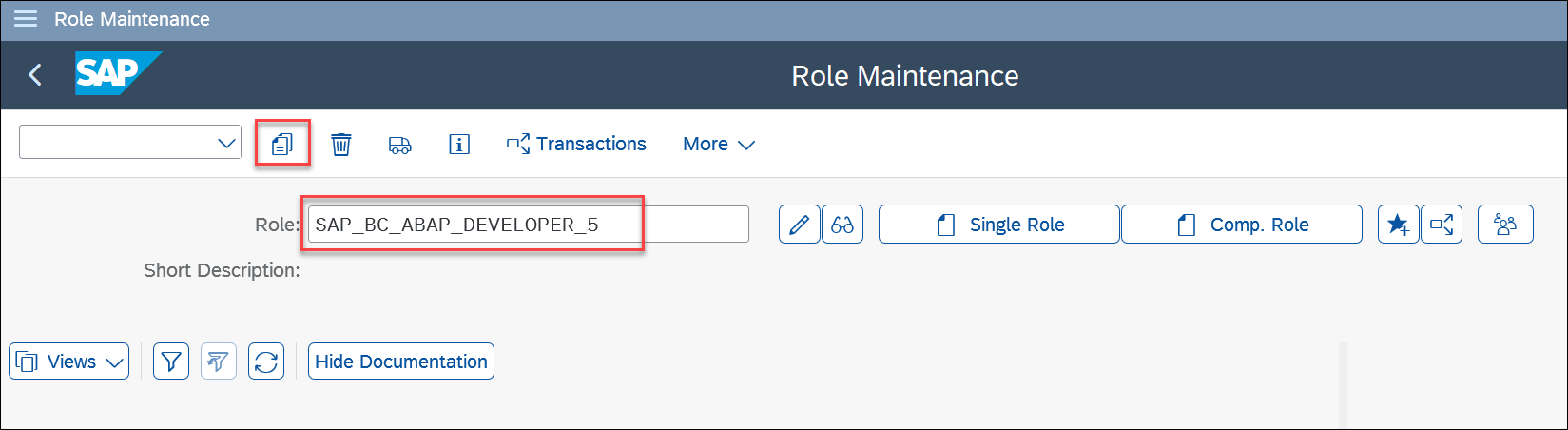
PFCG Role Maintenance in SAP’s workshop. The role name identifies a role to inspect. A role groups intended access; it is different from the result of one failed authorization check.
© 2025 SAP SE or an SAP affiliate company and abap-platform-rap110 contributors. Apache-2.0 (repository REUSE annotation). Reproduced unchanged for educational commentary. This is a source example, not a capture of your system.A REAL SCREEN TO RECOGNIZE
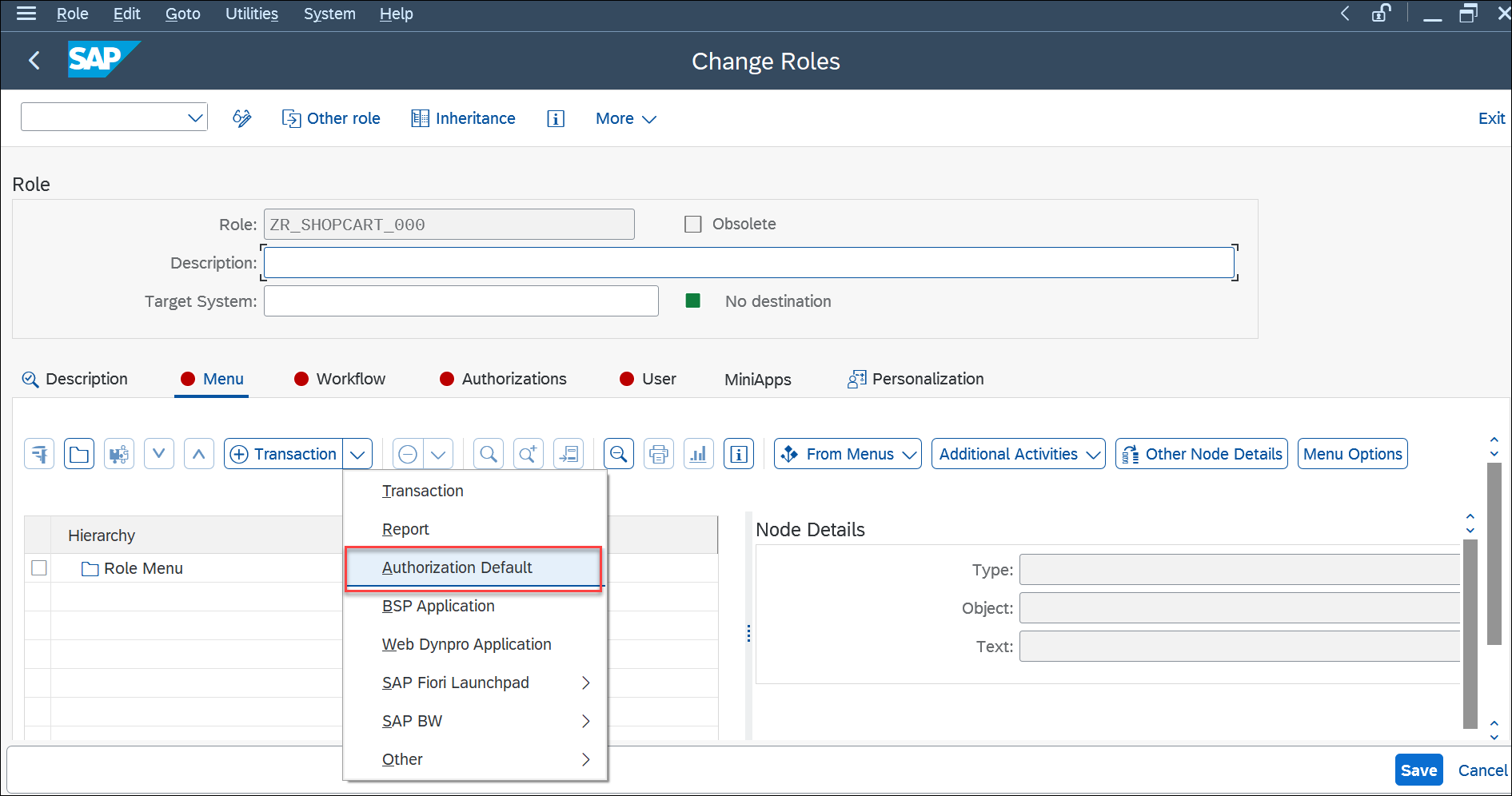
The Menu tab in SAP’s PFCG workshop example. Menu entries describe relevant tasks or services; effective access also depends on authorization data and user assignment. This is a workshop configuration, not a recommended role for every user.
© 2025 SAP SE or an SAP affiliate company and abap-platform-rap110 contributors. Apache-2.0 (repository REUSE annotation). Reproduced unchanged for educational commentary. This is a source example, not a capture of your system.A REAL SCREEN TO RECOGNIZE
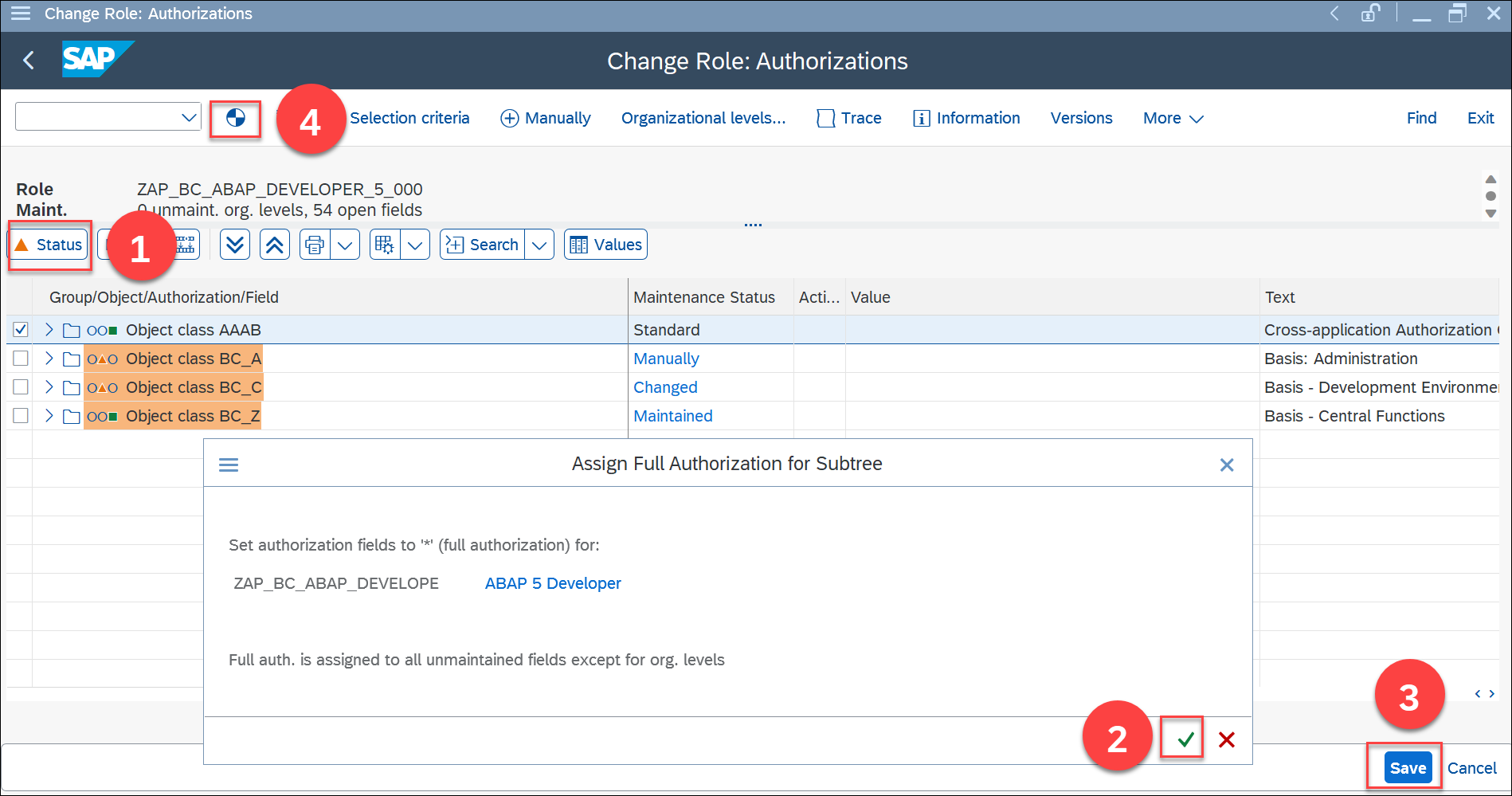
The Authorizations view in SAP’s PFCG workshop. Notice that authorization data and generated profile status are separate concepts from the role name. The workshop privileges shown are not a recommendation to grant the same access in a customer system.
© 2025 SAP SE or an SAP affiliate company and abap-platform-rap110 contributors. Apache-2.0 (repository REUSE annotation). Reproduced unchanged for educational commentary. This is a source example, not a capture of your system.A REAL SCREEN TO RECOGNIZE
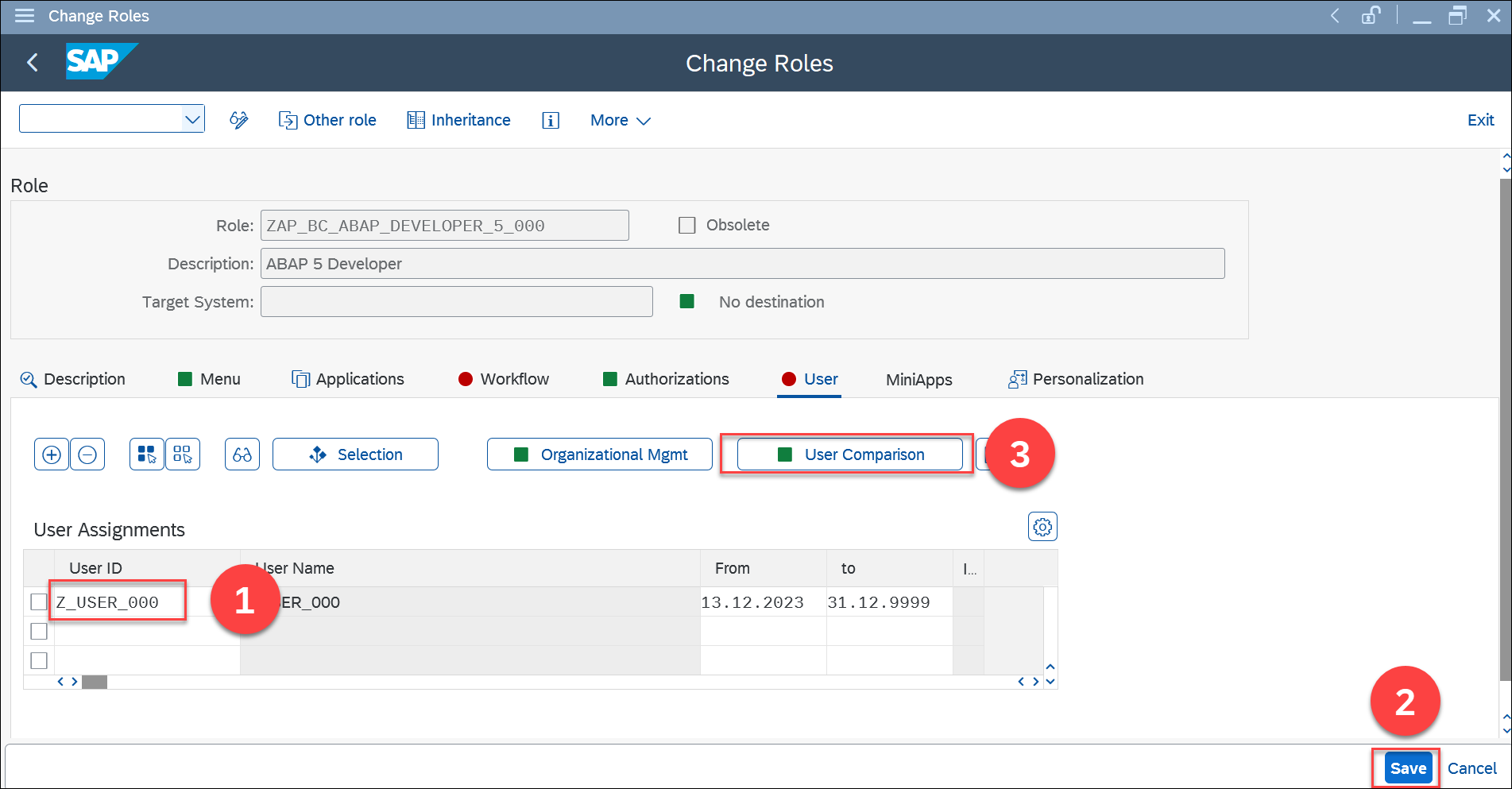
The User tab in SAP’s PFCG workshop. The role-to-user assignment and comparison step are different from defining the role’s authorization data. The displayed user is a workshop example, not a customer identity.
© 2025 SAP SE or an SAP affiliate company and abap-platform-rap110 contributors. Apache-2.0 (repository REUSE annotation). Reproduced unchanged for educational commentary. This is a source example, not a capture of your system.Words you’ll meet in this guide
- Authentication
- Checking who an identity belongs to.
- Authorization
- Permission for an action on particular data.
- PFCG
- The classic ABAP Role Maintenance transaction for organizing roles.
- Role
- A grouping of intended tasks and associated permissions.
- Authorization object
- A grouping of related permission fields checked by relevant SAP application logic.
- ABAP
- SAP’s programming language for business applications.
- GUI
- Graphical user interface. SAP GUI is a desktop interface used for many classic SAP tasks.
Preview the practical steps
SEE THE CONNECTION
See it in a simple example.
A small example to make the idea concrete.
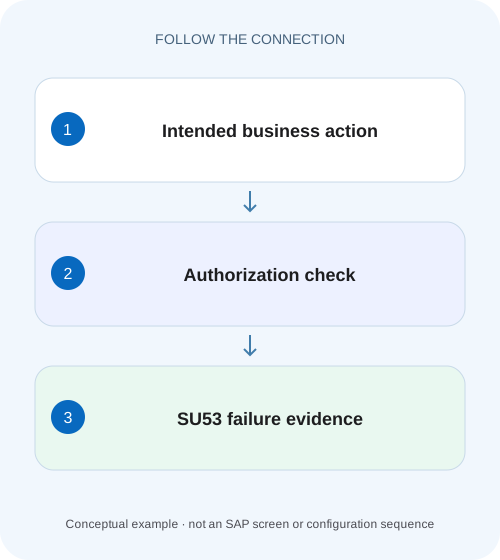
Capture the failed plant purchasing authorization
A manufacturing buyer cannot display an intended purchasing document in one organizational scope.
The useful result is an explained failed check
SU53 helps investigate an authorization failure by showing relevant failed-check information and user authorization context in supported ABAP systems.
Prerequisites and a capture plan
Identify the affected user, system/client, application or transaction, object being accessed and exact operation.
Understand an authorization object, its fields and the checked combination
An authorization check asks whether the current user has the authorization required for a particular object and field-value combination.
Capture the failed plant purchasing authorization
A manufacturing buyer cannot display an intended purchasing document in one organizational scope.
Capture the relevant failed authorization in the actual user context before asking for a targeted role correction.
| Reader | Business question | Evidence to carry forward |
|---|---|---|
| SAP developers and application teams supporting manufacturers | Capture the failed plant purchasing authorization | Capture the relevant failed authorization in the actual user context before asking for a targeted role correction. |
01 The useful result is an explained failed check
SU53 helps investigate an authorization failure by showing relevant failed-check information and user authorization context in supported ABAP systems. Capture it immediately after the action you are investigating, under the affected identity and session context. The application message describes the symptom; the authorization object and field values can explain what the application attempted to check. [3]
Do not treat the display as a shopping list of permissions to grant. A failed check can relate to an intentionally unavailable operation, another application layer or an optional branch that the application handles. Start with the approved business task and correlate the technical evidence to that exact failure. The practical goal is to establish the smallest justified correction and verify its boundary.
02 Prerequisites and a capture plan
Identify the affected user, system/client, application or transaction, object being accessed and exact operation. Record the time, original error and expected result. A colleague testing with a different account has a different authorization context, even when both open the same transaction code.
The user needs the supported access to display or capture SU53, and the administrator needs the appropriate diagnostic permissions to inspect another user’s saved evidence. If that access is absent, use the organization’s authorized capture route rather than reproducing the action as an administrator and calling that the user’s result. This tutorial requires no role change to collect the initial evidence.
03 Understand an authorization object, its fields and the checked combination
An authorization check asks whether the current user has the authorization required for a particular object and field-value combination. The object is the technical category being checked; fields describe its activity or business scope. Reading one familiar field in isolation can hide the combination that made the check fail.
Our fictional application defines custom object Z_ORDER_VIEW with fields Z_ACTION and Z_ORG. It defines DISPLAY as the display operation. These custom names are teaching identifiers, not delivered SAP authorization objects. The important reasoning is that DISPLAY for organization 1000 and DISPLAY for organization 2000 are different requests. A permission to change data is also not automatically the approved answer to a display failure.
Real SAP checks use their actual object definitions and value semantics. Ask the role owner to interpret the captured object in that context. Do not paste the fictional object into PFCG or infer a real transaction’s complete authorization design from this illustration.
04 Worked case: a buyer’s display fails in one organization
USER_A is approved to display the fictional purchasing document PO-A in organization 1000. At 10:05 the custom application rejects the display. The immediately captured example shows Z_ORDER_VIEW checked with Z_ACTION = DISPLAY and Z_ORG = 1000. The current role design visible to the analyst only contains the intended display authorization for organization 2000.
This gives a concrete hypothesis: the approved organizational scope was not represented in the effective access used by the failed action. It does not yet establish whether the role design is wrong, its profile is stale, the assignment is invalid or the user comparison is incomplete. Those are different points in the propagation chain.
If the business request actually concerned organization 2000 and the user accidentally opened PO-A in 1000, the same failed check could be correct. That is why the business approval and selected document context are part of the investigation, rather than paperwork to add after granting access.
| Evidence | Observed value | Question it answers |
|---|---|---|
| Caller | USER_A in QAS client 200 | Which identity and system? |
| Action | Display PO-A at 10:05 | Which business operation failed? |
| Custom checked object | Z_ORDER_VIEW | Which application check? |
| Requested fields | DISPLAY / organization 1000 | Which combination was required? |
| Observed role design | DISPLAY / organization 2000 | Does the current design match the approved scope? |
05 Capture the relevant failure before unrelated activity replaces it
Reproduce only the approved failing action when a controlled reproduction is necessary. Preserve the original application message, then start SU53 promptly in the affected context. Avoid navigating through several other restricted operations first: later failed checks can replace the evidence you wanted.
In classic SAP GUI documentation, entering SU53 or /nSU53 is a documented way to open the display. Follow the installed capture process if the application or frontend uses a different supported route. Record the capture timestamp and retain the useful object/field information with confidential business details appropriately protected. [1]
Pin down one operation
Record the exact document, action, user and system/client. State why this user should be permitted to perform it.
Expected observation: The reported denial belongs to an identifiable approved task.
Capture promptly under the affected identity
After the relevant failure, open the supported SU53 display/capture without first trying unrelated restricted actions.
Expected observation: The capture can be correlated with the failure time and object.
Keep application and authorization evidence together
Record the original message and the check’s object/field context. Include whether the result was saved for administrator review.
Expected observation: The reviewer can distinguish this incident from another user’s or later check.
06 Administrator review: capture time and current user data differ
SAP documents an important timing distinction: the failed-check area reflects the user’s capture time, while the displayed user authorization data can be read from the user buffer at the administrator’s later analysis time. Do not treat those two observations as though they were automatically one simultaneous snapshot. [3]
Suppose USER_A captures at 10:05, an approved role correction is applied at 10:20 and an administrator reviews at 10:30. A visible current authorization for 1000 does not prove that it existed during the 10:05 failure. Conversely, the older failed-check record does not prove the correction failed. Retain the times and perform a new original-operation check to establish the current result.
Supported other-user and saved-check functions also depend on the user’s prior capture and the installed version. Follow the documented process for that release. An administrator simply opening their own SU53 after testing a different account does not reconstruct USER_A’s original session. [4]
07 Choose the next investigation from the evidence
Use the first unexplained layer to select the next check. An application can reject a business operation for reasons other than the ABAP authorization object shown in an unrelated failure. A useful ticket makes the correlation explicit rather than assuming every visible SU53 row explains every red message.
| Observation | Interpretation to test | Next useful action |
|---|---|---|
| Captured object matches the failed task and scope | A relevant permission combination may be absent | Compare approved design, profile, assignment and comparison state. |
| Capture time follows several other failures | The display may describe another operation | Capture the original task again through the authorized route. |
| Administrator sees permission now | Current state may differ from capture time | Compare change timing and repeat the original operation. |
| No relevant failed check | Another layer or handled check may be involved | Correlate application messages and request a narrowly scoped diagnostic trace if justified. |
| Only another account succeeds | Different effective access or identity context | Compare the affected identity’s actual route and approved permissions. |
| Role change permits unrelated organizations | The correction may have broadened scope | Review effective access and the excluded-case test. |
08 Turn the evidence into a role change only when justified
For the worked case, the role owner should first decide whether DISPLAY/1000 is the approved requirement. If it is, inspect the PFCG design and the user’s effective role chain. A correct design with stale generation is a different change from adding a missing organizational value. A role assigned in another client cannot repair this client’s user context.
Keep the requested change specific. A broad wildcard may hide the symptom while granting operations or organizations outside the request. If the application is performing the wrong authorization check for the intended task, the proper correction can be application logic rather than a broader role. Preserve that alternative instead of assuming every failed check must be satisfied by every user.
09 Verify the required operation and one excluded case
After an approved correction, repeat the original display as the intended user through the original route. Check that PO-A in organization 1000 is actually displayed; merely reaching the transaction’s initial screen is not the same result. Capture any new failure separately because it may expose a second missing prerequisite.
Then use an authorized representative negative test for the intended excluded boundary. In our declared overall access design, USER_A should not gain organization 2000 or a change operation merely because the incident concerned display in 1000. Real users may have several legitimate roles, so choose the negative expectation from the complete approved design.
The final evidence should connect the approved task, captured check, chosen correction and observed business outcome. Do not report “SU53 is clear” as the sole acceptance result. The business operation and the access boundary are the useful checks.
10 Practice exercise: separate a stale capture from a failed fix
Prepare a worksheet with three timestamps: original failure 10:05, role correction 10:20 and administrator review 10:30. Keep the old failed-check row and a separate column for the current authorization data. Add a new display attempt at 10:35. Decide which observation supports each conclusion.
If 10:35 succeeds for the approved scope, the old failure remains useful historical evidence but is not evidence of a current denial. If it fails with a different object, begin a new correlated investigation rather than overwriting the first incident’s history. If the current display shows a permission yet the original task still fails, compare the effective identity, session and application message before declaring the permission irrelevant.
| Case | Expected observation | Mistake it prevents |
|---|---|---|
| Capture promptly after the target failure | Object and time correlate with the action | Diagnosing an unrelated later check. |
| Capture another failure before SU53 | Evidence may now refer to that later operation | Treating the display as a complete historical log. |
| Change access between capture and review | Old failure and current data can differ legitimately | Mistaking current access for capture-time access. |
| Retest a different user | Outcome describes that other identity | Calling an administrator test a user acceptance test. |
11 Frequently asked questions
Does SU53 list every permission I should have? No. It is diagnostic evidence about failed checks and related authorization data, not a complete approved role specification. Begin with the business task and the actual application check.
Can a security administrator capture my failure from a separate session? Use the supported user capture and administrator review functions for the installed version. The documentation’s capture-time distinction matters; a separate administrator’s own failure is not your session’s result.
Why is the error still present after a role was added? Confirm identity, system/client, validity, generated profile and effective comparison state. Then correlate the new application failure: it can concern another check, another layer or a business condition.
When is a trace appropriate? When the captured evidence cannot explain the reproducible operation and a scoped diagnostic is justified. Agree the identity, time window and operation with the authorized administrator. A trace should answer a defined question rather than collect broad unrelated activity.
What is a good handover sentence? “USER_A’s 10:05 display of PO-A in organization 1000 failed; the correlated capture requested the stated object/values; the approved role correction and 10:35 positive/negative checks are recorded.” Replace every teaching label with the real protected context.
Related services and next steps
Primary sources
Found this useful?
Share this guide with your network, or leave a like.
Your like is saved in this browser.