Authentication versus authorization in SAP: Identity and permitted actions
A manufacturer's integration can authenticate to an endpoint but still cannot perform the intended operational request.

Source review:
START HERE · NO PRIOR TOPIC KNOWLEDGE NEEDED
What it is. Why it matters.
Authentication checks who you are. Authorization checks what that identity may do, so being able to sign in does not mean being allowed to read or change every business record.
Completely new to SAP?
Manufacturers use SAP to connect work such as buying components, recording inventory, planning production, shipping equipment and accounting for costs. SAP S/4HANA is an enterprise resource planning system: it connects these activities through shared business data.
Security separates verifying an identity from granting permission to perform business actions. A role groups relevant access, while restrictions define the allowed data and activities.
A transaction code, or t-code, is a shortcut to a task in classic SAP GUI. Fiori apps provide another way to work. Names and screens depend on the product and release; you do not need a live system to learn the concepts in this guide.

Scope and source-review notes
Scope and evidence
Source review by FAST SAP SOLUTIONS® editorial. This badge describes our editorial review; it does not represent SAP certification or independent endorsement.
Conceptual SAP identity/access guide with a worked SAP Cloud Integration inbound HTTPS example. The concrete configuration comparison follows Cloud Foundry options in the linked checklist; Neo, Edge Integration Cell, ABAP and other products have different supported mechanisms and role administration.
Reviewed relevant official SAP documentation and available official indexed excerpts on 14 November 2026. The identifiers, requests, timelines and expected checks are original illustrative teaching material; no customer SAP execution or reproduction of an incident is claimed. Apply the documented options for the installed product, release and authentication route.
A MANUFACTURING EXAMPLE
Separate plant integration identity from permission
Trace the actual caller
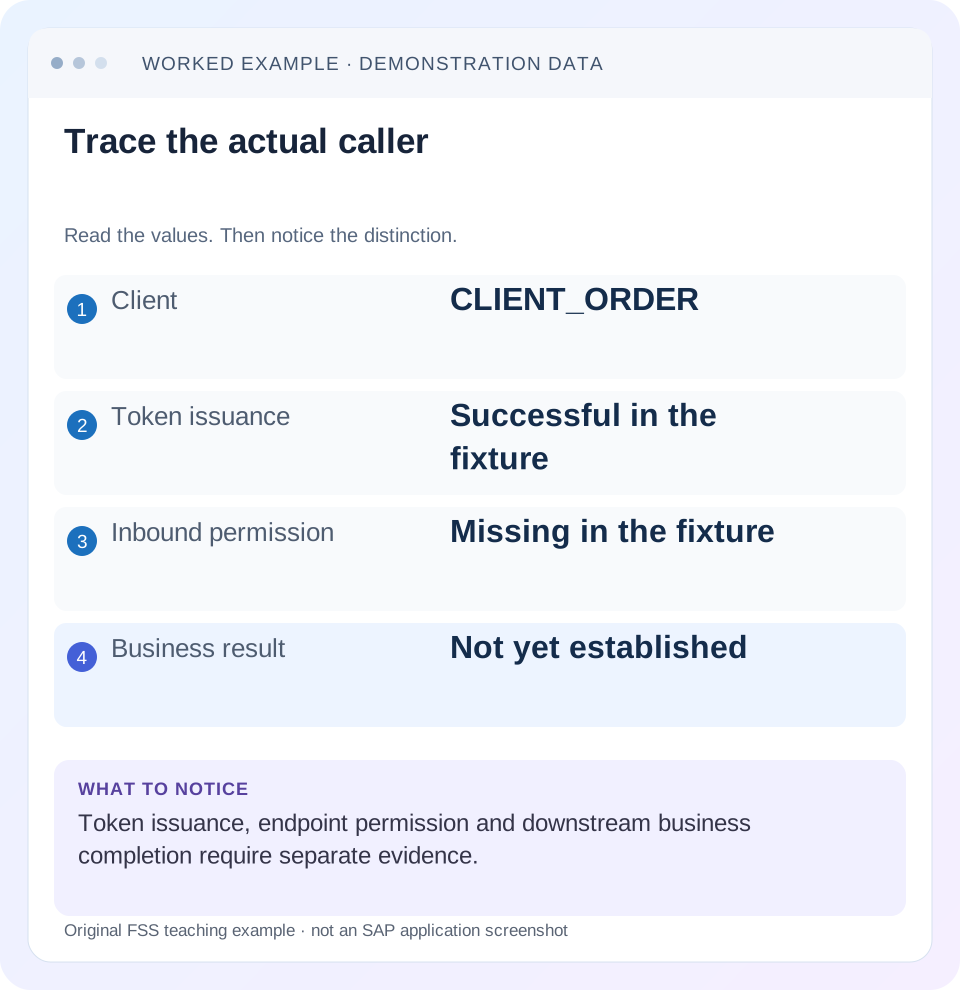
Read the example values
- Client
- CLIENT_ORDER
- Token issuance
- Successful in the fixture
- Inbound permission
- Missing in the fixture
- Business result
- Not yet established
A REAL SCREEN TO RECOGNIZE
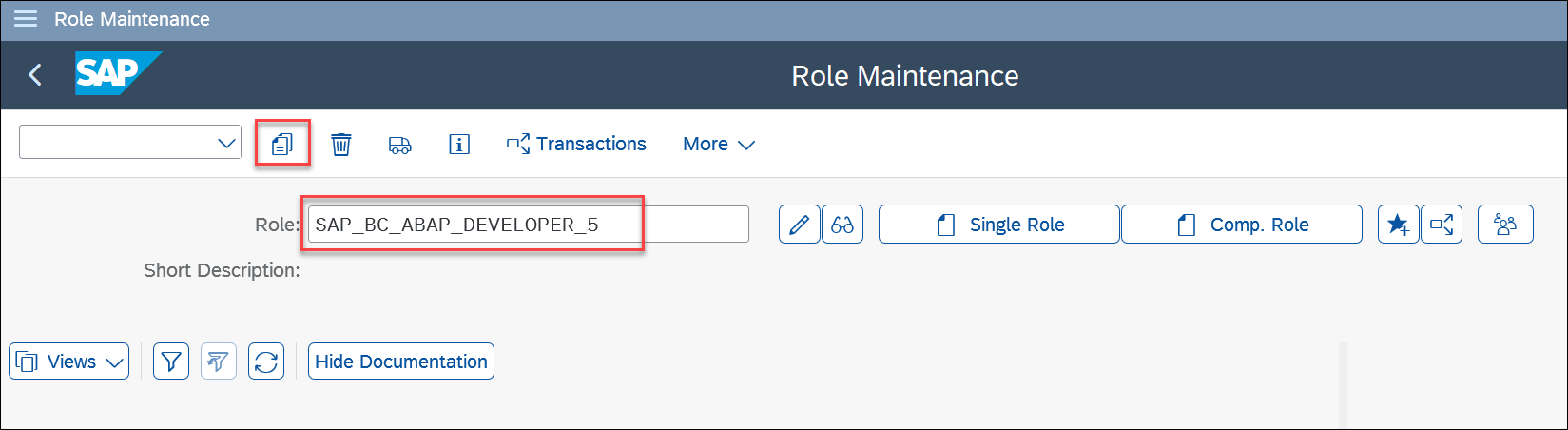
PFCG Role Maintenance in SAP’s workshop. The role name identifies a role to inspect. A role groups intended access; it is different from the result of one failed authorization check.
© 2025 SAP SE or an SAP affiliate company and abap-platform-rap110 contributors. Apache-2.0 (repository REUSE annotation). Reproduced unchanged for educational commentary. This is a source example, not a capture of your system.A REAL SCREEN TO RECOGNIZE
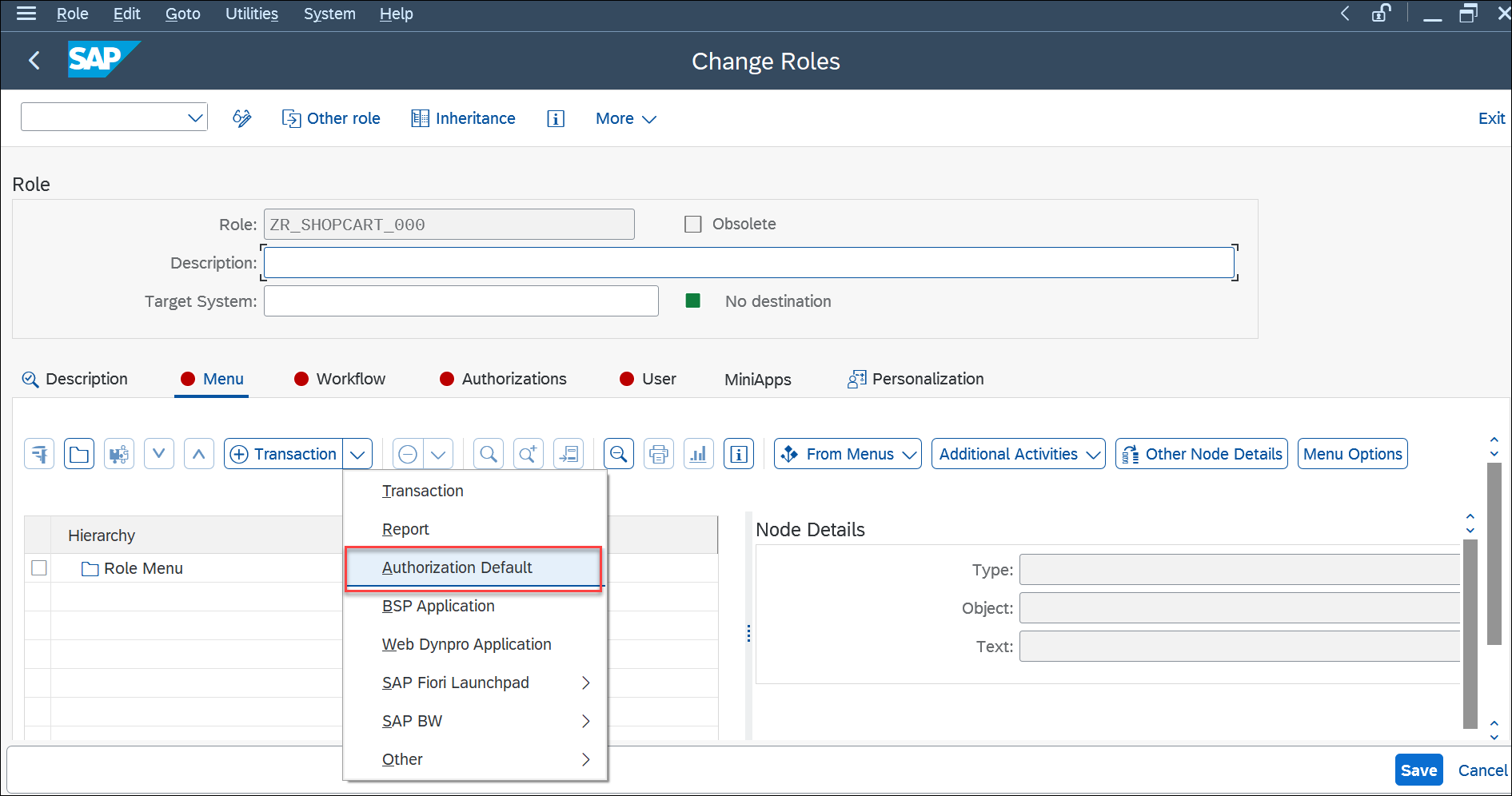
The Menu tab in SAP’s PFCG workshop example. Menu entries describe relevant tasks or services; effective access also depends on authorization data and user assignment. This is a workshop configuration, not a recommended role for every user.
© 2025 SAP SE or an SAP affiliate company and abap-platform-rap110 contributors. Apache-2.0 (repository REUSE annotation). Reproduced unchanged for educational commentary. This is a source example, not a capture of your system.A REAL SCREEN TO RECOGNIZE
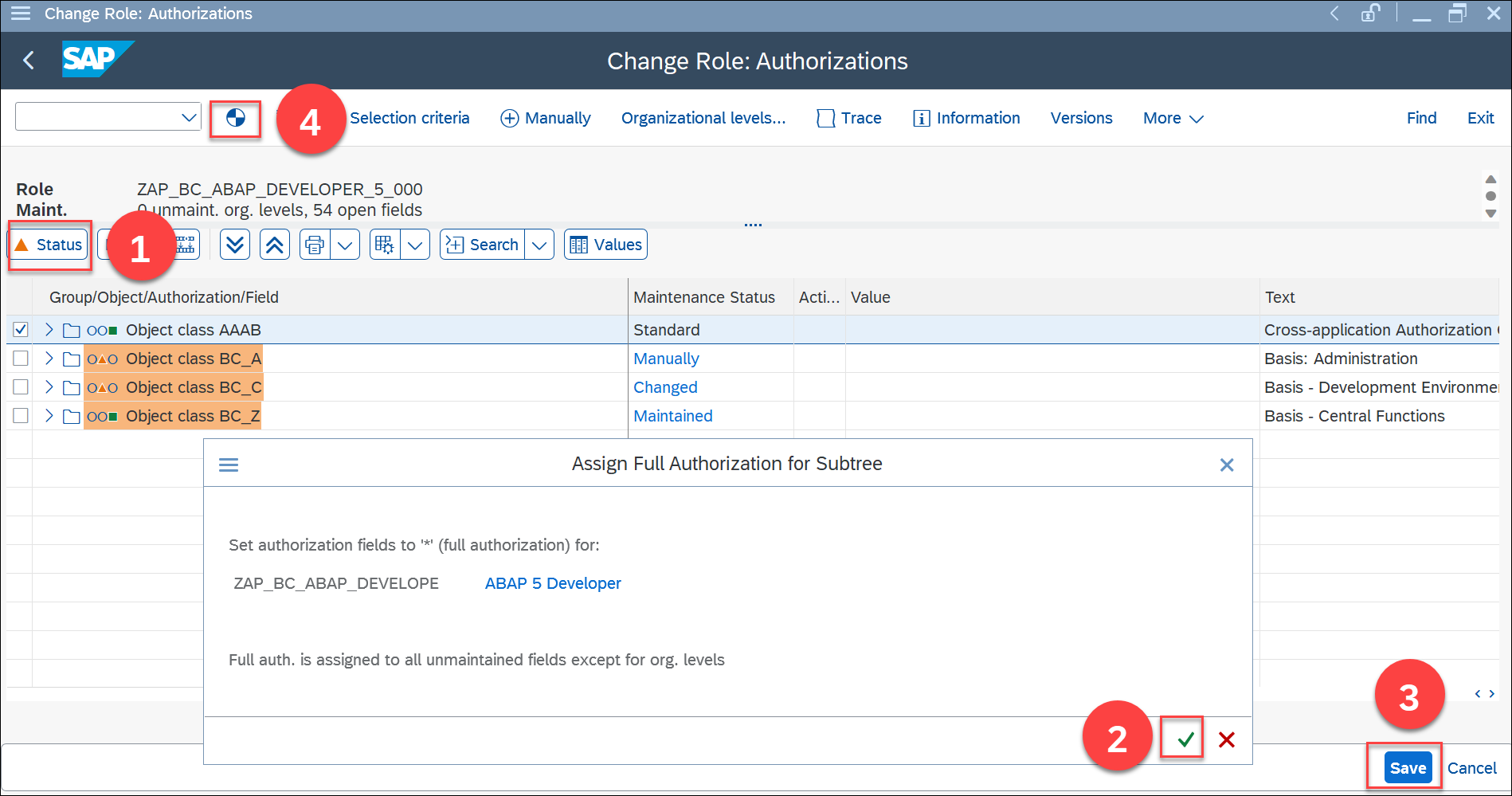
The Authorizations view in SAP’s PFCG workshop. Notice that authorization data and generated profile status are separate concepts from the role name. The workshop privileges shown are not a recommendation to grant the same access in a customer system.
© 2025 SAP SE or an SAP affiliate company and abap-platform-rap110 contributors. Apache-2.0 (repository REUSE annotation). Reproduced unchanged for educational commentary. This is a source example, not a capture of your system.A REAL SCREEN TO RECOGNIZE
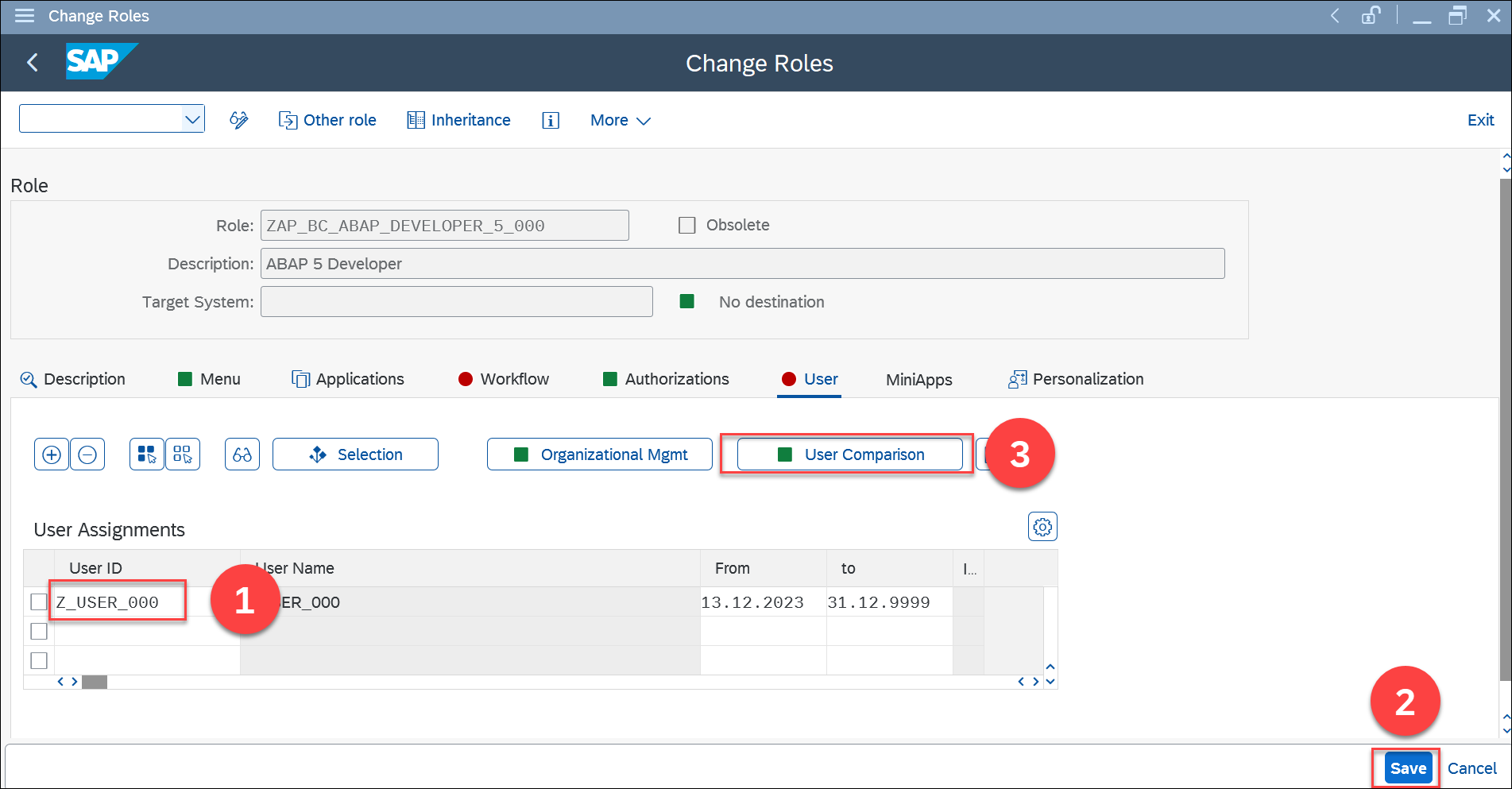
The User tab in SAP’s PFCG workshop. The role-to-user assignment and comparison step are different from defining the role’s authorization data. The displayed user is a workshop example, not a customer identity.
© 2025 SAP SE or an SAP affiliate company and abap-platform-rap110 contributors. Apache-2.0 (repository REUSE annotation). Reproduced unchanged for educational commentary. This is a source example, not a capture of your system.Words you’ll meet in this guide
- Authentication
- Checking who an identity belongs to.
- Authorization
- Permission for an action on particular data.
- PFCG
- The classic ABAP Role Maintenance transaction for organizing roles.
- Role
- A grouping of intended tasks and associated permissions.
- Authorization object
- A grouping of related permission fields checked by relevant SAP application logic.
- BTP
- SAP Business Technology Platform: cloud services for applications, data and integration.
- HTTP
- The request-and-response protocol used by web applications and APIs.
- OAuth
- An authorization framework for delegated access, commonly using access tokens.
Preview the practical steps
SEE THE CONNECTION
See it in a simple example.
A small example to make the idea concrete.
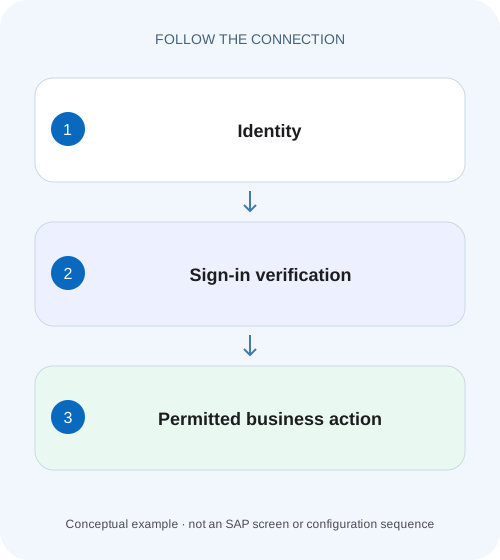
Separate plant integration identity from permission
A manufacturer's integration can authenticate to an endpoint but still cannot perform the intended operational request.
The short answer: a recognized identity still needs permission
Authentication establishes the identity accepted for a request.
Draw the actors before changing their access
An interactive person, an application’s OAuth client and an outbound backend technical user can be three different identities in one business flow.
Separate the access checks from the business result
A simplified investigation can distinguish transport reachability, identity validation, endpoint permission, processing and the target business operation.
Separate plant integration identity from permission
A manufacturer's integration can authenticate to an endpoint but still cannot perform the intended operational request.
Compare the authenticated identity with the endpoint's authorization checks before treating connectivity as sufficient business access.
| Reader | Business question | Evidence to carry forward |
|---|---|---|
| SAP developers and application teams supporting manufacturers | Separate plant integration identity from permission | Compare the authenticated identity with the endpoint's authorization checks before treating connectivity as sufficient business access. |
01 The short answer: a recognized identity still needs permission
Authentication establishes the identity accepted for a request. Authorization decides whether that identity may perform the requested operation in its relevant scope. SAP’s Cloud Integration inbound documentation explicitly separates those checks. Successful login or token issuance therefore does not, by itself, establish permission to invoke an endpoint or read the intended business record. [1]
The practical fix depends on the first failing boundary. A missing sender role is not normally repaired by resetting a valid password. An invalid credential is not normally repaired by assigning a broader business role. Start with one request, identify the actual caller and determine which server produced the observed response.
02 Draw the actors before changing their access
An interactive person, an application’s OAuth client and an outbound backend technical user can be three different identities in one business flow. A browser may authenticate a person to an identity provider; an integration endpoint may accept a client credential; the integration may then call ERP with another configured identity.
Write the identity and target at each boundary. A useful ledger includes source application, inbound endpoint, authentication mechanism, accepted principal, required permission and downstream target. Keep issuer/tenant/system/client context with identifiers. Two accounts with the same display name are not automatically the same security principal.
You need authorized configuration/log visibility and a harmless representative request. The first investigation should not change business data. When credentials or tokens are involved, record safe metadata and references rather than copying usable secrets into a ticket.
03 Separate the access checks from the business result
A simplified investigation can distinguish transport reachability, identity validation, endpoint permission, processing and the target business operation. These are diagnostic boundaries, not a claim that every product implements an identical internal pipeline. A gateway or router can reject a request before it reaches the component you expected.
For an integration, successful inbound permission only establishes that the sender passed that boundary. Mapping can still fail, the outbound destination can select another identity, and the backend can reject the business operation. A final status must be interpreted at the component and business level that produced it.
This is why “the token works” is too vague. Specify whether the authorization server issued it, the resource accepted its issuer/audience/lifetime, the required permission was present and the intended business action completed. Each statement needs its own evidence.
04 Worked case: a sender can authenticate but cannot invoke the flow
In a fictional training tenant, sender CLIENT_ORDER must call a read-only order-status integration for reference DEMO-100. Its client credential is accepted and a token can be obtained through the documented service configuration. The endpoint nevertheless denies the call because the sender permission selected for the integration flow is not represented by the client’s configured role relationship.
A developer can open the integration design workspace with their own identity. That proves a separate design-time access path, not CLIENT_ORDER’s runtime sender permission. Testing the endpoint as that developer can hide the distinction. Keep the real caller and its assigned runtime role context in the investigation.
After the authorized owner aligns the client permission and the adapter’s declared inbound requirement, the harmless status call can be tested again. If it then fails at the outbound ERP authorization, record that as a later boundary. The inbound repair did not promise that every downstream identity already had the required access.
| Boundary | Identity or context | Required observation |
|---|---|---|
| Developer workspace | Developer’s personal identity | Design-time access only. |
| Token acquisition | CLIENT_ORDER under its configured client flow | Token issuance result and safe client/issuer context. |
| Inbound endpoint | CLIENT_ORDER runtime sender context | Permission matches the integration’s selected authorization requirement. |
| Outbound backend | Configured backend identity | Actual system/client and business permission verified separately. |
| Business result | DEMO-100 status request | Expected status data, without a write. |
05 Use the right Cloud Integration role-configuration route
The linked Cloud Integration checklist distinguishes sender configurations. For a supported Basic-authentication IdP user, it describes a BTP role collection containing the MessagingSend role template and assignment to the IdP user. For an OAuth service client, it points to Cloud Integration Monitor → Manage Security → User Roles and the service instance/key setup for that role. [3]
The same checklist documents the predefined ESBMessaging.send role or a custom role for the relevant service-client option. These names are not interchangeable objects in every administration screen. Identify the chosen authentication option first, then follow its actual role relationship and the sender adapter’s configured authorization requirement. [3]
Do not give a personal role collection to a technical client merely because both call the same business integration. Nor should an administrator assume an existing service instance automatically grants every endpoint permission. Inspect the configured service/client and required role in the correct tenant and environment.
| Sender option | Configuration context to inspect | Why it matters |
|---|---|---|
| Supported Basic authentication with IdP user | BTP role collection with MessagingSend, assigned to that IdP user | The subject is a user, with the documented user/role-collection relationship. |
| OAuth service-client option | Cloud Integration User Roles plus the corresponding service instance/key configuration | The subject and role handoff differ from a personal user assignment. |
| Custom inbound role | The selected role in the supported sender/adapter and client setup | A default role elsewhere does not establish this endpoint’s required permission. |
06 A practical sequence for the inbound failure
Inspect configuration without changing several security layers at once. The required evidence is small: a known request, the intended principal and target, and the relevant role relationship. Avoid substituting an administrator identity during the acceptance check.
Identify the actual request target
Record the endpoint, method, tenant and timestamp. Establish whether the observed response came from the router, integration runtime or another component.
Expected observation: The failing server boundary is known.
Confirm the selected authentication option
Determine whether the caller is an IdP user, an OAuth client or a supported certificate identity. Inspect the documented option for this adapter/environment.
Expected observation: The identity is traced through the right mechanism.
Inspect safe identity evidence
Check the accepted client/user, relevant issuer/audience/lifetime context and correlated runtime message. Keep passwords, private keys and usable tokens out of shared records.
Expected observation: The intended principal, rather than a similarly named account, is established.
Compare required and configured permission
For the Cloud Integration example, compare the sender authorization role with the correct User Roles/service-client or IdP role-collection setup.
Expected observation: The missing or mismatched relationship is specific.
Verify the corrected boundary and downstream result
Repeat the authorized harmless status request as CLIENT_ORDER, then inspect the outbound target and expected business response.
Expected observation: Inbound acceptance and business completion have separately recorded outcomes.
07 What response codes can and cannot prove
HTTP 401 and 403 are useful clues, but interpret the component’s documented behavior and error body. A proxy, application router or custom application can affect what the caller sees. A browser redirect may indicate a login flow; it is not an order-status result. A response from the wrong backend can be technically successful and still irrelevant.
Use safe response metadata, a correlation reference and the server-side evidence you are authorized to inspect. If a token is issued but the endpoint rejects it, compare the resource and intended audience as well as the role. If the endpoint accepts the request but the body reports a business rejection, move to that business-processing boundary.
Do not diagnose every denial as a password failure or every 200 as success. In the worked case, the acceptance result is the expected DEMO-100 status under CLIENT_ORDER’s intended access, not simply a green connectivity test.
08 Troubleshooting common identity and permission mismatches
Choose the next check from the observed boundary. A controlled investigation changes one established cause and retains the evidence that led to it.
| Observation | Question | Next useful evidence |
|---|---|---|
| Credentials rejected before a token/session is established | Is the client/user and authentication mechanism correct? | Actual issuer, tenant, account and credential-reference context. |
| Token issued; resource rejects it | Is it intended and valid for this resource? | Documented token validation and resource-side message. |
| Identity accepted; sender permission denied | Does the actual principal have the required endpoint role? | Correct role-collection or service-client role configuration. |
| Developer succeeds; integration client fails | Are these different principals or access paths? | Caller identity ledger and runtime role relationship. |
| Inbound accepted; ERP rejects the call | Which outbound identity and business scope apply? | Destination, target system/client and backend authorization evidence. |
| 200 response but no business effect | Does the payload or later processing report failure? | Application result, persistence or asynchronous completion evidence. |
09 Verification: permit the intended task and preserve the boundary
Use an authorized test case with a known expected result. The positive case exercises CLIENT_ORDER’s read-only status request. The negative case uses a deliberately unpermitted operation or scope under the approved test plan. Do not manufacture the negative case by guessing passwords or sending business writes to production.
Include a comparison with the original failing client, not only a personal test account. If a second client is intentionally excluded from the endpoint, verify that exclusion in the controlled environment. A correction that permits both clients when only one was approved requires another access review.
For an asynchronous integration, receiving an accepted response is a milestone, not final business completion. Follow the relevant message and business reference to the agreed result. Retain any downstream identity change in the handover so a later incident starts at the correct boundary.
10 Practice exercise: classify four apparently similar failures
Make a worksheet with four observations: no token issued; token issued for another intended resource; correct identity accepted but endpoint role absent; inbound request accepted but backend authorization denied. For each, name the actor, target and next evidence. The exercise should lead to four different investigations rather than four password resets.
Now add a fifth observation: the administrator’s personal request succeeds while CLIENT_ORDER fails. Explain why this does not contradict the first four results. The test used a different principal. A useful review can identify that difference before anyone changes the integration’s permissions.
When moving from the worksheet to a development system, use the installed product’s documented options. The fictional client and order references are not objects to create automatically; they keep the learning case small and its expected outcomes explicit.
11 Frequently asked questions
Can successful SSO coexist with an access denial? Yes. SSO can establish a principal while an application permission or data scope still rejects the operation. Correlate the accepted identity with the relevant permission check.
Is OAuth itself the business role? No. The supported OAuth flow and token validation are part of the access mechanism. The resource still applies the relevant scope, role or business authorization rules.
Are design-time and runtime permissions the same? Do not assume so. The Cloud Integration example explicitly separates a developer’s workspace access from a sender’s permission to call an integration endpoint.
Should every client receive ESBMessaging.send? Follow the supported configuration and intended endpoint scope. The checklist documents predefined and custom-role options; it does not justify granting every sender the broadest available permission.
What should the resolution explain? Identify the failing boundary, the actual principal, the specific corrected relationship and the positive/negative business results. “Login works” is useful only when it states which login and what happened next.
Related services and next steps
Primary sources
Found this useful?
Share this guide with your network, or leave a like.
Your like is saved in this browser.