SAML versus OAuth in SAP integrations: Identify the protocol's job
A manufacturer connects users and services across SAP applications, but a working sign-in does not establish that an API token has the intended audience and permission.

Source review:
START HERE · NO PRIOR TOPIC KNOWLEDGE NEEDED
What it is. Why it matters.
SAML conveys assertions under a trust relationship. OAuth governs supported access-token flows, and a SAML assertion can participate in an OAuth exchange without making the two artifacts interchangeable.
Completely new to SAP?
Manufacturers use SAP to connect work such as buying components, recording inventory, planning production, shipping equipment and accounting for costs. SAP S/4HANA is an enterprise resource planning system: it connects these activities through shared business data.
Security separates verifying an identity from granting permission to perform business actions. A role groups relevant access, while restrictions define the allowed data and activities.
A transaction code, or t-code, is a shortcut to a task in classic SAP GUI. Fiori apps provide another way to work. Names and screens depend on the product and release; you do not need a live system to learn the concepts in this guide.

Scope and source-review notes
Scope and evidence
Source review by FAST SAP SOLUTIONS® editorial. This badge describes our editorial review; it does not represent SAP certification or independent endorsement.
Protocol comparison anchored in SAP’s documented AS ABAP SAML bearer assertion flow for OAuth 2.0. Browser SAML SSO, other OAuth grants, Cloud Integration, BTP and identity-service configurations have different supported setup. Request examples are deliberately nonsendable format illustrations; no assertions or usable credentials are supplied.
Reviewed relevant official SAP documentation and available official indexed excerpts on 14 November 2026. The identifiers, requests, timelines and expected checks are original illustrative teaching material; no customer SAP execution or reproduction of an incident is claimed. Apply the documented options for the installed product, release and authentication route.
A MANUFACTURING EXAMPLE
Diagnose identity across manufacturing applications
Separate exchange from resource access
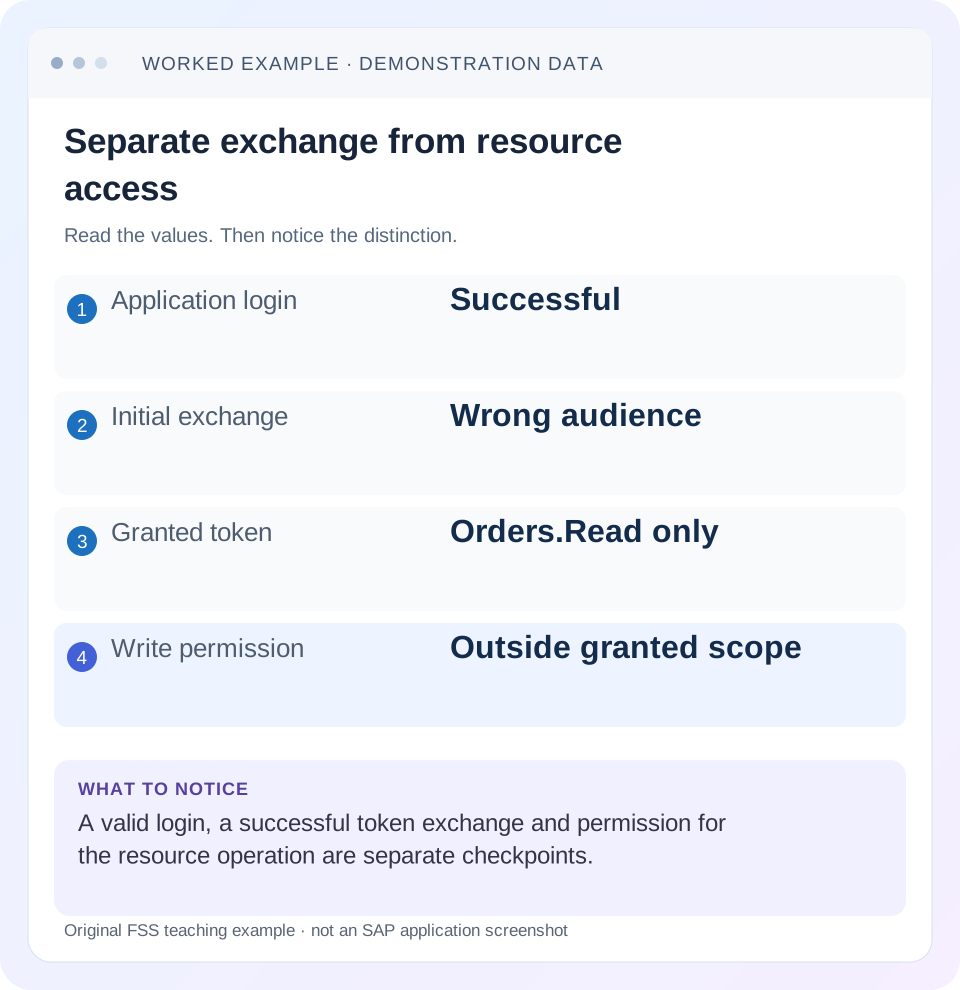
Read the example values
- Application login
- Successful
- Initial exchange
- Wrong audience
- Granted token
- Orders.Read only
- Write permission
- Outside granted scope
Words you’ll meet in this guide
- Authentication
- Checking who an identity belongs to.
- Authorization
- Permission for an action on particular data.
- PFCG
- The classic ABAP Role Maintenance transaction for organizing roles.
- Role
- A grouping of intended tasks and associated permissions.
- Authorization object
- A grouping of related permission fields checked by relevant SAP application logic.
- ABAP
- SAP’s programming language for business applications.
- API
- A defined interface through which programs exchange data or request actions.
- RFC
- Remote Function Call: a way for one system to call functions in another.
- XML
- A format that organizes data into named, nested elements.
- SAML
- A standard for exchanging identity-related assertions, often used for single sign-on.
- OAuth
- An authorization framework for delegated access, commonly using access tokens.
Preview the practical steps
SEE THE CONNECTION
See it in a simple example.
A small example to make the idea concrete.
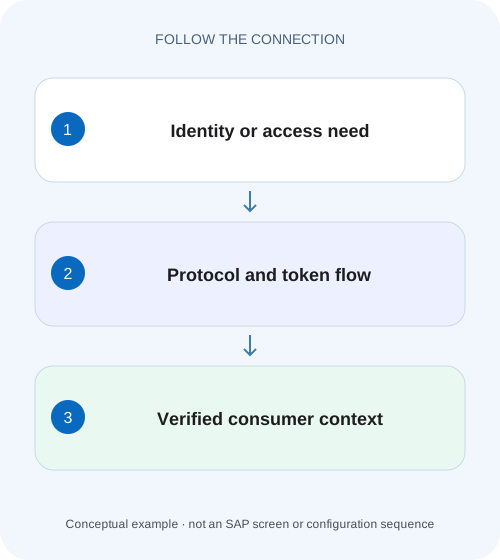
Diagnose identity across manufacturing applications
A manufacturer connects users and services across SAP applications, but a working sign-in does not establish that an API token has the intended audience and permission.
The short answer: compare responsibilities, not two login switches
SAML and OAuth can participate in the same SAP integration.
Identify the actors and the intended access model
Write down the resource owner, client application, assertion issuer, authorization server and resource server.
Distinguish the artifacts you are tracing
A browser SAML SSO exchange, a SAML assertion used as an OAuth grant and an OAuth access token are different artifacts with different recipients and validation contexts.
Diagnose identity across manufacturing applications
A manufacturer connects users and services across SAP applications, but a working sign-in does not establish that an API token has the intended audience and permission.
Identify each protocol's role and actual token or assertion context before changing the application's business logic.
| Reader | Business question | Evidence to carry forward |
|---|---|---|
| SAP developers and application teams supporting manufacturers | Diagnose identity across manufacturing applications | Identify each protocol's role and actual token or assertion context before changing the application's business logic. |
01 The short answer: compare responsibilities, not two login switches
SAML and OAuth can participate in the same SAP integration. SAML provides assertions exchanged under a trust relationship. OAuth provides a framework for a client to obtain and use access to protected resources. In SAP’s documented SAML bearer flow, a signed SAML assertion is presented during an OAuth token request, and the resulting access token is used for the resource call. [4]
Therefore “SAML works” does not establish that the OAuth client, target audience, grant, requested scopes or API permissions are correct. Break the integration into assertion acquisition, token issuance and resource access. A failure in one stage should not be repaired by changing unrelated stages.
02 Identify the actors and the intended access model
Write down the resource owner, client application, assertion issuer, authorization server and resource server. In a delegated scenario, the client acts for a user under the supported permission model. In a machine-to-machine scenario, the client may use its own application identity through a different supported grant. Do not invent a human user merely because one example uses delegation.
Record the actual tenant/system and configured identifiers for each actor. A display label such as “Corporate Login” does not identify the token audience or the resource server. Similarly, a working browser login in one tenant does not establish a trust relationship for an OAuth token endpoint in another.
Use authorized configuration visibility and a controlled representative operation. The learning exercise needs only safe metadata and expected outcomes. Treat assertions and bearer tokens as credentials; their contents are not material to copy into an ordinary shared ticket.
03 Distinguish the artifacts you are tracing
A browser SAML SSO exchange, a SAML assertion used as an OAuth grant and an OAuth access token are different artifacts with different recipients and validation contexts. Do not take an arbitrary browser SAML response and assume it is appropriate input to a token endpoint. [4] [5]
An OAuth access token is not automatically a JWT, and readable token claims are not proof of a valid signature or accepted permission. Use the resource’s documented validation/introspection mechanism. OpenID Connect is a separate identity layer built on OAuth 2.0; its authentication purpose should not be inferred merely from the presence of an OAuth access token. [6]
For troubleshooting, record artifact type, issuer, intended recipient/audience, relevant lifetime and correlation reference in the approved safe form. This lets the team compare boundaries without circulating a usable assertion or token.
| Artifact or exchange | Relevant recipient | Useful investigation question |
|---|---|---|
| Browser SAML SSO | Configured service-provider endpoint | Was this assertion intended for this login relying party? |
| SAML bearer grant assertion | Configured OAuth authorization server/token endpoint | Does it satisfy the trust, subject and validity requirements for this grant? |
| OAuth access token | Protected resource server | Is it valid for this resource and the required scope? |
| OpenID Connect identity result | Relying party under its OIDC flow | What user authentication result is actually established? |
04 Worked case: login succeeds but the token audience is wrong
CLIENT_ORDERS is a fictional application that needs delegated read access to an order API in QAS. USER_A can sign in to the application through the configured identity provider. The application obtains an assertion at 10:00, requests a token at 10:02 and receives a rejection. The assertion is still within its declared validity window, but its audience belongs to a different configured system.
The useful comparison is the assertion’s intended audience against the authorization server’s configured expected identity. A successful login says nothing about that mismatch. A password reset would not correct it. Editing the assertion’s XML locally would invalidate or bypass the trust model rather than produce an appropriately issued credential.
The authorized owner should align the application’s target/trust configuration and obtain the correct assertion through the supported issuer flow. Suppose the next exchange succeeds and grants Orders.Read but not Orders.Write. A later write denial then concerns the granted scope and resource permission; it is not evidence that SAML login failed again.
| Stage | Observed state | Interpretation |
|---|---|---|
| Application login | USER_A signs in | The application’s login stage succeeded. |
| Assertion metadata | Within time; intended for another system | Validity alone does not establish correct audience. |
| First token request | Rejected at 10:02 | Investigate the token-exchange boundary. |
| Corrected exchange | Orders.Read granted | The issued permission is narrower than a write requirement. |
| Read/write comparison | Read permitted; write denied in the fixture | Resource authorization must match the operation. |
05 Understand the documented SAP SAML bearer flow
SAP’s AS ABAP guide describes an OAuth client receiving a signed assertion from a trusted identity provider, then requesting an access token with the client identity, assertion and requested scopes. The authorization server evaluates the relevant trust and permissions before issuing the access result. [1] [4]
The guide also notes that the granted scope list can be smaller than the requested list. Read what was granted rather than assuming the original requested scope string is the effective permission. The client then presents the access token to the resource server, which performs its applicable validation and access checks. [4]
This is a specific supported SAP flow with prerequisites, including client/service assignment, enabled grant and required resource-owner/client authorization. It is not a generic instruction to enable every grant or reuse these settings in another product. Inspect the actual product’s client configuration and associated service before troubleshooting the exchange. [2] [4]
06 Inspect the documented ABAP client configuration
For the AS ABAP flow covered by the linked guide, OAuth 2.0 Administration is transaction SOAUTH2. Its Resource Owner Authentication section includes Grant Type SAML 2.0 Bearer Active, and the client setup selects a Trusted OAuth 2.0 IdP plus OAuth 2.0 scopes in Scope Assignment. Inspect these actual relationships rather than searching for one generic SSO-enabled flag. [7]
The guide’s prerequisites also include SSL, an established trusted identity provider and the appropriate System-type user for the OAuth client. These are configuration responsibilities for the authorized owner. A working personal browser login is not evidence that the separately selected client and trusted-IdP relationship exist. [7]
In CLIENT_ORDERS’s case, compare the selected IdP and target context with the issuer/audience evidence from the failed exchange. Then compare Scope Assignment with Orders.Read and the requested operation. Optional client-id-attribute and refresh-token settings are deliberate design choices in the documentation, not boxes to enable automatically to silence an error. Follow the installed release and approved configuration procedure before any change.
| Documented location or prerequisite | What to inspect | Connection to the worked failure |
|---|---|---|
| SOAUTH2: Resource Owner Authentication | SAML bearer grant active for the intended client | Is this client permitted to use this flow? |
| Trusted OAuth2.0 IdP | Selected trusted issuer relationship | Does it match the actual assertion issuer? |
| Scope Assignment | Configured OAuth scope IDs | Does the intended read permission exist for this client? |
| Client and resource-owner permissions | The guide’s separate authorization prerequisites | Token issuance must satisfy the declared delegation model. |
07 Read a token request without sharing its credentials
The following nonsendable format illustration shows the shape of the documented AS ABAP token request. CLIENT_ORDERS and Orders.Read are fictional identifiers; the authentication and assertion placeholders are deliberately not real credentials. Use the configured endpoint, supported client authentication and issuer-provided assertion in an authorized environment. [4]
Form values must be encoded through the actual client implementation; the placeholders below are displayed for readability. Do not construct or sign assertions by editing this example. The issuer and client configuration must establish the legitimate subject, audience and trust. The example teaches which boundary to inspect, not a shortcut around token validation.
POST /sap/bc/sec/oauth2/token HTTP/1.1
Host: training.example.invalid
Authorization: <configured-client-authentication-omitted>
Content-Type: application/x-www-form-urlencoded

client_id=CLIENT_ORDERS&scope=Orders.Read&grant_type=urn:ietf:params:oauth:grant-type:saml2-bearer&assertion=<issuer-provided-assertion-omitted>
08 Compare issuer, audience, subject, recipient and time deliberately
RFC 7522 defines requirements for the SAML assertion profile used with OAuth. In particular, the issuer and subject matter, the authorization server must be an intended audience and the assertion has a constrained validity window. Recipient checks apply in the specified subject-confirmation context. These fields are related, but they are not interchangeable labels. [5]
Use the values configured for the actual authorization server and issuer rather than guessing from a hostname. A test and production system can share a friendly service name while having distinct expected identifiers. Likewise, a subject suitable for an end-user grant is not automatically the client identity for a client-authentication assertion.
Correlate clocks and the actual exchange time where a lifetime error is reported. A screenshot taken after an assertion expired does not establish that it was expired when first submitted. Preserve the original timestamp and sanitized server result. Obtain fresh supported artifacts for a controlled retry rather than replaying a stale capture indefinitely.
09 Investigate the three boundaries in sequence
Classify the failing stage before changing trust or role configuration. A resource denial after a successful token exchange calls for different evidence from an assertion rejected at the token endpoint.
Establish the supported flow
Record whether this is browser SAML login, a SAML bearer OAuth grant, client credentials or another documented flow. Identify client, issuer, authorization server and resource.
Expected observation: The integration is not being diagnosed with another flow’s assumptions.
Inspect safe assertion context
Compare actual issuer/subject/audience/recipient and lifetime context with the configured expectations, using approved diagnostics without sharing usable artifacts.
Expected observation: The assertion is intended for this exchange under the supported trust.
Inspect token-request outcome
Correlate the token endpoint response with the client and requested scopes. Distinguish grant rejection, client authentication and other reported failures.
Expected observation: Token issuance or its specific failure is recorded.
Read the granted permission
Compare granted scopes and target resource with the required operation rather than only the original requested scopes.
Expected observation: The intended resource call has the relevant issued permission.
Verify resource and business result
Make an authorized harmless representative call, then inspect any later business-processing result separately.
Expected observation: Token acceptance and the required business outcome are both explained.
10 Troubleshooting decisions for common protocol confusion
The response and server-side message narrow the investigation. Avoid treating all failures as proof that SSO is broken, or all issued tokens as proof that the business action is authorized.
| Observation | Boundary to investigate | Next useful comparison |
|---|---|---|
| Browser login works; token exchange fails | SAML bearer/OAuth grant exchange | Configured client, issuer trust, audience, subject and server error. |
| Assertion time valid; exchange still rejected | Trust or intended-recipient validation may still fail | Expected audience/recipient and issuer relationship. |
| Requested write scope not granted | Scope assignment and authorization | Actual granted scope versus client/user permissions. |
| Token issued; API rejects the call | Resource validation or permission | Resource identity, token applicability and required operation. |
| A machine client cannot identify the end user | Possibly a different access model | Supported grant and whether user delegation was intended. |
| Decoded claims look correct; resource rejects | Decoding is not validation | Documented validation and the actual rejecting component. |
11 Verification and a small practice exercise
Create a metadata-only worksheet for the worked case: application login succeeds; assertion issued at 10:00; first exchange at 10:02 has the wrong audience; corrected exchange grants only Orders.Read. Explain why “not expired” did not settle the first failure and why a successful read did not authorize a write.
In an authorized test environment, the positive case should use the correct configured issuer/target and the permitted read. A negative test should confirm the intended excluded scope under an approved plan. Do not create malformed live assertions or guess credentials in production merely to generate a negative result.
Include a boundary case that changes only the target system. Compare configuration identifiers and expected result. If both systems return similar-looking data, use a known harmless system/business reference to establish which resource actually answered. Technical success from the wrong context is still a routing/configuration problem.
12 Frequently asked questions
Is SAML authentication and OAuth authorization? That shorthand can introduce the comparison, but it is not a complete flow description. OAuth includes client authentication and grant processing, and SAML assertions can be used inside an OAuth exchange. Draw the actual actors and artifacts.
Does an OAuth token prove a user signed in? Not by itself. Determine the supported grant and identity model. OpenID Connect defines an authentication layer; a machine-client access token may not represent the human login result the application expects.
Can I use the browser’s SAML response as the token assertion? Do not assume so. The intended recipient, audience, profile and issuer relationship must match the configured OAuth assertion flow. Follow the client’s supported acquisition path.
Are access tokens always JWTs? No universal token format should be assumed. Use the resource’s documented handling rather than making token decoding a substitute for validation.
What belongs in the handover? State the flow, actor/target context, first failing stage, safe correlated message, corrected configuration relationship, granted permission and verified business result. Keep credentials and assertions out of ordinary shared evidence.
Related services and next steps
Primary sources
- SAML 2.0 Bearer Assertion Flow for OAuth 2.0 Client | SAP Help Portal
- Configuring a Grant Type Extension with an OAuth 2.0 SAML Bearer Assertion
- Identity, Authentication, and Authorization | SAP Help Portal
- SAP Help: SAML 2.0 Bearer Assertion Flow for OAuth 2.0
- IETF RFC 7522: SAML 2.0 Profile for OAuth 2.0 Client Authentication and Authorization Grants
- OpenID Foundation: OpenID Connect specification overview
- SAP Help: Configuring the AS ABAP SAML bearer grant in SOAUTH2
Found this useful?
Share this guide with your network, or leave a like.
Your like is saved in this browser.