SAP Datasphere federation versus replication: Choose where the query runs
A manufacturer compares a federated result with replicated operational data refreshed earlier.

Source review:
START HERE · NO PRIOR TOPIC KNOWLEDGE NEEDED
What it is. Why it matters.
Federation reads data where it already lives; replication copies it to another location. SAP Datasphere supports such approaches so designers can balance freshness, availability and processing needs.
Completely new to SAP?
Manufacturers use SAP to connect work such as buying components, recording inventory, planning production, shipping equipment and accounting for costs. SAP S/4HANA is an enterprise resource planning system: it connects these activities through shared business data.
SAP HANA is a database platform. Data models describe how records relate; queries ask for results. Start with the intended result before looking at storage or performance.
A transaction code, or t-code, is a shortcut to a task in classic SAP GUI. Fiori apps provide another way to work. Names and screens depend on the product and release; you do not need a live system to learn the concepts in this guide.

Scope and source-review notes
Scope and evidence
Source review by FAST SAP SOLUTIONS® editorial. This badge describes our editorial review; it does not represent SAP certification or independent endorsement.
SAP Datasphere remote-table federation and replication concepts. Real-time support depends on connection type, source object and change-capture prerequisites.
Documentation review on 14 November 2026 using official SAP sources and indexed official excerpts where full Help text was unavailable. Scope and service or release differences are explained in the lesson. All datasets, requests and checks are illustrative; no customer SAP runtime execution or measured results are claimed.
A MANUFACTURING EXAMPLE
Explain two plant-reporting totals at different times
Where is the data being read?
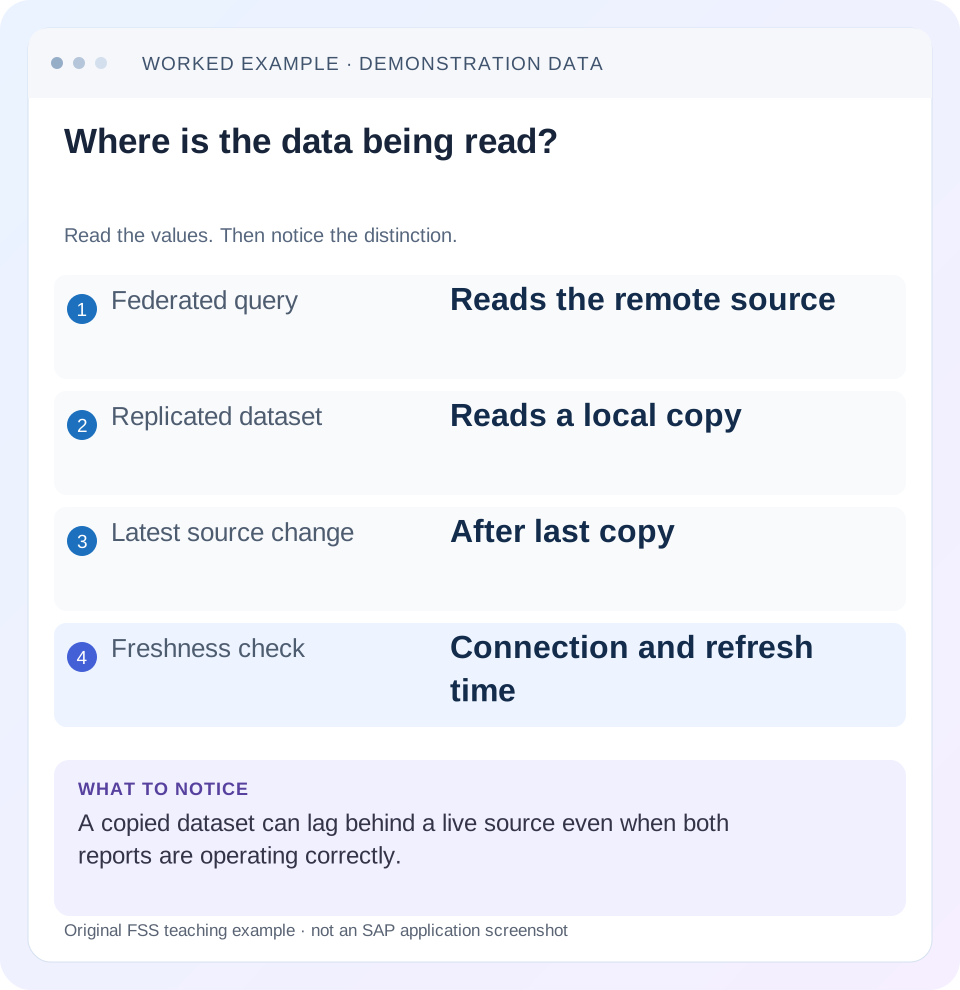
Read the example values
- Federated query
- Reads the remote source
- Replicated dataset
- Reads a local copy
- Latest source change
- After last copy
- Freshness check
- Connection and refresh time
Words you’ll meet in this guide
- Query
- A request to retrieve or calculate data.
- Table
- Data organized into rows and columns.
- Persistence
- Keeping data in storage so it survives beyond memory.
- CDS
- Core Data Services: reusable definitions of business data and relationships.
- HANA
- SAP’s database platform.
Preview the practical steps
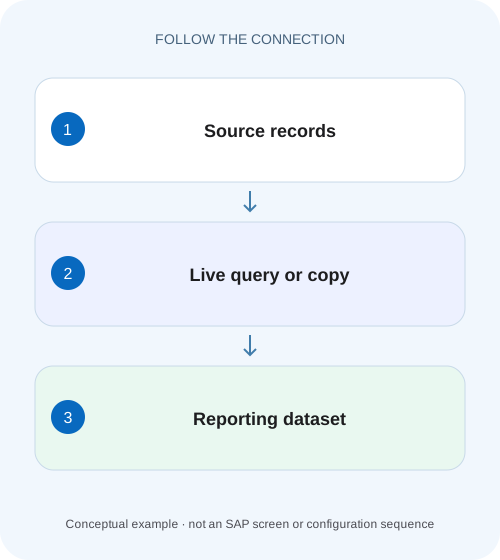
SEE THE CONNECTION
See it in a simple example.
A small example to make the idea concrete.
Explain two plant-reporting totals at different times
A manufacturer compares a federated result with replicated operational data refreshed earlier.
Choose the data path from freshness and workload requirements
Federation reads a remote source through the supported connection when the query needs its data.
Understand what the consumer actually reads
In remote access, Datasphere reads through the virtual table and its adapter to the source.
Worked case: two correct totals at different freshness points
Imagine a source sales fixture with order A=100 EUR and B=50 EUR at 10:00.
Explain two plant-reporting totals at different times
A manufacturer compares a federated result with replicated operational data refreshed earlier.
Identify execution location and freshness context before treating different totals as evidence of a calculation error.
| Reader | Business question | Evidence to carry forward |
|---|---|---|
| SAP developers and application teams supporting manufacturers | Explain two plant-reporting totals at different times | Identify execution location and freshness context before treating different totals as evidence of a calculation error. |
01 Choose the data path from freshness and workload requirements
Federation reads a remote source through the supported connection when the query needs its data. Replication copies data into SAP Datasphere and lets consumers read a local replica. Choose between them by defining acceptable data age, source availability, query workload and operating responsibilities. Replication can reduce repeated remote reads, but it introduces a refresh or change-capture process whose health must be monitored. [1]
This tutorial is for Datasphere modelers and data integrators working with remote tables. You need a deployed remote table in an authorized space, its connection type and a small source fixture. Remote-table replication, replication flows and data flows are different mechanisms. This lesson focuses on the remote-table monitor; current SAP source-specific guidance may recommend another acquisition mechanism for a particular connection. [2] [3]
02 Understand what the consumer actually reads
In remote access, Datasphere reads through the virtual table and its adapter to the source. In replicated access, the remote-table object is read from a replica table in Datasphere. The displayed object name can stay familiar while its data path changes. Inspect the actual Data Access and refresh state rather than inferring the mode from the model name. [1]
Federation does not imply that every operation in a complex model runs entirely in the source. Pushdown and data movement depend on the supported connector, operators and query plan. Likewise, local replication does not guarantee a fast query if the model joins at the wrong grain or reads excessive data. Separate access placement from model correctness and measured query behavior.
03 Worked case: two correct totals at different freshness points
Imagine a source sales fixture with order A=100 EUR and B=50 EUR at 10:00. A snapshot replica is refreshed then, so its total is 150 EUR. At 10:07, B changes to 70 EUR and order C=30 EUR is inserted. The source total becomes 200 EUR. A report at 10:10 can read 200 through remote access while the snapshot still reports 150 before its next scheduled refresh.
Both totals can reflect their configured data paths. The business question decides whether the snapshot is acceptable. A requirement that reporting data may be at most 20 minutes old could allow this observation, while a requirement to see every accepted order immediately would need another design and measured end-to-end behavior. These times are illustrative, not an SAP service-level promise.
| Order | 10:00 snapshot | 10:07 source |
|---|---|---|
| A | 100 EUR | 100 EUR |
| B | 50 EUR | 70 EUR |
| C | Absent | 30 EUR |
| Total | 150 EUR | 200 EUR |
04 Write the decision criteria before changing the mode
Define the report’s selected columns, filters, joins, expected row volume, concurrent use and acceptable data age. Identify the source owner’s limits on repeated analytical reads and the availability requirement when the source is unavailable. Also identify who owns refresh failures and whether the business can display a last-successful timestamp with stale data.
A daily reconciled finance report may prefer a deliberate consistent reporting cut rather than the newest individual row. An operational report may prefer current source visibility despite source dependency. A cross-source model needs a consistency strategy because refreshing one table now and another an hour ago can create relationships that never existed together. Choose the data path for that specific contract.
For a cross-table extension, suppose a customer dimension is refreshed at 09:00 while sales refresh at 10:15. A customer assigned to North at 09:00 moves to South at 10:07. Joining the current sales replica to the older dimension can classify new sales under an old region. Both replicas can be individually healthy while the report does not represent the business cut the analyst intended.
Decide whether the report uses current attributes, attributes as of a transaction date or a coordinated snapshot. That requirement changes modeling and refresh orchestration; enabling real-time mode for only the fact table does not settle it. Include the dimension version and relevant business effective dates in reconciliation rather than checking only the newest sales amount.
05 Check connector and source-object capability
SAP documents real-time remote-table replication only for connection types and source objects supporting change data capture. A successful remote preview does not establish CDC support, required source components or permission to record changes. Inspect the connection capability matrix and the source-specific guide before promising continuous updates. [3]
For SAP S/4HANA sources, compare the current supported acquisition options rather than assuming every table should be copied through one generic adapter. Some connections offer replication flows, extraction-enabled CDS sources or other supported methods. This lesson does not prescribe a specific extractor or annotation for every release. Record the exact source object and mechanism selected by the documented scenario. [2]
06 Read the remote-table state as a set of separate observations
Inspect Data Access, replication status, scheduled frequency and last successful update for the remote table. The monitor distinguishes snapshot and real-time replicated reads. A configured schedule describes intended refresh frequency; it does not prove the last run succeeded. A last-successful timestamp is stronger freshness evidence than the mere existence of a schedule. [1]
For the fixture, record the 10:00 successful snapshot and the planned 10:15 refresh. At 10:10, 150 is explained by that state. At 10:20, the same 150 needs investigation if the 10:15 run should have completed. Check whether it ran, failed, was paused or still works. Do not repeatedly click Start while an equivalent task is already running; SAP documents restrictions on concurrent similar tasks. [1]
07 Treat a mode change as an operational change
Before enabling replication, estimate local storage and memory needs, source extraction impact and refresh duration using representative data. Before returning to remote access, verify source availability and query behavior for the consumers. The switch changes dependencies even if a model’s visible columns remain the same.
Review the exact action selected. SAP’s monitor documentation warns that starting a full data replication on a real-time replicated table can remove its real-time replication behavior; scheduling a snapshot can also change the update mode. Do not use a full refresh as a harmless generic remedy without checking its documented effect. Capture the original mode and the intended resulting mode in the change record. [1]
08 Measure performance without changing the business result
Use the same permitted query, filter, expected rows and user context for comparison. Record duration, row counts and relevant source/tenant resource observations. Repeat only enough to distinguish a representative workload from a cold first read or a warmed cache, and label the conditions. This article provides no benchmark claim that a replica is always faster.
Check the result before comparing speed. If the source total is 200 and the snapshot total is 150, those are different data versions. A faster answer based on older rows is not a direct performance comparison of the same dataset. Align the fixture or explicitly report freshness alongside response time. Also investigate join multiplication and filtering before attributing every slow report to federation.
09 Troubleshoot freshness, availability and modeling separately
Use the first disagreement with the expected data contract. A stale replica and an incorrect calculation can produce the same wrong total but need different corrections. A source outage can affect remote reads while a previously loaded replica remains available under its supported design, though its age continues to increase.
| Observation | Question | Next check |
|---|---|---|
| Remote report lacks latest row | Is the source/query itself current? | Source commit, filters and source object |
| Snapshot still shows old value | Did the expected refresh complete? | Last successful update and task log |
| Real-time mode configured, lag grows | Is CDC/application healthy? | Connection, source prerequisites and progress evidence |
| Mode changed after full refresh | Did the action replace real-time behavior? | Monitor action history and effective Data Access |
| Local replica slow | Is the model/query efficient? | Plan, grain, filters and selected volume |
| Totals disagree despite aligned data | Is the semantic model correct? | Join multiplicity, currency and aggregation |
10 Verify a chosen design with known changes and failures
For the positive snapshot case, run the supported refresh and confirm A=100, B=70 and C=30, totaling 200 EUR. Record the new last-successful update and the consumer query. Then make or identify a later permitted source change and confirm it appears only after the intended next refresh, rather than calling the snapshot real-time.
For real-time replication, use supported insert, update and delete fixtures and measure observed source-to-consumer visibility. Do not require a literal zero-second delay. Verify that each operation reaches the intended target and remains associated with the right key. A row-count-only test can miss an update or a deletion balanced by an insertion.
For a negative or boundary test, pause the permitted development refresh or disconnect an approved test source path and verify the operational signal. Confirm what the report shows: a clear failure, a labeled older replica or another documented behavior. Restore the test setup through the supported procedure. Do not extrapolate one connector’s error presentation to every source.
11 Operate the freshness contract after the initial setup
Assign ownership for failed schedules, disconnected agents where used, CDC interruptions and source changes. Include the expected freshness window, escalation condition and safe recovery method. Removing replica data or reinitializing a table changes the consumer state and can require a full load, so understand the target impact before using such recovery actions.
When source schemas change, inspect the deployed remote-table definition and downstream models. A newly added column in the source does not automatically establish that every consumer can use it. A key or datatype change may require more than another refresh. Reconcile source contract, replication state and model changes together.
Can remote and replicated reports be compared? Yes, once you align filters, data version and semantics. What closes a decision? State the chosen access mode, supported connection/object capability, measured representative workload, observed freshness and failure ownership. The related SLT and calculation-view lessons explain capture progress and semantic correctness at the next layers.
Related services and next steps
Primary sources
Found this useful?
Share this guide with your network, or leave a like.
Your like is saved in this browser.