SAP EWM physical versus available stock: Why a visible quantity may not be allocatable
A plant warehouse holds component stock that is visible physically but not all eligible for the intended warehouse process.

Source review:
START HERE · NO PRIOR TOPIC KNOWLEDGE NEEDED
What it is. Why it matters.
Physical stock describes quantity present in an EWM stock context. Available stock considers what can be used by a relevant process under its reservations and stock checks.
Completely new to SAP?
Manufacturers use SAP to connect work such as buying components, recording inventory, planning production, shipping equipment and accounting for costs. SAP S/4HANA is an enterprise resource planning system: it connects these activities through shared business data.
Warehouse Management organizes where goods are and how they move. Stock identity, physical location, movement tasks and confirmed execution are separate pieces of the picture.
A transaction code, or t-code, is a shortcut to a task in classic SAP GUI. Fiori apps provide another way to work. Names and screens depend on the product and release; you do not need a live system to learn the concepts in this guide.

Scope and source-review notes
Scope and evidence
Source review by FAST SAP SOLUTIONS® editorial. This badge describes our editorial review; it does not represent SAP certification or independent endorsement.
EWM quant/physical/available concepts in supported embedded and decentralized scenarios. Storage-type aggregation, detailed reservations, stock keys and process selection vary; the worksheet is expressly not a universal availability formula.
Reviewed the cited official SAP indexed documentation excerpts on 14 November 2026. Direct Help Portal opens did not consistently expose readable page text. This is documentation-based teaching, not customer-system execution. All document identifiers, quantities and outcomes in the worked case are illustrative; installed release, edition, configuration and authorizations require local verification.
A MANUFACTURING EXAMPLE
Check components that can actually be allocated
Visible stock is not all free stock
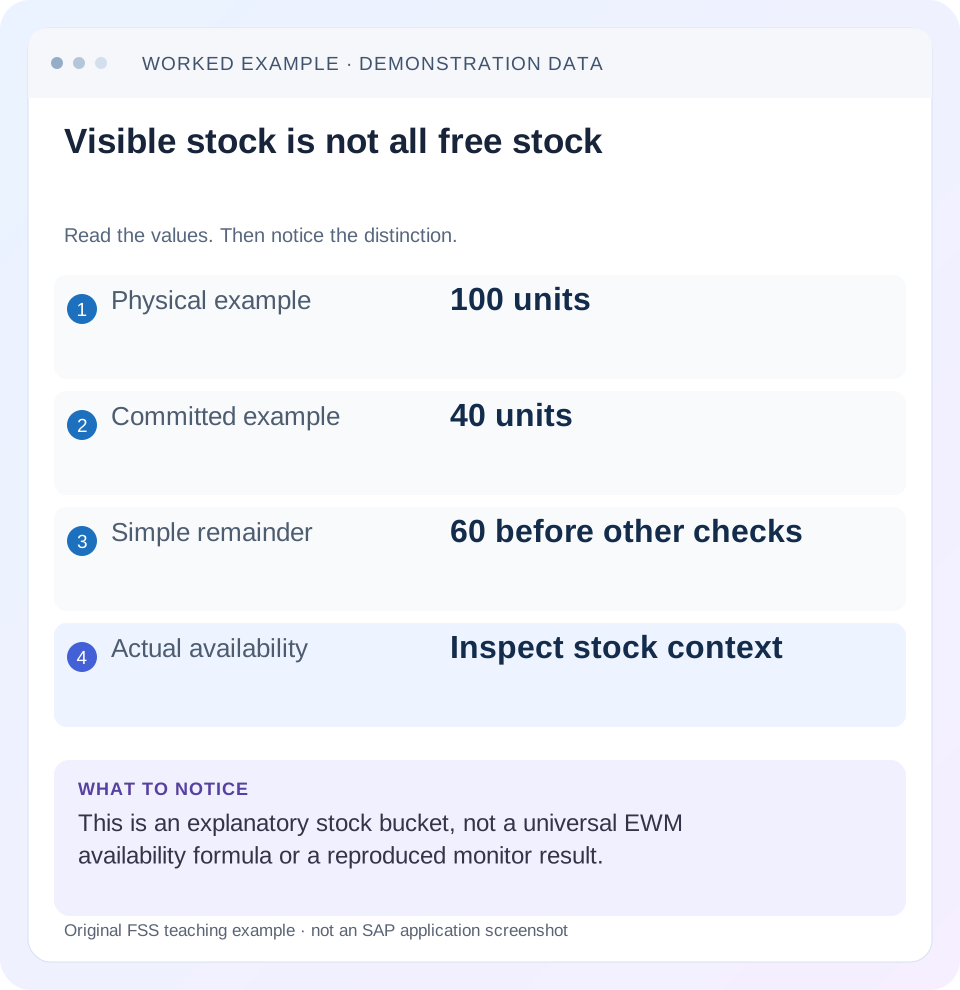
Read the example values
- Physical example
- 100 units
- Committed example
- 40 units
- Simple remainder
- 60 before other checks
- Actual availability
- Inspect stock context
Words you’ll meet in this guide
- Bin
- A named warehouse storage location.
- Handling unit
- An identified package of goods and packaging.
- Confirmation
- A record that relevant warehouse work was performed.
- Stock
- The goods recorded as held in a given business and location context.
- EWM
- Extended Warehouse Management: SAP’s application for warehouse processes.
Preview the practical steps
SEE THE CONNECTION
See it in a simple example.
A small example to make the idea concrete.
Check components that can actually be allocated
A plant warehouse holds component stock that is visible physically but not all eligible for the intended warehouse process.
Visible stock and allocatable stock answer different questions
Physical stock describes quantity present in an EWM stock context.
Scope and prerequisites
The guide concerns SAP EWM quant and quantity concepts in embedded or decentralized EWM.
Understand the quant and quantity lifecycle
SAP describes a quant as stock of a product with the same characteristics in a bin, resource, TU or HU.
Check components that can actually be allocated
A plant warehouse holds component stock that is visible physically but not all eligible for the intended warehouse process.
Compare the relevant batch, stock attributes and allocation context before promising the visible quantity to production supply.
| Reader | Business question | Evidence to carry forward |
|---|---|---|
| Plant stores, warehouse and materials teams | Check components that can actually be allocated | Compare the relevant batch, stock attributes and allocation context before promising the visible quantity to production supply. |
01 Visible stock and allocatable stock answer different questions
Physical stock describes quantity present in an EWM stock context. Available quantity supports allocation for the relevant warehouse process and can differ because existing work and stock identity matter. A product total in the monitor is therefore not a promise that the same total can be assigned to a new picking task. [1]
Start with the exact warehouse, product, stock key, batch/HU context and requested operation. This tutorial preserves the 100-physical/40-committed teaching bucket, then separates it into two batches to explain why even a sixty-unit remainder can be unsuitable for a particular request. The result is an evidence-based allocation investigation, not a universal stock-subtraction formula.
02 Scope and prerequisites
The guide concerns SAP EWM quant and quantity concepts in embedded or decentralized EWM. Storage-type settings, available-quantity levels, process selection and integration vary by release/configuration. ERP MMBE, ATP and EWM availability are different views and should not be treated as identical calculations.
Obtain warehouse, product, bin/resource/TU/HU context, batch, party entitled to dispose, stock type/usage and relevant request. Display access to stock, open/confirmed warehouse tasks and warehouse requests is needed. Proposed task creation, cancellation or correction requires an authorized training process.
Record the observation time and active monitor filters. A task created between two screenshots can legitimately change available quantity without a completed physical movement. The timing distinction is central to this investigation.
03 Understand the quant and quantity lifecycle
SAP describes a quant as stock of a product with the same characteristics in a bin, resource, TU or HU. Stock data includes its key, quantities and attributes. Different batches are distinct quant contexts; additional references can also separate stock. [1]
The documented quantity lifecycle distinguishes task creation from confirmation: picking-task creation checks/reduces the relevant available quantity, while physical quantity is checked/updated with task confirmation or goods movement. That explains how stock can remain physically visible after being committed to work. [1] [2]
Available quantity can be managed at an aggregation level different from the most specific physical stock, with reserved-quantity checks at more detailed HU/batch levels in the documented design. Read the storage-type configuration and actual task messages before applying a simple bucket calculation. [1]
04 Worked case: the sixty remainder contains different batches
The fictional warehouse has 100 PC of PROD-A in the stated scope. Forty are committed to existing open picking work. The simple explanatory remainder is sixty before other eligibility checks, matching the introductory learning example. These are worksheet quantities, not claimed monitor results.
Now inspect identity. Batch A has sixty physical pieces, forty of which are committed to that existing work. Batch B has forty physical pieces with no committed work in the fixture. The worksheet remainders are twenty for A and forty for B. Their sum is sixty, but a new request specifically requiring batch A cannot use B’s forty merely because the product matches.
A proposed new requirement for twenty-five of A therefore exceeds the twenty-piece worksheet population eligible under the stated assumptions. The actual system response and allocation depend on the installed selection, available/reserved levels and process controls. The point is to inspect that context instead of forcing the total sixty to justify the request.
| Stock identity | Physical | Existing committed work | Simple remainder |
|---|---|---|---|
| PROD-A / batch A | 60 PC | 40 PC | 20 PC |
| PROD-A / batch B | 40 PC | 0 PC | 40 PC |
| Combined product bucket | 100 PC | 40 PC | 60 PC before eligibility |
| New batch-A request | 25 PC required | Compare only intended population | 5 PC beyond stated A remainder |
05 Inspect the request before changing stock
Read the actual warehouse-request item and task-creation message. Identify required batch, stock type, ownership/entitlement, quantity/unit and any HU or document reference. A restriction can be intentional: the customer, quality or production process may need that exact stock population.
Do not remove the batch requirement or change stock classification merely because another batch is physically present. First establish whether an approved substitution is permitted and how the supported process records it.
Likewise, distinguish a request for a full HU from a product quantity that can be split. The same sixty pieces can be packaged or reserved in a way that affects the actual operation. Use the relevant product/HU task and stock context rather than assuming product totals describe every execution option.
06 Investigate in a repeatable sequence
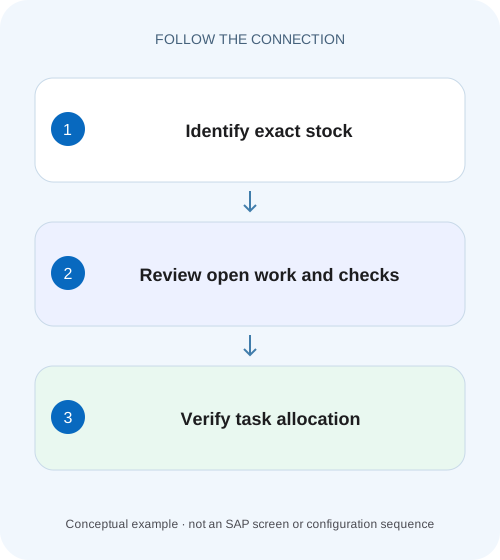
The sequence below identifies the earliest divergence between the request and eligible stock/work evidence.
Capture exact request identity
Record PROD-A, batch A, twenty-five PC, warehouse and required stock/entitlement/HU context.
Expected observation: The requested population is more precise than the product total.
Read physical stock at matching detail
Inspect batch A sixty and B forty with the actual stock keys and observation time.
Expected observation: Unrelated stock is not pooled into A’s eligibility.
Inspect existing open work
Find the forty-piece commitment and its source identity, status and request reference.
Expected observation: Visible stock is distinguished from already assigned work.
Review available/reserved levels
Compare the actual storage-type level and detailed checks with the task-creation message.
Expected observation: Any difference from the worksheet has a configuration/process question.
Verify one authorized outcome
After legitimate recovery or an approved allocation test, inspect selected stock, task quantity and remaining work/stock.
Expected observation: No duplicate task was created to test an unclear result.
07 Task creation can change availability before the pallet moves
In the fixture, existing work reserves forty of batch A. While it remains open, the sixty physical A pieces can still be visible at the source context even though only twenty remain in the simple uncommitted worksheet. That is not automatically a stock inconsistency. [1] [2]
If the forty-piece work is legitimately confirmed as moved, inspect its actual source and destination physical updates. The commitment and movement are separate lifecycle observations. A current physical quantity should not be compared with an old available value without checking when confirmation occurred.
If a worker reports a shortage or partial confirmation, inspect the exception and supported difference handling. Do not assume that canceling or confirming a task automatically restores a desired amount under every process. Follow the actual resulting documents and quantities.
08 Eligibility includes more than batch
Stock type, ownership/usage, party entitled to dispose and document references can separate otherwise similar product quantities. A visible quantity belonging to another entitled party or restricted category is not interchangeable with the request’s population.
Shelf-life or stock-removal rules can add selection conditions. An unexpired batch might still fail a remaining-life requirement or another process-specific criterion. Read the actual message and selection evidence rather than inventing a generic deduction for every restriction.
Bin and storage-type conditions also matter. A physically present HU in a blocked or otherwise unsuitable execution context may require an approved operational change. Keep physical presence, stock identity and process accessibility as three separate questions.
09 Counting and availability recovery solve different problems
A physical count establishes what is present under the approved inventory procedure. It does not by itself remove a valid commitment or make the wrong batch eligible. An allocation error should not automatically trigger a stock adjustment.
If the system shows sixty physical A pieces but only fifty are actually present, investigate the physical discrepancy through the warehouse inventory process and related movements. If all sixty are present but forty are committed, investigate existing work. These are different causes even if both reduce the quantity available for a new task.
For an integration discrepancy, compare EWM stock and the connected inventory system through actual documents and message state. A generic ERP product total cannot replace EWM’s detailed stock-key/task analysis.
10 Troubleshooting decisions
Use the stock key and work lifecycle to select the next evidence. Avoid deleting work or reclassifying stock until its business purpose is understood.
| Observation | Question | Next evidence |
|---|---|---|
| Physical 100, simple free 60 | What forty is committed and at what level? | Open WTs and matching source stock |
| Product remainder 60, batch-A request fails | How much belongs to eligible A? | Batch-level stock/reserved checks |
| Stock visible but wrong entitled party | Is ownership/entitlement compatible? | Actual stock key and request |
| Task created, source still physically full | Has movement been confirmed yet? | Task lifecycle and timestamps |
| Actual availability differs from bucket | Which aggregation/process checks apply? | Storage-type settings and exact message |
| Physical count differs too | Is there a real inventory discrepancy? | Warehouse PI and movement evidence |
11 Common mistakes in warehouse support
Do not subtract every open-task quantity from a product total without checking source/destination, direction and identity. Incoming work and outgoing commitments are not the same effect, and detailed reservations may already be represented in the displayed availability.
Do not release reservations or cancel another order’s tasks simply to make a new request succeed. The existing work may be valid and higher priority. The approved business decision should determine recovery.
Do not create several test tasks after an unclear response. Search the actual request and task references first; a missing confirmation message does not prove that creation failed. Duplicate work can further reduce availability and worsen the symptom.
12 Verification exercises
For the positive worksheet check, reconcile 100 physical, forty committed and sixty simple remainder, then split it into A twenty and B forty. Explain why twenty-five required A has a different outcome from a product-total request.
For the negative check, allocate B’s forty to satisfy a mandatory A request or count the existing forty as free merely because it has not moved. Identify the wrong identity or lifecycle assumption.
For boundary checks, test a full-HU requirement, batch-level reservation beneath aggregated availability, a partial confirmation and another entitled party in an authorized training setup. Record actual selected stock and messages. These examples are not claimed executions or a replacement for the installed availability algorithm.
13 Questions and the handover
Does physical mean unallocated? No. Existing work can commit quantity before physical movement. Is physical minus open work always the EWM available value? No. The illustration excludes detailed levels and eligibility rules. Does sufficient ERP plant stock prove an EWM task can be created? Inspect EWM’s request, stock identity and execution context.
A useful result names warehouse/product/batch/HU context, 100/forty/sixty worksheet limits, actual A/B quantities, existing forty-piece task and the exact creation message. It identifies whether the next action concerns business eligibility, existing work or physical discrepancy.
Continue with monitor investigation, warehouse tasks and posting changes to follow the relevant objects without confusing their states.
Related services and next steps
Primary sources
Found this useful?
Share this guide with your network, or leave a like.
Your like is saved in this browser.