SAP handling units: Identify packed goods without confusing them with a bin
A manufacturer packs goods into handling units and must distinguish the packed-goods identity from the warehouse location where they stand.

Source review:
START HERE · NO PRIOR TOPIC KNOWLEDGE NEEDED
What it is. Why it matters.
A handling unit identifies packed goods together with their packaging. It can help track a pallet or carton, while a storage bin identifies a location.
Completely new to SAP?
Manufacturers use SAP to connect work such as buying components, recording inventory, planning production, shipping equipment and accounting for costs. SAP S/4HANA is an enterprise resource planning system: it connects these activities through shared business data.
Warehouse Management organizes where goods are and how they move. Stock identity, physical location, movement tasks and confirmed execution are separate pieces of the picture.
A transaction code, or t-code, is a shortcut to a task in classic SAP GUI. Fiori apps provide another way to work. Names and screens depend on the product and release; you do not need a live system to learn the concepts in this guide.

Scope and source-review notes
Scope and evidence
Source review by FAST SAP SOLUTIONS® editorial. This badge describes our editorial review; it does not represent SAP certification or independent endorsement.
ERP/S/4HANA Handling Unit Management and EWM conceptual identity/hierarchy scope. Packing applications, numbering, statuses, HU-managed locations and movement/repacking dependencies require installed-process checks.
Reviewed the cited official SAP indexed documentation excerpts on 14 November 2026. Direct Help Portal opens did not consistently expose readable page text. This is documentation-based teaching, not customer-system execution. All document identifiers, quantities and outcomes in the worked case are illustrative; installed release, edition, configuration and authorizations require local verification.
A MANUFACTURING EXAMPLE
Identify packed equipment and component pallets
A package can change location
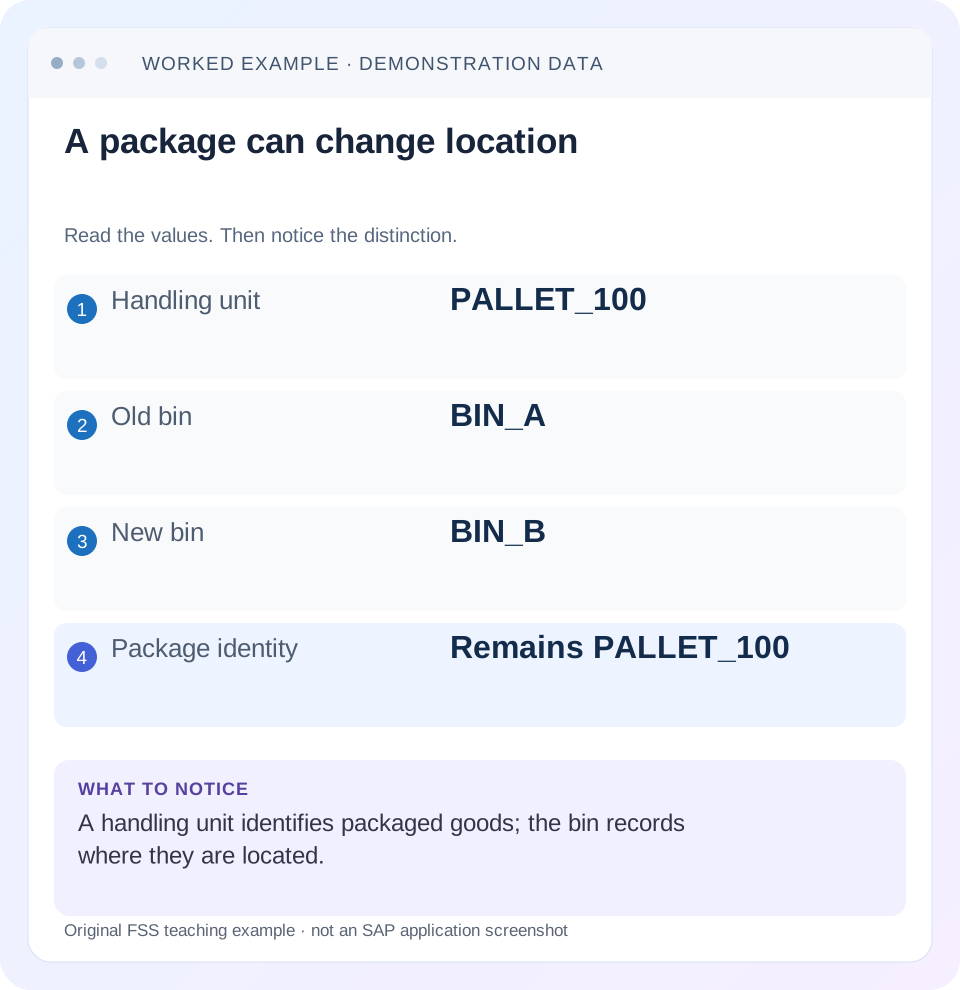
Read the example values
- Handling unit
- PALLET_100
- Old bin
- BIN_A
- New bin
- BIN_B
- Package identity
- Remains PALLET_100
Words you’ll meet in this guide
- Bin
- A named warehouse storage location.
- Handling unit
- An identified package of goods and packaging.
- Confirmation
- A record that relevant warehouse work was performed.
- Stock
- The goods recorded as held in a given business and location context.
- HANA
- SAP’s database platform.
- EWM
- Extended Warehouse Management: SAP’s application for warehouse processes.
Preview the practical steps
SEE THE CONNECTION
See it in a simple example.
A small example to make the idea concrete.
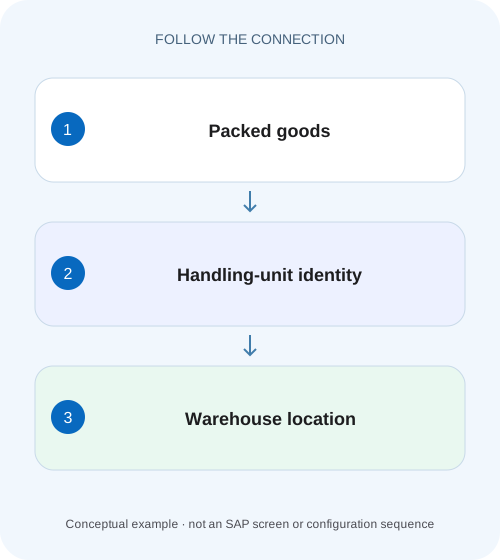
Identify packed equipment and component pallets
A manufacturer packs goods into handling units and must distinguish the packed-goods identity from the warehouse location where they stand.
A handling unit identifies packed goods; a bin identifies a place
A handling unit combines packaging material with the goods contained on or in it and has an identifying number.
Scope and prerequisites
The guide covers Handling Unit Management and EWM HU concepts using SAP’s current on-premise and historical warehouse references.
Understand header, items and nested structure
SAP documents HU attributes including identification, dimensions, weight/volume, status, materials/quantities and packaging.
Identify packed equipment and component pallets
A manufacturer packs goods into handling units and must distinguish the packed-goods identity from the warehouse location where they stand.
Trace the handling-unit contents and location evidence before interpreting the unit as a bin or an unrestricted stock promise.
| Reader | Business question | Evidence to carry forward |
|---|---|---|
| Plant stores, warehouse and materials teams | Identify packed equipment and component pallets | Trace the handling-unit contents and location evidence before interpreting the unit as a bin or an unrestricted stock promise. |
01 A handling unit identifies packed goods; a bin identifies a place
A handling unit combines packaging material with the goods contained on or in it and has an identifying number. A storage bin identifies an addressable location. A pallet can move from BIN_A to BIN_B while retaining its HU identity, so the pallet number is not another name for the bin. [1]
The distinction becomes practical when goods are nested, partially unpacked or apparently missing. This tutorial follows PALLET_100 with two carton HUs, verifies its contents without double counting and then moves and repacks part of it. The goal is to explain package identity, hierarchy, quantity and location as related but separate evidence.
02 Scope and prerequisites
The guide covers Handling Unit Management and EWM HU concepts using SAP’s current on-premise and historical warehouse references. Packing, numbering, status, HU-managed locations and document integration vary by installed ERP/S/4HANA/EWM process. Do not assume the same packing application or movement path exists everywhere.
Collect the HU identifier, packaging material/level, contained products and quantities, batch/serial context, parent/child relationships and current document/location. Obtain authorized display access to HU/packing, relevant delivery/warehouse documents and movement evidence. Proposed packing, unpacking or relocation belongs in an approved training process.
The illustrative labels PALLET_100 and CARTON_A/B are teaching identifiers, not a prescribed barcode format or SSCC implementation.
03 Understand header, items and nested structure
SAP documents HU attributes including identification, dimensions, weight/volume, status, materials/quantities and packaging. HU items can represent products or other handling units in a nested structure. A parent pallet can therefore contain cartons, each with its own contents and identity. [1] [2]
Product-level information such as batch remains relevant inside the packaging structure. Packing does not make different batches or serials interchangeable. Inspect the item details rather than treating the parent label as a complete material description.
The hierarchy and location answer different questions. “CARTON_A belongs to PALLET_100” is containment. “PALLET_100 is recorded in BIN_A” is location. If a carton is removed, the old containment statement can cease to be current while its individual HU identity continues through the supported process.
04 Worked case: one pallet, two cartons and twenty pieces
Fictional PALLET_100 contains CARTON_A with 12 PC of PROD-H and CARTON_B with 8 PC of the same product. The parent is initially in BIN_A. Under the stated homogeneous fixture, total contained product quantity is twenty pieces. The pallet and carton packaging quantities are not extra product pieces.
Moving the whole packed pallet to BIN_B in the approved process changes the recorded location while preserving the intended parent/child structure and twenty-piece content. The identity PALLET_100 remains the package identity, matching the introductory learning example.
Now remove CARTON_B through the supported unpack/repack process for another destination. PALLET_100 then contains CARTON_A’s twelve pieces, while CARTON_B retains eight in its new recorded context. The combined twenty-piece population is unchanged if no goods were consumed, lost or otherwise moved outside the fixture.
| Level/object | Contained object/product | Product quantity |
|---|---|---|
| PALLET_100 | CARTON_A + CARTON_B | 20 PC total from children |
| CARTON_A | PROD-H | 12 PC |
| CARTON_B | PROD-H | 8 PC |
| After carton removal | Pallet 12 + separate carton 8 | 20 PC across stated population |
| Location change | BIN_A → BIN_B | Does not create more product |
05 Read the physical label and system identity together
Confirm which level the scanned label identifies. Scanning CARTON_A while a process expects the top-level pallet can produce a different selection from scanning PALLET_100. The label’s existence does not prove that the current system hierarchy still matches the physical packaging. [1]
Check for reused, unreadable or duplicate-looking labels before creating another HU. A difficult-to-find pallet may already have a valid record under another document/location context. Search the full authorized identity and related references first.
If an external standard such as SSCC is used, follow the installed numbering/label design. SAP documents scannable unique identification concepts, but this lesson does not prescribe a universal prefix, check-digit implementation or number-range configuration.
06 Inspect a packed object in sequence
The sequence checks identity, content, hierarchy and location independently so a successful scan does not hide a packing error.
Confirm the HU and packaging level
Read PALLET_100 and compare its physical label with the supported HU display. Identify whether the process expects parent or child.
Expected observation: The scanned identity is the intended package level.
Expand the contents
Inspect CARTON_A12 and CARTON_B8, including product, unit and relevant batch/serial information.
Expected observation: The twenty-piece content is reconstructed from the correct leaves.
Read hierarchy and current location
Confirm parent/child relationships and the actual bin or document/execution context.
Expected observation: Containment is not confused with warehouse address.
Trace existing work
Find the related delivery/task/order or packing document and actual state before moving or recreating anything.
Expected observation: Planned destination is distinguished from completed movement.
Verify the authorized change
After training relocation or repacking, inspect contents, hierarchy, location and documents again.
Expected observation: The same population is accounted for once across old/new contexts.
07 Avoid double counting parent and child quantities
If the parent display summarizes twenty pieces and the two child displays show twelve and eight, adding twenty plus twelve plus eight gives forty by counting the same product twice. Determine whether a quantity is a summary or a leaf-level content line before totaling.
This is particularly important in exports that flatten nested HUs into repeated rows. Retain parent/child identity and the meaning of each quantity field. A report with three rows need not describe three independent product populations.
For the fixture, choose one consistent aggregation: either the parent’s validated twenty-piece summary or the two leaf contents twelve plus eight. Packaging materials can have their own quantities and values, but they should not be silently mixed into the product-piece total.
08 Movement state is separate from a destination proposal
A delivery or warehouse task can propose BIN_B while the pallet is still physically and systemically at BIN_A or an intermediate location. Inspect actual task/confirmation evidence and the installed HU process. A destination printed on a work instruction is not proof of arrival.
When a whole HU moves, verify which contents the process carries with it and whether any child was previously removed. Assuming CARTON_B remained packed after a valid repacking event can make the pallet’s expected quantity wrong.
If physical goods moved without the expected system confirmation, resolve the actual execution gap through the supported process. Do not create a second pallet identity to represent the same goods in the new bin.
09 Repacking changes relationships, not necessarily total stock
Removing CARTON_B changes the hierarchy and possibly its location/document context. In the simplified fixture it does not consume eight product pieces. A stock loss should not be inferred merely because the parent total falls from twenty to twelve.
For a partial product transfer between HUs, inspect source and destination item quantities and units, plus batch/serial identity where required. The approved packing operation should preserve the actual physical population and traceability.
Document dependencies can restrict unpacking or changes after loading, goods issue or other states. Check the actual HU/document status and supported process before proposing reversal or repacking. The same hierarchy change may be permitted before shipment and restricted afterward.
10 Stock eligibility remains attached to the contents
Packing goods into a pallet does not automatically change their quality status, ownership or remaining shelf life. A mixed HU can contain items with different relevant identities, depending on the supported design. Read the contents and process rules before promising the whole package for a request.
If one carton is under inspection, a twenty-piece parent physical quantity does not prove twenty unrestricted pieces. If the requested batch is in CARTON_A only, CARTON_B’s product cannot be substituted solely because the parent label matches.
Use the appropriate warehouse stock and document evidence for allocation. HU identity is a powerful way to find and handle a packed population, but it is not itself an availability or business-acceptance decision.
11 Troubleshooting decisions
Identify whether the mismatch concerns the label, content, hierarchy, location or process state. Each needs different evidence.
| Observation | Question | Next evidence |
|---|---|---|
| Pallet total appears doubled | Were parent and child summaries added? | Hierarchy and leaf quantity definitions |
| Scan finds wrong population | Which packaging level was scanned? | Parent/child identifiers and process expectation |
| Pallet not at printed destination | Was movement confirmed? | Current location and task/document state |
| Parent now 12 instead of 20 | Was eight-piece child repacked? | Packing history and CARTON_B context |
| HU exists but cannot be changed | Which document/status dependency applies? | HU and delivery/warehouse state |
| Physical 20,request cannot use all | What stock identities are inside? | Batch/category/ownership and allocation rules |
12 Common mistakes with package identity
Do not use a bin label as a substitute for an HU number. Several HUs can occupy a bin in permitted designs, and one HU can move over time. Do not use a material number alone to identify one particular pallet.
Do not recreate an HU because the original is absent from a narrow location filter. Search its full identity and related work. Duplicate labels/records can split packing and stock history.
Do not confirm all expected contents based only on the parent’s old label after repacking. Compare the current physical package and system hierarchy. A correct identifier on an outdated contents label can still mislead receiving or picking.
13 Verification exercises and questions
For the positive worksheet check, reconcile twelve plus eight to twenty, move PALLET_100 from BIN_A to BIN_B and verify unchanged content/hierarchy. Then remove CARTON_B and reconcile pallet twelve plus separate eight.
For the negative check, sum parent twenty and child twelve/eight to forty, or assume a printed target proves arrival. Identify the duplicated population or missing confirmation evidence.
For boundary checks, inspect nested levels, mixed batches, partial repacking and a postshipment change restriction in training. Does HU mean bin? No. Does repacking always reduce stock? It can only change containment in this fixture. A useful handover records HU level, contents, hierarchy, actual location/state and supporting documents, then links any remaining stock or task question.
Related services and next steps
Primary sources
Found this useful?
Share this guide with your network, or leave a like.
Your like is saved in this browser.