SAP WM quant versus storage bin: Why one bin can have different stock records
A factory store shows one bin containing different stock populations, so the bin label alone cannot explain the available material.

Source review:
START HERE · NO PRIOR TOPIC KNOWLEDGE NEEDED
What it is. Why it matters.
A storage bin is a warehouse location. A quant is a stock record with distinguishing attributes within relevant classic WM processing, so one bin can contain more than one stock record.
Completely new to SAP?
Manufacturers use SAP to connect work such as buying components, recording inventory, planning production, shipping equipment and accounting for costs. SAP S/4HANA is an enterprise resource planning system: it connects these activities through shared business data.
Warehouse Management organizes where goods are and how they move. Stock identity, physical location, movement tasks and confirmed execution are separate pieces of the picture.
A transaction code, or t-code, is a shortcut to a task in classic SAP GUI. Fiori apps provide another way to work. Names and screens depend on the product and release; you do not need a live system to learn the concepts in this guide.

Scope and source-review notes
Scope and evidence
Source review by FAST SAP SOLUTIONS® editorial. This badge describes our editorial review; it does not represent SAP certification or independent endorsement.
Classic ERP WM/LE-WM quant/bin concepts with ERP6.0 EHP8 SP25 documentation. S/4HANA supported-solution scope, mixed storage, quant merging and WM/IM integration require local verification; EWM is separate.
Reviewed the cited official SAP indexed documentation excerpts on 14 November 2026. Direct Help Portal opens did not consistently expose readable page text. This is documentation-based teaching, not customer-system execution. All document identifiers, quantities and outcomes in the worked case are illustrative; installed release, edition, configuration and authorizations require local verification.
A MANUFACTURING EXAMPLE
Explain several stock records in one component bin
One location, distinct stock records
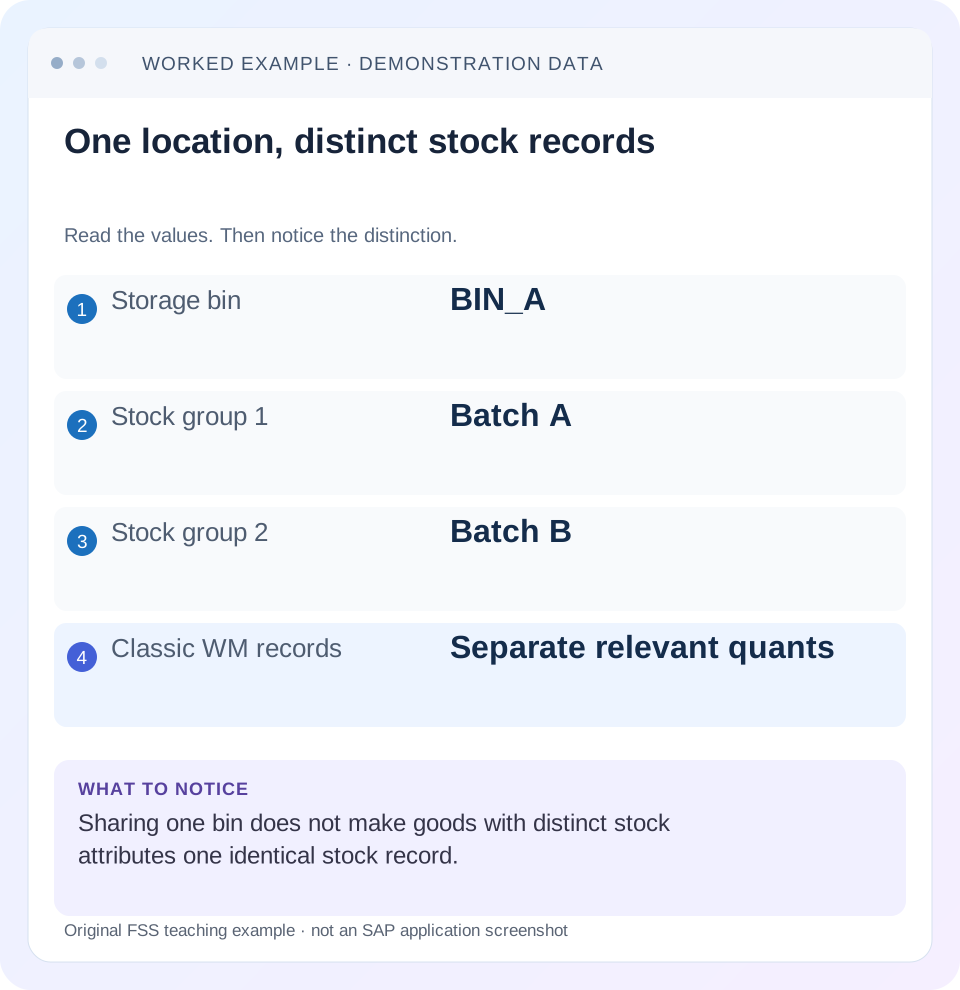
Read the example values
- Storage bin
- BIN_A
- Stock group 1
- Batch A
- Stock group 2
- Batch B
- Classic WM records
- Separate relevant quants
Words you’ll meet in this guide
- Bin
- A named warehouse storage location.
- Handling unit
- An identified package of goods and packaging.
- Confirmation
- A record that relevant warehouse work was performed.
- Stock
- The goods recorded as held in a given business and location context.
- HANA
- SAP’s database platform.
- EWM
- Extended Warehouse Management: SAP’s application for warehouse processes.
- WM
- Warehouse Management: the warehouse application or component in the relevant SAP product.
Preview the practical steps
SEE THE CONNECTION
See it in a simple example.
A small example to make the idea concrete.
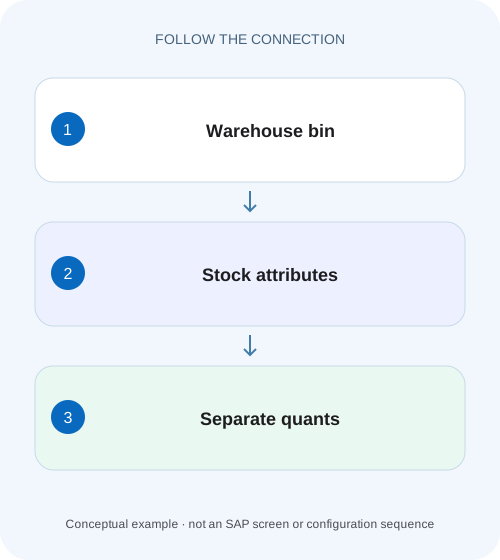
Explain several stock records in one component bin
A factory store shows one bin containing different stock populations, so the bin label alone cannot explain the available material.
A bin is an address; a quant is stock with specific attributes
In classic SAP WM, a storage bin is an addressable warehouse location.
Scope and prerequisites
The guide is explicitly classic ERP Warehouse Management/LE-WM conceptual scope, with ERP 6.0 EHP8 SP25 quant documentation.
Understand quant identity and lifecycle
SAP’s classic quant definition describes stock with the same features in one bin and explicitly distinguishes batches as different quants.
Explain several stock records in one component bin
A factory store shows one bin containing different stock populations, so the bin label alone cannot explain the available material.
Read each quant's relevant attributes alongside its location before combining quantities for a production-supply decision.
| Reader | Business question | Evidence to carry forward |
|---|---|---|
| Plant stores, warehouse and materials teams | Explain several stock records in one component bin | Read each quant's relevant attributes alongside its location before combining quantities for a production-supply decision. |
01 A bin is an address; a quant is stock with specific attributes
In classic SAP WM, a storage bin is an addressable warehouse location. A quant represents stock of a material with the same relevant features in that bin. One bin can therefore contain different stock records without those records being duplicates. [1] [2]
Before comparing totals, identify warehouse, storage type, bin, material, batch, stock category and special-stock context. This tutorial follows one bin with two unrestricted batches and a separate inspection population. It shows why a twelve-piece bin total does not prove twelve pieces of the requested batch/category can be picked.
02 Scope and prerequisites
The guide is explicitly classic ERP Warehouse Management/LE-WM conceptual scope, with ERP 6.0 EHP8 SP25 quant documentation. S/4HANA applicability depends on the supported warehouse solution and release. EWM has its own quant/stock-key/task model and should not inherit classic WM transaction instructions from this article.
Obtain warehouse number, storage type, bin, material, unit and relevant plant/storage-location, batch, category, special-stock and storage-unit context. Authorized stock/bin/quant and movement display access is needed. Proposed transfers, inventory adjustments or consolidation tests require the approved training process.
Record observation time and existing open movement references. A stock snapshot and a planned destination can differ while work is in progress. Do not edit quant records directly to make a total look familiar.
03 Understand quant identity and lifecycle
SAP’s classic quant definition describes stock with the same features in one bin and explicitly distinguishes batches as different quants. Quant data includes plant, material, batch, stock category and special-stock identity. The organizational support reference also lists location/storage-unit attributes relevant to splitting records. [1] [2]
Quants are created and deleted through goods movements in the documented model. A quant number identifies that stock record; it is not the permanent master identity of the material or a physical label that must survive every movement unchanged.
Adding compatible stock can increase a quant under the supported design, but actual merging and storage rules must be inspected. Do not assume two rows with the same material are eligible for consolidation when their other attributes or process context differ.
04 Worked case: twelve pieces in BIN_A are three populations
Fictional warehouse WH01/storage type T01/BIN_A contains material PART-Q in PC. Quant Q1 has six unrestricted pieces of batch A. Q2 has four unrestricted pieces of batch B. Q3 has two inspection pieces of batch A. For this worksheet all other organizational/ownership attributes are stated compatible, and mixed storage is assumed permitted by the training design.
The combined physical quantity is twelve. Unrestricted quantity across the stated batches is ten, but unrestricted batch A quantity is six. A request for eight unrestricted A cannot be justified by quoting twelve in the bin or ten unrestricted across both batches.
Q1 and Q3 share batch A but differ in category; Q1 and Q2 share unrestricted category but differ in batch. The distinctions explain why three records exist. The correct next step is to review the requested stock identity and permitted process, not delete or merge the records.
| Quant | Batch | Category | Quantity |
|---|---|---|---|
| Q1 | A | Unrestricted | 6 PC |
| Q2 | B | Unrestricted | 4 PC |
| Q3 | A | Inspection | 2 PC |
| Bin total | A+B | Stated categories combined | 12 PC |
| Eligible worksheet scope | A | Unrestricted only | 6 PC before other process checks |
05 Read the full location key before declaring a discrepancy
BIN_A can be a label reused in another storage type or warehouse. Retain warehouse and storage type alongside the bin. A screenshot of BIN_A without that context can compare unrelated locations.
Similarly, plant and storage location can distinguish stock even when the physical warehouse address looks the same. The WM view and the connected Inventory Management aggregate need a defined mapping and scope before comparison.
Start with a known quant or material in the intended bin and verify every key field. If it is absent, inspect filters and actual location/movement evidence. A missing row under a category filter does not prove that the material was never received.
For the eight-piece request, record that six matching pieces leave a two-piece shortfall under the worksheet assumptions. Asking for a supported alternate batch or quality disposition is a separate business decision, and should retain its own approval and stock-document evidence.
06 Inspect the bin and its stock records in sequence
The sequence explains each displayed record before deciding that stock is missing or duplicated.
Confirm the location scope
Record WH01/T01/BIN_A and the material/unit with observation time.
Expected observation: The comparison concerns one actual warehouse address.
List distinguishing attributes
Read Q1/Q2/Q3 batch, category and relevant plant/special-stock/storage-unit context.
Expected observation: Every separate stock population has an explanation.
Match the request
For eight unrestricted A, compare only the six-piece matching population and applicable process restrictions.
Expected observation: Bin total is not mistaken for eligible requested stock.
Read outstanding movements
Inspect related classic WM transfer orders and confirmation state before creating another movement.
Expected observation: Planned versus actual position is established.
Verify supported outcome
After authorized movement/category decision/count correction, revisit quant, bin and connected inventory evidence.
Expected observation: The business event explains the resulting records and totals.
07 Several quants are not necessarily a data-quality defect
Different batches, stock categories, special-stock owners or organizational contexts can justify multiple quants. A warehouse can deliberately preserve those identities for quality, customer allocation or traceability. An extra row is not proof of duplicate receipt.
To test actual duplication, compare the relevant receipt/movement documents and physical population, not merely row count. Two six-piece records can be legitimate separate populations or an error; their attributes and document history decide.
Do not merge quantities just because descriptions match. A special-stock quantity for a particular business reference may not be available for general demand. The required process must preserve that reference until an authorized change occurs.
08 Movement and confirmation explain current location
A transfer order can describe movement from BIN_A to BIN_B before completion is confirmed. Read its source, destination, quantity and state. A printed target or open movement is not proof that the physical stock has arrived. [1]
If four of batch B move to BIN_B under the simple fixture, BIN_A’s physical population becomes eight and BIN_B receives four, assuming the supported completed process and no other events. Batch/category identity should remain explainable through the actual documents.
The quant number after a movement need not be treated as the same permanent object label. Follow material/batch/category and document relationships rather than insisting one quant number must be present forever at every location.
09 Category changes differ from relocation
If the two inspection A pieces are legitimately released through the supported quality/WM process, the eligible unrestricted A population can change while the physical bin total remains twelve under the isolated fixture. That is a different business event from moving Q3 to another bin.
Do not use relocation to imply quality acceptance. The stock category must reflect the actual authorized decision and integrated posting where applicable. Conversely, a category change does not prove a physical move occurred.
Inspect how the installed WM/IM process represents the resulting records. The fixture explains quantity identity, not a universal instruction that two quants must always merge immediately after their visible attributes look similar.
10 Warehouse and Inventory Management reconciliation needs common scope
Inventory Management can show a plant/storage-location/category quantity while WM divides that population across bins and quants. A single-bin twelve cannot be expected to equal the whole storage location if other bins or intermediate areas contain stock.
Include relevant interim storage and outstanding WM work according to the actual process. A receipt can create warehouse demand before final putaway, so the quantity may not yet be in the expected destination bin.
If a real physical discrepancy remains, use the warehouse’s supported inventory process and connected reconciliation. Directly changing a quant or posting a generic adjustment can conceal a missing transfer confirmation or an incomplete reference chain.
11 Troubleshooting decisions
Keep location, identity and movement evidence separate in the worksheet. That prevents a correct bin total from hiding an ineligible stock population.
| Observation | Question | Next evidence |
|---|---|---|
| One bin,three records | Which attributes differ? | Batch/category/special-stock/organization |
| Twelve total,but eight A cannot pick | How much matches unrestricted A? | Q1 six and actual request restrictions |
| Same bin name,different result | Same warehouse/storage type? | Full location key and filters |
| Target bin empty,TO exists | Was movement confirmed? | TO source/destination and status |
| IM total differs from one bin | Are all mapped bins/contexts included? | Defined WM/IM reconciliation scope |
| Quant number disappeared | Was stock moved or fully picked? | Movement history and current stock identity |
12 Common mistakes and correction discipline
Do not delete or alter quants directly. Their records represent movement-controlled stock and identity. Do not use a count adjustment to conceal an unconfirmed warehouse move without investigating the actual event.
Do not treat a quant as a handling unit or a batch master. A pallet/carton identity, a production group and a stock record have different lifecycles. The same batch can appear in several bins or categories.
Do not transfer EWM available/reserved-quantity formulas or warehouse-task tools into a classic WM case. First establish the product and supported solution. Familiar terms such as quant and bin do not make the execution objects interchangeable.
13 Verification exercises and questions
For the positive worksheet check, reconcile six plus four plus two to twelve, unrestricted six plus four to ten and unrestricted A to six. Explain each quant’s separation. In training, inspect actual displayed attributes and permitted mixed-storage design.
For the negative check, combine Q1 and Q3 solely because batch A matches, or satisfy eight A with batch B’s four. Identify the category or batch violation.
For boundary checks, move all of Q2, fully pick a quant, release inspection stock through the supported process and compare another plant/special-stock context. Does one bin mean one quant? No. Does a changing quant number prove lost goods? Follow movements. A useful handover names full location, stock attributes, quantity and actual movement/confirmation references.
Related services and next steps
Primary sources
Found this useful?
Share this guide with your network, or leave a like.
Your like is saved in this browser.