SAP WM transfer requirement versus transfer order: Demand and executable movement
A plant warehouse has a demand for 50 components, only part translated into executable movement and less confirmed as moved.

Source review:
START HERE · NO PRIOR TOPIC KNOWLEDGE NEEDED
What it is. Why it matters.
A transfer requirement describes warehouse movement demand. A transfer order turns relevant demand into executable classic WM movement instructions, so requesting and executing work are distinct.
Completely new to SAP?
Manufacturers use SAP to connect work such as buying components, recording inventory, planning production, shipping equipment and accounting for costs. SAP S/4HANA is an enterprise resource planning system: it connects these activities through shared business data.
Warehouse Management organizes where goods are and how they move. Stock identity, physical location, movement tasks and confirmed execution are separate pieces of the picture.
A transaction code, or t-code, is a shortcut to a task in classic SAP GUI. Fiori apps provide another way to work. Names and screens depend on the product and release; you do not need a live system to learn the concepts in this guide.

Scope and source-review notes
Scope and evidence
Source review by FAST SAP SOLUTIONS® editorial. This badge describes our editorial review; it does not represent SAP certification or independent endorsement.
Classic LE-WM TR/TO concepts where supported in ERP/S/4HANA. EWM WT/WO is separate. Partial processing, confirmation/difference controls and S/4HANA solution scope need local verification; segmentation fields in the display reference are optional scope.
Reviewed the cited official SAP indexed documentation excerpts on 14 November 2026. Direct Help Portal opens did not consistently expose readable page text. This is documentation-based teaching, not customer-system execution. All document identifiers, quantities and outcomes in the worked case are illustrative; installed release, edition, configuration and authorizations require local verification.
A MANUFACTURING EXAMPLE
Trace a component replenishment movement
Demand versus executable work
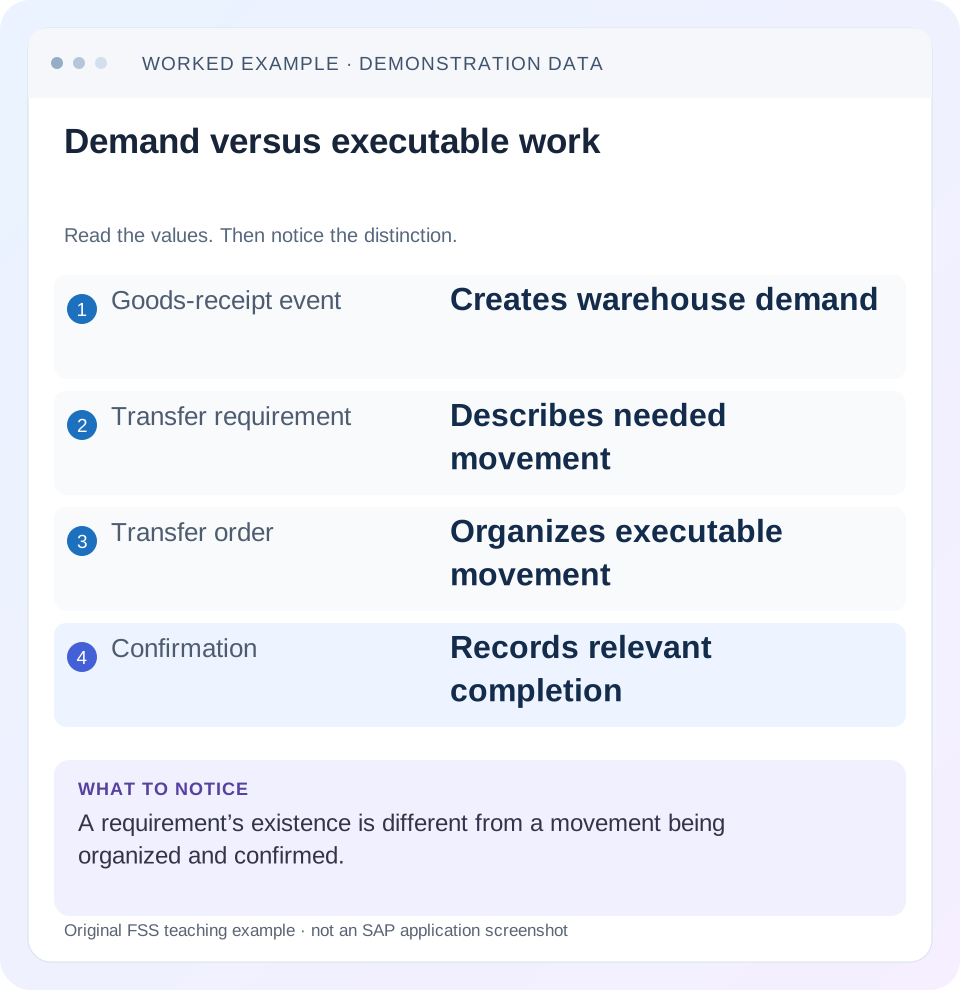
Read the example values
- Goods-receipt event
- Creates warehouse demand
- Transfer requirement
- Describes needed movement
- Transfer order
- Organizes executable movement
- Confirmation
- Records relevant completion
Words you’ll meet in this guide
- Bin
- A named warehouse storage location.
- Handling unit
- An identified package of goods and packaging.
- Confirmation
- A record that relevant warehouse work was performed.
- Stock
- The goods recorded as held in a given business and location context.
- HANA
- SAP’s database platform.
- EWM
- Extended Warehouse Management: SAP’s application for warehouse processes.
- WM
- Warehouse Management: the warehouse application or component in the relevant SAP product.
Preview the practical steps
SEE THE CONNECTION
See it in a simple example.
A small example to make the idea concrete.
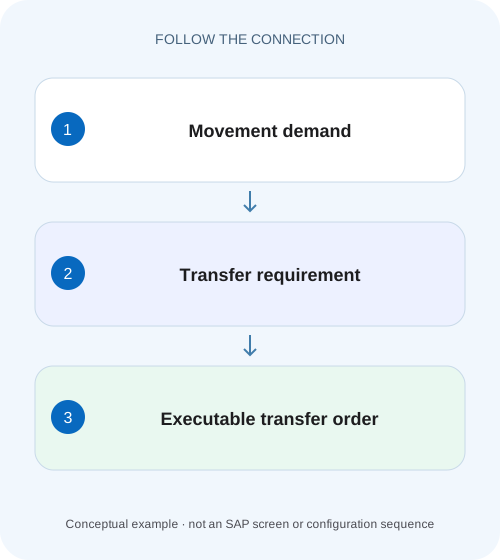
Trace a component replenishment movement
A plant warehouse has a demand for 50 components, only part translated into executable movement and less confirmed as moved.
Separate warehouse demand from organized and completed movement
A classic WM transfer requirement plans a warehouse movement.
Scope and prerequisites
The guide is classic LE-WM/WM scope where supported in the installed ERP/S/4HANA solution.
Understand the transfer requirement
SAP documents the TR as a planning document describing what, how much, when and why a warehouse movement is needed.
Trace a component replenishment movement
A plant warehouse has a demand for 50 components, only part translated into executable movement and less confirmed as moved.
Follow requirement, transfer order and confirmation quantities separately before promising replenishment to the assembly team.
| Reader | Business question | Evidence to carry forward |
|---|---|---|
| Plant stores, warehouse and materials teams | Trace a component replenishment movement | Follow requirement, transfer order and confirmation quantities separately before promising replenishment to the assembly team. |
01 Separate warehouse demand from organized and completed movement
A classic WM transfer requirement plans a warehouse movement. A transfer order provides executable movement instructions, and confirmation records the relevant completion. An open requirement, a created order and a confirmed order therefore describe different stages of the same warehouse need. [1]
This tutorial follows a fifty-piece putaway requirement with partial order coverage and confirmation. It shows how to distinguish demand not yet organized from work already open and work completed. The goal is a clear remaining-work statement that prevents a second transfer order from duplicating movement already planned.
02 Scope and prerequisites
The guide is classic LE-WM/WM scope where supported in the installed ERP/S/4HANA solution. EWM warehouse tasks/orders are different document concepts. S/4HANA applicability and supported Stock Room Management or other warehouse scope must be checked against the actual release. [2]
Collect warehouse, requirement/header/item, material, quantity/unit, stock identity, source business event and related transfer-order items. Authorized display access to requirements, TOs, bin/quant stock and relevant Inventory Management documents is needed. Proposed movement, confirmation or cancellation requires an approved training/operational process.
LT21 is a documented transfer-order display entry point in applicable classic systems. One cited display reference discusses segmentation-specific fields; those fields and prerequisites should not be assumed for every ordinary WM implementation.
03 Understand the transfer requirement
SAP documents the TR as a planning document describing what, how much, when and why a warehouse movement is needed. It can communicate Inventory Management events to WM or support other warehouse demand. Header context and individual material items must be read together. [1]
A requirement does not prove that goods physically reached a final bin. An Inventory Management receipt can establish a receiving event while warehouse putaway remains pending. Keep the original business reference so that stock and warehouse work can be reconciled.
The documented lifecycle updates the requirement as related orders are created, confirmed or canceled. Therefore the displayed open/processed state has to be interpreted with the actual linked orders, not by subtracting one remembered receipt quantity from one screenshot.
04 Understand the transfer order and confirmation
The TO describes executable warehouse movement under the supported classic process, including source/destination and quantity context. Creation organizes work; confirmation records what the warehouse actually processed according to the installed procedure. [1] [2]
A TO can have several items with different completion or exception evidence. Reading only the header or one confirmed line can conceal unresolved work. Retain warehouse, order and item references in the investigation.
A planned destination should not be reported as current physical location without the relevant movement/confirmation evidence. Likewise, a confirmation error should be investigated before creating replacement work, because an unclear client response does not prove no processing occurred.
05 Worked case: fifty required, thirty ordered, twenty confirmed
Fictional requirement TR-A item 10 concerns 50 PC of PART-W for putaway in warehouse WH01. TO-A covers 30 PC against that requirement. In the selected training design, its relevant work is represented by 20 PC confirmed and 10 PC still open. No other orders, corrections or differences exist in the initial fixture.
The remaining work has two distinct parts:20 PC of the original need is not yet covered by this order, and 10 PC is already organized but not confirmed. Twenty completed plus ten open plus twenty not yet organized reconciles the original fifty under the stated assumptions.
Calling all thirty remaining pieces “no transfer order exists” would be wrong because ten already has work. Creating a new thirty-piece TO without reconciling existing coverage could duplicate that ten. The actual system’s requirement-completion controls and partial-processing representation must still be inspected.
| Population | Quantity | Evidence |
|---|---|---|
| Original demand | 50 PC | TR-A/item 10 |
| Completed part | 20 PC | Actual confirmed TO evidence |
| Existing open work | 10 PC | TO-A unconfirmed population |
| Not yet organized | 20 PC | Remaining requirement after stated coverage |
| Total reconciled | 20+10+20=50 PC | Fixture only; read actual controls/references |
06 Start from the source business event and requirement item
Confirm why TR-A exists. A goods receipt, production replenishment or manually initiated warehouse need can have a different expected flow. Match material, plant/storage context, stock category and unit before following the order.
If the requester points to a receipt of fifty, verify the actual material-document item and its warehouse relationship. The receipt may contain multiple materials or other stock contexts, and the warehouse requirement can have several lines.
Do not use a different requirement with a matching description to explain the case. Full document/item identity and quantity basis come first. A similar date or bin label is only a search clue.
07 Investigate requirement and orders in sequence
The sequence preserves existing work while identifying the true unorganized and unconfirmed portions.
Read TR-A/item 10
Confirm WH01, PART-W,50 PC, movement purpose and source reference.
Expected observation: The warehouse demand is the intended population.
Find all related orders/items
Use LT21 or supported selection/display to inspect TO-A and any other related work. Include canceled/confirmed items.
Expected observation: The thirty-piece coverage is established from documents.
Separate actual states
Verify 20 confirmed and 10 open with source/destination, unit and exception evidence.
Expected observation: Created work is not mistaken for completed work.
Identify the uncovered need
Under the fixture, isolate 20 not yet organized and compare current requirement controls.
Expected observation: Any new work request concerns the justified remainder.
Verify the authorized outcome
After legitimate completion or new remaining work, inspect TR state, TO items, bins/quants and connected references.
Expected observation: The fifty-piece population is accounted for without duplicate movement.
08 Read TO display without turning review into confirmation
The cited SAP display reference supports individual and grouped transfer-order displays and notes that selection can also lead to confirmation functions. Review the current mode/action before executing a processing function. [2]
For TO-A, retain the source and destination bins, material/batch/category, planned and actual quantities and confirmation context. A row showing destination A-01 can be a plan while stock remains in an interim/source area.
If a worker reports that twenty physically moved but no confirmation is recorded, establish the actual operational gap. If confirmation exists but the physical goods are elsewhere, investigate the false/wrong-location event rather than creating another movement to hide it.
09 Partial processing and differences need actual item evidence
The fixture’s 20/10 split is deliberately explicit. Installed procedures can represent partial work through different items/orders or supported confirmation/difference handling. Read those actual objects instead of assuming one universal partial-confirmation screen.
If only 18 of a planned 20 physically moved, preserve actual 18 and the two-piece difference/question. Do not confirm 20 merely to close a line. Use the supported exception/reconciliation process and inspect how it affects the requirement and stock.
Conversely, if a completed 20 was posted twice in a worksheet, the apparent demand completion can exceed reality. Reconcile references and actual physical movement; counts of order headers or printed labels do not establish quantity completion.
10 Cancellation and IM corrections can change demand
SAP documents requirement updates on related TO creation, confirmation or cancellation and certain Inventory Management cancellations before order generation. The supported effect depends on the actual timing and document chain. [1]
Before canceling a receipt or TO, inspect existing warehouse work and confirmed movement. A correction before any TO exists can have a different recovery path from one after goods reached a final bin. Preserve original and reversing references.
Do not directly reduce the requirement to match a target number. Establish whether the business demand changed, an original posting was wrong or the warehouse work remains unfinished. The correction should record that actual cause.
11 Classic WM and EWM terminology must stay separate
A classic transfer order is not simply an EWM warehouse order under another name. EWM distinguishes activity tasks and executable packages differently. Copying an EWM method into a classic WM case can target the wrong object and leave the real requirement unresolved.
Identify the warehouse solution in the ticket and training fixture. If the system is EWM, follow its request/WT/WO and monitor process. If it is classic WM, use TR/TO and the supported stock/confirmation relationships.
The shared business question remains useful across products: what is needed, what work exists and what actually completed? The technical objects providing those answers must come from the installed product.
12 Troubleshooting decisions
Distinguish unorganized demand from open executable work and confirmed movement. That separation determines whether to create, execute or correct.
| Observation | Question | Next evidence |
|---|---|---|
| TR open,no known TO | Was work organized under another reference? | All linked TO items and selection scope |
| TO exists,target bin empty | Is movement still unconfirmed? | Source/destination and actual confirmation |
| Fifty need,thirty still unresolved | How much already has open work? | 20 confirmed/10 open/20 uncovered fixture |
| One item confirmed,TR unresolved | Do other items/quantities remain? | Item-level coverage and completion controls |
| Correction proposed after receipt reversal | Which warehouse work already exists? | IM/TR/TO timing and reversal chain |
| User refers to EWM order | Is the product/model wrong? | Installed warehouse solution and actual objects |
13 Verification exercises
For the positive worksheet check, reconcile 20 completed plus 10 existing open plus 20 not organized to 50. After legitimate completion of the ten and supported organization/completion of the remaining twenty, inspect actual requirement and stock evidence.
For the negative check, create another 30 because 30 is not yet confirmed, ignoring the existing ten-piece open work. Explain the duplicate coverage. Then treat a TO destination as proof of arrival and identify the missing confirmation/physical evidence.
For boundary checks, use a multi-item requirement, a cancellation before TO generation, a correction after confirmation and an eighteen-of-twenty actual movement. Record installed messages and resulting documents in an authorized training process; no runtime execution is claimed here.
14 Questions and the handover
Does a TR move goods? It plans the need. Does TO creation prove completion? Inspect confirmation and actual movement. Should every unresolved quantity receive another order? First distinguish existing open coverage from work not yet organized.
A useful handover names WH01/TR-A/item 10,50 PC, TO-A coverage 30, actual 20 confirmed and 10 open, plus 20 uncovered under the fixture. It records exact source/destination and any exception, then specifies whether the next action is execution, remaining-work creation or correction.
Continue with classic WM quant/bin, handling units and movement history to inspect the stock identities and physical/document evidence behind the work.
Related services and next steps
Primary sources
Found this useful?
Share this guide with your network, or leave a like.
Your like is saved in this browser.