SAP MMBE stock overview: Read plant, storage location and stock category together
A planner sees ten components across stock categories and must decide whether all ten support an assembly requirement at the intended plant.

Source review:
START HERE · NO PRIOR TOPIC KNOWLEDGE NEEDED
What it is. Why it matters.
MMBE shows a material’s stock in relevant organizational and stock categories. A plant, storage location and stock status together explain what a displayed quantity represents.
Completely new to SAP?
Manufacturers use SAP to connect work such as buying components, recording inventory, planning production, shipping equipment and accounting for costs. SAP S/4HANA is an enterprise resource planning system: it connects these activities through shared business data.
Materials Management supports purchasing and inventory. A request, order, goods receipt and supplier invoice describe separate events, each with its own record and status.
A transaction code, or t-code, is a shortcut to a task in classic SAP GUI. Fiori apps provide another way to work. Names and screens depend on the product and release; you do not need a live system to learn the concepts in this guide.

Scope and source-review notes
Scope and evidence
Source review by FAST SAP SOLUTIONS® editorial. This badge describes our editorial review; it does not represent SAP certification or independent endorsement.
Classic stock overview concepts in ERP and supported S/4HANA, with 2023 Latest documentation. Display levels/categories/units, segmentation and app availability vary; ATP and WM/EWM execution availability are separate scope.
Reviewed the cited official SAP indexed documentation excerpts on 14 November 2026. Direct Help Portal opens did not consistently expose readable page text. This is documentation-based teaching, not customer-system execution. All document identifiers, quantities and outcomes in the worked case are illustrative; installed release, edition, configuration and authorizations require local verification.
A MANUFACTURING EXAMPLE
Check stock before promising assembly supply
Read the stock category
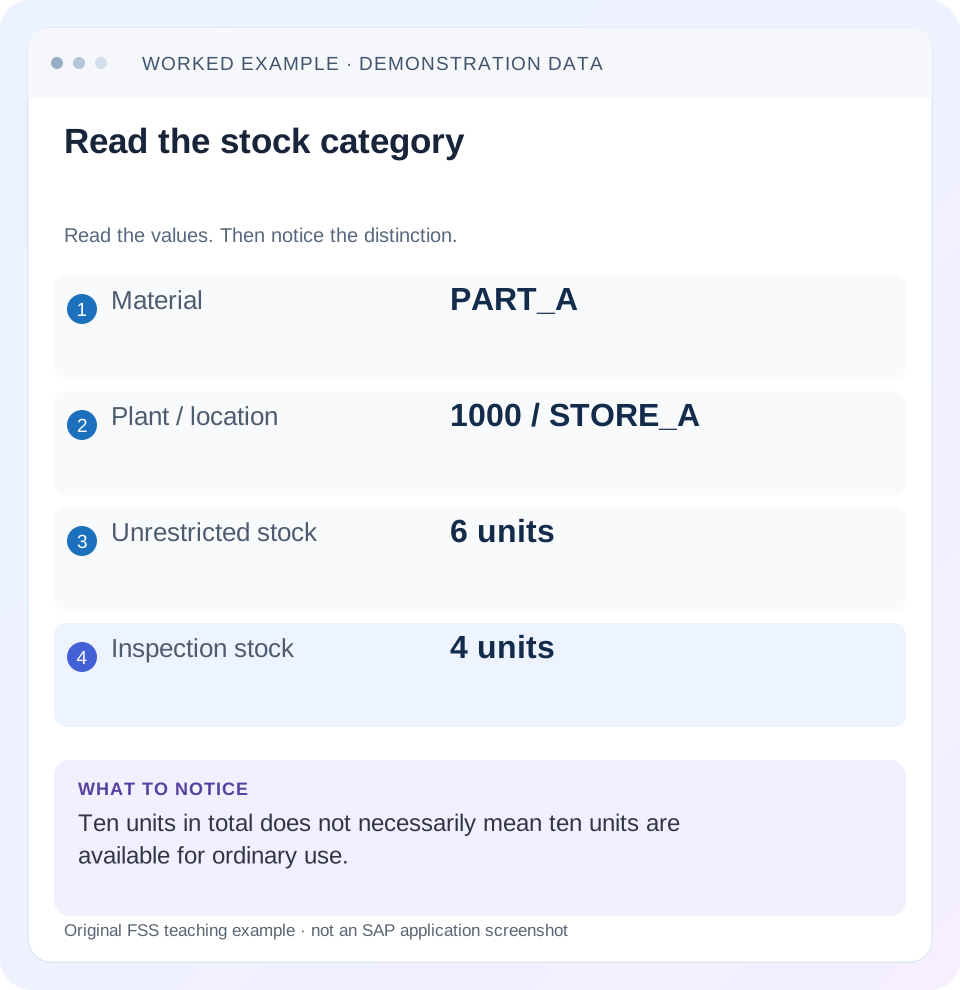
Read the example values
- Material
- PART_A
- Plant / location
- 1000 / STORE_A
- Unrestricted stock
- 6 units
- Inspection stock
- 4 units
Words you’ll meet in this guide
- Material
- A product or supply item managed in SAP.
- Plant
- An organizational unit for relevant logistics operations.
- Goods receipt
- A recorded receipt of goods in a business process.
- Purchase order
- A purchasing document requesting goods or services from a supplier or supplying plant.
- Invoice
- A supplier’s bill for goods or services.
- HANA
- SAP’s database platform.
- EWM
- Extended Warehouse Management: SAP’s application for warehouse processes.
Preview the practical steps
SEE THE CONNECTION
See it in a simple example.
A small example to make the idea concrete.
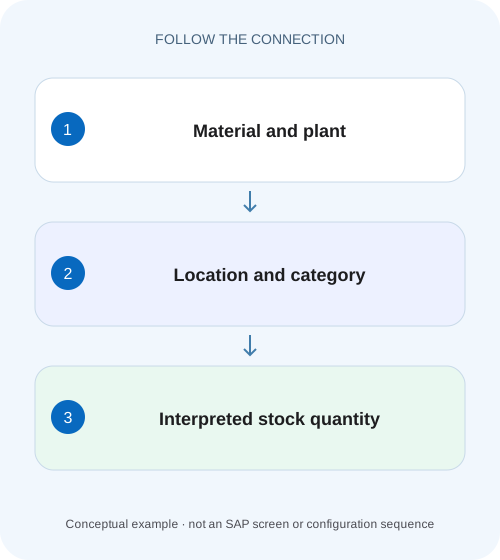
Check stock before promising assembly supply
A planner sees ten components across stock categories and must decide whether all ten support an assembly requirement at the intended plant.
Read quantity together with organizational level and stock category
MMBE shows a material’s stock across relevant organizational and stock contexts.
Scope and prerequisites
The scope is classic stock overview and documented ERP/S/4HANA material-master stock concepts.
Understand the hierarchy and avoid double counting
SAP documents stock overview across organizational levels, contrasting it with material-master views restricted to one plant or storage location.
Check stock before promising assembly supply
A planner sees ten components across stock categories and must decide whether all ten support an assembly requirement at the intended plant.
Read plant, storage location, unit and stock category together rather than promising the total shown at a higher level.
| Reader | Business question | Evidence to carry forward |
|---|---|---|
| Plant stores, warehouse and materials teams | Check stock before promising assembly supply | Read plant, storage location, unit and stock category together rather than promising the total shown at a higher level. |
01 Read quantity together with organizational level and stock category
MMBE shows a material’s stock across relevant organizational and stock contexts. A company-wide quantity does not prove that the same amount exists at one issuing storage location, and stock in quality inspection is not automatically unrestricted stock for ordinary use. Expand the relevant branch before making a supply claim. [1]
This tutorial develops the existing six-unrestricted/four-inspection example and adds a second location. You will distinguish a total, a category, ownership context and process availability, then reconcile one apparent discrepancy through a material document. The goal is to describe what actually exists where, without turning a stock snapshot into an unsupported delivery promise.
02 Scope and prerequisites
The scope is classic stock overview and documented ERP/S/4HANA material-master stock concepts. Exact categories, display versions, levels and app availability depend on edition and configuration. Segmentation-enabled displays add their own features; they are not assumed prerequisites for every installation. EWM bin-level availability requires its warehouse process context.
Obtain material, plant, storage location, batch where relevant, stock category, ownership/special-stock context and unit. Authorized stock and material-document display access is needed. Record observation time in a live investigation because new postings can change the position while teams compare screenshots.
Start with a specific question: “Can P100/S100 supply eight pieces from the required stock context?” This is narrower and more useful than “SAP shows ten, so why cannot we issue eight?”
03 Understand the hierarchy and avoid double counting
SAP documents stock overview across organizational levels, contrasting it with material-master views restricted to one plant or storage location. A hierarchy can show a parent total and the child quantities that contribute to it. Adding parent and child values together can count the same stock twice. [1]
For a simple hierarchy, plant P100 can contain S100 and S200. The plant total answers a broader question than stock at S100. A process operating at S100 cannot assume stock at S200 is already in its issuing context; a supported transfer may be needed.
Stock-type or special-stock detail can expose additional distinctions. Preserve the branch labels in any handover or export. A bare “10” copied from the tree loses the information that makes the quantity interpretable.
04 Worked case: six unrestricted and four under inspection
The fictional material PART_A at P100/S100 has 6 PC in unrestricted-use stock and 4 PC in quality inspection. The narrow physical total across those two stated categories is ten. It does not mean all ten are eligible for an ordinary unrestricted-use issue.
Storage location S200 has another 8 PC unrestricted. Across the simplified plant fixture there are fourteen unrestricted pieces and four inspection pieces, or eighteen across the stated categories. At S100, however, the unrestricted quantity remains six. A request for eight from S100 cannot be explained by quoting eighteen at plant level.
Even the six unrestricted pieces are not a guarantee that every process will allocate all six. Batch, reservation, warehouse and availability-check rules can affect the next action. The stock overview establishes the observed inventory context; process-specific availability must be checked separately.
| Plant/location | Category | Quantity | Interpretation |
|---|---|---|---|
| P100 / S100 | Unrestricted-use | 6 PC | Relevant local ordinary-stock context |
| P100 / S100 | Quality inspection | 4 PC | Separate usability/quality context |
| P100 / S200 | Unrestricted-use | 8 PC | Different issuing location |
| P100 total | Unrestricted across stated locations | 14 PC | Do not add again to the child quantities |
| P100 total | All stated categories | 18 PC | Not an eight-piece S100 availability promise |
05 Choose display scope and unit deliberately
SAP’s stock-overview documentation describes display versions and selected levels. Review those settings before interpreting a missing branch. A category or organizational level not included in the active display can be absent from view without being absent from the system. [1] [2]
Check the unit shown. The documented overview can display supported alternative units. If another report shows boxes, establish the material conversion before comparing its number with pieces. A change of display unit can alter the visible number without changing the physical quantity.
If segmentation or another industry-specific feature is active, identify its additional stock distinctions and the relevant documentation. Do not collapse them merely because a simpler training screenshot lacks those levels.
06 Investigate the eight-piece issue question in sequence
Use the tree as the starting evidence, then follow the actual failed process. This avoids correcting stock merely because a parent total looks sufficient.
Confirm the requested identity
Record PART_A/P100/S100, required category, unit and batch/special-stock context for the eight-piece request.
Expected observation: The issuing process has a defined stock population.
Read the matching branch
Inspect S100’s six unrestricted and four inspection pieces, retaining the display scope and observation time.
Expected observation: The ten-piece local total is separated into meaningful categories.
Compare other locations carefully
Inspect S200’s eight pieces and establish whether a supported transfer or alternate-location process is intended.
Expected observation: Plant-wide quantity is not mistaken for local stock.
Read the actual process message
Check the issue/availability/warehouse result with its own rules, reservations and document reference.
Expected observation: The next failure is distinguished from the stock snapshot.
Verify after authorized action
After a legitimate transfer or quality decision, inspect resulting material documents and refresh the same branch.
Expected observation: Any changed stock context has document evidence.
07 Ownership and batches can change the interpretation
Suppose part of a displayed physical total is supplier consignment. Those units are not automatically ordinary company-owned inventory even if they are on the same premises. Inspect supplier/special-stock detail and the relevant withdrawal or ownership-transfer process.
For batch-managed material, the correct batch can matter to quality, expiration or customer requirements. A material-level total can be sufficient while the eligible batch has too little. Expand and verify the actual batch rather than assigning another batch merely to complete an issue.
Serial identity and handling units add different questions. MMBE’s quantity context does not prove that a particular serialized device or packed HU is where the warehouse operator expects. Follow the appropriate object and warehouse display for that investigation.
08 Reconcile a changed quantity with movement evidence
If S100 previously showed six unrestricted and now shows three, identify relevant movements between the two observations. A three-piece goods issue can explain the change in the simplified fixture. A transfer to another category or location can produce a different explanation even when the overall plant total is unchanged.
Use MB51 or the supported material-document reporting/display to find the actual event, then verify document/year/item, dates, quantity/unit and source/destination context. The report should explain the stock change rather than be treated as a separate stock balance.
Compare a consistent boundary. A screenshot from morning and a movement extract ending yesterday cannot be expected to reconcile today’s later postings. Record timestamps and include corrections before raising an inconsistency.
09 Quality stock requires a quality decision, not a label change
The four inspection pieces in the worked case are inventory in a different usability context. Determine the applicable inspection/quality process and whether they can be accepted, rejected or otherwise disposed of. A receiving analyst should not infer unrestricted usability from physical presence alone.
If an authorized quality decision results in a supported stock posting, inspect its material-document and stock-category effect. A changed inspection status and a completed stock posting may be separate observations in the actual process.
Do not move the four into unrestricted stock merely to satisfy the eight-piece request without the required decision. The business need identifies urgency, not proof that the goods meet acceptance criteria. Preserve the resulting reference and refresh the relevant branch after the supported action.
10 Troubleshooting decisions
The first useful distinction is whether the discrepancy concerns scope, category, identity or a later process rule. The same material total can coexist with several valid restrictions.
| Observation | Question | Next evidence |
|---|---|---|
| Company/plant total enough, local issue fails | Is stock at the actual location? | Matching plant/storage-location branch |
| Ten local, only six unrestricted | Are categories being combined? | Stock-type detail and quality evidence |
| Other report differs by a factor | Are display units aligned? | Alternative/base conversion |
| Material total enough, batch fails | Does eligible batch have quantity? | Batch stock and requirements |
| Unrestricted stock visible, allocation fails | Which process availability rule applies? | Actual check/message and reservations/warehouse context |
| Branch absent | Is level/category selected and authorized? | Display version, selection and role scope |
11 Common mistakes in stock communication
Do not add hierarchy totals to their own children. Do not call all physical quantities “available” without defining the process. Do not omit ownership or batch context when it affects who may use the stock and under what conditions.
Do not post an adjustment because two displays observed at different times disagree. Establish movement timing and scope first. A legitimate later issue can explain the entire difference without any stock error.
Do not use an ERP storage-location snapshot as proof of EWM bin-level allocatability. Warehouse tasks, stock keys, HUs and other warehouse rules can influence execution. Connect the systems through their actual documents rather than inventing a generic subtraction formula.
12 Verification exercises
For the positive worksheet check, reconcile S100’s ten as six unrestricted plus four inspection, and plant unrestricted fourteen as six plus eight from S200. Confirm that parent totals are not added again.
For the negative check, promise eight unrestricted from S100 solely because the plant total is eighteen. Identify both scope and category errors. Separately change the displayed unit to BOX with a known conversion and explain why the raw number changes.
For boundary checks, use zero unrestricted with positive inspection stock, one eligible batch among several and a transfer posted between observations. In an authorized training system, compare actual category and document outcomes. These proposed checks do not claim customer-system execution.
13 Questions and the handover
Does unrestricted mean every process can use the stock? It identifies a stock context, while actual process checks can add requirements. Does MMBE provide a historical balance for any date? Establish the supported reporting function for the historical question rather than assuming the current overview answers it.
A useful case result states: “At the recorded time, PART_A/P100/S100 has six PC unrestricted and four PC inspection. S200 has eight unrestricted. The requested eight at S100 requires the supported process decision; the eighteen-piece plant total is not local unrestricted availability.”
Continue with movement history, batch/shelf-life controls and EWM physical-versus-available stock to investigate how the observed quantity changed and whether it is eligible for the requested execution.
Related services and next steps
Primary sources
Found this useful?
Share this guide with your network, or leave a like.
Your like is saved in this browser.