Integration Suite certificate renewal: Check aliases, trust and the actual connection
A manufacturer's invoice integration needs a certificate renewal while the receiver must recognize the correct sending identity.

Source review:
START HERE · NO PRIOR TOPIC KNOWLEDGE NEEDED
What it is. Why it matters.
A certificate supports trust in a secure connection or identity. Renewal replaces time-limited certificate material, and every affected connection must use the intended replacement.
Completely new to SAP?
Manufacturers use SAP to connect work such as buying components, recording inventory, planning production, shipping equipment and accounting for costs. SAP S/4HANA is an enterprise resource planning system: it connects these activities through shared business data.
SAP Business Technology Platform, or BTP, provides cloud services for applications, data and integration. A connection needs a route, an identity and permission to perform the intended task.
A transaction code, or t-code, is a shortcut to a task in classic SAP GUI. Fiori apps provide another way to work. Names and screens depend on the product and release; you do not need a live system to learn the concepts in this guide.

Scope and source-review notes
Scope and evidence
Source review by FAST SAP SOLUTIONS® editorial. This badge describes our editorial review; it does not represent SAP certification or independent endorsement.
SAP Integration Suite Cloud Integration tenant keystore concepts. Certificate ownership and renewal procedures vary for SAP-provided, customer-managed and remote-system certificates.
Documentation review on 14 November 2026 using official SAP sources and indexed official excerpts where full Help text was unavailable. Scope and service or release differences are explained in the lesson. All datasets, requests and checks are illustrative; no customer SAP runtime execution or measured results are claimed.
A MANUFACTURING EXAMPLE
Renew the certificate used by a factory invoice flow
Renew the whole trust path
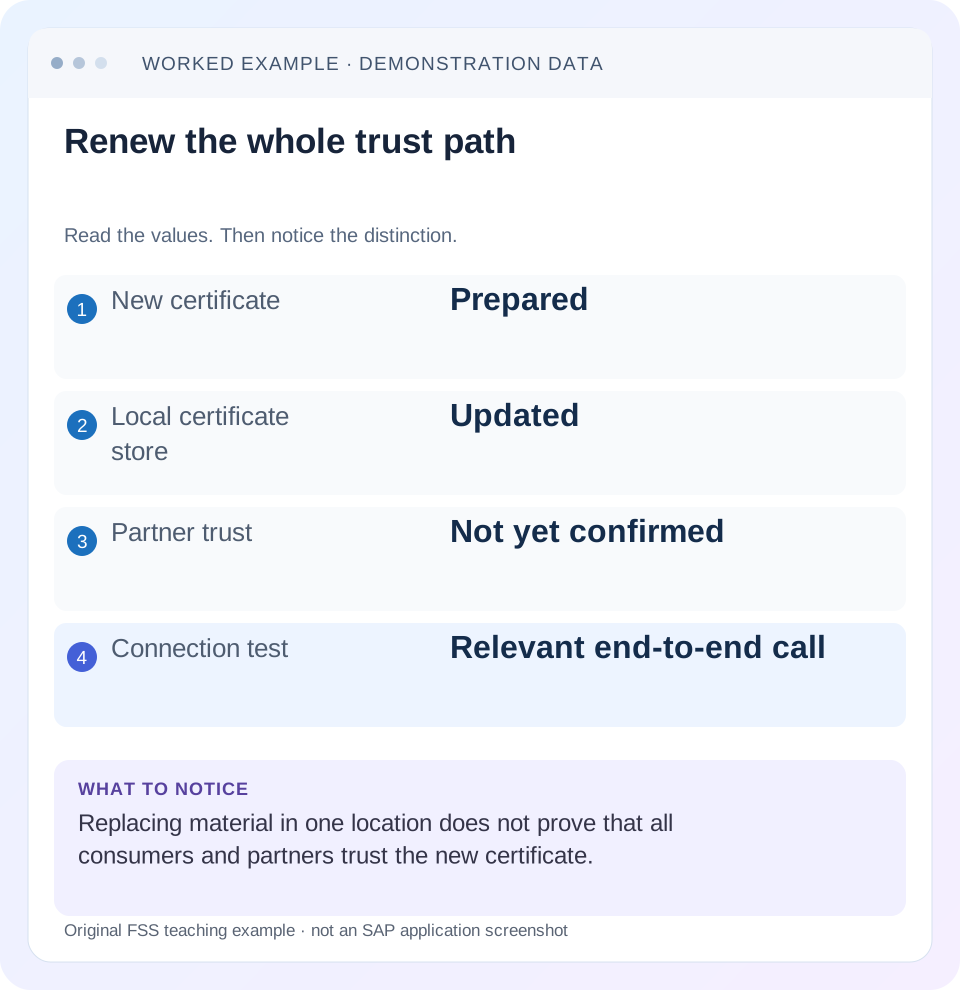
Read the example values
- New certificate
- Prepared
- Local certificate store
- Updated
- Partner trust
- Not yet confirmed
- Connection test
- Relevant end-to-end call
Words you’ll meet in this guide
- Backend
- The service or system doing the work behind an interface.
- Destination
- Named connection settings for another service.
- Credential
- Access information used to prove an identity.
- Subaccount
- A BTP scope for applications, services and access settings.
- XML
- A format that organizes data into named, nested elements.
Preview the practical steps
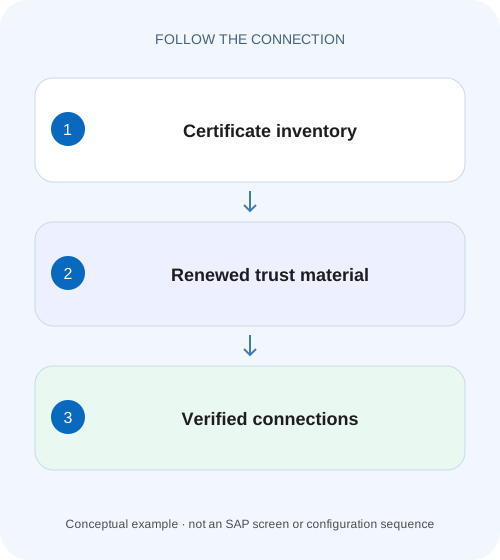
SEE THE CONNECTION
See it in a simple example.
A small example to make the idea concrete.
Renew the certificate used by a factory invoice flow
A manufacturer's invoice integration needs a certificate renewal while the receiver must recognize the correct sending identity.
Renew the identity and trust path, then prove the connection
Certificate renewal in Cloud Integration is a coordinated change to a security path, not just an upload.
Distinguish trusted certificates from key pairs
A trusted certificate entry contains public certificate material used for trust or verification.
Worked case: renew the tenant identity used by an invoice receiver
Imagine flow InvoiceSend using alias partner_client for outbound HTTPS client authentication to a partner invoice endpoint.
Renew the certificate used by a factory invoice flow
A manufacturer's invoice integration needs a certificate renewal while the receiver must recognize the correct sending identity.
Trace the used alias, credential handoff and connection verification before removing the old credential or assuming upload alone completes renewal.
| Reader | Business question | Evidence to carry forward |
|---|---|---|
| SAP developers and application teams supporting manufacturers | Renew the certificate used by a factory invoice flow | Trace the used alias, credential handoff and connection verification before removing the old credential or assuming upload alone completes renewal. |
01 Renew the identity and trust path, then prove the connection
Certificate renewal in Cloud Integration is a coordinated change to a security path, not just an upload. Identify whether the certificate represents the tenant, a remote server, a sender or a message-signing identity. Then establish which alias references it, who holds its private key and which peer must trust the replacement. A new validity date in the keystore does not prove that the actual interface can authenticate or verify messages. [1] [2]
This tutorial is for Cloud Integration administrators and integration developers planning certificate changes. You need authorized keystore inspection, flow configuration and partner coordination. The main worked case is an outbound HTTPS client certificate owned by the tenant. Inbound authentication and message-level signing have separate procedures; Neo-specific certificate-to-user mapping instructions must not be applied as a universal Cloud Foundry setup.
02 Distinguish trusted certificates from key pairs
A trusted certificate entry contains public certificate material used for trust or verification. A key-pair entry includes a private key associated with a public certificate. A tenant authenticating with a client certificate needs access to the private key in the supported keystore setup. Importing only its public certificate does not create that private-key possession. [1]
The peer uses trust and identity rules appropriate to the scenario. For HTTPS, server identity and client identity are separate directions. For XML signatures or encryption, the relevant message step can select a certificate or key by alias. Do not assume that replacing an HTTPS certificate also updates an XML Signature Verifier or a partner’s encryption key. Inventory each use explicitly. [2]
03 Worked case: renew the tenant identity used by an invoice receiver
Imagine flow InvoiceSend using alias partner_client for outbound HTTPS client authentication to a partner invoice endpoint. The current certificate has an illustrative expiry of 30 November 2026. A replacement certificate is valid from 15 November 2026. The partner’s trust configuration currently recognizes the old certificate or its issuing chain under the partner’s policy.
The change must preserve the intended flow reference, deliver the replacement certificate chain through the approved public-material channel and update the peer’s trust as required. If the receiver pins an individual certificate, a new certificate signed by the same authority can still require a peer change. If the receiver trusts a CA chain, confirm the new chain and identity rules rather than assuming unchanged trust.
| Object | Owner | Proof needed |
|---|---|---|
| Alias partner_client | Tenant administrator | Intended key pair and replacement certificate |
| InvoiceSend receiver config | Integration developer | Alias reference and supported reload action |
| Partner trust | Receiver administrator | New identity or chain accepted |
| Known invoice test | Business/integration owner | Harmless accepted exchange with intended identity |
04 Inventory alias references and certificate metadata
For each affected entry, record alias, entry type, public certificate fingerprint, subject, issuer, serial number and validity period. These are identifiers, not a replacement for trust review. Compare the certificate’s intended usage and the service’s supported algorithm or chain requirements. Keep private keys and keystore passwords out of the inventory and general ticket.
Search the approved integration configuration for alias references and list affected flows, including infrequently used ones. A shared alias can be used by several receiver channels or message-security steps. Conversely, two similarly named aliases may hold different identities. Record the actual deployed configuration and tenant scope so a development certificate does not become evidence for a production renewal.
05 Agree the supported renewal and overlap sequence
SAP’s tenant client-certificate renewal procedure describes coordination between the receiver administrator, tenant administrator and integration developer, including keeping the existing alias for the replacement in that documented scenario and restarting the sending flow. Follow the current procedure for your certificate ownership and runtime; do not generalize that lifecycle action to every certificate type. [3]
When the receiver supports simultaneous acceptance of old and new client certificates, agree that overlap explicitly. Establish peer trust for the replacement, exchange the tenant entry through the applicable supported procedure, complete the required lifecycle action and verify a fresh exchange before retiring old trust. For InvoiceSend, the replacement must already be valid at the cutover time. A compromised old key can require a different emergency sequence. [3]
For the documented outbound tenant-client-certificate procedure, a receiver that cannot accept both identities needs a planned downtime branch. Agree the window, stop the sending integration flow and obtain confirmation that it is stopped before the identity exchange. Replace the tenant key pair/certificate under the documented alias, provide the required public certificate and CA chain to the receiver administrator, and wait for confirmation that peer trust is ready. Only then authorize the supported flow restart and verify a fresh business exchange. Coordinate all affected sending flows rather than leaving another consumer of the replaced identity active during the handoff. [5]
The cited tenant-client and client-root renewal procedures also require restart coverage on every relevant runtime node when the tenant cluster has multiple nodes. Cached keystore state can otherwise leave other nodes failing while one request succeeds. Use the supported flow lifecycle operation for the actual runtime and record its coverage; this is not an instruction to access or manipulate managed nodes manually. Do not retire old peer trust based only on one successful request when lifecycle coverage is still unconfirmed. [3] [5]
06 Check time, chain and key association before cutover
The replacement must be valid at the actual cutover time. In the fixture, switching on 14 November would be premature because the illustrative new certificate starts on 15 November. Check timezone and system-time assumptions when reviewing not-before and not-after values. A certificate with a later expiry can still be unusable today.
Inspect the supported certificate chain and its relationship to the private key. A chain missing a required intermediate can cause a handshake failure even when the leaf certificate looks correct. A replacement public certificate associated with the wrong private key cannot authenticate as intended. Use supported keystore validation and the approved certificate-generation process rather than attempting to repair key material manually.
Also compare the endpoint hostname and server certificate. A client-certificate renewal cannot fix a server-name mismatch or an expired remote server certificate. Preserve which direction failed during TLS negotiation so the team changes the correct store.
Fingerprint comparison is useful for proving which public certificate was installed, but it does not decide whether that certificate is appropriate. A new fingerprint is expected after renewal. Verify the intended subject and issuer context, key association and peer trust policy separately. In the InvoiceSend case, record both the old and new public fingerprints so a peer-side observation can be matched to the change without sharing the private key or entire keystore. If the peer still observes the old fingerprint, investigate connection reuse, selected alias and required lifecycle action before assuming the uploaded replacement is invalid.
07 Exercise the real connection and business contract
Use a permitted non-destructive request through InvoiceSend or an agreed representative test path that exercises the same receiver configuration and client identity. A browser call from an administrator’s workstation does not prove the tenant presented the replacement. Where safely available, correlate the peer’s TLS/client identity evidence with the test timestamp.
Then inspect the business response. A successful TLS connection can still end in an application authorization failure or business rejection. Record these results separately: connection established, intended identity accepted and test operation accepted. If the interface only supports writes, agree a controlled test business object and reconciliation method before execution rather than inventing a harmless operation.
08 Troubleshoot by the failed security direction
Keep the original handshake or verification error and compare it with the renewal ledger. Do not import arbitrary trust certificates to make an error disappear. Establish which certificate the local and remote side actually selected.
| Observation | Boundary | Next comparison |
|---|---|---|
| Keystore import succeeds, TLS fails | Peer trust or selected identity | Actual alias, peer trust and chain |
| New certificate not yet valid | Validity timing | Not-before value and system time |
| Server name or server trust error | Remote server identity | Endpoint hostname and remote certificate chain |
| TLS succeeds, HTTP authorization denied | Application identity/rights | Peer mapping or authorization for new identity |
| Only one flow fails | Reference or lifecycle | Deployed alias and documented reload behavior |
| XML signature fails after HTTPS passes | Message-level security | Verifier/signer alias and signing certificate |
09 Plan message-security renewal around in-flight work
For signing and encryption, certificates can affect messages already in transit or stored for retry. A message signed with the old private key still needs the corresponding verification trust when it is processed later. An encrypted payload still needs the appropriate decryption private key. Retiring material solely because new messages use a replacement can strand older work.
SAP publishes separate renewal guidance for XML Digital Signature Verifier keys. Review the relevant message step and any supported overlap behavior. Inventory queues, data stores and partner retry windows that can contain older material. This is a different timing problem from testing a fresh HTTPS handshake. A successful new connection does not prove that historical encrypted or signed messages remain processable. [4]
10 Define recovery without assuming old material remains usable
Before cutover, define who can restore the previous supported entry or select a valid replacement if verification fails. Keep any permitted recovery material only in approved secure storage. Once old access is revoked, expired or compromised, reverting to it may be impossible or inappropriate. State that decision boundary in the change record.
If the test fails, classify the cause before repeated replacement attempts. A missing peer trust update can be corrected on the peer. A wrong alias reference requires a flow configuration correction. A certificate not yet valid may require rescheduling or a correctly issued replacement. Repeatedly uploading the same file does not resolve those distinctions.
For a partially successful business call, reconcile receiver state before retrying after security is repaired. A timeout following connection establishment can leave uncertainty about a business commit. Certificate renewal does not remove the need for stable business references and duplicate protection.
11 Verify positive, negative and boundary cases
For a positive test, establish a fresh supported connection after cutover and verify the intended operation. For a negative development test, select a deliberately untrusted test identity and confirm the peer rejects it. This verifies the peer’s restriction rather than merely showing that some certificate works. Do not use expired production material for an unnecessary experiment.
For a boundary test, review the new certificate’s start time, the old certificate’s retirement time and any overlap window. Include a queued message signed or encrypted under the prior identity where the design requires it. Verify each affected flow, including a scheduled interface that does not run during the change window.
What proves completion? Record non-secret old/new certificate identities, alias, affected flow versions, peer trust confirmation, the applicable lifecycle action and its all-node coverage, fresh exchange results and old-material disposition. For a non-overlap change, include stopped-flow and peer-readiness confirmations. One successful request does not by itself prove every relevant runtime node refreshed its cached state. The related service-key rotation lesson provides a similar consumer handoff ledger for non-certificate credentials. [3] [5]
Related services and next steps
Primary sources
Found this useful?
Share this guide with your network, or leave a like.
Your like is saved in this browser.