SAP purchasing account assignment: Where should the cost go?
A component manufacturer buys workshop supplies for two departments and must explain which responsibility receives each share of the cost.

Source review:
START HERE · NO PRIOR TOPIC KNOWLEDGE NEEDED
What it is. Why it matters.
Account assignment tells purchasing where a cost belongs. Its category determines the relevant kind of recipient, such as a cost center or project, and the information the buyer must supply.
Completely new to SAP?
Manufacturers use SAP to connect work such as buying components, recording inventory, planning production, shipping equipment and accounting for costs. SAP S/4HANA is an enterprise resource planning system: it connects these activities through shared business data.
Materials Management supports purchasing and inventory. A request, order, goods receipt and supplier invoice describe separate events, each with its own record and status.
A transaction code, or t-code, is a shortcut to a task in classic SAP GUI. Fiori apps provide another way to work. Names and screens depend on the product and release; you do not need a live system to learn the concepts in this guide.

Scope and source-review notes
Scope and evidence
Source review by FAST SAP SOLUTIONS® editorial. This badge describes our editorial review; it does not represent SAP certification or independent endorsement.
Account-assigned purchasing in classic ERP and supported S/4HANA; category codes, required fields, application distribution features, partial-processing rules and financial posting timing are configuration/release dependent.
Reviewed the cited official SAP indexed documentation excerpts on 14 November 2026. Direct Help Portal opens did not consistently expose readable page text. This is documentation-based teaching, not customer-system execution. All document identifiers, quantities and outcomes in the worked case are illustrative; installed release, edition, configuration and authorizations require local verification.
A MANUFACTURING EXAMPLE
Allocate plant support purchases
Where should this purchase cost go?
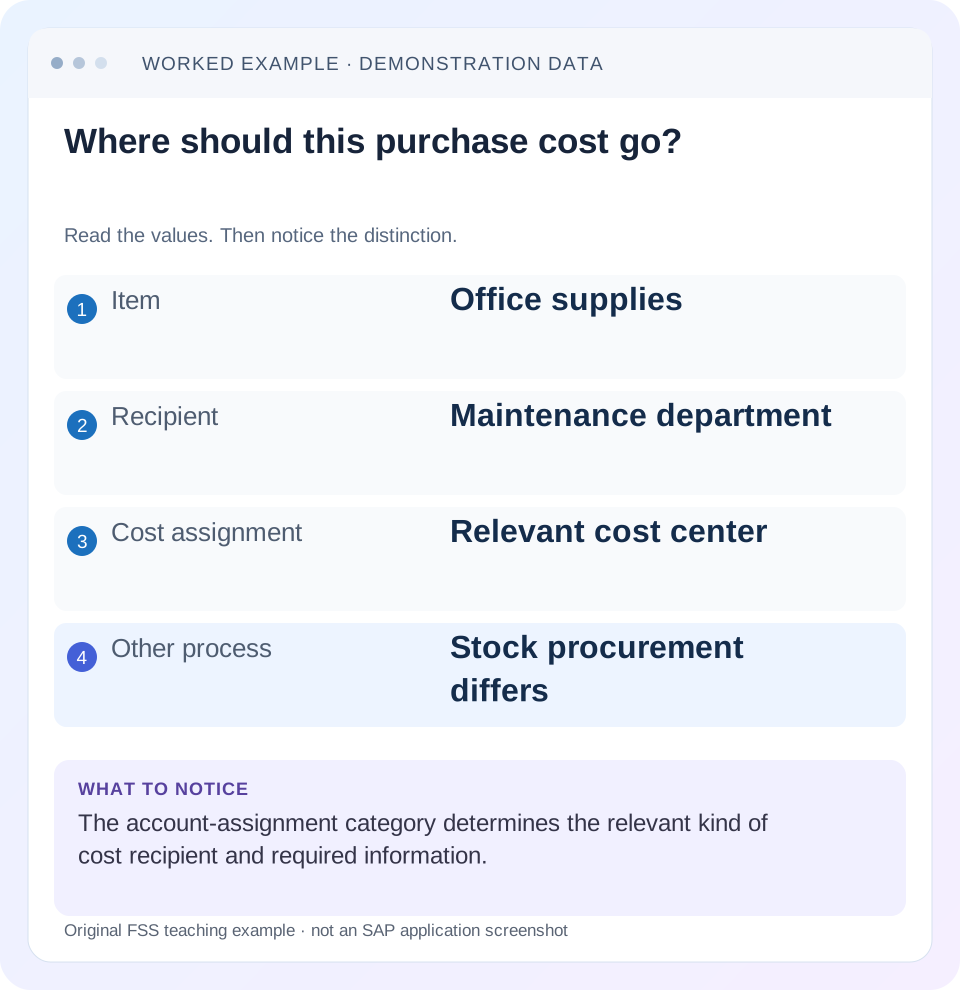
Read the example values
- Item
- Office supplies
- Recipient
- Maintenance department
- Cost assignment
- Relevant cost center
- Other process
- Stock procurement differs
Words you’ll meet in this guide
- Material
- A product or supply item managed in SAP.
- Plant
- An organizational unit for relevant logistics operations.
- Goods receipt
- A recorded receipt of goods in a business process.
- Purchase order
- A purchasing document requesting goods or services from a supplier or supplying plant.
- Invoice
- A supplier’s bill for goods or services.
- Fiori
- SAP’s approach to business application design.
- HANA
- SAP’s database platform.
Preview the practical steps
SEE THE CONNECTION
See it in a simple example.
A small example to make the idea concrete.
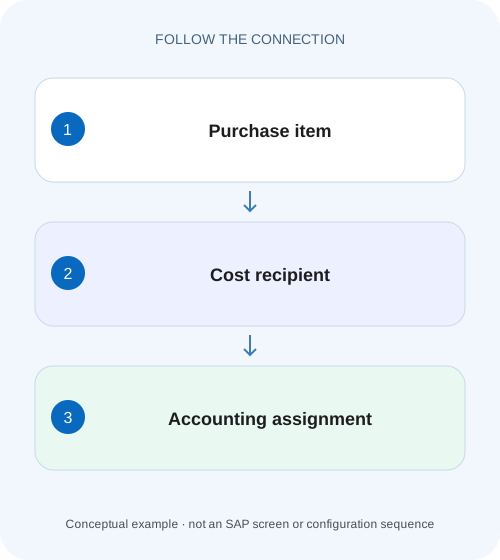
Allocate plant support purchases
A component manufacturer buys workshop supplies for two departments and must explain which responsibility receives each share of the cost.
The category identifies the kind of cost recipient
Purchasing account assignment explains where the cost of a consumption-oriented purchase belongs.
Scope and prerequisites
This guide concerns account-assigned purchasing in classic ERP and supported SAP S/4HANA scenarios.
Stock purchasing and direct consumption follow different intentions
A standard stock purchase adds material to the company’s inventory process; later consumption may charge an object.
Allocate plant support purchases
A component manufacturer buys workshop supplies for two departments and must explain which responsibility receives each share of the cost.
Compare the PO item assignment and distribution with the intended workshop owners before accounts payable processes the invoice.
| Reader | Business question | Evidence to carry forward |
|---|---|---|
| Manufacturing buyers and purchasing managers | Allocate plant support purchases | Compare the PO item assignment and distribution with the intended workshop owners before accounts payable processes the invoice. |
01 The category identifies the kind of cost recipient
Purchasing account assignment explains where the cost of a consumption-oriented purchase belongs. Its category determines the nature of the assignment and the required details. A cost center, asset or project reference represents a different business purpose; choosing an available object merely to save an item can produce the wrong financial treatment. [1]
The category is also different from the G/L account. The cost recipient identifies the organizational or business object that bears the cost, while the account classifies its accounting nature in the supported process. A complete purchase item may require both. This tutorial follows a departmental purchase with a controlled split and shows how to reconcile the resulting assignments.
02 Scope and prerequisites
This guide concerns account-assigned purchasing in classic ERP and supported SAP S/4HANA scenarios. Exact category codes, allowed item/category combinations, field requirements and posting timing depend on configuration and release. Multiple-account-assignment features also differ across classic transactions and Fiori applications; do not assume that every application supports every distribution option.
The reader should understand a purchase-order item and have display access to purchasing account assignments and the relevant cost objects. Obtain the business purpose, company/controlling context, valid recipients and the accounting owner’s intended treatment before entry. Use a training system for proposed postings. The illustrative value calculations exclude tax, freight, exchange differences and other conditions so that assignment logic remains visible.
03 Stock purchasing and direct consumption follow different intentions
A standard stock purchase adds material to the company’s inventory process; later consumption may charge an object. A direct-consumption purchase identifies its cost destination in the purchasing item. These are different document and valuation questions even if the physical goods look similar. [1]
For example, replacement parts held for general warehouse demand differ from supplies ordered specifically for a maintenance department. Equipment intended for capitalization requires the supported asset process and recipient data. A project purchase needs the relevant project assignment. The description “equipment” alone does not decide capitalization, and a convenient cost center does not override the approved accounting purpose.
Determine the intended business treatment before interpreting a missing-field message. If the selected category requests an asset when the purchase is actually departmental consumption, review the choice; do not create a fictitious asset or enter an unrelated number to make validation pass.
04 Worked case: department supplies split sixty/forty
The fictional item is 100 identical supply packs at 10 currency units per pack, giving a simplified net value of 1,000. Maintenance department M100 will use sixty packs and facilities department F200 forty. The approved process supports multiple account assignment with a quantity distribution for this item. Both recipients are valid for the organizational and time context. [2] [3]
The quantity distribution is 60 + 40 = 100 packs. At the same simplified unit price, the expected net allocation is 600 to M100 and 400 to F200. A percentage representation would be 60% and 40%, but the actual document distribution method must be recorded rather than mixing a quantity in one line with a percentage in another.
These values describe the intended full item. A partial receipt or partial invoice introduces a separate distribution question. The configured partial-processing rule determines how the relevant amount is allocated; it should not be inferred from the first listed account-assignment line.
| Assignment | Quantity | Share | Simplified net value |
|---|---|---|---|
| Maintenance M100 | 60 packs | 60% | 600 |
| Facilities F200 | 40 packs | 40% | 400 |
| Item total | 100 packs | 100% | 1,000 |
05 Read the assignment fields as a coherent set
Capture the selected category, recipient identifier, G/L context where required, company/controlling scope and distribution method. Check validity and organizational compatibility. An identifier that exists in a master-data display can still be unsuitable for the purchasing item’s organization or posting period. [2] [3]
SAP documents quantity, percentage and value-related distribution options in supported purchasing processes. Availability depends on the exact application and release. If a template or interface supplies a distribution indicator, verify that its line values use the same interpretation. Sixty in a percentage field and sixty in a quantity field happen to match in this hundred-pack example, so use a different total when testing the mapping.
Retain the business rationale for the split. It should explain why M100 bears sixty packs and F200 forty, rather than just documenting that the screen accepted the entries.
06 Enter and inspect the assignment in sequence
The following sequence can be used with the supported purchasing application. It emphasizes the checks that must survive copying, defaults and later follow-on documents.
Confirm the business purpose
Establish direct consumption for the two departments and the approved recipient type. Review whether the item should instead be stock, asset or project procurement.
Expected observation: The selected category reflects the intended accounting purpose.
Validate both recipients
Check M100 and F200 in the relevant organizational and validity context. Confirm required accounting fields.
Expected observation: Both assignments are eligible for this item.
Choose one distribution method
For the example, enter quantity allocation of 60 and 40 packs and reconcile to the 100-pack item.
Expected observation: No undistributed quantity or accidental mixed interpretation remains.
Inspect follow-on evidence
After authorized training receipt/invoice processing, display the resulting assignment and accounting evidence at the applicable posting stage.
Expected observation: Observed allocation can be compared with the approved intention.
07 Reason carefully through partial processing
Suppose a partial invoice covers a simplified 500 of the 1,000 net item. Under a proportional 60/40 distribution assumption, its illustrative allocation would be 300 and 200. That result follows from the assumption; it is not a promise that every configured process allocates partial invoices proportionally. SAP documents controls for partial-invoice distribution that must be checked. [3]
If the business wants the first sixty packs assigned entirely to M100 before F200 receives any, the intended partial-processing behavior differs from proportional distribution. Capture that requirement and determine whether the supported process and settings implement it. A full-item split alone does not communicate the timing rule.
At receipt and invoice, distinguish posting relevance from allocation. Valuated versus nonvaluated receipt behavior can change when financial effects arise. Use the installed process and actual accounting documents to establish timing instead of assuming every saved PO immediately posts expense.
08 Copied items and defaults need deliberate review
Copying a purchase item can retain account-assignment data that was valid for another department or project. Before saving the copied item, compare the business purpose, organizational context and recipients. A required field being filled is not proof that it is correct.
If a requisition is converted to an order, inspect how its assignments were adopted and whether approved changes occurred. Do not assume that the order is identical merely because it references the requisition. The buying process may change quantity, price or assignment within its permitted controls.
For interfaces, test the distribution indicator and each line’s meaning with a nontrivial example such as 80 packs split 48/32. That prevents a 100-unit fixture from hiding a percentage-versus-quantity mapping defect. Reconcile actual target data through supported display.
09 Troubleshoot category and allocation separately
A document that cannot be saved and a posted document that charges the wrong recipient are different failures. Use the observed boundary to select the investigation.
| Observation | Question | Next evidence |
|---|---|---|
| Required recipient field appears unexpected | Was the correct business category selected? | Purpose, category and field requirements |
| Recipient exists but is rejected | Is organization or validity incompatible? | Object validity and item company/controlling context |
| Split total is incomplete | Are quantities/percentages on one consistent basis? | Distribution indicator and line totals |
| Full item correct, partial invoice unexpected | Which partial distribution rule applies? | Item control and actual invoice allocations |
| Copied item charges old department | Was inherited assignment reviewed? | Source item and target assignment |
| PO saved but no expense document | At what event is the process financially relevant? | Receipt/invoice settings and accounting references |
10 Common mistakes and their practical effects
Do not select another category to suppress a required-field error without revisiting the business purpose. A category change can alter which recipient and posting behavior are expected. The system accepting the item does not certify correct accounting treatment.
Do not treat item category and account-assignment category as synonyms. One characterizes the purchasing process, while the other concerns assignment of the cost in the supported design. Their allowed combinations matter, but they answer different questions.
Do not assume the first assignment receives rounding differences or all partial costs. Check the actual supported behavior and resulting documents. For allocations involving currency precision, reconcile at the document’s permitted precision and retain the observed residual treatment rather than inventing a universal rule.
11 Acceptance checks for the worked purchase
For the positive check, verify 100 packs at 10, a 1,000 simplified net value, valid M100/F200 recipients and quantity allocations of sixty and forty. Follow the authorized financial event and compare the actual allocation with the approved full-item and partial-processing requirements.
For the negative check, use a worksheet with only sixty and thirty packs allocated; ten packs remain unexplained. Separately put F200 into an incompatible organizational context and identify why existence is not eligibility. These checks target meaningful defects rather than merely restating the screen fields.
For boundary checks, test one assignment, a fractional or rounding-sensitive distribution if supported, and a partial invoice that does not divide cleanly. Include a cancellation or correction in the training plan and inspect the reverse relationship. The expected outcome must account for both quantity and value basis.
12 Questions and a useful resolution statement
Can an item have multiple recipients? Supported processes can provide multiple account assignment, with distribution options depending on the application and release. Verify the actual allowed method and partial-processing controls.
Can an assignment be changed after follow-on documents? Restrictions and correction effects depend on the document state and process. Establish existing receipts/invoices before proposing a change, and use the supported correction path.
A useful case result reads: “The 100-pack consumption item is assigned by quantity, sixty to M100 and forty to F200. Simplified full-item net costs are 600 and 400. Partial-document allocation and actual posting timing were checked against the installed controls.” Continue with requisition/order relationships, service acceptance or invoice display when those documents are the next boundary.
Related services and next steps
Primary sources
Found this useful?
Share this guide with your network, or leave a like.
Your like is saved in this browser.