SAP Integration Suite message mapping: Structure is not the whole business meaning
A manufacturer's integration converts a supplier document with several component items into the receiver's line structure.

Source review:
START HERE · NO PRIOR TOPIC KNOWLEDGE NEEDED
What it is. Why it matters.
Message mapping transforms the structure of information between systems. Matching field names is insufficient if the source and target give those fields different business meanings.
Completely new to SAP?
Manufacturers use SAP to connect work such as buying components, recording inventory, planning production, shipping equipment and accounting for costs. SAP S/4HANA is an enterprise resource planning system: it connects these activities through shared business data.
Integration connects applications so they can exchange information. A delivered message still needs the receiving application to understand and accept its business meaning.
A transaction code, or t-code, is a shortcut to a task in classic SAP GUI. Fiori apps provide another way to work. Names and screens depend on the product and release; you do not need a live system to learn the concepts in this guide.

Scope and source-review notes
Scope and evidence
Source review by FAST SAP SOLUTIONS® editorial. This badge describes our editorial review; it does not represent SAP certification or independent endorsement.
SAP Cloud Integration graphical message-mapping resources, item context, semantic rules and mapping-test tooling. The XML order/invoice shapes and arithmetic are authored fixtures, not a released SAP invoice API.
Documentation review on 14 November 2026 using official SAP sources and indexed official excerpts where full Help text was unavailable. Scope and service or release differences are explained in the lesson. All datasets, requests and checks are illustrative; no customer SAP runtime execution or measured results are claimed.
A MANUFACTURING EXAMPLE
Preserve component line meaning in a supplier map
Same data type, different meaning
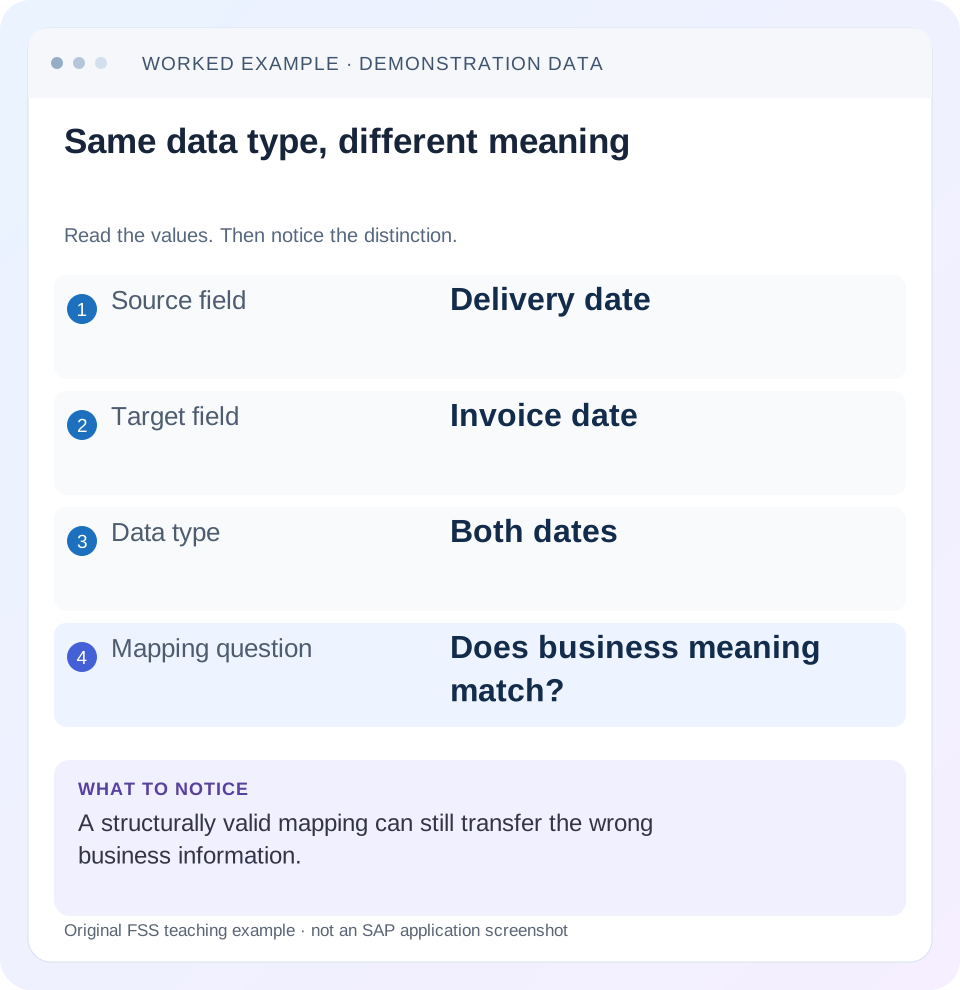
Read the example values
- Source field
- Delivery date
- Target field
- Invoice date
- Data type
- Both dates
- Mapping question
- Does business meaning match?
Words you’ll meet in this guide
- Message
- A package of information sent between systems.
- Payload
- The business content carried in a request or message.
- API
- A defined interface for another program to use.
- Receiver
- The system to which a message or request is sent.
- XML
- A format that organizes data into named, nested elements.
Preview the practical steps
SEE THE CONNECTION
See it in a simple example.
A small example to make the idea concrete.
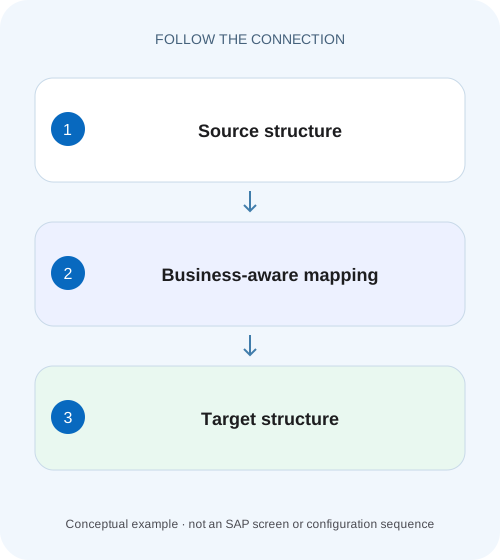
Preserve component line meaning in a supplier map
A manufacturer's integration converts a supplier document with several component items into the receiver's line structure.
Map business meaning and repeated-item context, not just field names
Message mapping transforms a defined source representation into a target representation.
Separate schema shape, mapping expression and business rule
The source schema describes available structure and occurrences.
Worked case: two order items become two invoice lines
Imagine source order ORD-1001 with item 10 quantity 2 at 5 EUR and item 20 quantity 3 at 7 EUR.
Preserve component line meaning in a supplier map
A manufacturer's integration converts a supplier document with several component items into the receiver's line structure.
Check item cardinality, identifiers and quantity meaning before treating a structurally valid output as a correct business document.
| Reader | Business question | Evidence to carry forward |
|---|---|---|
| SAP developers and application teams supporting manufacturers | Preserve component line meaning in a supplier map | Check item cardinality, identifiers and quantity meaning before treating a structurally valid output as a correct business document. |
01 Map business meaning and repeated-item context, not just field names
Message mapping transforms a defined source representation into a target representation. A target document can be well formed and schema compatible while carrying the wrong item quantity, unit or date. Begin with an explicit field rule and a small multi-item fixture, then verify structure, context and receiver meaning together. [1]
This tutorial is for Cloud Integration developers using a graphical message-mapping definition. You need source/target schemas, the deployed mapping identity and a sanitized test message. SAP supports several schema/resource types with documented limitations; availability and JSON behavior depend on the current environment. The order-to-invoice example below is an authored teaching contract, not a standard SAP invoice API or an approved business posting flow. [1]
02 Separate schema shape, mapping expression and business rule
The source schema describes available structure and occurrences. The target schema describes required output shape and types. Mapping expressions connect and calculate values, while the business rule explains why those values belong in the target. A date-to-date connection satisfies a type relationship but cannot decide whether delivery date is a valid invoice date.
Write important rules in a ledger before drawing connections. Include source location/context, target location/context, transformation, missing-input policy and verification. This makes a reviewer able to assess the meaning without reverse engineering every graphical line. Preserve namespace URIs and repeated-element identities in that ledger.
03 Worked case: two order items become two invoice lines
Imagine source order ORD-1001 with item 10 quantity 2 at 5 EUR and item 20 quantity 3 at 7 EUR. The agreed invoice mapping produces net line amounts 10 and 21 EUR, total 31 EUR. Source unit EA maps to receiver unit PCE only because this fictional interface explicitly agrees that correspondence.
The source contains RequestedDeliveryDate 2026-11-20 and BillingDate 2026-11-14. The target InvoiceDate must use BillingDate under this teaching contract. Copying delivery date because it is the first date field gives a structurally valid but semantically wrong invoice. If BillingDate is missing, follow the agreed error policy rather than substituting delivery date without authorization.
<Order xmlns="urn:fss:source" externalId="ORD-1001">
  <RequestedDeliveryDate>2026-11-20</RequestedDeliveryDate>
  <BillingDate>2026-11-14</BillingDate>
  <Items>
    <Item id="10"><Quantity>2</Quantity><Unit>EA</Unit><Price>5</Price></Item>
    <Item id="20"><Quantity>3</Quantity><Unit>EA</Unit><Price>7</Price></Item>
  </Items>
</Order>
04 Define the expected target independently of the implementation
Write the expected output before configuring the mapping. Its two lines retain source item identity, quantity/unit association and independently checked arithmetic. This target is a test oracle for the authored contract, not a claim that an SAP receiver accepts these exact fields.
| Target | Rule | Missing/invalid policy |
|---|---|---|
| InvoiceDate | Use BillingDate, not delivery date | Reject if required billing date absent |
| Line identity | Retain each source item ID | Reject missing/duplicate identity per contract |
| Quantity/Unit | Keep each item quantity with its mapped unit | Reject unknown required unit |
| NetAmount | Item quantity × item price in EUR | Reject invalid numeric input |
| NetTotal | Sum valid line net amounts | No complete total if a required line fails |
<Invoice xmlns="urn:fss:target" sourceOrder="ORD-1001">
  <InvoiceDate>2026-11-14</InvoiceDate>
  <Currency>EUR</Currency>
  <Lines>
    <Line id="10"><Quantity>2</Quantity><Unit>PCE</Unit><NetAmount>10</NetAmount></Line>
    <Line id="20"><Quantity>3</Quantity><Unit>PCE</Unit><NetAmount>21</NetAmount></Line>
  </Lines>
  <NetTotal>31</NetTotal>
</Invoice>
05 Configure the intended mapping artifact and schema versions
SAP documents creating a Message Mapping flow step, assigning or creating its .mmap definition and adding source/target message resources. Confirm the actual deployed reference and resource versions. A correct local mapping can be irrelevant if the flow still references an earlier artifact or dynamically selects another mapping. [1]
Use the exact source and target namespace/occurrence definitions. When schemas change, inspect existing mapping expressions and unused references deliberately; SAP’s mapping documentation notes that schema revisions do not automatically remove every old mapping definition. A successful save does not prove that an obsolete field or expression was removed from the intended contract. [2]
06 Preserve repeated-item context through every expression
For item 10, quantity 2 must remain associated with price 5 and identity 10. For item 20, quantity 3 belongs with price 7 and identity 20. Flattening repeated values or changing context without understanding it can pair 2 with 7 or reuse a header value for every line. The output can still contain two valid numeric amounts.
Inspect the relevant node’s input/output queues in the supported mapping test tooling. Use a fixture with different values per item so wrong pairing is visible; two identical items can hide a context defect. Do not add context-removal functions merely because a field is empty. Explain which parent grouping the target requires and verify the resulting line identities and counts.
For nested groups such as deliveries containing items, retain both levels of identity when testing. A field repeated once per delivery is not necessarily repeated once per item. A single-item sample cannot establish correct behavior for that hierarchy.
07 Keep value translation distinct from structural mapping
The EA-to-PCE correspondence is a business-identifier translation, not a universal conversion rule. Maintain it in the supported value-mapping mechanism or another explicit agreed contract. If a source unit is unknown, choose a documented rejection or fallback policy. Returning PCE for every input can create wrong quantities while satisfying the target schema.
Also distinguish code translation from numeric unit conversion. Mapping a label from EA to PCE under an agreed equivalent-piece definition leaves quantity unchanged. Converting a quantity from boxes to pieces requires a conversion factor and product/context rules. A lookup returning a unit string does not perform that arithmetic automatically. The related value-mapping lesson develops the identifier context in detail.
08 Specify types, optional values and rounding deliberately
A missing element, an empty element and explicit null in a supported JSON source can have different semantics. Define whether the target member is omitted, cleared, defaulted or rejected. Do not manufacture a default invoice date or zero amount simply because it makes the output syntactically complete.
For arithmetic, define decimal precision, rounding point and currency context under the business contract. Rounding each line and then summing can differ from summing higher-precision values and rounding once. Include a fractional fixture to expose that choice. Do not use floating-point formatting or a hard-coded two-decimal assumption as a universal rule for every currency and receiver.
For JSON targets, inspect the supported mapping settings for basic datatype handling. A string "true" differs from boolean true, and numeric text differs from a number. SAP documents settings affecting these outputs; verify the actual serialized target rather than reading only the graphical field label. [1]
09 Resolve arithmetic boundaries before approving the target
Extend the fixture with two lines whose unrounded net values are 0.335 EUR each. Under an explicitly agreed illustrative half-up rule to two decimal places, rounding each line gives 0.34 + 0.34 = 0.68. Summing first gives 0.670, which rounds to 0.67. Both calculations follow a coherent algorithm; only the receiver’s business contract determines the required result.
Record whether NetTotal is the sum of displayed rounded line values or a separately rounded high-precision total. Also define which field supplies price precision and whether quantity has fractional scale. Do not fix a one-cent difference by adding an unexplained adjustment to the last line. That hides the missing rule and can produce a different error when line order changes.
Keep currency and unit context throughout the calculation. A price per box cannot be multiplied by a quantity in pieces without the agreed conversion. For a negative fixture, deliberately provide that incompatible combination and verify rejection or the documented conversion path. For a boundary fixture, reorder lines and verify the business result remains stable under the chosen rule. Arithmetic tests should expose semantic assumptions rather than merely confirm that a numeric function returned a value.
10 Use whole-mapping and node-level tests for different questions
SAP’s mapping editor documents Simulate for the whole mapping and Display Queue for a selected XML node. Use whole-output comparison for the target contract and node-level inspection for a suspicious expression or repeated context. Check current tenant/runtime restrictions before depending on simulation availability. [2]
For ORD-1001, compare the complete target with the expected date, two line IDs, quantities, units, amounts and total. If only NetAmount is wrong, inspect that node’s quantity/price inputs and context. If the whole output uses an unexpected namespace or mapping variant, investigate schema/reference selection before changing arithmetic.
11 Troubleshoot the first incorrect value or occurrence
A successful transformation is a technical outcome. Use a rule ledger and expected fixture to determine whether it fulfilled the business contract. Keep the original source, mapping version and sanitized target together so another developer can reproduce the reasoning.
| Observation | Question | Next evidence |
|---|---|---|
| Invoice date equals delivery date | Was the wrong semantic source connected? | Rule ledger and selected date field |
| Amounts use another item price | Was item context lost? | Input/output queues and stable IDs |
| One line missing | Was occurrence creation suppressed or filtered? | Source item count and target line construction |
| Unknown unit becomes PCE | Was an arbitrary default used? | Value-mapping context and missing-value policy |
| Numbers emitted as strings | Are target datatype settings correct? | Target schema and actual JSON serialization |
| Local test passes, deployed flow differs | Which artifact was selected? | Deployed reference/version and runtime input |
12 Verify positive, negative and boundary fixtures
The positive fixture must produce InvoiceDate 2026-11-14, lines 10/20, amounts 10/21 and total 31 EUR. Verify every identity/value association, not only the grand total. A swapped pair of equal amounts or an omitted line balanced by duplication can hide behind a correct total.
For a negative fixture, remove BillingDate and confirm the agreed rejection without substituting RequestedDeliveryDate. Use an unknown unit and invalid price in separate cases so each error path is attributable. For boundaries, test no items, one item, repeated item IDs, optional fields absent and several nested parent groups.
After mapping tests pass, verify a permitted receiver-side scenario using the actual interface contract. Schema-valid output can still fail business authorization or validation. State whether receiver execution was performed or only designed. The final review should include rules, schemas, artifact identity, fixtures and unresolved runtime limits rather than only a screenshot of connected fields.
Related services and next steps
Primary sources
Found this useful?
Share this guide with your network, or leave a like.
Your like is saved in this browser.