ABAP CDS returns fewer rows for a user: Check DCL without removing security
A manufacturing buyer sees fewer operational rows than a broad-access support user because their authorized organizational scope can differ.

Source review:
START HERE · NO PRIOR TOPIC KNOWLEDGE NEEDED
What it is. Why it matters.
CDS defines reusable views of business data. DCL adds rules that restrict which rows a user may read, so different users can legitimately see different results.
Completely new to SAP?
Manufacturers use SAP to connect work such as buying components, recording inventory, planning production, shipping equipment and accounting for costs. SAP S/4HANA is an enterprise resource planning system: it connects these activities through shared business data.
Security separates verifying an identity from granting permission to perform business actions. A role groups relevant access, while restrictions define the allowed data and activities.
A transaction code, or t-code, is a shortcut to a task in classic SAP GUI. Fiori apps provide another way to work. Names and screens depend on the product and release; you do not need a live system to learn the concepts in this guide.

Scope and source-review notes
Scope and evidence
Source review by FAST SAP SOLUTIONS® editorial. This badge describes our editorial review; it does not represent SAP certification or independent endorsement.
ABAP CDS/DCL read protection using classic7.52 and current documented concepts. Entity type, SQL/framework access path, projection inheritance and authorization provisioning differ by installed release; sample custom objects require local creation and syntax checks.
Reviewed relevant official SAP indexed documentation excerpts on 14 November 2026. Examples, identifiers, amounts and expected observations are illustrative; no customer SAP execution was performed. Transaction availability, labels and results depend on the installed release, deployment and local configuration.
A MANUFACTURING EXAMPLE
Explain purchasing visibility across plants
Same view, different access
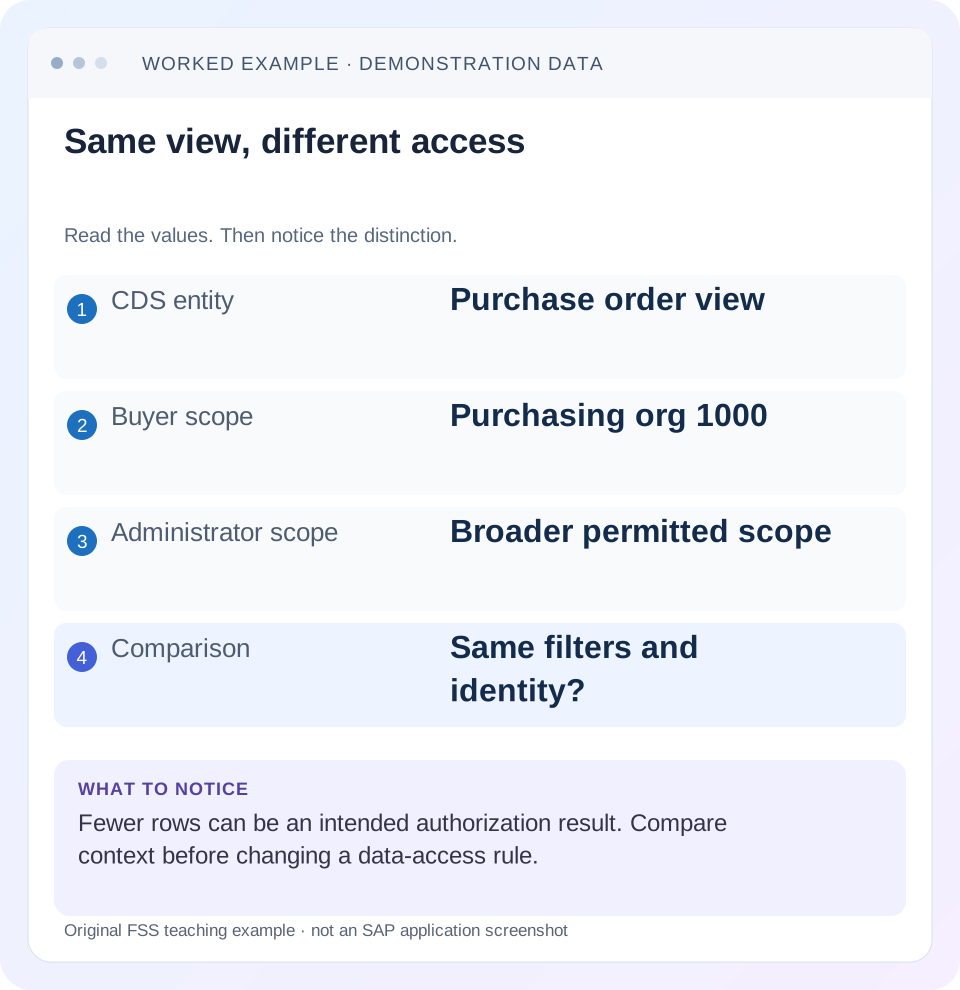
Read the example values
- CDS entity
- Purchase order view
- Buyer scope
- Purchasing org 1000
- Administrator scope
- Broader permitted scope
- Comparison
- Same filters and identity?
Words you’ll meet in this guide
- Authentication
- Checking who an identity belongs to.
- Authorization
- Permission for an action on particular data.
- PFCG
- The classic ABAP Role Maintenance transaction for organizing roles.
- Role
- A grouping of intended tasks and associated permissions.
- Authorization object
- A grouping of related permission fields checked by relevant SAP application logic.
- ABAP
- SAP’s programming language for business applications.
- CDS
- Core Data Services: reusable definitions of business data and relationships.
- SQL
- A language used to read and work with database data.
- DCL
- Data Control Language: definitions that restrict access to relevant CDS data.
- ADT
- ABAP Development Tools: SAP tools for ABAP development in Eclipse and, on supported systems, Visual Studio Code.
Preview the practical steps
SEE THE CONNECTION
See it in a simple example.
A small example to make the idea concrete.
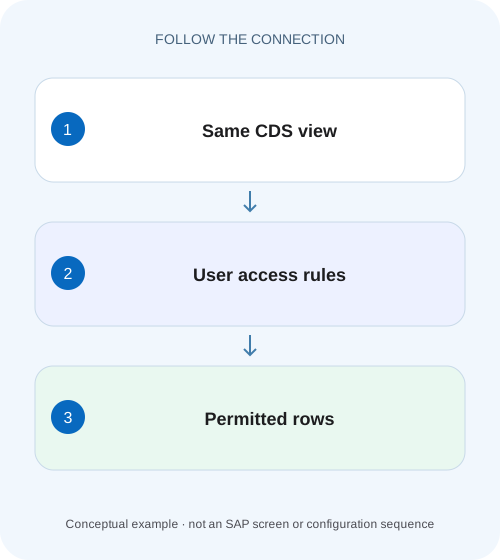
Explain purchasing visibility across plants
A manufacturing buyer sees fewer operational rows than a broad-access support user because their authorized organizational scope can differ.
Fewer CDS rows can be the intended authorization result
ABAP CDS access control can restrict a read according to Data Control Language rules, including conditions based on the current user’s authorizations.
Make the two reads comparable first
Record the exact CDS entity accessed, SQL/service path, filters, parameters, client, business date and runtime identity.
Understand implicit row conditions and PFCG aspects
SAP describes CDS access checks during supported entity reads through ABAP SQL/Open SQL and relevant framework paths.
Explain purchasing visibility across plants
A manufacturing buyer sees fewer operational rows than a broad-access support user because their authorized organizational scope can differ.
Check the actual CDS access-control and user context before removing security to make the counts match.
| Reader | Business question | Evidence to carry forward |
|---|---|---|
| SAP developers and application teams supporting manufacturers | Explain purchasing visibility across plants | Check the actual CDS access-control and user context before removing security to make the counts match. |
01 Fewer CDS rows can be the intended authorization result
ABAP CDS access control can restrict a read according to Data Control Language rules, including conditions based on the current user’s authorizations. Two users reading the same entity can legitimately receive different rows. Investigate that possibility without disabling the protection, while also checking ordinary filters, joins, parameters and execution context. [1] [2]
This tutorial is for ABAP/CDS developers and authorization analysts. It uses classic ABAP CDS/DCL concepts documented for ABAP 7.52 and current access-control guidance; view entities, projections, analytical paths and ABAP Cloud authorization provisioning require release-specific review. You need authorized ADT source access, relevant role evidence and permitted training identities. Code and data are illustrative and were not activated or executed in SAP.
02 Make the two reads comparable first
Record the exact CDS entity accessed, SQL/service path, filters, parameters, client, business date and runtime identity. A developer’s ADT preview and a browser request can use different users or different top-level entities. A technical integration user can also differ from the person who initiated the business request.
Compare the same known document keys, not just total counts. A row absent because an inner join has no matching text is different from an unauthorized purchasing organization. If a date parameter or client differs, resolve that ordinary selection difference before attributing the result to DCL. Equal-looking application URLs do not prove equivalent backend queries.
03 Understand implicit row conditions and PFCG aspects
SAP describes CDS access checks during supported entity reads through ABAP SQL/Open SQL and relevant framework paths. Access conditions can filter the result rather than produce a visible “no authorization” error for each excluded row. A successful SELECT returning two rows can therefore be a correct protected read. [1] [2] [3]
A PFCG aspect maps CDS elements to authorization-object fields and relevant fixed activity values. The DCL role is not simply another PFCG role to assign by name. The documented MappingRole=true pattern applies the access rule generally, while the referenced user-dependent authorization values determine which data passes. Inspect both the active access source and the actual user authorization values.
04 Worked case: one buyer sees two of three orders
Fictional entity ZI_FSS_PO contains three purchase-order rows in one declared client/company/currency context. Buyer U100 is authorized to read purchasing organization 1000; reviewer UALL has approved read scope 1000 and 2000. Assume the example rule is active on the entity actually read and no other condition or grant changes the result.
U100 should see PO1/PO2, count 2 and illustrative total 300 EUR. UALL should see all three, count 3 and total 600 EUR. The missing PO3 for U100 is expected under the declared business rule. The broader reader is an authorized comparison identity, not a technique for bypassing production access.
| Order | Purchasing organization | Net amount | U100 expected |
|---|---|---|---|
| PO1 | 1000 | 100 EUR | Visible |
| PO2 | 1000 | 200 EUR | Visible |
| PO3 | 2000 | 300 EUR | Excluded |
| U100 result | 1000 only | 300 EUR | 2 rows |
| UALL result | 1000 and 2000 | 600 EUR | 3 rows |
05 Read a small DCL example with explicit prerequisites
The following original teaching pattern assumes an active custom authorization object Z_FSS_PO with EKORG and ACTVT fields, an existing CDS entity ZI_FSS_PO exposing PurchasingOrganization, and properly provisioned classic authorizations for the test users. Those objects are prerequisites, not released SAP APIs or delivered configuration. Validate syntax and the supported model in your installed release. [3] [4]
The left side is the CDS element; EKORG is the authorization field providing its permitted values. ACTVT 03 is the declared read activity. Do not replace a real application’s object with this invented one. The example shows how to reason about a mapping, not how to redesign an existing SAP authorization concept.
@EndUserText.label: 'Illustrative purchasing organization read scope'
@MappingRole: true
define role ZR_FSS_PO {
  grant select on ZI_FSS_PO
    where ( PurchasingOrganization ) =
      aspect pfcg_auth( Z_FSS_PO, EKORG, ACTVT = '03' );
}
06 Check the accessed entity, not only its data source
Access control is defined for the referenced CDS entity; it is not automatically inherited through every higher view. SAP’s guidance explains that lower-entity access controls are generally not applied merely because a higher entity selects from them, with particular tools/scenarios having their own generated inheritance behavior. Identify the actual top-level read. [2] [5]
If the application reads ZC_FSS_PO rather than ZI_FSS_PO, inspect ZC’s protection and any explicit inherited conditions. A lower entity’s correct preview does not prove the consumer entity has the same row protection. Conversely, a restrictive condition on the top-level entity can explain fewer rows even when a base-table inspection contains more data. Record the full relevant entity chain.
07 Inspect annotation and active-source state accurately
The authorizationCheck annotation governs applicable behavior together with the existence and state of access controls. The reviewed guidance explains that #CHECK expects a DCL role but does not create one automatically; #NOT_REQUIRED can still execute an existing role. Therefore reading #NOT_REQUIRED as “DCL is disabled” is incorrect in the documented model. [6]
Annotation defaults and available values vary across documented versions, so inspect the explicit value and installed release. Also confirm that the relevant DCL and DDL changes are active and transported in the tested system. An editor showing an inactive correction does not prove runtime uses it. Do not change the annotation or add privileged access merely to make a row-count comparison larger.
08 A practical diagnostic sequence
Use a small expected row set and permitted identities. The objective is to explain allowed and excluded rows, not maximize data returned.
Freeze query context
Record accessed entity/path, parameters, filters, client and runtime user for both reads.
Expected observation: The comparison is like-for-like.
Identify the first missing key
Choose PO3 and verify ordinary source/join/date conditions through authorized evidence.
Expected observation: The missing row is concrete.
Read active access conditions
Inspect every relevant access control, mapped element/object/field and fixed condition on the accessed entity.
Expected observation: PurchasingOrganization-to-EKORG is explicit.
Compare approved user values
Verify U1001000 versus UALL1000/2000 through the supported authorization process.
Expected observation: The expected 2-versus3 result has an authorization basis.
Verify the actual application path
Retest the intended read after any approved correction and preserve PO3 exclusion for U100.
Expected observation: A developer preview alone does not certify the consumer.
09 Separate DCL from application and write authorization
A read condition does not replace every service, transaction, business-object or action authorization. A user can see an order but lack approval/update permission, or fail service access before CDS row conditions are relevant. Identify the layer of the actual denied task.
For the example, U100 reading PO1 does not establish permission to approve it. If the complaint is an approval button denial, inspect the application’s documented action checks rather than broadening the read DCL. Likewise, a successful login is not evidence of row access, and a missing UI tile is not necessarily a DCL result. Keep identity, operation access and row selection separate.
10 Troubleshoot row filtering without weakening it
A diagnostic conclusion should name the condition or context difference that explains the first missing key.
| Observation | Inspect | Possible cause |
|---|---|---|
| Only organization 2000 missing | Mapped organizational authorization | Intended user scope |
| Rows disappear for every user | Fixed DCL and ordinary query conditions | Common filter/join or active-source issue |
| Base view differs from consumer | Top-level protection/inheritance | Different accessed entity |
| #NOT_REQUIRED present but rows filtered | Existing active DCL | Annotation does not universally suppress it |
| Role change made, result unchanged | Actual runtime user/system/active authorization | Different identity or provisioning state |
| Read works, action denied | Application/write authorization | Different security layer |
11 Review all relevant grants and conditions
A single restrictive-looking access source does not establish the effective result if other applicable access rules or framework behavior participate. Inspect the complete active design and its documented combination semantics for the release. Do not reason about authorization as though the first file opened is the only rule.
If PO3 unexpectedly appears for U100, establish every relevant grant and actual organizational value before blaming the restrictive mapping. If PO1 disappears, inspect fixed conditions and data joins as well as authorization. A troubleshooting change must preserve both kinds of evidence: required rows appear for legitimate users and excluded rows stay protected. One successful demonstration under a broad user can conceal a security regression.
12 Verify positive, negative and boundary cases
The positive worksheet check expects U100 seeing PO1/PO2 totaling 300 and UALL seeing PO1/PO2/PO3 totaling 600 on the declared basis. The negative check directly requests or filters PO3 under U100 and confirms the supported protected result rather than switching identity. Also verify that a no-org-authority test identity receives no example rows where the declared active rule applies.
A boundary test adds a fourth row with an initial or unexpected organizational value and asks how the actual equality/aspect semantics treat it; do not assume blank means unrestricted. Another reads the consumer projection and verifies its own protection. These are proposed tests; the sample code was not compiled and no SAP authorization trace or customer data query was executed.
13 Record a reproducible explanation
A useful result reads: “The application reads ZI_FSS_PO under U100 with the stated filters. Active access mapping compares PurchasingOrganization with approved EKORG read values. U100 has 1000; PO3 is 2000 and is excluded. PO1/PO2 remain visible. The same path under approved broader UALL returns the declared third row.” Replace teaching identifiers with protected real evidence.
If the cause remains open, identify the missing proof: active source, runtime identity, authorization values, source row or consumer path. Do not report “DCL issue” solely from different counts. After correction, keep the positive/negative key set and actual path in the review receipt so later refactoring does not silently change the access boundary.
14 Frequently asked questions
Does a successful SELECT prove unrestricted access? No; row conditions can produce a filtered successful result. Does DCL automatically follow every lower view? No universal inheritance assumption is safe. Is #CHECK sufficient without a role? It does not create a protective role by itself in the documented scope.
Can I disable DCL to confirm the theory? Use authorized source/context inspection and controlled test identities that exercise the intended protection. Use SU53 guidance for appropriate classic authorization evidence, but do not treat absence of a familiar error as proof that no row filtering exists. Identity and application-role lessons help when the actual failure occurs before the CDS read.
Related services and next steps
Primary sources
Found this useful?
Share this guide with your network, or leave a like.
Your like is saved in this browser.