ABAP Cloud released APIs: Check the release contract before using an object
A manufacturer builds an order-summary extension and must distinguish a technically visible SAP object from an interface released for its development model.

Source review:
START HERE · NO PRIOR TOPIC KNOWLEDGE NEEDED
What it is. Why it matters.
An API is an interface another program can use. A released SAP API has an explicit permitted use; merely finding an object in a system does not make it a supported extension point.
Completely new to SAP?
Manufacturers use SAP to connect work such as buying components, recording inventory, planning production, shipping equipment and accounting for costs. SAP S/4HANA is an enterprise resource planning system: it connects these activities through shared business data.
ABAP is SAP’s programming language for business applications. A program reads data, applies rules and produces a result. Start with the objects involved before investigating code.
A transaction code, or t-code, is a shortcut to a task in classic SAP GUI. Fiori apps provide another way to work. Names and screens depend on the product and release; you do not need a live system to learn the concepts in this guide.

Scope and source-review notes
Scope and evidence
Source review by FAST SAP SOLUTIONS® editorial. This badge describes our editorial review; it does not represent SAP certification or independent endorsement.
ABAP Cloud released-object consumption; exact contracts, visibility and component-access capabilities depend on product and backend release.
Primary documentation reviewed on 14 November 2026 using official indexed excerpts. Documentation review only; authored examples were not compiled or executed in an SAP system.
A MANUFACTURING EXAMPLE
Choose a supported contract for a plant extension
Existence versus supported use
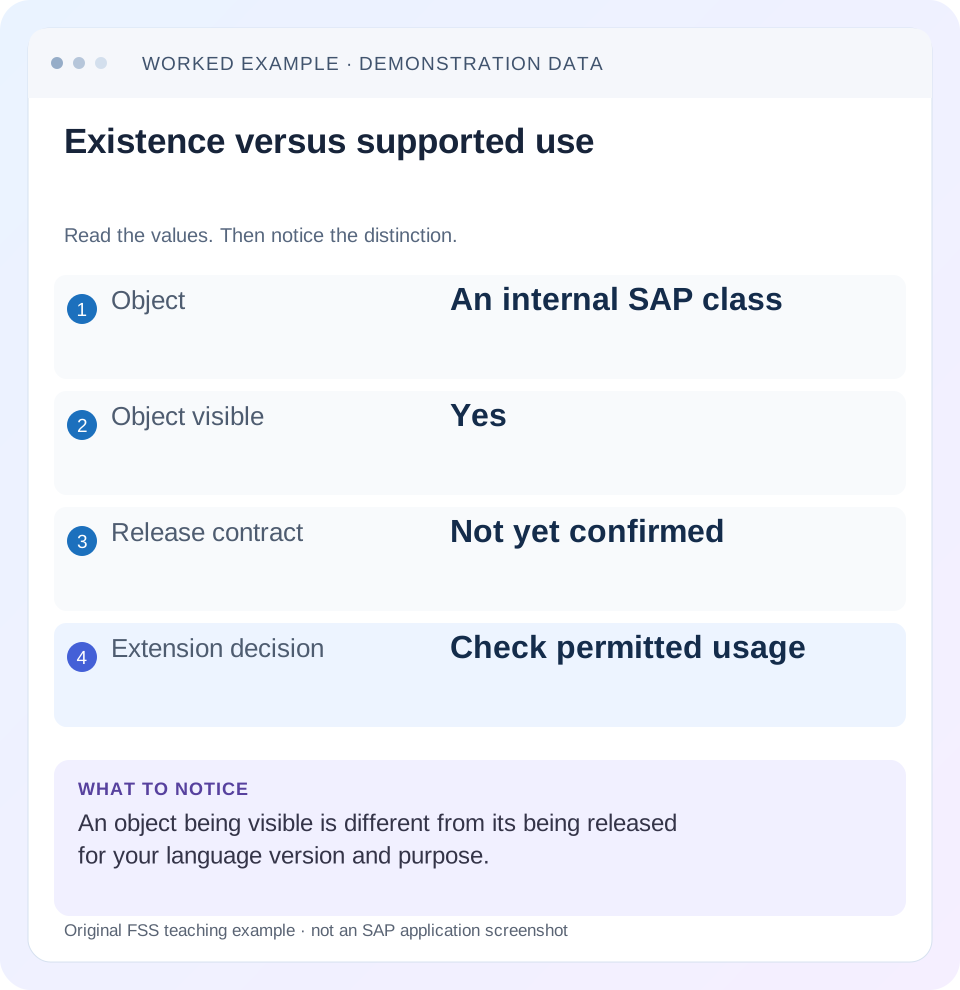
Read the example values
- Object
- An internal SAP class
- Object visible
- Yes
- Release contract
- Not yet confirmed
- Extension decision
- Check permitted usage
Words you’ll meet in this guide
- Program
- A set of instructions executed by a computer.
- Class
- A reusable unit that groups data with operations called methods.
- Database
- Organized information kept beyond one program execution.
- Internal table
- A list of rows held temporarily in an ABAP program’s memory.
- Key
- One or more fields used to identify or find a record.
- ABAP
- SAP’s programming language for business applications.
- CDS
- Core Data Services: reusable definitions of business data and relationships.
- API
- A defined interface through which programs exchange data or request actions.
- ADT
- ABAP Development Tools: SAP tools for ABAP development in Eclipse and, on supported systems, Visual Studio Code.
Preview the practical steps
SEE THE CONNECTION
See it in a simple example.
A small example to make the idea concrete.
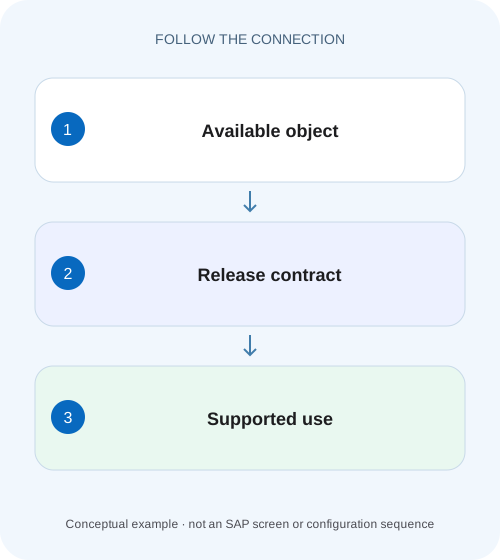
Choose a supported contract for a plant extension
A manufacturer builds an order-summary extension and must distinguish a technically visible SAP object from an interface released for its development model.
Visibility is the start of discovery, not permission to depend on an object
For ABAP Cloud development, inspect an object's API state, release contract and applicable visibility before using it as a dependency.
Scope: ABAP Cloud, language versions and software components
This guide is for developers planning an ABAP extension or reviewing a legacy dependency.
Read release contract and visibility together
C0 identifies dedicated extension use, C1 system-internal consumption and C2 remote API use in the reviewed documentation.
Choose a supported contract for a plant extension
A manufacturer builds an order-summary extension and must distinguish a technically visible SAP object from an interface released for its development model.
Check the actual release and consumption contract before making the custom application depend on the object.
| Reader | Business question | Evidence to carry forward |
|---|---|---|
| SAP developers and application teams supporting manufacturers | Choose a supported contract for a plant extension | Check the actual release and consumption contract before making the custom application depend on the object. |
01 Visibility is the start of discovery, not permission to depend on an object
For ABAP Cloud development, inspect an object's API state, release contract and applicable visibility before using it as a dependency. A class or CDS entity can exist in the system and be visible in ADT while remaining unavailable for your intended extension context. The syntax and consistency checks enforce a development model, not simply whether a name can be found. [1]
The practical question is “released for which use, in this system and language version?” C1 system-internal consumption and C2 remote API consumption are different contracts. A remote endpoint being published does not automatically make its internal implementation class a permitted local dependency. This tutorial turns that distinction into a repeatable selection and verification process. [1]
02 Scope: ABAP Cloud, language versions and software components
This guide is for developers planning an ABAP extension or reviewing a legacy dependency. Record whether the source object uses ABAP for Cloud Development, ABAP for Key Users or standard ABAP. Also record product edition, backend release, package and software component. These establish the environment in which release metadata and allowed access are interpreted.
ABAP Cloud's restrictions aim to decouple extensions from internal SAP implementation. Access within a software component and access across component boundaries are not identical situations. Do not simplify the model to “every custom object needs a SAP release flag.” Use the documented component and language-version rules for your own object relationships, while checking the appropriate released contract for SAP dependencies. [2]
03 Read release contract and visibility together
C0 identifies dedicated extension use, C1 system-internal consumption and C2 remote API use in the reviewed documentation. Other contracts address configuration content and AMDP use. The contract describes the purpose for which interface stability is provided; it is not a ranking in which a higher number permits every lower-numbered use. [1]
For applicable C0 and C1 objects, visibility distinguishes developer extensibility with ABAP for Cloud Development from key-user extensibility with ABAP for Key Users. A release intended for key-user apps may therefore fail the needs of a developer extension. Capture the exact label and supported purpose rather than recording only a green or released indicator. [1]
| Intended task | Contract concept | Additional checks |
|---|---|---|
| Call a local interface in an extension | C1: use system-internally | Language-version visibility and object capabilities |
| Consume a remote business service | C2: use as remote API | Protocol, service version and communication setup |
| Extend a dedicated extension point | C0: extend | Permitted extension mechanism and visibility |
| Reuse an object in AMDP | C4: AMDP use | Runtime and supported object type |
| Manage configuration persistence | C3: configuration content | Dedicated editor/API contract |
04 Worked case: an order summary extension
A fictional extension ZCL_ORDER_SUMMARY needs order ID, company code, currency and net amount. A developer finds an internal SAP class whose private implementation reads exactly these values. Another team suggests a released CDS interface, while an integration developer offers a remote order service. These are three different candidates, even if all can reveal similar data.
Write the real requirement first: an authorized local read for one order in an ABAP Cloud extension, with amount and currency semantics retained. The internal class fails if it lacks the required release contract. The CDS candidate must be checked for C1 visibility and required fields. The remote service may fit a side-by-side integration, but invoking it locally just to avoid understanding the internal extension model adds another architectural boundary.
| Candidate | Evidence to collect | Possible decision |
|---|---|---|
| Internal implementation class | API state and supported public interface | Reject as dependency if unreleased |
| Released CDS order interface | C1 visibility, elements, authorization behavior | Use if contract covers required read |
| Remote order service | C2 service contract and communication context | Use for the intended integration boundary |
| Direct base-table read | Release status and supported semantics | Do not assume table existence permits access |
05 Find and inspect candidates in ADT
Use the supported released-API repository views or object-search filters in your installed ADT version to locate relevant candidates. Then open the exact object in the correct project. Check API State where that object type supports it, and read the interface, documentation and dependencies exposed to consumers. A search result is a discovery aid; the object metadata is the decision evidence. [3]
Search for a business capability as well as a technical name. A predecessor may have a released successor with another naming pattern. If an API is deprecated, inspect its documented successor and migration implications. Do not choose an old object solely because a widely circulated code sample uses it. Current availability in your backend is more relevant than the age or popularity of an example. [1] [3]
06 Check the full usable contract, not only the release label
A released read interface still needs to meet the business requirement. Inspect key fields, associations, parameter requirements, amount/currency references and supported capabilities. Determine how authorizations and filters apply in the intended consumption path. An interface that omits a required dimension cannot be repaired by joining arbitrary unreleased tables without revisiting the extension design.
For a writing API, inspect transactional behavior, error reporting and supported operation sequencing. A stable public interface does not mean every sequence of calls is valid. The caller must obey preconditions and transaction ownership. For the order-summary read, test missing orders and unauthorized scope so an empty result is not automatically interpreted as an accounting value of zero.
07 Prove the dependency in the intended language version
Create a minimal consumer in an authorized development package using the same language version and component context as the planned extension. Reference only the candidate interface and required public types. Activate it and run the applicable checks. A successful reference from a standard-ABAP scratch report does not prove the same reference is allowed in ABAP Cloud.
Use a small controlled data fixture for behavior once activation succeeds. For the order summary, compare order identity, amount and currency, then test an unknown key. Record every activation or check diagnostic exactly. If a parameter type is not usable, inspect whether you chose an internal signature or an unsupported overload rather than immediately attempting to bypass the checker.
Record the consumer context
Capture source language version, software component, backend release and target product.
Expected observation: The planned dependency has a defined context.
Record provider metadata
Inspect release contract, API state, visibility and documented successor where relevant.
Expected observation: The permitted use is explicit.
Build the smallest consumer
Reference only required public elements in the real development context.
Expected observation: Activation tests the actual intended access.
Verify business semantics
Compare identity, authorization outcome, amount and currency for known and missing keys.
Expected observation: Technical eligibility and business suitability are both assessed.
08 When no released candidate covers the requirement
Separate a missing capability from a difficult search. Recheck the business operation, available APIs and supported extension mechanisms. A projection or composition of released interfaces may satisfy the requirement without a new internal dependency. Sometimes the correct design is a different process boundary or a smaller requirement.
In landscapes that support a governed compatibility or wrapper approach, follow the documented architecture and ownership rules for that product. A wrapper is not a universal loophole: it does not transform arbitrary internal implementation into a SAP-supported public contract. Record any remaining standard-ABAP dependency and its lifecycle responsibility candidly. Do not copy SAP source into a customer namespace and describe the result as released.
09 Troubleshooting release-related failures
Read the complete diagnostic and identify whether it concerns language syntax, object release, visibility, component access or a genuinely absent capability. These can produce similar developer frustration while requiring different corrections.
| Observation | Question | Next action |
|---|---|---|
| Object visible but reference rejected | Correct contract and visibility? | Inspect API State in this backend |
| Works in standard ABAP only | Different language-version rules? | Test a minimal Cloud consumer |
| API marked deprecated | Is a successor documented? | Plan migration against its contract |
| Remote service exists; local class blocked | Confusing C2 with C1? | Consume the appropriate public boundary |
| Release label present; field missing | Does interface cover the requirement? | Choose another released model or revise design |
| Customer object blocked across components | Are component access rules satisfied? | Review component relations and applicable release |
10 Verify positive, negative and lifecycle cases
A positive check activates the minimal consumer and returns a known order with its correct currency. A negative check uses a missing or out-of-scope order and confirms the documented result without leaking unrelated data. A boundary check asks for an optional field, initial value or unsupported operation and records the actual contract behavior.
For lifecycle verification, include the dependency in the project's appropriate ATC and compatibility review. Record the product and release where it was reviewed. Documentation-based eligibility today does not establish availability in every earlier or later edition. Keep the successor decision visible so a future upgrade does not become a fresh archaeology exercise.
11 Document a short dependency decision
A useful decision reads: “The order summary is a local ABAP Cloud read. Candidate X was inspected in backend Y for C1 with Cloud-development visibility. Required order, company, amount and currency elements are available; missing-key and authorization behavior are covered by the proposed checks.” Replace those placeholders with real evidence before claiming implementation validation.
Include rejected candidates only when they explain a material tradeoff, such as choosing local released consumption over a remote integration boundary. The maintenance record should make the selected interface's purpose and limitations understandable without retaining a long search history. Link the resulting implementation and actual validation record when available.
12 Frequently asked questions
Does released mean every field is suitable for my report? No. It establishes a permitted stable interface for a purpose; you still need the correct business semantics and capabilities.
Does C2 imply C1? No. Remote and local use are separate release purposes. Inspect each relevant contract.
Can I mark an SAP object released myself? Do not change SAP-delivered metadata to bypass the development model. Customer release capabilities apply to your owned objects within the documented rules.
Where should I investigate a failed check? Use the related ATC lesson to preserve check context, and the ADT navigation lesson to verify the exact object and project. Those steps often expose a wrong system, wrong language version or mistaken predecessor before a larger redesign is needed.
Related services and next steps
Primary sources
Found this useful?
Share this guide with your network, or leave a like.
Your like is saved in this browser.