SAP SARA data archiving: Understand write, delete and read before planning a run
A manufacturer considers archiving closed operational documents while some related work remains open.

Source review:
START HERE · NO PRIOR TOPIC KNOWLEDGE NEEDED
What it is. Why it matters.
SAP data archiving uses application-specific objects to move eligible historical data into archive files and manage supported database deletion and later access.
Completely new to SAP?
Manufacturers use SAP to connect work such as buying components, recording inventory, planning production, shipping equipment and accounting for costs. SAP S/4HANA is an enterprise resource planning system: it connects these activities through shared business data.
Migration moves business data into a target system. Lifecycle management controls how software or configuration changes move between environments; both need evidence of the target result.
A transaction code, or t-code, is a shortcut to a task in classic SAP GUI. Fiori apps provide another way to work. Names and screens depend on the product and release; you do not need a live system to learn the concepts in this guide.

Scope and source-review notes
Scope and evidence
Source review by FAST SAP SOLUTIONS® editorial. This badge describes our editorial review; it does not represent SAP certification or independent endorsement.
Classic SAP data archiving with SARA. Archiving objects, retention requirements, storage integration and automatic follow-on jobs vary by application and release.
Documentation review on 14 November 2026 using official SAP sources and indexed official excerpts where full Help text was unavailable. Scope and service or release differences are explained in the lesson. All datasets, requests and checks are illustrative; no customer SAP runtime execution or measured results are claimed.
A MANUFACTURING EXAMPLE
Preserve access to manufacturing document history
Plan three separate archiving checks
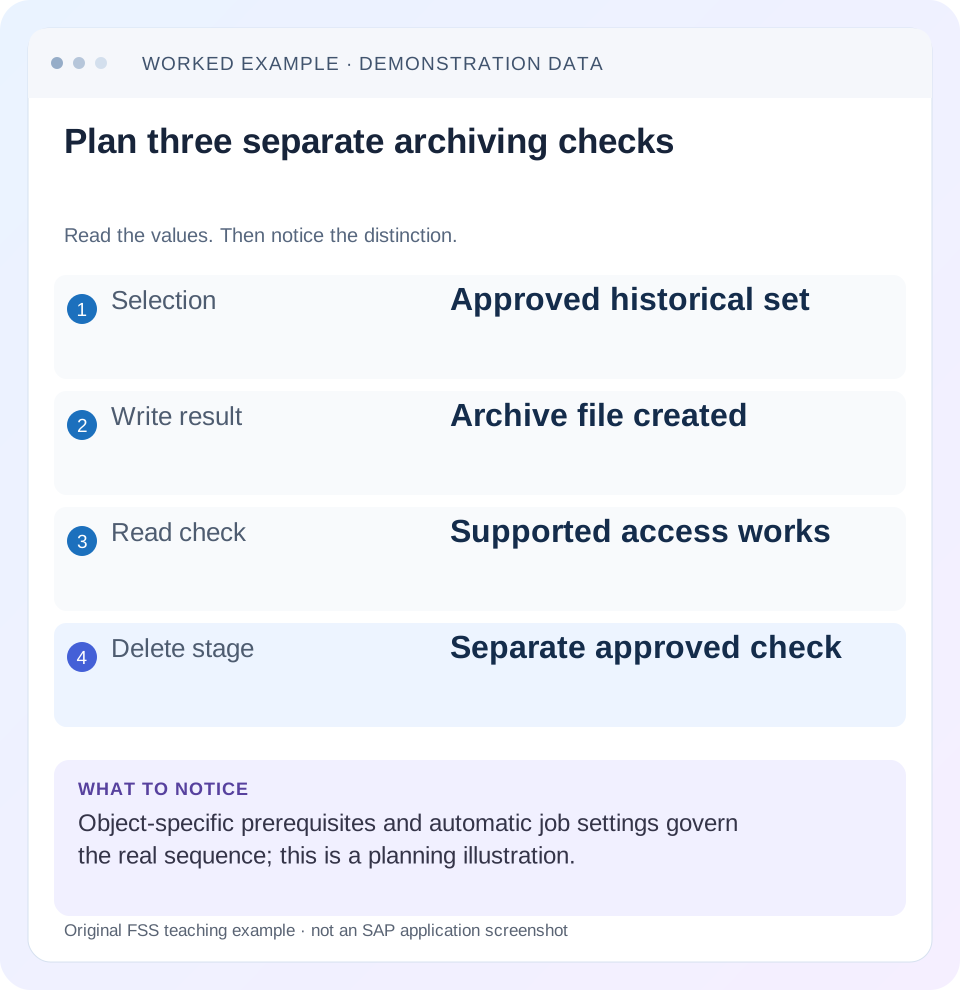
Read the example values
- Selection
- Approved historical set
- Write result
- Archive file created
- Read check
- Supported access works
- Delete stage
- Separate approved check
Words you’ll meet in this guide
- Source
- The system or dataset information comes from.
- Target
- The destination system or dataset.
- Validation
- A check that information meets required rules.
- HANA
- SAP’s database platform.
Preview the practical steps
SEE THE CONNECTION
See it in a simple example.
A small example to make the idea concrete.
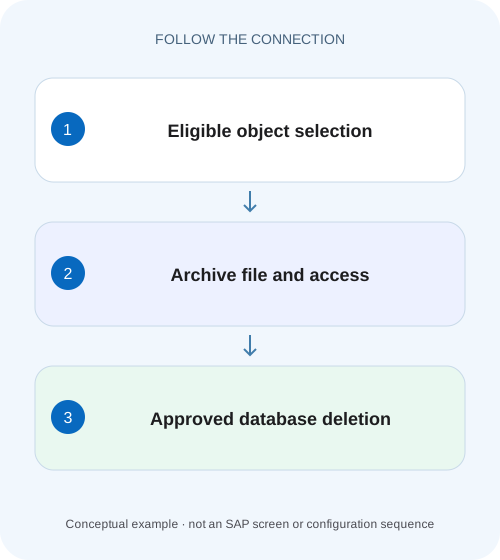
Preserve access to manufacturing document history
A manufacturer considers archiving closed operational documents while some related work remains open.
Plan retained history and database deletion as separate outcomes
Classic SAP data archiving uses application-specific archiving objects to write eligible data to archive files and manage supported database deletion and later access.
Understand the object boundary before choosing tables
An archiving object describes a supported application data unit and the programs that handle it.
Worked case: two closed objects qualify, one open object remains
Imagine an approved historical selection containing object F1001, closed with value 100 EUR; F1002, closed with value 200 EUR; and F1003, still open with value 300 EUR.
Preserve access to manufacturing document history
A manufacturer considers archiving closed operational documents while some related work remains open.
Distinguish archive write, deletion and later read access before assuming a successful write removed database records or proved retrieval.
| Reader | Business question | Evidence to carry forward |
|---|---|---|
| SAP developers and application teams supporting manufacturers | Preserve access to manufacturing document history | Distinguish archive write, deletion and later read access before assuming a successful write removed database records or proved retrieval. |
01 Plan retained history and database deletion as separate outcomes
Classic SAP data archiving uses application-specific archiving objects to write eligible data to archive files and manage supported database deletion and later access. SARA is the administration entry point, but the object’s programs, eligibility checks and settings govern the real sequence. A successful write is not proof of database deletion, and a successful delete is not proof that users can retrieve the required history. [1] [2]
This tutorial is for Basis administrators and application/data owners planning an archiving run. You need the installed archiving-object documentation, approved business scope, retention/hold decisions and authorized test access. Examples use fictional business-object keys. Real selection fields, preparation, storage integration, automatic follow-on jobs and reload support vary by object and release.
02 Understand the object boundary before choosing tables
An archiving object describes a supported application data unit and the programs that handle it. That unit can span several database tables and dependent records. A large table name alone does not identify which business objects are eligible or how their related data must remain consistent.
Identify the owning application and the actual object used for its process. Review prerequisites such as document completion, age, dependencies and object-specific preparation in the installed guide. Do not infer a universal retention period from a technical example. The business/data owner defines which historical objects may enter the supported archiving lifecycle and which remain excluded.
03 Worked case: two closed objects qualify, one open object remains
Imagine an approved historical selection containing object F1001, closed with value 100 EUR; F1002, closed with value 200 EUR; and F1003, still open with value 300 EUR. Assume this fictional application’s documented eligibility rule excludes open objects. The expected write contains F1001 and F1002, while F1003 remains in active application data.
After the supported delete phase for the eligible set, the two archived objects should be available through the intended archive read path and the open object should remain active. The ledger counts logical business objects, not physical table rows. An archiving object can write/delete many related rows and can have object-specific auxiliary cleanup, so do not expect a universal one-document/one-row relationship.
| Object | State/value | Expected treatment |
|---|---|---|
| F1001 | Closed; 100 EUR | Eligible under stated fixture rule |
| F1002 | Closed; 200 EUR | Eligible under stated fixture rule |
| F1003 | Open; 300 EUR | Remain active; exclusion explained |
| Eligible subtotal | 2 objects; 300 EUR | Reconcile archive and delete results |
04 Inspect the complete job chain before starting write
Check the selected variant, scope, test/productive behavior where provided and object-specific technical settings. SAP documents automatic delete-job options in relevant archiving scenarios. Starting a write can therefore schedule later productive processing according to configuration; it is not universally an isolated harmless copy. [3]
Record whether storage is performed before deletion, whether deletion starts automatically and which postprocessing steps exist. Confirm the actual background job identities and users. A team expecting to pause between write and delete must configure and approve that sequence through the supported process before launching the run. Do not discover automatic deletion only after the first file closes. [3] [4]
05 Select and validate a small object-specific test scope
Use a permitted representative set in a suitable test landscape. Include the two eligible objects and the open excluded object from the fixture. Save the exact selection and its business rationale. Read the object’s test mode and logs if available rather than inventing a generic checkbox that every archiving program shares.
Compare proposed eligible counts with application status and dependencies. If F1002 is excluded unexpectedly, read its reason before changing dates or completion flags. The exclusion may protect a still-required dependent process. A lower-than-selected archived count can be correct when the object performs documented checks. Preserve selected, eligible, written, deleted and retained counts separately.
06 Verify archive creation and storage evidence
After the supported write, inspect its completion, archive session/file references, object counts and error/spool information. A background job ending does not prove every selected object was written. Compare F1001/F1002 identities and relevant totals with the expected 300 EUR fixture subtotal.
Where a connected storage system is used, inspect storage status and actual supported access. A local file path and a stored archive object are different observations. Verify the location that the later delete/read process is configured to use. If the file is unavailable after movement, investigate storage integration and permissions before proceeding through a sequence that depends on it. [4]
Follow the fixture through the intermediate duplicate representation. Before writing, active data contains all three objects with a logical total of 600 EUR. After a successful write but before deletion, active data can still contain all three while the archive also contains F1001/F1002 worth 300 EUR. Adding those two representations produces 900 EUR, which is not a new business total. The same historical objects are represented twice during this phase.
After the supported deletion completes, the intended logical reconciliation is active F1003 at 300 EUR plus archived F1001/F1002 at 300 EUR, preserving the original 600 EUR across the two access paths. This is an illustrative business-object ledger, not a prediction of physical database storage. If only F1001 is deleted in a partial run, F1002 still exists in both representations; retain that exception explicitly rather than summing every active and archived record.
Use the archive session and object identities to deduplicate any reconciliation report that spans both paths. An active-only operational report and a historical archive report can each be correct within their scope while showing different totals. Define the report’s intended population before treating the difference as lost data. Test the report behavior that business users actually require, including the transition period between write and delete.
| Phase | Active logical value | Archive logical value | Interpretation |
|---|---|---|---|
| Before write | 600 EUR | 0 EUR | Three original objects |
| After write; before delete | 600 EUR | 300 EUR | Overlap; naive 900 EUR double-counts history |
| After completed eligible deletion | 300 EUR | 300 EUR | Disjoint intended populations total 600 EUR |
07 Treat deletion as application-aware database work
The delete phase operates under the archiving object’s documented rules after required write/storage prerequisites. SAP’s generic deletion guidance describes verification against archive files and configuration-dependent storage access. Some object guides also document auxiliary deletion beyond the archived business records. Read that actual object behavior rather than promising that every delete program touches only identical rows from one file. [2] [4]
Inspect the selected session/files and the delete job result. If deletion fails after writing succeeded, the database footprint can remain even though archive files exist. Repeatedly writing the same selection is not automatically the correct recovery. Determine whether the supported action is resuming/repeating deletion for the existing session or another object-specific procedure.
08 Prove the business read path and its authorizations
Use the supported read or retrieval path for the archiving object and a representative authorized business user. SARA can launch read programs, while some applications provide archive-aware display or Archive Information System access. Required information structures/indexes and user authorizations vary. A technical file read by an administrator does not prove a user can locate F1001 by the business key they normally use. [1] [5]
For the fixture, retrieve F1001 and F1002 and verify identity, value/currency and the historical information the process requires. Confirm that F1003 remains available in active processing. If the archive can be read sequentially but search by business key fails, inspect the supported indexing/search design rather than assuming the file is corrupt.
09 Troubleshoot the first phase whose evidence diverges
Keep selection, write, storage, deletion and reading as separate rows. That makes a partial run explainable and avoids responding to every symptom by running the write program again.
| Observation | Question | Next evidence |
|---|---|---|
| Selected object not archived | Did eligibility checks exclude it? | Object log, status and dependencies |
| Write job completed, fewer objects | Was completion partial or correctly filtered? | Written identities/counts and messages |
| Archive file created, database unchanged | Did deletion run and succeed? | Session/file delete state and job log |
| Deletion ran unexpectedly | Was automatic follow-on configured? | Object-specific settings and job chain |
| Archive exists, user cannot find object | Is read/search/authorization configured? | Read program, information structure and user access |
| Read fails after storage movement | Can the configured storage path retrieve it? | Storage status, access and integration errors |
10 Recover without breaking session and file traceability
Preserve the original archive session, file references, job logs and eligible-object ledger. If write or delete is incomplete, follow the object’s supported recovery method. Do not manually delete database rows to make counts agree with an archive file. That bypasses application consistency and can break the retained history’s relationship to active data.
Also avoid assuming reload is always available or restores the original operational state. SARA administers programs supplied for an object; actual reload support and consequences depend on that object. A business request to restore archived history needs the documented application process, not a generic import of a file into tables.
If storage media is unavailable, reconcile backup/recovery and storage ownership before treating database deletion as complete success. Data archiving is not a replacement for the backup strategy protecting the archive and system metadata. A retained business history must remain recoverable under the agreed design.
11 Verify positive, negative and boundary conditions
For the positive fixture, account for two written eligible objects, the supported database deletion result and successful business retrieval of F1001/F1002 with their 300 EUR subtotal. For a negative case, verify F1003 is excluded while open. Do not change its status solely to make an archiving test pass.
For a boundary case, select an object exactly around the relevant age/date criterion and confirm the object’s documented interpretation, including timezone or application date where relevant. Test a dependency that keeps an otherwise old object ineligible. Include automatic-job behavior in the test so the productive sequence is understood.
Finally verify an authorized user with the intended limited role and an intentionally unauthorized role under the supported test process. Archived data should remain available to its permitted users without being exposed broadly. Record execution evidence and unresolved limitations rather than assuming an administrator’s successful read covers every business access path.
12 Measure footprint and retained usability separately
Database deletion does not imply an immediate identical reduction in allocated database storage. Physical reclamation, indexes and application metadata have their own behavior. Measure the relevant logical counts and actual storage observations instead of advertising a guaranteed percentage reduction.
What closes the run? Object/version, approved scope, eligibility reasons, variant/job chain, archive session/files, storage/read evidence, delete results and remaining active objects. The two-object fixture is small, but the same ledger scales into a controlled reconciliation for a larger run.
Can I use SARA as a generic cleanup tool? Use the application’s documented archiving object and lifecycle. Can a write be treated as a harmless backup? Automatic follow-on behavior and object effects must be inspected first. The related HANA backup lesson explains why retained archive history and database disaster recovery are separate operational responsibilities.
Related services and next steps
Primary sources
Found this useful?
Share this guide with your network, or leave a like.
Your like is saved in this browser.