SAP HANA data backup versus log backup: Understand the recovery chain
A manufacturer's database operations team needs to distinguish the data backup from the log chain relevant to a recovery objective.

Source review:
START HERE · NO PRIOR TOPIC KNOWLEDGE NEEDED
What it is. Why it matters.
A HANA data backup supplies a starting database state. Log backups and other applicable recovery inputs provide later history required for a supported recovery target.
Completely new to SAP?
Manufacturers use SAP to connect work such as buying components, recording inventory, planning production, shipping equipment and accounting for costs. SAP S/4HANA is an enterprise resource planning system: it connects these activities through shared business data.
SAP HANA is a database platform. Data models describe how records relate; queries ask for results. Start with the intended result before looking at storage or performance.
A transaction code, or t-code, is a shortcut to a task in classic SAP GUI. Fiori apps provide another way to work. Names and screens depend on the product and release; you do not need a live system to learn the concepts in this guide.

Scope and source-review notes
Scope and evidence
Source review by FAST SAP SOLUTIONS® editorial. This badge describes our editorial review; it does not represent SAP certification or independent endorsement.
SAP HANA database backup and recovery concepts. Tenant/system scope, backup types, encryption, third-party tools and system replication require version-specific recovery planning.
Documentation review on 14 November 2026 using official SAP sources and indexed official excerpts where full Help text was unavailable. Scope and service or release differences are explained in the lesson. All datasets, requests and checks are illustrative; no customer SAP runtime execution or measured results are claimed.
A MANUFACTURING EXAMPLE
Explain recoverability of manufacturing business data
A target needs its required history
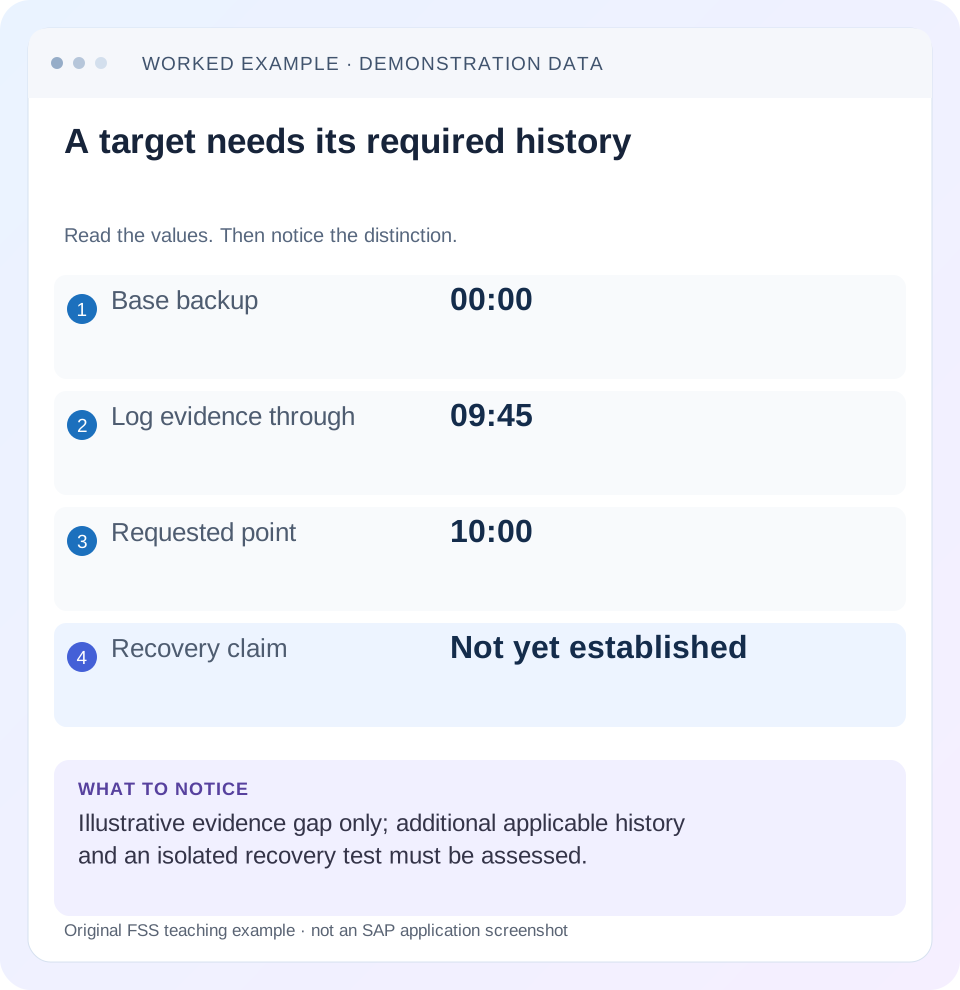
Read the example values
- Base backup
- 00:00
- Log evidence through
- 09:45
- Requested point
- 10:00
- Recovery claim
- Not yet established
Words you’ll meet in this guide
- Query
- A request to retrieve or calculate data.
- Table
- Data organized into rows and columns.
- Persistence
- Keeping data in storage so it survives beyond memory.
- HANA
- SAP’s database platform.
Preview the practical steps
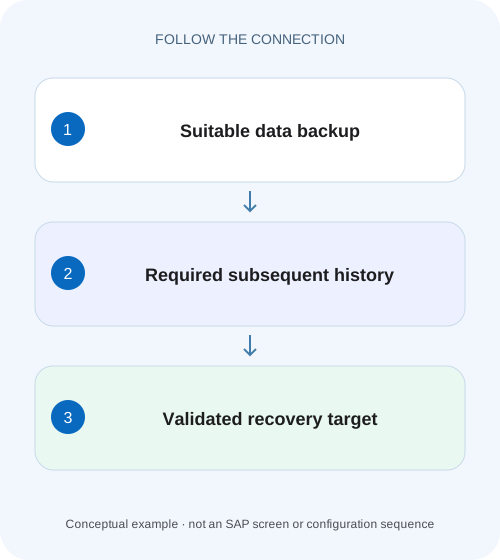
SEE THE CONNECTION
See it in a simple example.
A small example to make the idea concrete.
Explain recoverability of manufacturing business data
A manufacturer's database operations team needs to distinguish the data backup from the log chain relevant to a recovery objective.
Recoverability depends on the required chain, not one successful backup
A HANA data backup provides a recovery starting point; subsequent log history and other applicable inputs determine which later state can be reconstructed.
Distinguish data state, redo history and recovery targets
A complete data backup supplies database content from which recovery can start.
Worked case: midnight base backup and an unproven 10:00 target
Imagine tenant SALES with a complete data backup recorded around 00:00.
Explain recoverability of manufacturing business data
A manufacturer's database operations team needs to distinguish the data backup from the log chain relevant to a recovery objective.
Check the documented backup and recovery context before treating one successful backup artifact as proof of the intended recoverability.
| Reader | Business question | Evidence to carry forward |
|---|---|---|
| SAP developers and application teams supporting manufacturers | Explain recoverability of manufacturing business data | Check the documented backup and recovery context before treating one successful backup artifact as proof of the intended recoverability. |
01 Recoverability depends on the required chain, not one successful backup
A HANA data backup provides a recovery starting point; subsequent log history and other applicable inputs determine which later state can be reconstructed. To assess recovery to a target time, identify the exact database, suitable base backup, required delta/log sequence, accessible media and encryption prerequisites. A green overnight backup job is useful evidence, but it does not prove that every dependency for this morning’s recovery survives. [1] [2] [3]
This tutorial is for HANA database administrators and application owners reviewing a recovery plan. It addresses SAP HANA Platform backup/recovery concepts and the documented HANA 2.0 SPS 08 recoverability checker. HANA Cloud managed recovery, storage snapshots, system replication and third-party backup products have their own supported procedures. No command here stops or recovers a database.
02 Distinguish data state, redo history and recovery targets
A complete data backup supplies database content from which recovery can start. Differential and incremental data backups can reduce the work needed under a supported strategy, but they have dependencies on an appropriate complete backup and other history. Log backups preserve redo information used to reach later transactional states. The recovery engine chooses a compatible path, not simply the newest filenames. [3]
Define whether the objective is the latest reachable state after storage failure or a point before a logical error. A point-in-time recovery intentionally reconstructs an earlier database state, so later changes are absent from that recovered state. Do not use “recover to latest” and “undo the bad update” as interchangeable requests. [1]
03 Worked case: midnight base backup and an unproven 10:00 target
Imagine tenant SALES with a complete data backup recorded around 00:00. The inventory currently confirms log-backup media through an observed 09:45 boundary. At 10:05 the team requests recovery to 10:00 after a storage incident. Those facts leave an evidence gap: the required history from the verified boundary to 10:00 has not yet been established.
Do not conclude automatically that recovery is possible or that 09:45 is the latest reachable time. Additional log backups, a surviving compatible log area or other applicable history may exist. Conversely, if relevant storage is lost, the log area on that lost storage cannot be assumed available. The next step is a scoped dependency inventory and supported recoverability check.
| Dependency | Current evidence | Conclusion |
|---|---|---|
| Database | Tenant SALES | Scope identified; system database is separate |
| Complete backup | Catalog/media for midnight backup | Candidate recovery base |
| Later logs | Media confirmed through observed 09:45 boundary | Partial history evidence |
| Requested target | 10:00 UTC | Reachability not yet established |
| Remaining history | Unverified | Inspect compatible backups/log area and checker result |
04 Identify scope and time precisely
Record tenant/database identity, source system, relevant host/service scope, backup history and target timestamp with timezone. A backup of one tenant is not proof about another. A system-database recovery and a tenant recovery have different procedures. Also establish whether the intended target environment and HANA revision are supported for the backup being used.
Timestamps in human notes are labels; actual recovery depends on the catalog and compatible log positions. Capture backup identifiers and operation start/end information rather than treating “midnight backup” as an exact transactional cut. For a logical error, identify the last acceptable business point and the first bad commit as accurately as the application evidence permits. A guessed clock time can reintroduce the error or exclude valid work.
05 Inventory catalog entries and the surviving media separately
The backup catalog records backup history and recovery-relevant metadata. It is not the backup content itself. Check whether file locations are reachable or whether Backint can retrieve the required objects through the configured provider. A catalog row marked successful does not prove a file was retained, a storage path survived or a recovery host has permission to read it. [4]
For each candidate dependency, record backup ID, type, location/provider reference and access evidence. Include all required volumes/services according to the supported procedure. A file copied from one service is not necessarily a complete database backup. Preserve the original media and catalog before housekeeping or relocation changes make the investigation harder.
Review retention as a dependency policy rather than a simple age cutoff. A complete backup and its required later history must survive together for the claimed target. Keeping several recent log files while removing their compatible base does not automatically preserve the desired recovery path. Conversely, a newer complete backup can support a different target window without proving every older point remains reachable.
Test retrieval from the location that would survive the stated disaster. A checker run on the original host can accidentally use local paths or configuration that the recovery environment lacks. Include the recovery host’s supported media access, provider setup and secure key availability in the isolated exercise. This makes the test relevant to loss of original storage rather than merely to an ordinary restart.
06 Check data-backup and log-history compatibility
Compare the base backup’s history with the subsequent delta and log inputs. A log file from another database or an incompatible recovery history cannot fill a gap merely because its timestamp looks close. For delta backups, identify the complete backup and intervening dependencies required by the selected recovery path.
The current log area may contribute history under a supported scenario. Decide explicitly whether the assessment includes it or tests only off-system backups. That distinction changes the disaster scenario being evaluated. A check that succeeds using the original host’s log area does not prove recovery after loss of that same storage.
For the SALES fixture, create two evidence statements if appropriate: reachability with surviving log area and reachability using only retained backup media. Label each. This gives application owners a meaningful view of the resilience actually tested rather than one unexplained “recoverable” flag.
Check how the source history was generated, using read-only configuration and successful backup history. SAP documents that overwrite log mode does not produce log backups. After an overwrite-to-normal transition, a full data backup is required before log backups are written again. If that transition occurred, verify the subsequent full backup and actual successful log backups instead of assuming an enabled schedule proves continuity. This is a source-history preflight, not a claim that every recovery target must already use normal mode. It does not call for changing live parameters during an incident; missing historical redo cannot be manufactured by a current setting change. [6]
07 Use the recoverability checker for the question it actually answers
SAP documents hdbrecovercheck.py for checking required resources and point-in-time reachability, with separate consistency-checking options. Its result depends on selected database, target time, paths and whether log area or delta backups are included. A consistency-only check is different from proving that the required chain reaches the requested time. [2]
The documented tool has restrictions, including data snapshots, system copy and system replication scenarios it does not support. Inspect the installed help and version before selecting options. Keep checker output with its inputs, and read missing-path or incompatibility messages rather than reducing the result to exit status alone. [2]
python python_support/hdbrecovercheck.py -h
python python_support/hdbrecovercheck.py checkPointInTimeReachable -h
08 Include encryption and external-provider prerequisites
Encrypted backups require the supported encryption-key recovery prerequisites. SAP documents keeping encryption root-key backups available externally for relevant recovery scenarios. Verify access to required key backups and their protected recovery information through the approved process; do not place passwords or key material in the incident ledger. [5]
For Backint, include provider configuration, accessible backup identifiers, credentials/authorization through their secure mechanism and the supported recovery-host setup. A backup product’s successful job proves only what that job tested. A provider outage or missing restoration permission can prevent access to otherwise intact media. Test the documented retrieval path in the isolated recovery exercise.
09 Troubleshoot the first missing recovery dependency
An unreachable target time can result from missing history, an incorrect path, incompatible media or inaccessible resources. Preserve the checker’s exact reason and compare it with the ledger. Do not delete older backups because a newer one exists until the retention/recovery strategy establishes their role.
| Observation | Question | Next evidence |
|---|---|---|
| Backup job succeeded, files absent | Did retention or storage remove media? | Catalog identity and surviving media/provider retrieval |
| Logs confirmed only through 09:45 | What history covers the target? | Compatible later logs and surviving log area |
| Consistency passes, target unproven | Was reachability checked? | Checker mode, inputs and point-in-time result |
| Encrypted backup cannot be used | Are required keys accessible? | Supported root-key recovery prerequisites |
| Different catalog/database history | Are inputs compatible? | Database identity and backup/log sequence |
| Technical recovery succeeds, application wrong | Was business validation defined? | Target time, documents and integration consistency |
10 Test recovery in an isolated environment and validate the application
A supported isolated recovery test provides stronger operational evidence than inventory alone. Plan the target environment, recovery inputs, resource capacity and isolation so recovered systems do not send unintended outbound business messages. Follow the database and application procedures for the actual deployment; this article does not prescribe live recovery commands.
After technical recovery, verify database availability and application fixtures around the selected target. For example, identify a valid document committed before the target and one committed after it. The former should appear in the recovered state and the latter should not if the test is truly point-in-time to that boundary. Also compare relevant totals and dependent-system reconciliation.
For a negative test, remove a copied required log from the isolated test inventory and confirm the missing dependency is detected without modifying retained production backups. For a boundary test, assess the same target with and without the surviving log area where supported. Record which scenario succeeds; that difference can expose reliance on storage that a disaster would remove.
11 Relate recovery objectives to demonstrated evidence
The recovery point objective expresses the business’s tolerable loss window; the recovery time objective expresses the intended restoration time. Neither is established by backup frequency alone. Media availability, history continuity, retrieval time, replay work, infrastructure preparation and application checks all affect the actual recovery outcome.
In the SALES example, confirmed media through 09:45 and a requested 10:00 target describe an unresolved evidence interval. After checking later history, report the actual validated target and tested scenario. If a logical error occurred at 09:50, recovering to 10:00 would retain it; the business must choose an appropriate earlier target and reconcile excluded later work.
What closes the plan? A named database and target, compatible media/key/provider inventory, checker mode/result, isolated-test evidence and application acceptance checks. State untested scenarios honestly. The related savepoint lesson explains why recent persistence on the original storage does not replace this recovery chain.
Related services and next steps
Primary sources
Found this useful?
Share this guide with your network, or leave a like.
Your like is saved in this browser.