SE09, SE10 and SE01: Understand tasks, requests and transport release
A manufacturer prepares a custom application update whose transport request still contains an unfinished task.

Source review:
START HERE · NO PRIOR TOPIC KNOWLEDGE NEEDED
What it is. Why it matters.
A transport request packages SAP changes for movement between systems. Tasks hold contributors’ changes; releasing a task and releasing its containing request are separate milestones.
Completely new to SAP?
Manufacturers use SAP to connect work such as buying components, recording inventory, planning production, shipping equipment and accounting for costs. SAP S/4HANA is an enterprise resource planning system: it connects these activities through shared business data.
Migration moves business data into a target system. Lifecycle management controls how software or configuration changes move between environments; both need evidence of the target result.
A transaction code, or t-code, is a shortcut to a task in classic SAP GUI. Fiori apps provide another way to work. Names and screens depend on the product and release; you do not need a live system to learn the concepts in this guide.

Scope and source-review notes
Scope and evidence
Source review by FAST SAP SOLUTIONS® editorial. This badge describes our editorial review; it does not represent SAP certification or independent endorsement.
Classic ABAP Change and Transport System/Transport Organizer concepts. SE09/SE10/SE01 entry screens and available functions vary by release.
Documentation review on 14 November 2026 using official SAP sources and indexed official excerpts where full Help text was unavailable. Scope and service or release differences are explained in the lesson. All datasets, requests and checks are illustrative; no customer SAP runtime execution or measured results are claimed.
A MANUFACTURING EXAMPLE
Release a plant application change completely
Task release versus request release
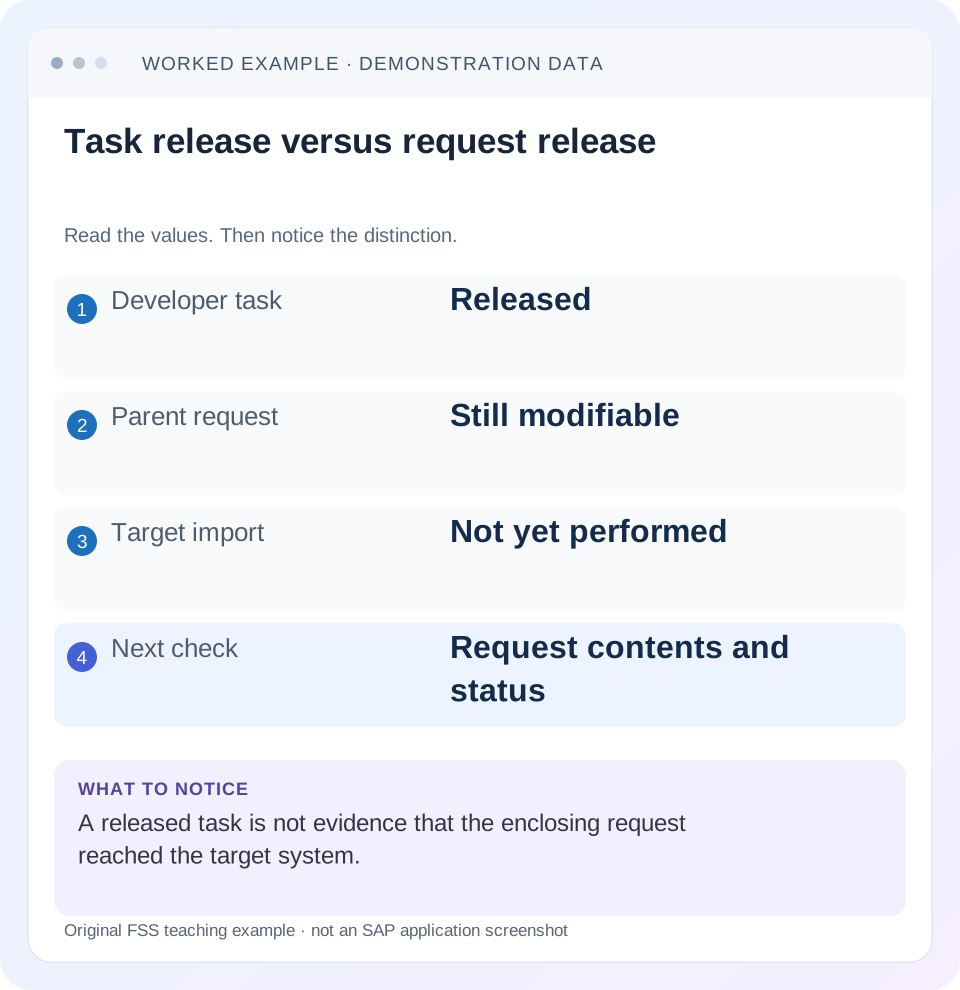
Read the example values
- Developer task
- Released
- Parent request
- Still modifiable
- Target import
- Not yet performed
- Next check
- Request contents and status
Words you’ll meet in this guide
- Source
- The system or dataset information comes from.
- Target
- The destination system or dataset.
- Validation
- A check that information meets required rules.
- ABAP
- SAP’s programming language for business applications.
- GUI
- Graphical user interface. SAP GUI is a desktop interface used for many classic SAP tasks.
- ADT
- ABAP Development Tools: SAP tools for ABAP development in Eclipse and, on supported systems, Visual Studio Code.
Preview the practical steps
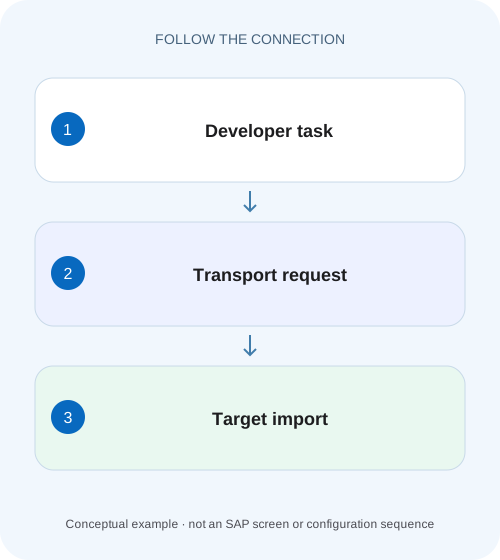
SEE THE CONNECTION
See it in a simple example.
A small example to make the idea concrete.
Release a plant application change completely
A manufacturer prepares a custom application update whose transport request still contains an unfinished task.
A task release, request release and target import are separate milestones
SE09 and SE10 open classic Transport Organizer views; SE01 provides an extended organizer in applicable systems.
Understand the contributor task and shared request
A task records a contributor’s object entries under a parent change request.
Worked case: one finished task and one unfinished task
Imagine Workbench request DEVK900100 containing task DEVK900101 for developer A’s validation class and DEVK900102 for developer B’s related message handling.
Release a plant application change completely
A manufacturer prepares a custom application update whose transport request still contains an unfinished task.
Inspect the task and request states separately before telling the release team that the change is ready to import.
| Reader | Business question | Evidence to carry forward |
|---|---|---|
| SAP developers and application teams supporting manufacturers | Release a plant application change completely | Inspect the task and request states separately before telling the release team that the change is ready to import. |
01 A task release, request release and target import are separate milestones
SE09 and SE10 open classic Transport Organizer views; SE01 provides an extended organizer in applicable systems. The important distinction is the lifecycle of the actual task and parent request, not the transaction code alone. Releasing a developer task does not release its parent request or import anything into the target system. [1] [2]
This tutorial is for ABAP developers and transport coordinators using classic CTS. You need request/task identities, authorized display, the intended target landscape and the local release process. GUI/ADT entry points, request types and controls vary by release. The fictional DEV request and customer-class example below explain review and evidence; no transport is released or imported.
02 Understand the contributor task and shared request
A task records a contributor’s object entries under a parent change request. SAP documents that task release copies its object entries into the parent request’s object list while the objects remain locked within the change request’s development context. The task’s completion is therefore a contribution milestone, not a target-deployment result. [3]
Once the relevant tasks are released, the authorized request owner can perform the parent release through the supported process. For a transportable request, release initiates export and prepares the request for target import under CTS. Export completion and import completion still have their own logs. Do not report “in QAS” merely because the parent status changed. [4]
03 Worked case: one finished task and one unfinished task
Imagine Workbench request DEVK900100 containing task DEVK900101 for developer A’s validation class and DEVK900102 for developer B’s related message handling. A releases task 101 after completing tests. B’s task remains modifiable because its negative-case message is still wrong. The parent request is still not ready to release.
The change affects a fictional customer class ZCL_ORDER_VALIDATE that requires a reason for a controlled order action. Positive and negative behavior depend on both code and messages being consistent. Releasing only A’s task cannot establish that the combined feature is complete. Creating another request to bypass B’s unfinished task can split dependencies without resolving them.
| Object | State | Meaning |
|---|---|---|
| DEVK900101 | Released | Developer A contribution completed |
| DEVK900102 | Modifiable | Developer B work remains |
| DEVK900100 | Modifiable | Shared request not released |
| QAS import | Not performed | No target-change evidence yet |
04 Find the request with the correct filters and ownership
Use the organizer’s user and status selection to locate the request. A request absent from a default “my modifiable work” view can exist under another owner or released status. SAP’s organizer documentation describes these selection-based views. Confirm the exact request identity before creating a replacement or assuming content was lost. [1]
Inspect the parent and every task, including object lists and documentation. A request can contain an unrelated correction from another contributor or an object no one remembers adding. The release review should describe all intended content, not only the change mentioned in the current ticket. Keep ownership and the accountable release coordinator explicit.
05 Read request type, target and object scope from the request
Workbench and Customizing changes have different scope and transport considerations. Inspect the actual request type and object list rather than inferring them solely from SE09 versus SE10. For client-dependent settings, verify the relevant source/target client and the supported transport design. Repository changes and application data are not interchangeable transport content.
Confirm the intended target route and local/transportable nature of the objects. If an object was created in a local development context, a normal release may not provide the expected cross-system movement. Resolve package and lifecycle requirements through the supported development process. Do not move objects or manipulate locks merely to make one organizer view look complete.
06 Review dependencies before releasing the final task
List objects and prerequisites outside DEVK900100: referenced classes, domains, table changes, configuration and any required earlier request. Determine which target versions are needed and their import sequence. A class that activates in DEV because a dependency exists locally can fail or behave differently in QAS if that prerequisite was never transported.
For the validation example, write two expected cases: the controlled action with an allowed reason succeeds, while the same action without a required reason returns the intended validation error. Verify B’s message handling using the same rule. If a separate configuration request activates the rule, include its import dependency and functional acceptance rather than treating it as unrelated administration.
Make the fictional rule observable with a small contract. Assume the controlled action requires a nonblank reason after trimming surrounding whitespace. An allowed reason PRICE should succeed; an empty reason should return the intended validation message; spaces alone should be treated as empty. These are authored project requirements for ZCL_ORDER_VALIDATE, not SAP standard behavior. Developer A and B should agree on the same contract so the class does not reject one case while the message handling implies another.
Now add prerequisite request DEVK900090, containing the fictional configuration that enables this rule. Suppose QAS has not imported 090. DEVK900100 can import its class and message content successfully while the feature remains inactive in QAS. A test of PRICE alone may still pass and conceal the missing prerequisite; the empty-reason test reveals that the expected rejection is absent. That explains why positive-only testing cannot establish the transported behavior.
Record the required sequence and target observation: prerequisite 090 present, final class/message contents from 100 present, then all three contract cases checked in the intended client. If local DEV settings made the rule active without a transportable record, fix that lifecycle gap through the supported configuration process. Do not insert an undocumented target-only setting and then report that request 100 carried the complete feature.
| Input reason | Rule active | Expected fixture result |
|---|---|---|
| PRICE | Yes | Allowed action |
| Empty | Yes | Required-reason validation |
| Three spaces | Yes | Required-reason validation after agreed trimming |
| Empty | No | Missing rejection reveals prerequisite gap |
07 Do not treat task release as a frozen source snapshot
Task release moves object entries into the request’s reviewable content, but the documented development locks remain associated with the request context. Inspect the actual object versions and final combined state before parent release. Another contributor’s later change to a shared object can affect what the request ultimately exports.
Keep the reviewed code/configuration state tied to release evidence. A screenshot showing that task 101 was released yesterday does not prove the current class still matches yesterday’s test. Re-run or review the relevant checks when content materially changes. The acceptance target is the final request contents, not a memory of one contributor’s task.
08 Release through the supported process and inspect export logs
After all required tasks and content reviews are complete, the authorized owner follows the installed release process. SAP documents that a transportable change request’s release exports objects and marks the request for target import. The export can still be progressing when an overview first appears, so inspect its final log rather than treating the first status change as completion. [4]
If export fails, preserve the error and identify the actual failed step with the transport coordinator. Do not create duplicate requests or manually copy files as an unexplained bypass. A released request normally needs a supported correction/recovery path; changing its visible state is not a business-safe substitute for addressing the export problem.
09 Verify target import and target behavior separately
Use the target system’s supported transport-management/import monitoring, commonly STMS in classic landscapes, and correlate the exact request. Review import logs, warnings/errors and relevant activation results. A successful export from DEV proves no target application behavior by itself. [2] [5]
Then inspect the intended target object version and run the permitted positive/negative feature checks. For ZCL_ORDER_VALIDATE, confirm both allowed-reason and missing-reason behavior under the intended target configuration and user role. A transport can import technically while a missing configuration prerequisite causes the business result to differ. Record that as a target verification failure rather than declaring the release complete.
10 Troubleshoot the first lifecycle stage that is incomplete
Use task, request, export, import and application evidence as separate rows. This prevents an organizer status from becoming a catch-all explanation for a target defect.
| Observation | Question | Next evidence |
|---|---|---|
| Task released, parent modifiable | Are other tasks/content unfinished? | Complete task list and owner review |
| Request not found in default view | Are user/status filters correct? | Exact ID, owner and released selection |
| Release cannot proceed | Which prerequisite or authority is missing? | Installed release message and task states |
| Parent released, QAS unchanged | Did export and target import complete? | Transport logs and import queue/history |
| Import succeeds, function fails | Are dependencies/configuration present? | Target versions and functional fixture |
| Later change differs from tested task | Was shared content changed before export? | Final request objects and review evidence |
11 Use positive, negative and boundary verification
For the positive fixture, complete and review both tasks, verify the final request content and confirm export/import plus the target feature. For the negative case, leave task 102 unfinished in a development exercise and identify why task-101 release alone cannot establish a ready parent. No actual release is needed to explain that state.
For boundaries, inspect a request owned by another contributor, a released request hidden by filters and a dependency transported separately. Verify that the team finds the correct record and sequence before mutation. Include a neighboring feature using a shared class so the change does not silently break another call path.
Keep tests proportional to the change: use meaningful syntax/activation, code review and feature checks for the transported content. Do not invent an SAP return code or claim a customer import was executed from this documentation-only tutorial.
12 Close with a release chain another operator can follow
The handoff should list task IDs, parent request, final object scope, dependency sequence, export result, target import and functional acceptance. State unresolved warnings and whether the business behavior was actually checked. A transport request number alone is not a complete release record.
Can I fix a target problem by reimporting repeatedly? First identify whether the cause is missing content, import failure or application configuration; repeated imports do not supply an absent prerequisite automatically. Can SE01 override the lifecycle? It is another organizer entry point with applicable extended functions, not permission to bypass readiness and target checks.
The related Cloud Transport Management lesson explains a different transport service. Its nodes and routes should not be confused with classic CTS task/request states, even though both require evidence from source content through target behavior.
Related services and next steps
Primary sources
Found this useful?
Share this guide with your network, or leave a like.
Your like is saved in this browser.