BTP on-premise destination fails? Check the Cloud Connector location ID
A manufacturer has connectors for different plants using similar virtual system names, and its extension needs the correct route.

Source review:
START HERE · NO PRIOR TOPIC KNOWLEDGE NEEDED
What it is. Why it matters.
A destination describes how to reach a service. For on-premise access, a Cloud Connector provides the route; a Location ID can distinguish connectors in the same subaccount.
Completely new to SAP?
Manufacturers use SAP to connect work such as buying components, recording inventory, planning production, shipping equipment and accounting for costs. SAP S/4HANA is an enterprise resource planning system: it connects these activities through shared business data.
SAP Business Technology Platform, or BTP, provides cloud services for applications, data and integration. A connection needs a route, an identity and permission to perform the intended task.
A transaction code, or t-code, is a shortcut to a task in classic SAP GUI. Fiori apps provide another way to work. Names and screens depend on the product and release; you do not need a live system to learn the concepts in this guide.

Scope and source-review notes
Scope and evidence
Source review by FAST SAP SOLUTIONS® editorial. This badge describes our editorial review; it does not represent SAP certification or independent endorsement.
SAP BTP destinations and Cloud Foundry application-router connectivity to Cloud Connector. Authentication details are scenario specific; the cited product setup is not a universal credential template.
Documentation review on 14 November 2026 using official SAP sources and indexed official excerpts where full Help text was unavailable. Scope and service or release differences are explained in the lesson. All datasets, requests and checks are illustrative; no customer SAP runtime execution or measured results are claimed.
A MANUFACTURING EXAMPLE
Connect a plant app through the intended connector
Select the intended connector
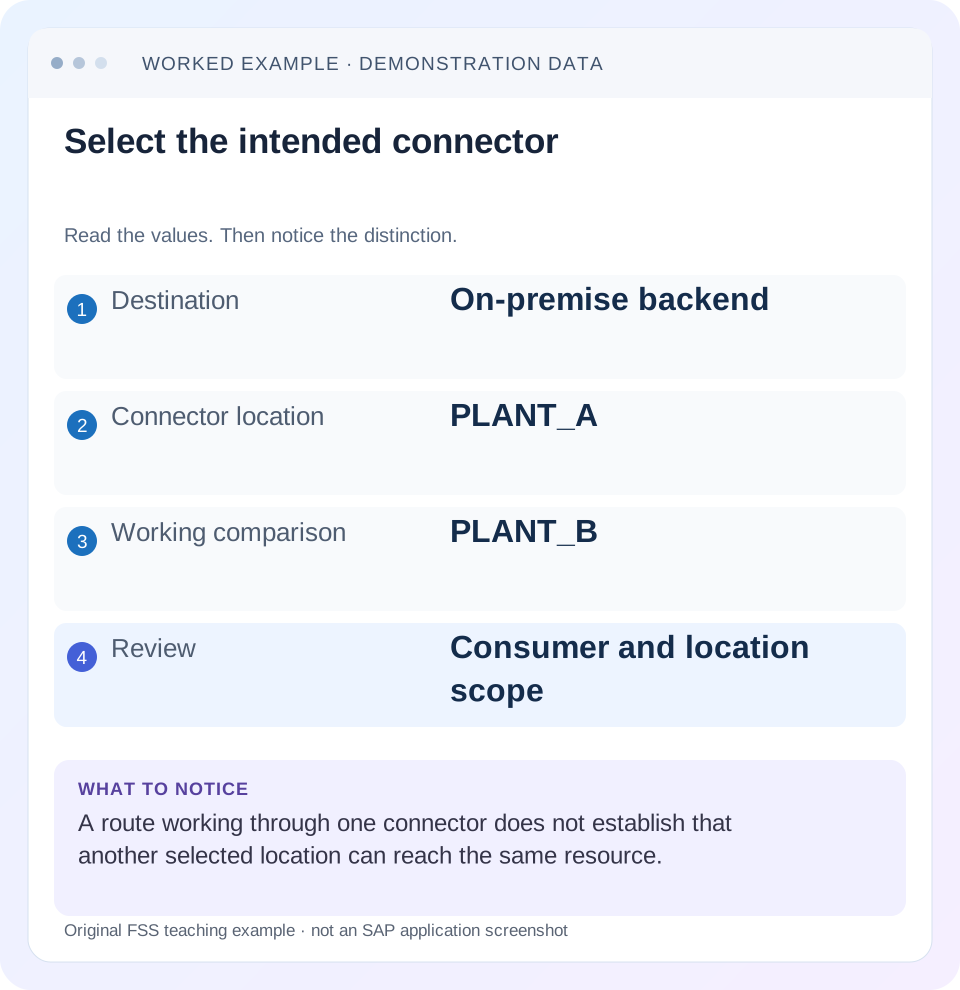
Read the example values
- Destination
- On-premise backend
- Connector location
- PLANT_A
- Working comparison
- PLANT_B
- Review
- Consumer and location scope
Words you’ll meet in this guide
- Backend
- The service or system doing the work behind an interface.
- Destination
- Named connection settings for another service.
- Credential
- Access information used to prove an identity.
- Subaccount
- A BTP scope for applications, services and access settings.
- OData
- A standard for reading and updating data through a web API.
- BTP
- SAP Business Technology Platform: cloud services for applications, data and integration.
- HTTP
- The request-and-response protocol used by web applications and APIs.
Preview the practical steps
SEE THE CONNECTION
See it in a simple example.
A small example to make the idea concrete.
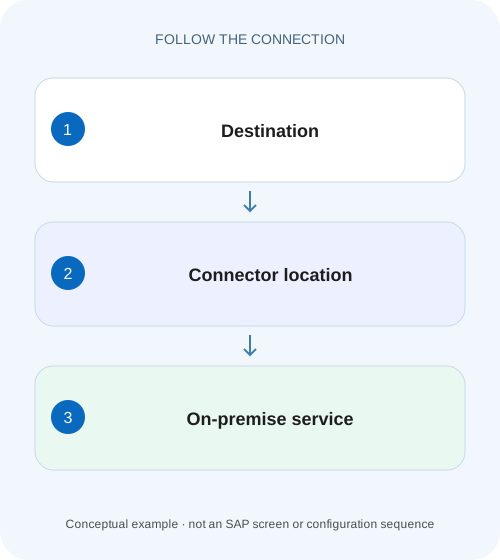
Connect a plant app through the intended connector
A manufacturer has connectors for different plants using similar virtual system names, and its extension needs the correct route.
Select the right connector before testing the backend
For a supported SAP BTP on-premise destination, the Cloud Connector location ID selects the intended connector connection for the subaccount.
Keep four identities separate
The subaccount identifies the cloud context connected to Cloud Connector.
Worked case: PLANT_A and PLANT_B share a virtual name
Imagine one subaccount connected to two authorized connector installations.
Connect a plant app through the intended connector
A manufacturer has connectors for different plants using similar virtual system names, and its extension needs the correct route.
Compare the destination and connector Location ID with the intended plant landscape before concluding that a reachable virtual name identifies the right system.
| Reader | Business question | Evidence to carry forward |
|---|---|---|
| SAP developers and application teams supporting manufacturers | Connect a plant app through the intended connector | Compare the destination and connector Location ID with the intended plant landscape before concluding that a reachable virtual name identifies the right system. |
01 Select the right connector before testing the backend
For a supported SAP BTP on-premise destination, the Cloud Connector location ID selects the intended connector connection for the subaccount. Compare the exact value on the destination and connector, then compare the destination’s virtual host and port with the connector mapping. A connector that reaches the backend locally does not prove the application selected that connector. [1]
This lesson targets developers and connectivity administrators using an HTTP destination through BTP Connectivity and Cloud Connector. You need read access to the destination, the consuming application context and connector configuration. Adapter and product support varies: a location property supported by a BTP destination is not automatically supported by every Cloud Integration adapter or product-specific connector setup. Follow the consumer’s documented connectivity requirements. [2]
02 Keep four identities separate
The subaccount identifies the cloud context connected to Cloud Connector. The location ID distinguishes the relevant connector location within that supported context. A virtual host and port identify an exposed system mapping. Finally, the internal host and port identify the actual backend reached from the connector machine. These values solve different routing problems and need not be identical.
A destination URL should use the virtual endpoint required by the documented on-premise setup. Copying the internal hostname from a successful server-side test can bypass the abstraction the destination expects. Likewise, using the correct virtual URL with the wrong location can select a connector that has no such mapping. Diagnose these identities independently before examining business authorization. [1]
03 Worked case: PLANT_A and PLANT_B share a virtual name
Imagine one subaccount connected to two authorized connector installations. Location PLANT_A maps virtual erp.virtual:443 to internal a-erp.corp:443. Location PLANT_B maps the same virtual name to b-erp.corp:443. Destination ERP_READ is intended to read Plant A orders, but its location property says PLANT_B. A connection can succeed and still reach the wrong ERP system.
Use a harmless system-identifying response or a known test object whose meaning is agreed with the backend owner. A bare 200 is insufficient in this fixture because both backends might answer. Record the expected system and client or tenant context. The first repair is to select PLANT_A, then verify that the returned business identity agrees with Plant A.
| Setting | Intended value | Incorrect comparison |
|---|---|---|
| Subaccount | Same authorized subaccount | Connector registered elsewhere |
| Location ID | PLANT_A | PLANT_B |
| Virtual endpoint | erp.virtual:443 | Internal a-erp.corp hostname |
| Backend resource | Approved read path | Unrelated root connection test |
| Expected identity | Plant A test object | Any HTTP 200 |
04 Inspect the application’s actual destination resolution
Identify which destination the consumer resolves and from which scope. A similarly named destination in another subaccount, a deployment environment variable or a differently bound service can explain why a cockpit edit has no effect. Record the application and deployment identity, destination name and source of destination resolution. Compare these with the failing request timestamp.
For application-router scenarios, SAP documents supported integration with Connectivity service. Verify required service instances and bindings for that runtime rather than assuming the destination entry itself creates a tunnel. A destination is configuration used by a consumer; the consumer still needs the supported mechanism to resolve it and establish the on-premise connection. [2]
Also compare the actual resource path with a URL assembled by the UI. An application might call /sap/opu/odata while the destination diagnostic checks only a root endpoint. Preserve slash boundaries and any configured service-root prefix. In a safe test, request the exact allowed read through the consumer and then compare that path with the connector resource policy. This catches a second defect that can remain after the location is corrected: selecting PLANT_A correctly while requesting an unexposed or duplicated path.
05 Compare location values as identifiers
Copy the configured location ID from the appropriate connector-to-subaccount connection and compare it with the destination property used by the consumer. In BTP HTTP destination setups, the commonly documented property is CloudConnectorLocationId; confirm that spelling and applicability in the exact consumer documentation. Treat the identifier as exact text, including accidental whitespace and differences in capitalization.
An empty location is also a meaningful setup choice, not a universal instruction to select any connector. Establish how the documented consumer resolves the default location before changing it. If several locations exist, document the intended one explicitly where supported. Do not infer failover behavior from the fact that two connectors can reach similar systems.
06 Walk the tunnel, mapping and resource boundaries in order
A healthy cloud connection shows that the connector is connected to the subaccount. A reachable internal system shows that the connector can contact a configured backend. Resource exposure determines which paths are allowed through that mapping. Backend authentication and authorization then decide which operations the caller may perform. Each success leaves later boundaries unproven.
Confirm the connector connection
Compare the registered subaccount, location ID and connection state with the destination consumer context.
Expected observation: The intended PLANT_A connector is available to the correct subaccount.
Compare virtual-to-internal mapping
Match destination virtual host and port to the system mapping. Confirm internal host, port and protocol with the backend inventory.
Expected observation: The virtual endpoint resolves to the intended Plant A backend.
Inspect exposed resources
Compare the actual request path with the permitted resource and subpath policy in Cloud Connector. Use a narrow approved read.
Expected observation: The requested path is explicitly allowed without broadening unrelated access.
Verify the real caller
Run the harmless application request with its intended identity and compare the returned object or system context.
Expected observation: The complete consumer path reaches Plant A and is authorized for the read.
07 Distinguish path denials from identity failures
If the connector selects the correct mapping but denies the resource, inspect the requested path and exposure policy. A system-level reachability test does not demonstrate permission for every path below that system. Conversely, a backend 401 or 403 after the resource is forwarded requires examination of credentials, principal propagation or backend authorization, depending on the supported setup.
Preserve the error provenance. A proxy-level message, a connector access-control denial and an application-level JSON error may use similar HTTP statuses. Save the sanitized response body, timestamp and correlation evidence. Avoid broad changes such as exposing all subpaths or switching ProxyType from OnPremise to Internet just to make one diagnostic pass; those changes alter the design being tested.
08 Troubleshooting decisions for a location mismatch
Use a working connector as a comparison only after establishing that it is intended to reach the same backend and resource. In the fixture, PLANT_B is not a valid success reference for Plant A business data merely because it answers the same virtual hostname.
| Observation | Question | Next check |
|---|---|---|
| Connector connected, application fails | Did the consumer select this location? | Actual destination and location property |
| Connection succeeds, wrong data returned | Does another location map the same virtual host? | Backend identity and system mapping |
| Virtual host not found | Is the mapping present at this location? | Virtual host, port and selected connector |
| Resource access denied | Is this path exposed? | Resource/subpath policy and exact URL |
| Backend 401 or 403 | Was the intended identity authenticated and authorized? | Supported auth design and backend evidence |
09 Validate a fix with a small request matrix
For a positive check, send the original harmless application read through ERP_READ and verify the Plant A identity. For a negative check, use a deliberately unexposed test path in a safe environment and confirm the expected access denial. This proves that the fix did not simply make every backend path reachable.
For a boundary check, compare a configured exact resource with a child path under its subpath policy. Also test a location value that intentionally does not exist in a controlled development setup, recording the resulting failure. Do not claim a universal status code: error presentation depends on the consumer, proxy and connector versions. The acceptance condition is correct selection and a clearly attributable failure.
Repeat the check after deployment if the consumer loads destination configuration differently at startup or runtime. A browser refresh alone may not replace cached application configuration. Verify the actual destination source and deployed version instead of repeatedly editing the connector.
10 Investigate intermittent results with a time-correlated comparison
If the same application sometimes works, avoid assuming that a location ID changes spontaneously. Compare the request times with application versions, destination resolution sources and connector connection state. Two deployed application versions may read different destination names, or a scheduled integration may use a separate credential and path from the interactive UI.
Build two evidence rows: the successful read and the failed read. For each, include consumer identity, destination name, resolved location, virtual host/port, path and backend response identity. If the location differs, investigate configuration loading or a distinct consumer path. If the location is identical but the connector is unavailable during the failure, investigate that connection’s availability and underlying network evidence.
Where high availability is part of the design, use the documented connector topology and support conditions. A second independently configured location is not automatically a transparent replacement for the first. In the Plant A/Plant B fixture, retrying through Plant B can be worse than a clear failure because it returns another site’s data. Acceptance must prove the intended system, not simply restore a green connection indicator.
11 Questions to answer before closing the incident
Can a successful connection test prove business access? It proves only what that diagnostic actually exercised. The complete path includes destination resolution, connector selection, resource exposure and caller authorization.
Should virtual and internal hosts be identical? They can be configured that way in some scenarios, but identity is not required by the conceptual mapping. Use the values agreed for your documented setup and do not expose internal hostnames unnecessarily.
What evidence belongs in the record? Include subaccount ID, destination name, consumer version, location ID, virtual mapping, sanitized path, expected backend identity and verification time. Exclude passwords, bearer tokens and private keys. Link the separate Cloud Connector resource-access lesson when reachability succeeds but a path remains denied.
Related services and next steps
Primary sources
Found this useful?
Share this guide with your network, or leave a like.
Your like is saved in this browser.