SAP CO assessment versus distribution: Understand what happens to cost detail
A manufacturer allocates a facilities balance between production departments and needs to explain which cost detail reaches each receiver.

Source review:
START HERE · NO PRIOR TOPIC KNOWLEDGE NEEDED
What it is. Why it matters.
Distribution retains original cost-element detail in the documented cost-center process. Assessment presents allocated costs through its configured assessment cost element or allocation structure.
Completely new to SAP?
Manufacturers use SAP to connect work such as buying components, recording inventory, planning production, shipping equipment and accounting for costs. SAP S/4HANA is an enterprise resource planning system: it connects these activities through shared business data.
Financial Accounting records business events as accounting documents. An account groups relevant amounts; individual entries explain how the total arose.
A transaction code, or t-code, is a shortcut to a task in classic SAP GUI. Fiori apps provide another way to work. Names and screens depend on the product and release; you do not need a live system to learn the concepts in this guide.

Scope and source-review notes
Scope and evidence
Source review by FAST SAP SOLUTIONS® editorial. This badge describes our editorial review; it does not represent SAP certification or independent endorsement.
Classic cost-center accounting distribution and assessment concepts. Account terminology, Universal Allocation availability and allocation structures vary by release and configuration.
Reviewed relevant official SAP indexed documentation excerpts on 14 November 2026. Examples, identifiers, amounts and expected observations are illustrative; no customer SAP execution was performed. Transaction availability, labels and results depend on the installed release, deployment and local configuration.
A MANUFACTURING EXAMPLE
Explain shared factory overhead
The same total can have different detail
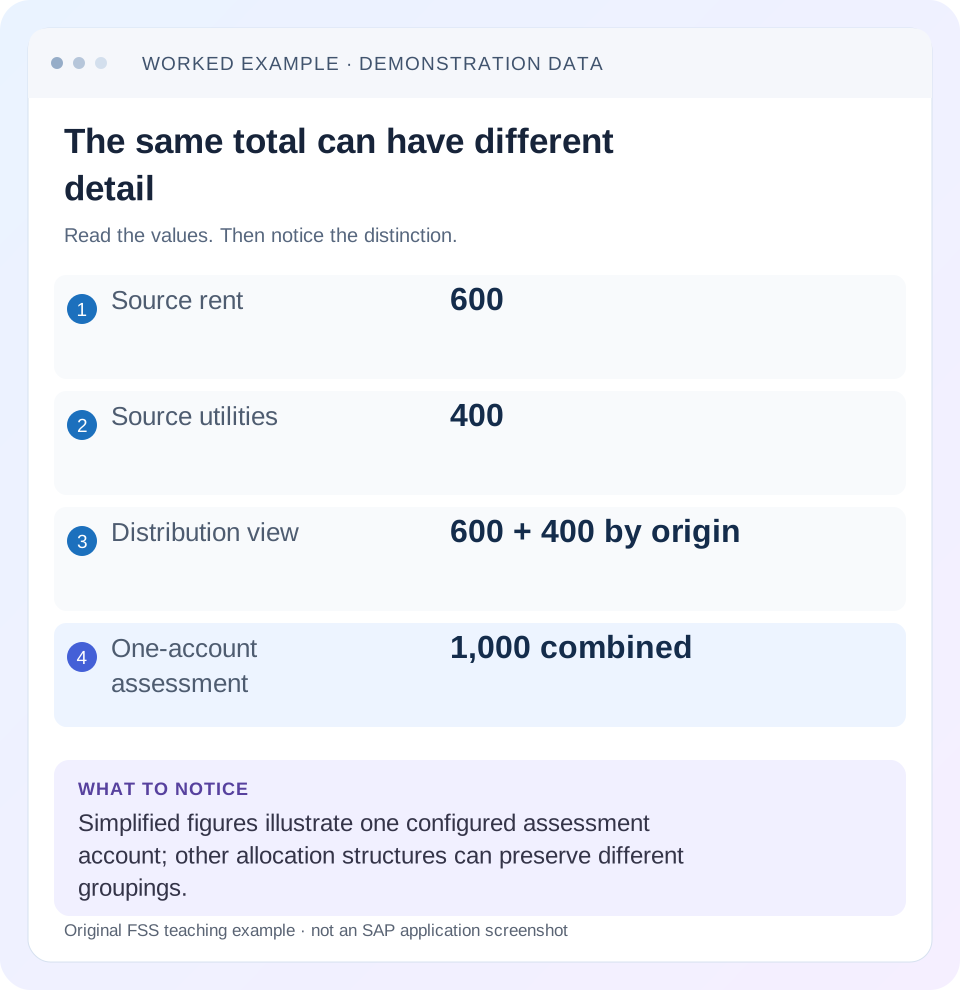
Read the example values
- Source rent
- 600
- Source utilities
- 400
- Distribution view
- 600 + 400 by origin
- One-account assessment
- 1,000 combined
Words you’ll meet in this guide
- Posting
- Recording a financial entry.
- General ledger
- The main collection of financial accounts.
- Open item
- An accounting entry still needing matching or settlement.
- Company code
- An organizational unit used for separate financial accounts.
- Accounting document
- A record of a financial entry with a header and individual account lines.
- HANA
- SAP’s database platform.
Preview the practical steps
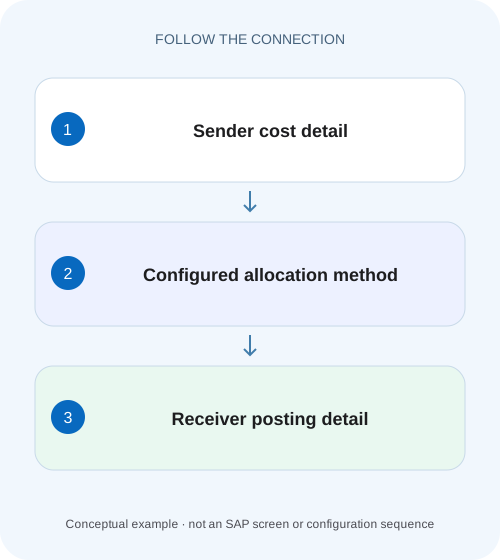
SEE THE CONNECTION
See it in a simple example.
A small example to make the idea concrete.
Explain shared factory overhead
A manufacturer allocates a facilities balance between production departments and needs to explain which cost detail reaches each receiver.
Choose the receiver explanation before the allocation method
Distribution and assessment can allocate the same sender balance and produce the same receiver total while telling a different accounting story.
Understand what moves and what remains traceable
An allocation has at least four independent inputs: eligible sender costs, the amount selected for allocation, eligible receivers and the rule dividing that amount.
Worked case: split a facilities balance between two teams
Facilities cost center FAC100 has 600 rent and 400 utilities in one period, one currency and one actual-value basis.
Explain shared factory overhead
A manufacturer allocates a facilities balance between production departments and needs to explain which cost detail reaches each receiver.
Compare the allocation method, sender detail and receiver result before explaining the factory's departmental cost report.
| Reader | Business question | Evidence to carry forward |
|---|---|---|
| Manufacturing finance, controlling and purchasing teams | Explain shared factory overhead | Compare the allocation method, sender detail and receiver result before explaining the factory's departmental cost report. |
01 Choose the receiver explanation before the allocation method
Distribution and assessment can allocate the same sender balance and produce the same receiver total while telling a different accounting story. In the classic cost-center process, distribution retains the original primary cost elements; assessment posts through assessment cost elements. Choose between them by asking what the receiving manager must explain: the original rent and utility categories, or a defined shared-service charge. The amount alone cannot answer that question. [1] [2]
This tutorial is for controllers and finance analysts investigating periodic allocations in SAP ERP or supported S/4HANA cost-center accounting. You need access to the sender and receiver reports, the allocation definition and the resulting documents. The worked figures are illustrative. Universal Allocation and classic cycle processing have different available applications and terminology; identify your process before applying a screen-specific procedure.
02 Understand what moves and what remains traceable
An allocation has at least four independent inputs: eligible sender costs, the amount selected for allocation, eligible receivers and the rule dividing that amount. The posting representation is a fifth choice. A correct receiver share does not prove that the selected costs were right, and a correct account presentation does not prove that the receiver population was complete. Keep these questions separate during reconciliation. [1] [2]
SAP describes distribution as allocating primary costs under their original cost elements and retaining sender/receiver information in the CO document. Assessment can allocate primary and secondary costs using an assessment cost element. In S/4HANA, cost elements are represented within the G/L account model; the reporting question remains whether the receiver sees original accounts or the configured allocation accounts. Do not infer the original expense composition from one assessment account balance.
03 Worked case: split a facilities balance between two teams
Facilities cost center FAC100 has 600 rent and 400 utilities in one period, one currency and one actual-value basis. There are no other eligible costs, credits, tax effects or prior allocations in this illustration. Sales has a tracing factor of 60 and Engineering 40. The selected sender balance is 1,000 and total factors are 100, so Sales receives 600 and Engineering receives 400.
These factors are deliberately simple weights, not a claim that headcount or floor area is automatically available or legally required. The controller must identify the maintained driver and why it reflects the business policy. If Sales has 60 square metres and Engineering 40 square metres, preserve that unit and period with the factor rather than merely writing 60:40.
| Original category | Sender selected | Sales 60% | Engineering 40% |
|---|---|---|---|
| Rent | 600 | 360 | 240 |
| Utilities | 400 | 240 | 160 |
| Total | 1,000 | 600 | 400 |
04 Explain the same example under assessment
If one assessment account groups both categories, Sales receives a facilities assessment of 600 and Engineering 400. The sender still needs its credit and allocation document trail. The receiver report no longer explains 360 rent plus 240 utilities from the assessment account alone. That is an intended change in presentation if the agreed reporting product is a facilities service charge. [3]
Assessment need not compress every expense into one universal account. A configured allocation structure can group different sender accounts into several assessment accounts. For example, a design could keep building-related and communication-related services separate. Inspect the actual assignments and their coverage. An unmapped sender category or an overlapping interpretation of groups is a configuration question, not evidence that assessment itself calculates percentages differently.
05 Read the segment as an executable business rule
In the supported allocation definition, inspect the sender selection, sender values, receiver selection and tracing-factor rule for the relevant period. Write each in business language: “Select FAC100 rent and utilities for October actuals; allocate the selected 1,000 to these two departments in the maintained 60:40 ratio.” This statement gives the business owner something precise to approve.
Check whether the cycle contains other segments, whether senders can also receive allocations and whether the execution is iterative under your configured process. Those details can explain why a later segment starts with a different balance from the original expense report. Preserve execution order and run identity. Comparing one segment with a report after all segments have finished mixes different points in the calculation.
06 Reconcile an execution in a controlled sequence
Use a supported test or simulation option where your allocation application provides it. Review its messages and sender/receiver totals before a productive execution. A successful technical status means the application completed its processing; it does not establish that the business allocation was appropriate.
Freeze the comparison basis
Record controlling area, year, period, currency, actual/plan basis, cycle or allocation identifier and the observation time. Export the selected sender line items if permitted.
Expected observation: All compared reports describe the same scope.
Reconstruct the driver
List the receiver factors and their total. Calculate each share independently using receiver factor divided by total factor.
Expected observation: 60/100 and 40/100 explain the illustrative 600 and 400.
Inspect the accounting representation
Open representative allocation documents and compare the receiver accounts with the chosen method. Retain sender references.
Expected observation: Distribution preserves rent/utilities; the one-account assessment shows facilities assessment.
Reconcile debits and credits
Compare allocated sender credits with receiver debits on the same currency basis. Explain rounding and any deliberately unallocated sender balance.
Expected observation: The example reallocates 1,000 once, without creating another 1,000 of enterprise expense.
07 Understand residual balances and rounding
A sender balance remaining after allocation is not automatically an error. The definition might select only part of the sender accounts or only a stated proportion, and another segment might handle the rest. Establish the expected residual before judging the result. In this example the intended residual for the selected rent and utility costs is zero; a residual of 100 therefore requires an explanation of selection or allocation coverage.
For a boundary exercise, divide 1,000 among three equal factors. The mathematical shares are repeating decimals. The application must represent currency amounts at its supported precision, so the displayed results may include a rounding allocation. Reconcile the posted total and documented rounding treatment instead of manually forcing every receiver to show an identical rounded amount and accidentally changing the total.
08 Troubleshoot the actual discrepancy
Begin with the first number or account that differs from the independent reconstruction. If the sender selected amount is wrong, investigating receiver percentages first wastes effort. If all receiver totals are correct but category detail is missing, investigate the allocation method and account structure before changing factors.
| Observation | Likely investigation layer | Evidence to inspect |
|---|---|---|
| Selected sender total is 900, expected 1,000 | Sender selection or timing | Account groups, period, postings and prior runs |
| Sales receives 500 rather than 600 | Receiver factor or population | Actual factor values and denominator |
| Total correct; original accounts absent | Assessment presentation | Assessment account/allocation structure |
| Sender credited twice | Execution history | Run identifiers and reversal relationships |
| Some categories remain on sender | Coverage or deliberate residual | Selected accounts, percentages and other segments |
| Reports disagree only in one currency | Comparison basis | Currency type, valuation and report selection |
09 Avoid double counting and speculative reruns
Adding the original sender expense and the gross receiver debit reports can double count the same economic costs if sender credits are omitted. Explain which report is before allocation, which is after allocation and whether it includes allocation credits. An enterprise-level reconciliation should account for the transfer rather than treating every positive receiver number as a new external expense.
If a posted allocation is wrong, establish the supported reversal or adjustment process for that allocation type and period. Do not simply run it again with changed factors because the second result looks closer to expectation. Preserve original run, correction and replacement references. Reconcile the final state of both senders and receivers after the correction, including any downstream allocation that consumed the first result.
10 Verify the rule with positive, negative and boundary cases
A positive test uses the stated 600 rent and 400 utilities with factors 60 and 40. Independently calculate the table, then compare the actual supported test output. Check both total and account detail. A distribution result with correct total but collapsed categories fails the stated reporting requirement even if no monetary difference remains.
A negative test places a separate 200 travel cost outside the eligible sender selection. It should not silently enter this facilities allocation under the proposed definition. A second test sets a receiver factor to zero and checks the supported handling rather than assuming the application invents an equal share. A boundary test leaves no valid factors: examine the actual message or skip behavior before productive use. These are proposed training checks, not claims of executed SAP tests.
11 Document the result so a manager can use it
A useful explanation reads: “FAC100 allocated 1,000 for October. Sales received 600 and Engineering 400 using maintained factors 60 and 40. Distribution shows Sales rent 360 and utilities 240; the alternative one-account assessment shows a 600 facilities charge. The total is equal but the receiver detail differs.” That is clearer than saying one report is more detailed.
Retain the approved business driver, selected cost categories, run identifier, representative sender/receiver documents and the reconciliation. If the purpose changes from departmental expense analysis to shared-service charging, review reporting requirements before changing method. Historical comparisons may need an explanation of the presentation change even when the financial total is unchanged.
12 Questions that clarify the next design decision
Can assessment retain some meaningful categories? Yes, a suitable allocation structure can provide several assessment groupings. It still does not make each assessment posting an original primary-cost posting. Design the categories around the receiver question and verify their configured mapping.
Which method is more accurate? Accuracy depends on selected costs, factors, receivers and execution as well as presentation. Distribution can preserve the wrong selected costs accurately. Assessment can give a valid service charge while hiding details that a particular report needs. For ongoing responsibility and temporary activities, follow the internal-order and cost-center lesson; for organization boundaries, verify the company-code and controlling-area relationship before expanding an allocation across entities.
Related services and next steps
Primary sources
Found this useful?
Share this guide with your network, or leave a like.
Your like is saved in this browser.