SAP PT60 time evaluation versus payroll: Understand the processing boundary
A manufacturer's time administrator investigates employee time results while payroll needs its own processing evidence.

Source review:
START HERE · NO PRIOR TOPIC KNOWLEDGE NEEDED
What it is. Why it matters.
Time evaluation processes employee time information into relevant results. Payroll calculates pay using its own inputs and rules; the two processes connect but are not identical.
Completely new to SAP?
Manufacturers use SAP to connect work such as buying components, recording inventory, planning production, shipping equipment and accounting for costs. SAP S/4HANA is an enterprise resource planning system: it connects these activities through shared business data.
SAP HR applications manage employee-related records and processes. A record’s subject, validity dates and access permissions all matter before it is read or changed.
A transaction code, or t-code, is a shortcut to a task in classic SAP GUI. Fiori apps provide another way to work. Names and screens depend on the product and release; you do not need a live system to learn the concepts in this guide.

Scope and source-review notes
Scope and evidence
Source review by FAST SAP SOLUTIONS® editorial. This badge describes our editorial review; it does not represent SAP certification or independent endorsement.
Classic SAP Time Evaluation/PT60 and payroll integration concepts. Employee time-management status, schema and country/process setup determine actual processing.
Reviewed relevant official SAP indexed documentation excerpts on 14 November 2026. Examples, identifiers, amounts and expected observations are illustrative; no customer SAP execution was performed. Transaction availability, labels and results depend on the installed release, deployment and local configuration.
A MANUFACTURING EXAMPLE
Separate factory time evaluation from payroll
Time results versus pay results
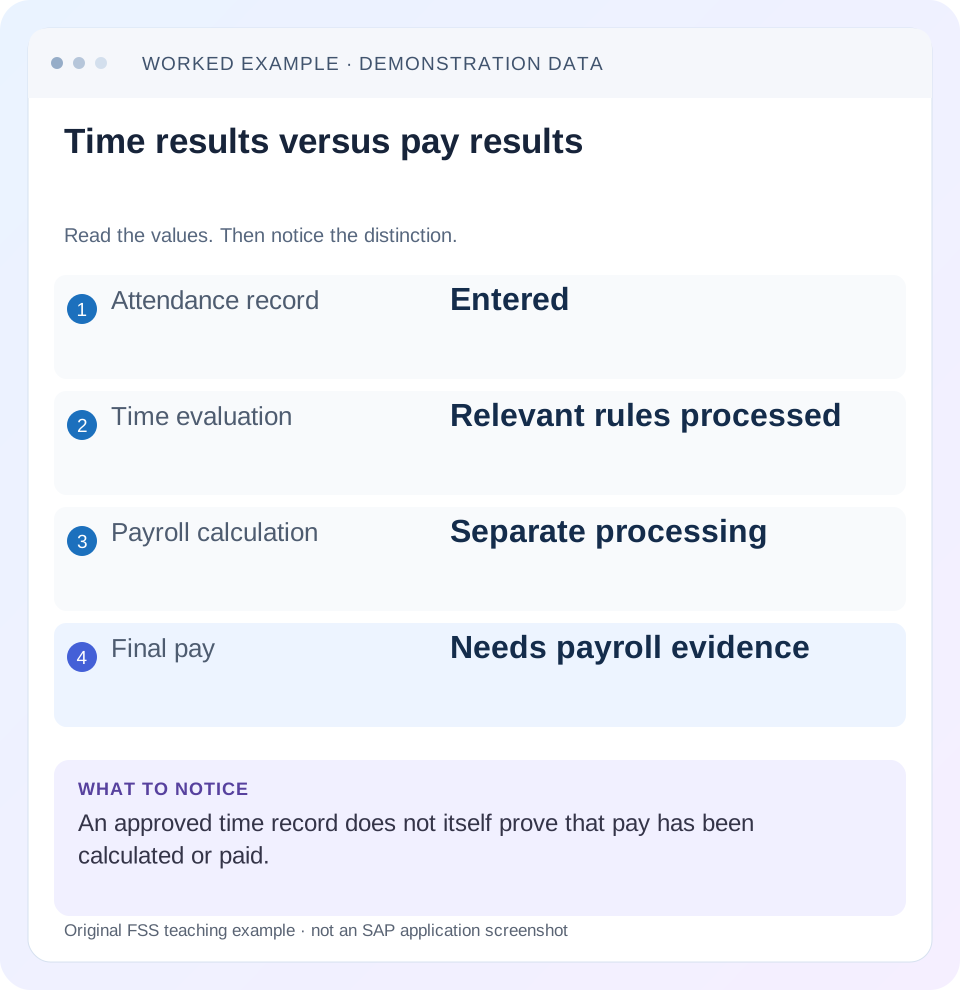
Read the example values
- Attendance record
- Entered
- Time evaluation
- Relevant rules processed
- Payroll calculation
- Separate processing
- Final pay
- Needs payroll evidence
Words you’ll meet in this guide
- Employee record
- Stored information about a person’s employment.
- Validity
- The dates during which a record applies.
- Payroll
- The process that calculates an employee’s pay.
- HANA
- SAP’s database platform.
- HCM
- Human Capital Management: SAP software for employee-related information and processes.
Preview the practical steps
SEE THE CONNECTION
See it in a simple example.
A small example to make the idea concrete.
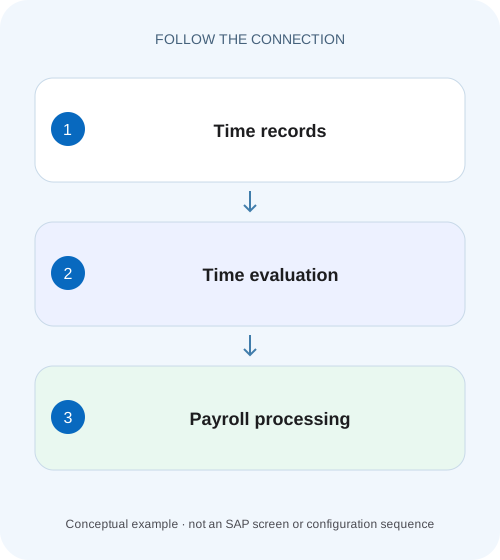
Separate factory time evaluation from payroll
A manufacturer's time administrator investigates employee time results while payroll needs its own processing evidence.
Separate recorded time, evaluated time and payroll valuation
PT60 is a classic entry point for Time Evaluation using RPTIME00.
Understand the input chain before the driver
SAP’s documented flow starts with work schedules and time recording, includes uploads or administrative corrections where applicable, evaluates time and handles messages before payroll uses generated time wage types.
Read employee status and schema as processing scope
The time-management status and selected schema influence whether and how a person is evaluated in the actual process.
Separate factory time evaluation from payroll
A manufacturer's time administrator investigates employee time results while payroll needs its own processing evidence.
Follow time evaluation and payroll as separate documented boundaries; a time result does not establish that payroll completed.
| Reader | Business question | Evidence to carry forward |
|---|---|---|
| Plant HR, time and payroll application teams | Separate factory time evaluation from payroll | Follow time evaluation and payroll as separate documented boundaries; a time result does not establish that payroll completed. |
01 Separate recorded time, evaluated time and payroll valuation
PT60 is a classic entry point for Time Evaluation using RPTIME00. Time evaluation processes relevant time data under the assigned rules and can produce balances, messages and time wage types. Payroll then uses its own calculation process to value relevant inputs. A successful time-evaluation run does not establish correct net pay or a completed bank payment. [1] [2]
This tutorial is for time administrators, payroll analysts and HCM support in classic SAP ERP or supported HCM for S/4HANA. Employee time-management status, schema, country and recording model determine actual behavior. You need authorized time/master-data, evaluation-result/log and payroll-input/result display. The overtime example uses explicitly invented training policy and wage-type labels, not statutory rules or a delivered payroll formula.
02 Understand the input chain before the driver
SAP’s documented flow starts with work schedules and time recording, includes uploads or administrative corrections where applicable, evaluates time and handles messages before payroll uses generated time wage types. Positive recording of actual attendance and negative recording of deviations are different supported concepts. Do not expect every employee to have clock events or the same input records. [1] [3]
For an incident, record personnel assignment, relevant date range, planned-time context, actual recording source, approval state and the employee’s applicable time-management setup. A missing time event is a meaningful defect only if that employee’s supported recording model requires it. Comparing with a colleague under a different status/schema can create a false expectation.
03 Read employee status and schema as processing scope
The time-management status and selected schema influence whether and how a person is evaluated in the actual process. SAP’s support references identify PT60/RPTIME00 and separate contexts such as concurrent-employment processing. Do not infer one universal driver/schema route from the phrase “time evaluation.” [2] [4]
Capture the actual variant and selection, schema and evaluation-through date visible in the permitted process. If P100 is not selected or is excluded by applicable status checks, changing an overtime valuation rule cannot create a missing evaluated result. Resolve selection and prerequisites before investigating calculation logic.
04 Worked case: two approved overtime hours
Fictional P100 has a declared planned net working time of 8 hours on 10 November 2026 and valid net attendance of 10 hours. The classroom policy treats 2 approved hours above plan as overtime. Assume the relevant evaluation rule produces an illustrative time wage type OT_EX with quantity 2 hours after all approvals and checks. OT_EX is a teaching label, not a delivered SAP wage type.
The payroll worksheet then assumes an all-inclusive overtime rate of 30 EUR per hour, giving 2×30=60 EUR. That rate is another declared training input. Real payroll can use different bases, premiums, splits and country rules. The useful distinction is quantity 2 in the evaluated time result versus amount 60 in the payroll valuation, not the particular illustrative rate.
| Stage | Input/result | What it proves |
|---|---|---|
| Planned time | 8 net hours | Declared schedule basis |
| Recorded attendance | 10 net hours | Recorded duration, subject to validation |
| Approval/rule | 2 eligible overtime hours | Declared policy outcome |
| Time evaluation | OT_EX quantity 2 hours | Time result under the assumed rule |
| Payroll valuation | 2×30 EUR=60 EUR | Illustrative gross component |
| Bank payment | No evidence in this case | Cannot be inferred from PT60 or wage-type quantity |
05 Investigate a missing quantity before a missing amount
If the payslip lacks the expected 60, first inspect whether time evaluation produced OT_EX2 for the right date and personnel assignment. If it did not, inspect recorded hours, break/net-duration treatment, planned schedule, approval, schema and evaluation messages. A payslip alone cannot identify which upstream stage failed.
For example, the declared policy may require approval and produce no payable overtime until approval exists. Ten recorded hours are not automatically two approved overtime hours. Alternatively, a missing clock-out can prevent a valid duration. These are different branches: one is approval/rule eligibility, another is incomplete source time. Do not change payroll amounts to conceal either unexplained input.
06 Follow the evaluated result into payroll
If OT_EX2 exists, compare the actual payroll input period, relevant time-result transfer/read context and payroll result. SAP documents payroll use of time wage types to calculate gross wage; the detailed valuation is process specific. A result for 10 November is not automatically included in a payroll cutoff that processed only data through 9 November. [1]
If payroll receives quantity 2 but values it unexpectedly, inspect the actual wage-type valuation and rate context. Under the declared worksheet, quantity 2 at 30 gives 60; quantity 2 at 25 gives 50. That10 difference points to the assumed rate or valuation basis rather than the source duration. Preserve quantity, unit and amount separately so an analyst can locate the first divergence.
07 Use logs and time statements as different evidence
The evaluation log explains processing and messages for the selected execution, while stored results or a time statement show resulting time information in their supported format. SAP’s transaction/report reference identifies PT61/RPTEDT00 for a time-statement form and relevant result-display tools. Use only the authorized supported tools for the installed process. [4]
A job completing does not prove every selected person/day evaluated without unresolved errors. Inspect the actual employee messages and coverage. A time statement showing balances is also not a bank confirmation or full payroll calculation trace. Choose evidence that answers the current layer’s question and retain the run/date context needed to reproduce it.
08 A practical time-to-pay investigation
Work forward from the earliest uncertain stage, with one consistent personnel/date identity.
Reconstruct source time
Read planned net 8, recorded net 10 and approval evidence for 10 November in the declared case.
Expected observation: The expected 2 hours have an explicit basis.
Confirm evaluation scope
Inspect person, date range, status, schema, variant and actual messages.
Expected observation: The relevant day was eligible and actually processed.
Read the time result
Find the supported evaluated quantity/unit and any balances/messages.
Expected observation: OT_EX2 is established or its absence explained.
Compare payroll consumption
Read the payroll period/input/result and actual time quantity used.
Expected observation: A cutoff or missing input is separated from valuation.
Reconstruct valuation
Apply the actual approved rate/rule, then verify result after authorized correction/reprocessing.
Expected observation: The amount follows identified quantity and valuation inputs.
09 Corrections can require reprocessing beyond one displayed day
Time evaluation can maintain balances and apply rules that depend on prior days or periods. A corrected10 November event can therefore require a supported recalculation scope that reaches beyond the single row the user changed. Establish the actual recalculation indicators, earliest relevant change and process instructions with the time/payroll owner.
Do not manually overwrite a stored result or clear indicators merely to reduce runtime or suppress an error. Correct the authoritative source data or approved rule, then use supported reprocessing and verify affected balances and payroll consequences. If payroll already processed the period, retroactive-accounting controls and source ownership form a separate layer. PA03 status alone does not explain the entire time recalculation.
10 Troubleshoot the first divergent stage
A useful incident statement identifies whether the issue is source time, evaluation quantity, payroll input or valuation. “Overtime wrong” is only the starting complaint.
| Observation | Inspect | First branch |
|---|---|---|
| 10 recorded, no valid duration | Clock/break/source completeness | Recording defect |
| Duration valid, no overtime | Approval/schedule/rule | Evaluation eligibility |
| Employee absent from PT60 result | Selection/status/schema | Processing scope |
| OT_EX2 exists, payroll lacks it | Period/cutoff/input chain | Consumption/integration |
| Payroll quantity 2, amount 50 | Actual rate/valuation | Valuation rather than duration |
| Corrected day, later balance differs | Recalculation chain | Accumulated-period effect |
11 Verify quantity, amount and unaffected dates
The positive worksheet test reconstructs 10−8=2 and 2×30=60 under the declared policy. In authorized training, inspect actual source, time result and payroll result separately. A positive test needs the right personnel assignment, date, unit and valuation basis, not just an expected number appearing somewhere.
A negative test omits the required approval and checks the supported rule’s actual output. Another holds quantity 2 constant but changes the declared rate to 25 to explain amount 50. A boundary test evaluates exactly8 net hours, where the simple above-plan quantity is zero, then a day outside payroll cutoff. These are proposed checks; no time evaluation or payroll was executed for this lesson.
12 Keep quota and balance questions separate from cash valuation
Time evaluation can also manage time accounts and absence entitlements under the supported configuration. A two-hour balance movement need not be a two-hour cash payment. The business may use a time-account outcome or another rule in its actual approved design. Identify whether the disputed result is a balance, entitlement, wage-type quantity or monetary valuation. [3]
For P100, do not add a2-hour balance and OT_EX2 as though both represent four hours worked. They can be related representations of one evaluated event under the design. Reconcile each output’s purpose and any compensation/consumption relationship. Similarly, approval of a time record does not by itself prove a quota was accrued or a payroll wage type generated.
13 Write a resolution that names the corrected layer
A precise result can read: “P100/10 November had valid net 10 against planned 8; approved rule produced OT_EX2. Payroll consumed2 in the reviewed period and the declared valuation produced 60 EUR. Payment outcome was not examined.” If evaluation instead produced 0 because approval was absent, state that cause and the approved next action.
Retain minimized personnel reference, source correction, evaluation scope/messages, result quantity and payroll comparison. After a rule/configuration change, include representative unaffected dates and employee groups where authorized. Do not claim payroll is correct from PT60 completion alone, and do not claim PT60 is wrong merely because a later payroll rate differs from a spreadsheet.
14 Frequently asked questions
Does PT60 calculate net pay? It evaluates time; payroll has a separate calculation process. Does every employee use the same time-evaluation schema? No; status, recording model and configured process matter. Can I calculate overtime solely as attendance minus schedule? Only in an explicitly simplified exercise; actual approval, break and policy rules must be read.
Why did rerunning payroll not fix missing hours? The upstream time result or its consumption may still be wrong. Use infotype/PA20 guidance for dated master/time context, personnel-area guidance for applicable groupings and PA03 guidance for payroll-stage and retroactive restrictions.
Related services and next steps
Primary sources
Found this useful?
Share this guide with your network, or leave a like.
Your like is saved in this browser.