SAP ALE change pointers: Why a master-data change may not create an IDoc
A manufacturer changes component master data but the expected outbound IDoc does not appear.

Source review:
START HERE · NO PRIOR TOPIC KNOWLEDGE NEEDED
What it is. Why it matters.
ALE change pointers record relevant master-data changes for supported distribution processes. A separate processing step can turn those recorded changes into outbound IDocs.
Completely new to SAP?
Manufacturers use SAP to connect work such as buying components, recording inventory, planning production, shipping equipment and accounting for costs. SAP S/4HANA is an enterprise resource planning system: it connects these activities through shared business data.
Integration connects applications so they can exchange information. A delivered message still needs the receiving application to understand and accept its business meaning.
A transaction code, or t-code, is a shortcut to a task in classic SAP GUI. Fiori apps provide another way to work. Names and screens depend on the product and release; you do not need a live system to learn the concepts in this guide.

Scope and source-review notes
Scope and evidence
Source review by FAST SAP SOLUTIONS® editorial. This badge describes our editorial review; it does not represent SAP certification or independent endorsement.
Classic ALE change-pointer distribution. Message support, relevant fields, jobs and retention depend on release and interface design.
Documentation review on 14 November 2026 using official SAP sources and indexed official excerpts where full Help text was unavailable. Scope and service or release differences are explained in the lesson. All datasets, requests and checks are illustrative; no customer SAP runtime execution or measured results are claimed.
A MANUFACTURING EXAMPLE
Explain an unsent component-master change
Trace a change before delivery
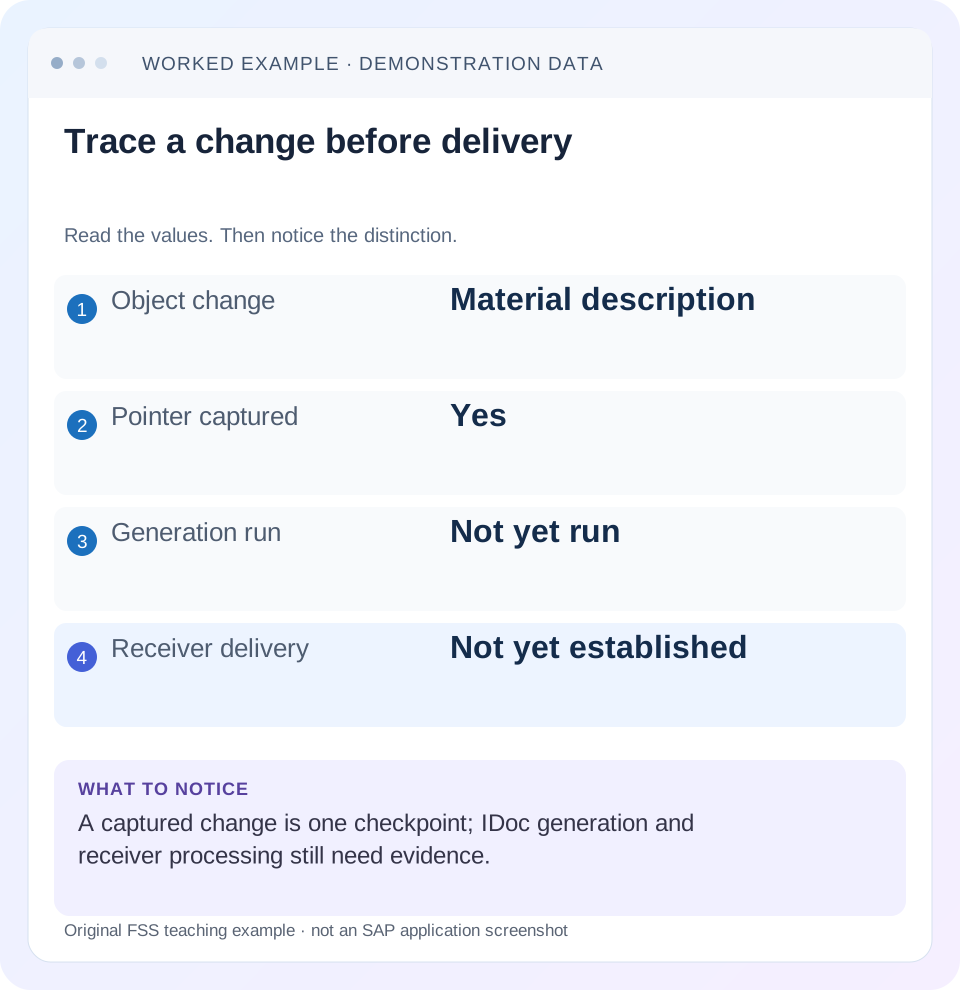
Read the example values
- Object change
- Material description
- Pointer captured
- Yes
- Generation run
- Not yet run
- Receiver delivery
- Not yet established
Words you’ll meet in this guide
- Message
- A package of information sent between systems.
- Payload
- The business content carried in a request or message.
- API
- A defined interface for another program to use.
- Receiver
- The system to which a message or request is sent.
- IDoc
- A structured SAP document format used to exchange business data.
Preview the practical steps
SEE THE CONNECTION
See it in a simple example.
A small example to make the idea concrete.
Explain an unsent component-master change
A manufacturer changes component master data but the expected outbound IDoc does not appear.
A saved change, a pointer and a delivered IDoc are different checkpoints
ALE change pointers flag relevant master-data changes for supported distribution.
Understand what a change pointer represents
In the documented Shared Master Data flow, relevant application change information reaches the change-document interface and the change-pointer mechanism.
Worked case: the pointer exists, but the MATMAS job has not run
Imagine test material M-100 in source client 100.
Explain an unsent component-master change
A manufacturer changes component master data but the expected outbound IDoc does not appear.
Trace the configured change-pointer and generation steps before resending the master or creating a duplicate message manually.
| Reader | Business question | Evidence to carry forward |
|---|---|---|
| SAP developers and application teams supporting manufacturers | Explain an unsent component-master change | Trace the configured change-pointer and generation steps before resending the master or creating a duplicate message manually. |
01 A saved change, a pointer and a delivered IDoc are different checkpoints
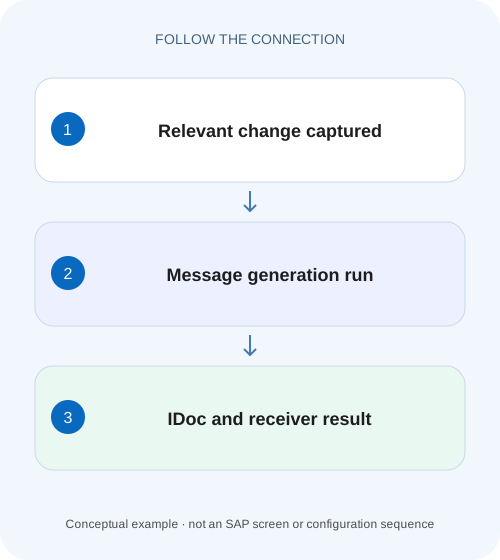
ALE change pointers flag relevant master-data changes for supported distribution. A later evaluation process reads them and generates IDocs, which still need dispatch and receiver processing. When a material change produces no expected IDoc, locate the missing checkpoint instead of repeatedly changing the material or regenerating all outbound work. [1] [2]
This tutorial is for classic ALE support analysts and developers. You need source system/client, object key, changed field, change time, intended message type and receiver, plus authorized display access to configuration, jobs and IDocs. It applies only when the interface actually uses change pointers. DRF, application events, custom extracts and other mechanisms can have different triggers and monitoring.
02 Understand what a change pointer represents
In the documented Shared Master Data flow, relevant application change information reaches the change-document interface and the change-pointer mechanism. Evaluation then reads application data and creates a master IDoc for ALE distribution. A pointer is therefore a signal to process relevant changed objects; it should not be assumed to be a complete immutable event payload containing every old and new field value. [1]
That distinction matters if an object changes several times before the scheduled generation run. The generated master-data representation can reflect the application data and distribution logic used by that run. If a downstream requirement needs every intermediate business transition, verify that requirement against the actual interface rather than assuming a change-pointer feed is an event ledger.
03 Worked case: the pointer exists, but the MATMAS job has not run
Imagine test material M-100 in source client 100. At 10:03 an authorized user changes its description from Bolt A to Bolt A Revised. Assume the configured interface uses MATMAS change pointers and that this field is relevant in the installed scenario. The change is captured, but the periodic generation job is scheduled for 10:15. At 10:10 there is no outbound IDoc yet.
This observation is explained by the configured schedule, not automatically a capture failure. At 10:16, inspect the actual job result and message selection. If no job ran or its variant selected another message type, the next action belongs to generation scheduling or selection. If an IDoc was created, move to its dispatch and receiver outcome rather than continuing to investigate pointer activation.
| Time | Checkpoint | What is established |
|---|---|---|
| 10:03 | M-100 description committed | Source business change |
| 10:04 | Relevant pointer observed | Capture occurred |
| 10:10 | Before 10:15 evaluation | No IDoc can still fit the schedule |
| 10:16 | Inspect actual generation result | Generation success remains to verify |
| Later | Inspect receiver M-100 | Business application remains to verify |
04 Confirm the interface uses this mechanism and the right message
Identify the sender, receiver and logical business message from the interface specification and actual configuration. A familiar object name is not enough. Different consumers can receive different message types or use separate extraction methods. Keep the source client and test timestamp with the evidence because activation and job scheduling are client/scenario dependent.
For M-100, state why MATMAS is the expected message and which receiver should receive it. SAP’s ERP-to-PEO documentation provides a concrete supported example of periodic RBDMIDOC generation for MATMAS, but it does not make that setup universal for every material integration. Follow the actual product and release contract. [3]
05 Inspect activation at general, message and field layers
Classic SAP guidance identifies BD61 for general change-pointer activation and BD50 for message-type activation. BD52 defines relevant field lists in applicable message scenarios. Compare all relevant layers with the time the test change occurred. A general activation alone does not make every message and field relevant. [1] [2]
If a field was excluded, capture may correctly omit it. If the interface was activated after 10:03, do not assume it retroactively records the earlier change. Plan a supported initial or corrective distribution if needed. Do not activate every field or every message type merely to make a test produce activity; that can create unnecessary volume and change unrelated interfaces. [4]
06 Trace change-document and pointer evidence by object and time
Use the application’s supported change history and change-pointer inspection for the installed release. Compare M-100, the changed field and committed time with the expected message. If the change was never saved or the application path does not produce the relevant change information, a pointer job cannot create evidence that does not exist.
Avoid hard-coding legacy storage assumptions into an investigation script. SAP’s historical guide discusses older pointer tables and migration to newer storage. Use the supported tools and release documentation rather than clearing or updating database tables directly. Preserve whether a pointer is unprocessed, processed or outside the intended selection; those are different states with different recovery implications.
For a description change, preserve the language and any other relevant object context in the test record. A receiver filter or mapping may intentionally distribute only selected language texts. If the revised description is captured and an IDoc is generated but the chosen language is absent downstream, the investigation has moved from pointer capture to payload selection or mapping. Do not activate additional pointer fields until that later boundary is understood.
07 Inspect the generation run, variant and result
SAP documents BD21 and report RBDMIDOC for evaluating change pointers in the classic ALE flow. Inspect the scheduled job’s actual execution, variant, message type and application output. A green background job with a different variant is not proof that MATMAS changes for this scenario were evaluated. [1] [3]
For the fixture, compare the planned 10:15 run with its real start/end state. If it failed, preserve the error and determine whether any IDocs were already generated before retrying. If it completed with no work, check selection and pointer state before changing source data again. A second source edit can obscure whether the first change was captured correctly.
08 Follow generated IDocs through dispatch and receiver application
Once the IDoc exists, record its number, message/basic type, partner context and status history using the supported monitor. Generation and dispatch are separate stages. Some partner settings collect outbound work for later sending, so the existence of an outbound document does not prove transmission. A technically dispatched document still needs receiver-side processing evidence.
Correlate the source change and IDoc with the receiver object M-100. Check the revised description in the intended receiver system/client, not simply an outbound status. If the receiver rejects the message, inspect its application error and supported reprocessing procedure. The change-pointer investigation is then complete at capture/generation but the business distribution remains unresolved.
09 Troubleshoot the first missing checkpoint
Classify the observation before selecting an action. A missing pointer, unprocessed pointer, generated unsent IDoc and rejected inbound IDoc are four different incidents, even if the user describes all of them as “the material did not arrive.”
| Observation | Question | Next evidence |
|---|---|---|
| No relevant pointer | Was capture active and field relevant then? | Source change, BD61/BD50/BD52 and message contract |
| Pointer exists, no IDoc | Did correct evaluation run? | RBDMIDOC job/variant and pointer state |
| Job successful, wrong message selected | Was the intended variant used? | Actual job parameters and interface design |
| IDoc exists, not sent | Is outbound dispatch deferred or failed? | Partner output mode and IDoc status |
| IDoc dispatched, receiver unchanged | Did receiver apply the business data? | Inbound/application result and target object |
| Many repeat messages | Were edits or regeneration repeated? | Original changes, job runs and duplicate effects |
10 Recover through the existing supported distribution path
If capture was active and a valid pointer remains unprocessed, repair the actual generation failure and use the supported evaluation process. If an IDoc already exists, choose its appropriate recovery path rather than regenerating the business object blindly. If the original change was never captured, agree a supported corrective distribution with the interface owner.
Keep original object, change and processing identifiers linked to any replacement. Do not reset processed flags or delete pointer data directly to force new activity. A corrected distribution can carry current master data rather than the historical value someone expected, so compare the intended target state before replay. Multiple edits to M-100 may have changed the desired description again.
Coordinate with scheduled generation and dispatch jobs. Manual recovery and automatic jobs should not race through the same intended work without the supported controls. The goal is one traceable business distribution, not merely more IDocs in the monitor.
11 Treat pointer cleanup as retention work
SAP’s classic guidance recommends keeping pointer storage controlled and documents reorganization through BD22/RBDCPCLR. That is a lifecycle/retention task with criteria for obsolete or processed work, not a generic fix for missing distribution. Review the installed release and retention policy before cleanup. [1]
Preserve incident evidence and confirm unresolved changes are accounted for before a broad cleanup. A smaller pointer table is operationally useful only when the intended distribution and retention obligations remain satisfied. If volume grows repeatedly, inspect unnecessary message/field activation and generation cadence instead of relying solely on more frequent deletion.
12 Verify relevant, irrelevant and timing-boundary changes
For the positive test, change one permitted relevant field on M-100, observe capture, run or wait for the intended generation schedule and trace the resulting IDoc to the correct receiver value. Record each checkpoint and its time. This proves the whole designed path rather than only the pointer mechanism.
For a negative test, change an explicitly irrelevant field in an approved fixture and verify the documented outcome. Do not assume every saved field must generate MATMAS. For a timing boundary, make a relevant change just after an evaluation run and show it is handled by the next appropriate run rather than declared missing immediately.
Also test two relevant edits before evaluation and compare the resulting master-data representation with the actual contract. What closes the incident? Source/client/object, field/time, activation/relevance, pointer state, generation job, IDoc identity and receiver result. The related IDoc type and status lessons continue the investigation once generation succeeds.
Related services and next steps
Primary sources
Found this useful?
Share this guide with your network, or leave a like.
Your like is saved in this browser.