SAP logical system versus RFC destination: Separate recipient identity from connectivity
A manufacturer exchanges business data across systems and must distinguish the logical recipient from the technical connection used to reach it.

Source review:
START HERE · NO PRIOR TOPIC KNOWLEDGE NEEDED
What it is. Why it matters.
A logical system identifies a business-system context in ALE. An RFC destination describes a technical route to a remote partner, including connection-specific settings.
Completely new to SAP?
Manufacturers use SAP to connect work such as buying components, recording inventory, planning production, shipping equipment and accounting for costs. SAP S/4HANA is an enterprise resource planning system: it connects these activities through shared business data.
Integration connects applications so they can exchange information. A delivered message still needs the receiving application to understand and accept its business meaning.
A transaction code, or t-code, is a shortcut to a task in classic SAP GUI. Fiori apps provide another way to work. Names and screens depend on the product and release; you do not need a live system to learn the concepts in this guide.

Scope and source-review notes
Scope and evidence
Source review by FAST SAP SOLUTIONS® editorial. This badge describes our editorial review; it does not represent SAP certification or independent endorsement.
Classic ABAP ALE logical-system and RFC-destination concepts. Naming conventions and assignment rules must follow the documented integration scenario.
Documentation review on 14 November 2026 using official SAP sources and indexed official excerpts where full Help text was unavailable. Scope and service or release differences are explained in the lesson. All datasets, requests and checks are illustrative; no customer SAP runtime execution or measured results are claimed.
A MANUFACTURING EXAMPLE
Identify the intended plant receiver
A connection can reach the wrong context
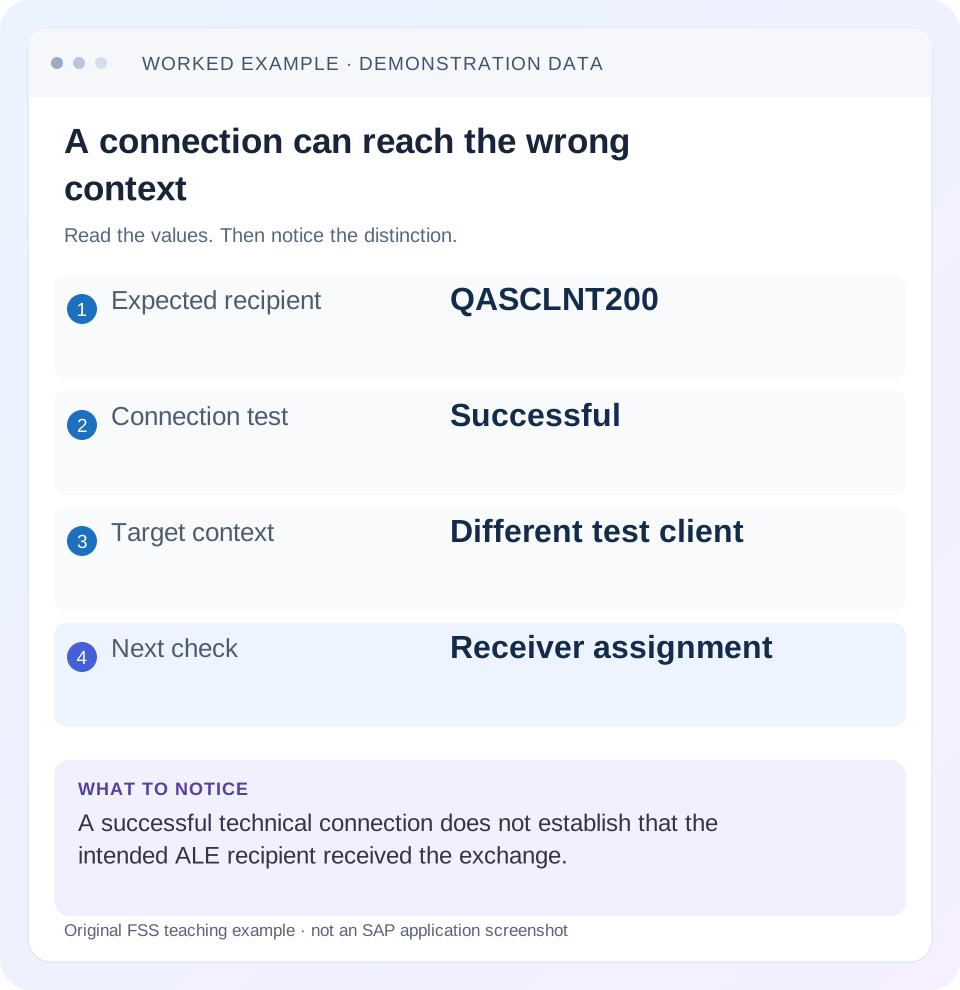
Read the example values
- Expected recipient
- QASCLNT200
- Connection test
- Successful
- Target context
- Different test client
- Next check
- Receiver assignment
Words you’ll meet in this guide
- Message
- A package of information sent between systems.
- Payload
- The business content carried in a request or message.
- API
- A defined interface for another program to use.
- Receiver
- The system to which a message or request is sent.
- ABAP
- SAP’s programming language for business applications.
- IDoc
- A structured SAP document format used to exchange business data.
- RFC
- Remote Function Call: a way for one system to call functions in another.
- GUI
- Graphical user interface. SAP GUI is a desktop interface used for many classic SAP tasks.
- HTTP
- The request-and-response protocol used by web applications and APIs.
Preview the practical steps
SEE THE CONNECTION
See it in a simple example.
A small example to make the idea concrete.
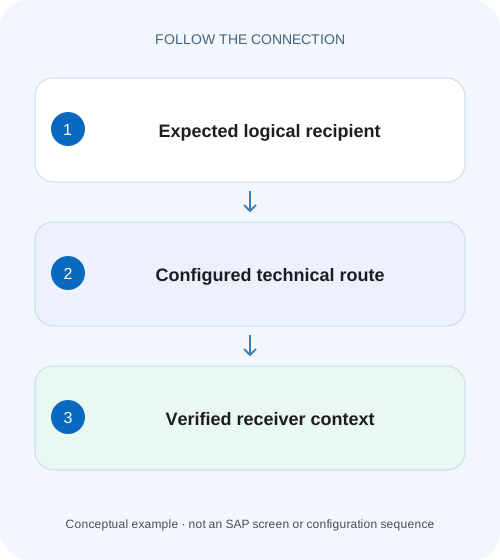
Identify the intended plant receiver
A manufacturer exchanges business data across systems and must distinguish the logical recipient from the technical connection used to reach it.
A logical recipient is an identity; an RFC destination is a connection
In classic ALE, a logical system identifies a client’s business-system context.
Understand uniqueness and technical addressing separately
SAP’s logical-system guidance states that client assignments must be unique across the relevant ALE network: one client is assigned one logical system and another client must not reuse that identity.
Worked case: the name says client 200, the settings say 210
Imagine source logical system DEVCLNT100 distributing material data to intended receiver QASCLNT200.
Identify the intended plant receiver
A manufacturer exchanges business data across systems and must distinguish the logical recipient from the technical connection used to reach it.
Compare logical-system identity and RFC-destination configuration before assuming a passing connection proves correct business routing.
| Reader | Business question | Evidence to carry forward |
|---|---|---|
| SAP developers and application teams supporting manufacturers | Identify the intended plant receiver | Compare logical-system identity and RFC-destination configuration before assuming a passing connection proves correct business routing. |
01 A logical recipient is an identity; an RFC destination is a connection
In classic ALE, a logical system identifies a client’s business-system context. An RFC destination defines a technical route and connection settings used to contact a remote partner. A successful connection test therefore does not establish that an ALE message reached the intended logical receiver. Trace the identity-to-route relationship and verify the actual target system/client. [1] [2] [3]
This tutorial is for ALE developers and Basis/integration support teams. You need expected sender/receiver identities, source client, applicable distribution/partner configuration and authorized SM59 display. Naming and assignment rules depend on the integration scenario. Some SAP setup guides require the destination name to match the logical system, while other integrations use explicit mappings; follow the relevant guide. [4]
02 Understand uniqueness and technical addressing separately
SAP’s logical-system guidance states that client assignments must be unique across the relevant ALE network: one client is assigned one logical system and another client must not reuse that identity. That gives distributed business data an unambiguous source/recipient context. It is not merely a display label for a host. [1]
A destination can contain direct or load-balanced technical addressing, client/logon context and connection-type-specific settings. Its name can follow an organizational convention, but the settings determine where a connection goes. A destination named QASCLNT200 can still be misconfigured to log on to client 210. Reading the name is not a substitute for inspecting the endpoint and client. [3]
03 Worked case: the name says client 200, the settings say 210
Imagine source logical system DEVCLNT100 distributing material data to intended receiver QASCLNT200. The interface references an RFC destination also named QASCLNT200. A copied destination definition points to the approved QAS server but its logon client is 210. The connection test succeeds because client 210 is reachable and the technical identity can log on there.
The intended material result is absent in client 200. This is not a contradiction: the test reached a different context. Depending on receiver validation, the actual message can be rejected for identity mismatch or processed under an unintended context. Inspect the configuration and existing evidence before sending another business message. Do not use live misrouting as a diagnostic experiment.
| Layer | Expected | Observed defect |
|---|---|---|
| Source logical identity | DEVCLNT100 | DEVCLNT100 |
| Logical receiver | QASCLNT200 | QASCLNT200 in interface |
| Destination name | Scenario-approved QASCLNT200 | Name appears correct |
| Destination logon client | 200 | 210 |
| Connection test | Reach intended test context | Succeeded against client 210 |
| Business verification | Material in client 200 | Not established |
04 Start from the actual interface assignment
Identify how this interface resolves its receiver: distribution model, partner profile, port, method mapping or another documented mechanism. For an IDoc path, follow the actual outbound partner and port relationship through the relevant supported configuration. A destination tested manually may be unrelated to the one selected by the business process.
Keep the expected sender/receiver logical systems and the actual control metadata with the message identity. If the destination differs from expectation, inspect the assignment that selected it before changing the endpoint of a widely used destination. One destination can have multiple consumers, and changing it to fix a single incorrect assignment can misroute the others.
05 Inspect logical-system/client assignment in the correct landscape
Use authorized display of the client’s logical-system assignment and the relevant ALE definitions. SAP documents assigning the logical-system name to the client. Compare source and receiver inventories, including copies or recently refreshed systems. A test system copied from production can retain references that need the supported post-copy handling. [2]
Do not rename a productive logical system merely to make an endpoint name look consistent. Existing business documents, partner references and interfaces can depend on the identity. The SAP support guidance explicitly addresses the special considerations of maintaining names in productive systems. Treat a copy/rename requirement as a scoped lifecycle task with its supported procedure, not an ad hoc repair for one failed connection. [1]
06 Inspect destination type, endpoint, client and identity
In SM59, display the destination used by the failing process. Confirm its connection type and the applicable technical fields. ABAP connections, TCP/IP connections and HTTP destinations have different contracts, so do not copy a type-3 example into every interface. For a load-balanced ABAP connection, compare the target system and group context as documented for that setup. [3]
Compare the non-secret logon client and technical user identity with the intended receiver. Keep passwords and tokens out of screenshots and tickets. A successful logon under an administrator’s identity does not prove that the configured technical user has the required business/RFC authorization. Record which identity a test actually exercises.
07 Follow scenario-specific naming rules without confusing meaning
SAP’s cited central/child-system setup requires an RFC destination named exactly like the logical system in uppercase. If that is the applicable scenario, satisfy that requirement. It still leaves two objects: a logical identity and a destination whose settings must reach the correct client. Matching strings do not merge their responsibilities. [4]
If another supported product guide uses an explicit destination mapping or a different naming convention, follow that contract instead. Do not generalize a central-user-administration example into a universal rule that every RFC destination everywhere must equal a logical-system name. The useful review asks both whether naming/assignment requirements are met and whether the technical target is correct.
08 Interpret connection, authorization and business results in layers
A connection test can establish a technical path within its supported scope. A remote logon or authorization test can establish another aspect of the intended identity. The actual business exchange proves whether the correct recipient applies the intended data. Keep each result separate and say exactly what was tested.
For the fixture, a corrected destination pointing to client 200 can expose a later authorization error that was not visible in client 210. That is a new boundary, not evidence the client correction was wrong. Conversely, a successful technical test against 200 does not prove that distribution filters select the intended material. Follow the actual message path and receiver result.
09 Troubleshoot from the first mismatched identity
Use the inventory to identify where expected and actual context first differ. Avoid simultaneously changing logical identity, partner assignment and destination credentials, because that obscures the cause and can affect unrelated consumers.
| Observation | Question | Next evidence |
|---|---|---|
| Green connection, wrong client | Do settings match the intended recipient? | Destination endpoint/client and target assignment |
| Correct endpoint, wrong message recipient | Did interface select the right partner/route? | Distribution/partner/port relationship |
| Copied test landscape references production | Was post-copy identity handling completed? | Supported copy plan and reference inventory |
| Logon succeeds, function denied | Is intended technical user authorized? | Actual user and required operation |
| Destination name matches, data still absent | What does the business exchange do? | IDoc/application status and receiver object |
| One repair breaks another feed | Was the destination shared? | Consumer inventory and assignment scope |
10 Apply the narrow correction and preserve shared dependencies
If the interface assignment is wrong, correct that mapping through the supported configuration process. If the shared destination itself points to the wrong client for every intended consumer, plan its endpoint/client correction with those consumers accounted for. If logical-system assignment is wrong after a copy, use the relevant lifecycle procedure and reconciliation.
Before replaying failed work, inspect current receiver state and pending automatic processing. A message might have reached client 210 or another wrong context and produced a result. Fixing the route does not remove that unintended result. Record its disposition with the business owner rather than treating the configuration change as complete cleanup.
Preserve original and corrected identifiers in the incident record. A reviewer should be able to explain why QASCLNT200 now resolves to the intended QAS/client 200 without seeing credentials or relying on a destination’s display name.
Also inventory reverse-direction communication where the scenario requires it. Correcting DEV-to-QAS routing does not prove that acknowledgments, synchronous lookups or a separate QAS-to-DEV flow use the correct destination. Keep each direction’s logical sender, logical receiver and technical route in separate rows. Otherwise a working forward test can conceal an old copied return path.
After a landscape refresh, compare those rows with the approved environment inventory before enabling automatic jobs. The fixture should show QAS client 200 explicitly rather than relying on a host alias shared by several clients. This turns a naming convention into a checkable identity-to-connection contract.
11 Verify one controlled exchange and its negative boundaries
For the positive test, use a permitted harmless or controlled test message and trace it from DEVCLNT100 to QASCLNT200. Verify the receiver system/client, logical identity and expected test material result. Confirm the actual configured technical identity, not merely the operator’s GUI logon.
For a negative development check, inspect a deliberately mismatched configuration and ensure the preflight comparison catches it before business sending. The exercise should not require writing data into a wrong client. For a boundary case, test another consumer sharing the corrected destination and verify its intended route still holds.
Also include an authorization-limited test identity where appropriate. It should fail at the expected authorization boundary while still identifying the correct receiver. A configuration repair should not broaden rights merely to obtain a green test. Record observation time and the deployed/configuration revision for reproducibility.
12 Questions for environment handover and incident closure
Can two clients share one logical-system name because they use the same host? The cited ALE uniqueness rule concerns business/client identity, not physical host sharing. Preserve distinct identities as required by the network.
Can an RFC destination have a different name? The applicable scenario decides its naming and assignment rules. Regardless of name, verify the endpoint, client and consumer relationship.
What closes the incident? Expected and actual logical identities, selected destination, non-secret technical target, causal mismatch, correction, existing-message disposition and one verified receiver outcome. The related IDoc and SM58 lessons continue the investigation when the identity-to-route mapping is correct but generation or delivery still fails.
Related services and next steps
Primary sources
Found this useful?
Share this guide with your network, or leave a like.
Your like is saved in this browser.