SAP IDoc status 51: Diagnose before you reprocess
A manufacturer's incoming invoice IDoc fails because its business data does not satisfy the target context.

Source review:
START HERE · NO PRIOR TOPIC KNOWLEDGE NEEDED
What it is. Why it matters.
An IDoc is an SAP structured document for exchanging data. Status 51 indicates an application-processing error in the relevant inbound flow, so the business error must be understood before retrying.
Completely new to SAP?
Manufacturers use SAP to connect work such as buying components, recording inventory, planning production, shipping equipment and accounting for costs. SAP S/4HANA is an enterprise resource planning system: it connects these activities through shared business data.
Integration connects applications so they can exchange information. A delivered message still needs the receiving application to understand and accept its business meaning.
A transaction code, or t-code, is a shortcut to a task in classic SAP GUI. Fiori apps provide another way to work. Names and screens depend on the product and release; you do not need a live system to learn the concepts in this guide.

Scope and source-review notes
Scope and evidence
Source review by FAST SAP SOLUTIONS® editorial. This badge describes our editorial review; it does not represent SAP certification or independent endorsement.
Inbound IDoc processing in SAP ERP and SAP S/4HANA systems that provide classic ALE/IDoc administration transactions such as WE02 and BD87. Exact messages, process codes, reports and authorizations vary by release and application component.
Documentation review on 14 November 2026 using official SAP sources and indexed official excerpts where full Help text was unavailable. Scope and service or release differences are explained in the lesson. All datasets, requests and checks are illustrative; no customer SAP runtime execution or measured results are claimed.
A MANUFACTURING EXAMPLE
Investigate a rejected component supplier invoice IDoc
Received but not accepted
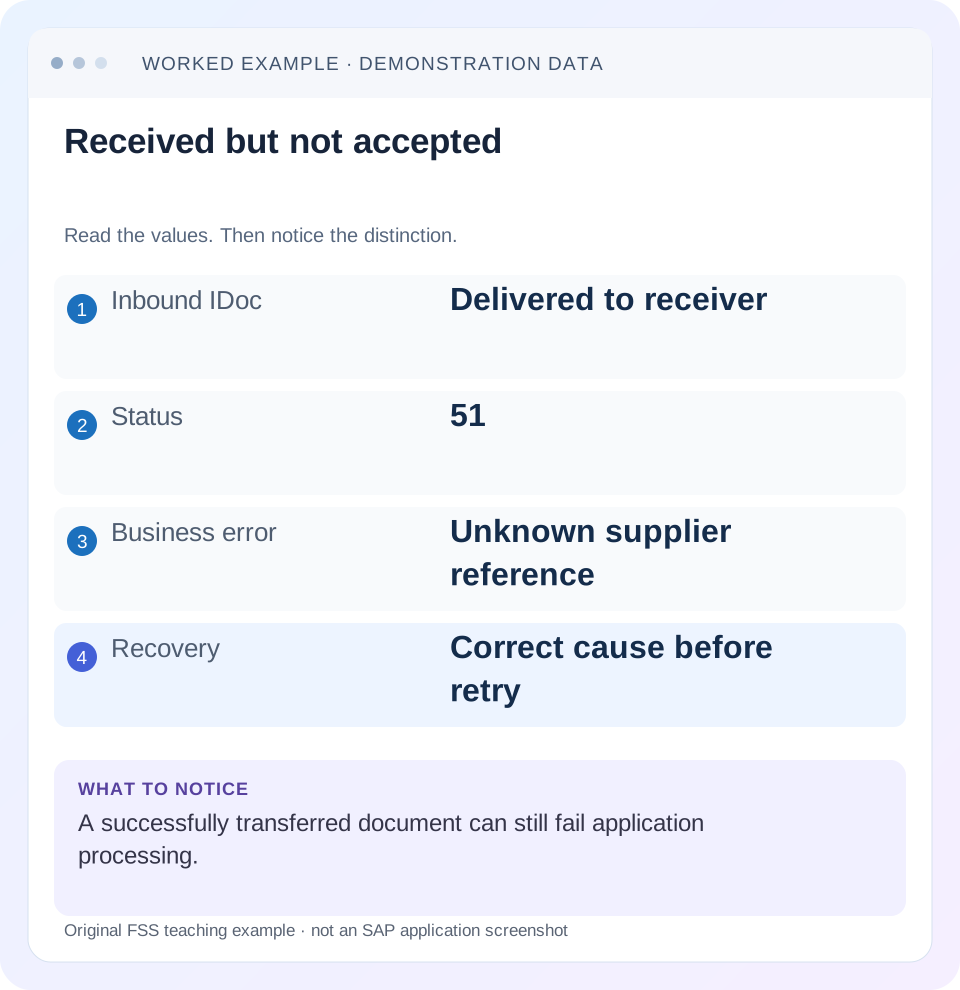
Read the example values
- Inbound IDoc
- Delivered to receiver
- Status
- 51
- Business error
- Unknown supplier reference
- Recovery
- Correct cause before retry
Words you’ll meet in this guide
- Message
- A package of information sent between systems.
- Payload
- The business content carried in a request or message.
- API
- A defined interface for another program to use.
- Receiver
- The system to which a message or request is sent.
- IDoc
- A structured SAP document format used to exchange business data.
- HANA
- SAP’s database platform.
Preview the practical steps
SEE THE CONNECTION
See it in a simple example.
A small example to make the idea concrete.
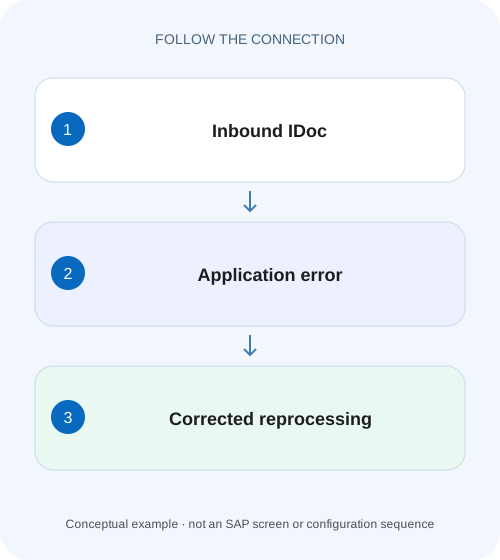
Investigate a rejected component supplier invoice IDoc
A manufacturer's incoming invoice IDoc fails because its business data does not satisfy the target context.
Status 51 identifies an application failure, not one universal cause
Inbound IDoc status 51 means the application document was not posted under that processing result.
Preserve the IDoc and its status history
Record receiving system/client, IDoc number, logical message, basic type, extension, sender/receiver partners, creation time and full relevant status error.
Worked case: an invoice references a supplier unavailable in the target context
Imagine inbound invoice reference EXT-INV-700 for supplier V404, company code 1000 and a net amount of 120 EUR.
Investigate a rejected component supplier invoice IDoc
A manufacturer's incoming invoice IDoc fails because its business data does not satisfy the target context.
Read the actual application error and target data before reprocessing, so repeated attempts do not replace diagnosis.
| Reader | Business question | Evidence to carry forward |
|---|---|---|
| SAP developers and application teams supporting manufacturers | Investigate a rejected component supplier invoice IDoc | Read the actual application error and target data before reprocessing, so repeated attempts do not replace diagnosis. |
01 Status 51 identifies an application failure, not one universal cause
Inbound IDoc status 51 means the application document was not posted under that processing result. Read the actual status message, type, partner and business reference before selecting a remedy. A missing business prerequisite, invalid mapping, incorrect inbound processing configuration and temporary lock can all need different recovery paths. Reprocessing unchanged work is not a diagnosis. [1] [2]
This tutorial is for support analysts and ALE/application developers in ERP or S/4HANA landscapes with classic IDoc administration. You need authorized WE02/BD87 display and the receiving application’s error/recovery procedure. Exact process codes, messages and report behavior are application- and release-specific. The invoice example is illustrative, not a claim that every invoice interface uses the same basic type or posting function.
02 Preserve the IDoc and its status history
Record receiving system/client, IDoc number, logical message, basic type, extension, sender/receiver partners, creation time and full relevant status error. Read the history as a sequence: an earlier 51 may have been followed by another attempt or a successful posting. A saved screenshot of the original state can become stale while an automatic job works.
Keep the application reference with the technical IDoc identity. An outbound sender number need not equal the receiver’s number. Correlate the actual exchange and business key rather than searching for a familiar local number. Keep sensitive invoice values or personal information only in authorized evidence; a general ticket can contain sanitized identifiers and the error classification.
03 Worked case: an invoice references a supplier unavailable in the target context
Imagine inbound invoice reference EXT-INV-700 for supplier V404, company code 1000 and a net amount of 120 EUR. Its receiving IDoc records status 51 with an application message saying the supplier is unavailable for the required target context. Assume the authoritative receiver lookup confirms no intended invoice was posted. Retrying unchanged content will encounter the same prerequisite.
The correction depends on why V404 is unavailable. It can be the wrong mapped identifier, a valid supplier missing required company-code setup or a source-data error. Replacing it with an arbitrary existing supplier would make posting easier while changing the business obligation. The application owner must establish the intended supplier and supported maintenance/correction path.
| Field | Intended value | Verification purpose |
|---|---|---|
| External invoice reference | EXT-INV-700 | Find the intended business effect |
| Supplier | V404 after correct mapping | Confirm the actual payee |
| Company code | 1000 | Confirm organizational prerequisite |
| Net amount/currency | 120 EUR | Check resulting invoice content |
| Initial receiver result | No intended invoice confirmed | Define safe recovery starting state |
04 Classify the actual message before choosing an owner
Business validation normally needs application/master-data investigation. Inbound process or function assignment errors need ALE/application configuration review. Locking or runtime failures need time-correlated system and application evidence. SAP’s PEO/ERP troubleshooting documentation gives concrete status-51 examples involving inappropriate inbound function configuration; those are examples, not a universal prescription for another interface. [2]
Create one hypothesis tied to the message and a check that could disprove it. For V404, compare source identifier, mapping result and receiver supplier context. If those are correct, inspect the prerequisite the error actually names. If the message instead says a function is not allowed, do not create supplier master data to solve it.
A supplier can exist in the receiver globally while lacking the company-code context required by the invoice. Record the exact prerequisite named by the application rather than closing the check when a supplier search returns a name. If several IDocs share V404 but target different company codes, one correction may fix only a subset. Build the recovery cohort from the verified prerequisite and organizational scope. After the first successful retry, compare any new error with the original one; resolving supplier setup can reveal a separate amount, tax or posting-period validation that needs its own investigation.
05 Inspect type and inbound processing only when evidence points there
Compare the actual message/basic/extension combination with the partner contract and installed receiver processing. A structurally recognizable IDoc can still select an unintended application path. Conversely, the correct processing assignment can receive business-invalid data. Keep structural and application validations separate.
Use the supported configuration documentation for the exact message and release. Avoid copying a process code or function module from a successful unrelated interface. A MATMAS configuration does not repair an invoice message merely because both use IDocs. Preserve the original assignments and the reason for any change so target-system differences can be reviewed.
06 Investigate locks and temporary failures with current evidence
If the application error reports an object lock, identify the business object and relevant time. Determine whether the lock is still held and whether it belongs to legitimate work. Do not delete locks or repeatedly reprocess while another transaction is updating the same object. A stale lock-looking message can remain in history after the actual condition changes.
SAP’s inbound error-handling documentation describes selective resubmission and periodic handling for lock-related failures. Use the supported application/release procedure and appropriate selection. A repeated lock error can indicate scheduling contention or long-running business processing; clearing the individual IDoc does not explain recurrence. [3]
07 Reconcile business state before another attempt
Inspect whether the intended receiver document or any relevant side effect already exists. Status 51 is a processing result, but custom handlers, external calls or earlier attempts can complicate the business picture. An uncertain outcome needs reconciliation, not a new independent submission through another channel.
For EXT-INV-700, search using the stable external reference and correct supplier/company-code context. If a document exists, compare amount, currency, state and whether it belongs to this instruction. If the authoritative application confirms no posting, document that starting point. A new test IDoc or resend can carry a different technical identity while representing the same invoice, so duplicate controls must use the intended business contract.
08 Correct the cause and choose the supported recovery scope
After the responsible owner corrects mapping, data, configuration or temporary condition, select the original IDoc or an explicitly supported replacement process. BD87 is the classic status monitor for processing selected work, and SAP documents RBDMANI2 for resubmitting applicable inbound errors. Check the installed report and application procedure rather than applying a generic mass-run recipe. [3] [4]
Begin with one representative corrected IDoc. Preserve the selected number, correction and expected document. Coordinate with automatic jobs so manual recovery does not race with scheduled processing. If payload correction or regeneration is required, keep the relationship to the original work and explain whether current source state or original event state is intended.
09 Do not use a test IDoc as an untracked production repair
Test tools can create and process new IDocs. That can be useful in an authorized development fixture but is not merely another display of the original record. A copied payload can post business data and can bypass the original technical history. Define target, data and expected effect before using such a tool.
For a productive recovery, use the application’s supported path and retain traceability. If a replacement invoice is generated, reconcile the original IDoc’s disposition and any pending automatic retry. A green new document while the original remains eligible for posting can create a later duplicate. The incident is not closed until both original and replacement work are accounted for.
10 Troubleshoot status 51 by the first failed prerequisite
Use a small decision table with the actual error text as the entry point. Several IDocs with status 51 should not automatically be one recovery cohort; group them only when the same verified cause and correction apply.
| Observed error or state | Question | Next evidence |
|---|---|---|
| Supplier/customer unavailable | Is identifier and target context correct? | Mapping, master data and organizational setup |
| Function/process assignment error | Is the intended inbound application selected? | Type/partner/process configuration |
| Object locked | Is legitimate processing still active? | Current object lock and owning process |
| Runtime exception | What failed in this attempt? | Correlated application log/dump and code context |
| Document exists despite failed history | Is the outcome already applied? | External-reference lookup and attempt sequence |
| Same error after retry | Was the prerequisite actually corrected? | Correction evidence and unchanged payload fields |
11 Verify both final status and business content
After recovery, inspect the new status history and the intended receiver document. Status 53 indicates application posting in the documented status list, but closure still needs the right business result: EXT-INV-700, intended supplier, company code 1000 and 120 EUR. A document against another supplier is not success simply because posting completed. [1]
For the positive fixture, correct the actual V404 prerequisite and verify one intended invoice. For a negative fixture, retain an invalid supplier in a safe development case and confirm the error remains actionable without changing unrelated data. For a boundary fixture, test a duplicate external reference under the receiver’s documented contract and verify it cannot create an unintended second obligation.
If the issue is transient locking, observe another scheduled case under comparable conditions. One successful manual retry can recover an invoice while leaving a contention problem open. Record that distinction and any remaining IDocs needing separate review.
12 Close with a causal explanation and a controlled backlog plan
The handoff should connect original status message, verified cause, exact correction, selected recovery method and final business outcome. State what was actually executed and what remains a proposed check. If documentation alone was reviewed, do not claim a reproduced customer repair.
For a backlog, identify which records share the corrected cause and which differ by supplier, company code, message type or error. Reconcile a representative sample and apply the supported selection procedure with ownership. A bulk status clear cannot replace that analysis.
Can I simply resend from the source? Only when the interface’s supported recovery and duplicate contract justify it. Should every 51 be handled by Basis? No; the actual application message identifies the needed expertise. The related IDoc type, logical-system and idempotency lessons explain structural, routing and replay boundaries around this application error.
Related services and next steps
Primary sources
Found this useful?
Share this guide with your network, or leave a like.
Your like is saved in this browser.