SAP shelf life: Expiration date and minimum remaining life answer different questions
A factory receives a dated production material that has not expired, but its remaining life may be shorter than the plant requires at receipt.

Source review:
START HERE · NO PRIOR TOPIC KNOWLEDGE NEEDED
What it is. Why it matters.
An expiration date marks a product’s defined end of shelf life. Minimum remaining shelf life specifies how much life must remain for a relevant receipt check.
Completely new to SAP?
Manufacturers use SAP to connect work such as buying components, recording inventory, planning production, shipping equipment and accounting for costs. SAP S/4HANA is an enterprise resource planning system: it connects these activities through shared business data.
Master data describes reusable business entities such as products and business partners. Transactions refer to those records, so identities and units need to remain consistent.
A transaction code, or t-code, is a shortcut to a task in classic SAP GUI. Fiori apps provide another way to work. Names and screens depend on the product and release; you do not need a live system to learn the concepts in this guide.

Scope and source-review notes
Scope and evidence
Source review by FAST SAP SOLUTIONS® editorial. This badge describes our editorial review; it does not represent SAP certification or independent endorsement.
Inventory Management shelf-life checks in classic ERP and supported S/4HANA; current references include on-premise 2025 FPS01. Plant/movement activation, date basis, period/rounding, PO/material minimum and message behavior require local verification.
Reviewed the cited official SAP indexed documentation excerpts on 14 November 2026. Direct Help Portal opens did not consistently expose readable page text. This is documentation-based teaching, not customer-system execution. All document identifiers, quantities and outcomes in the worked case are illustrative; installed release, edition, configuration and authorizations require local verification.
A MANUFACTURING EXAMPLE
Check dated production materials
Unexpired can still be too short-lived
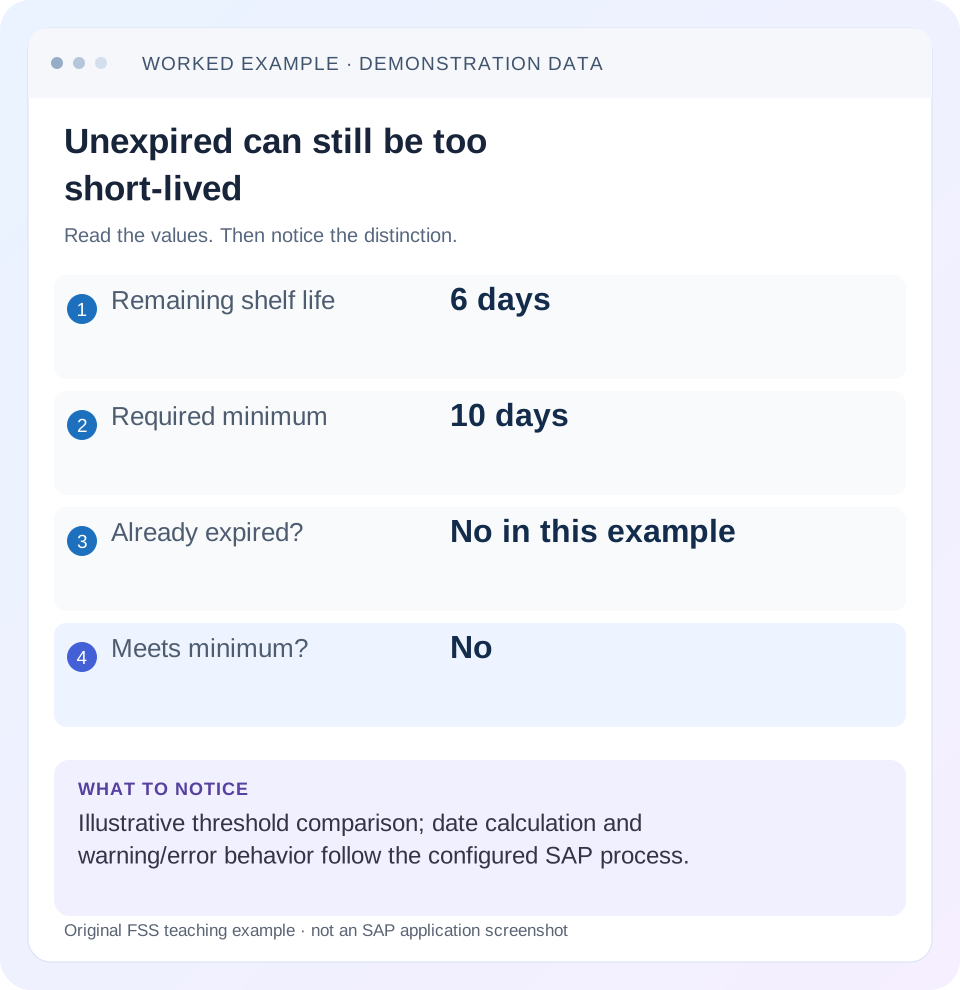
Read the example values
- Remaining shelf life
- 6 days
- Required minimum
- 10 days
- Already expired?
- No in this example
- Meets minimum?
- No
Words you’ll meet in this guide
- Master record
- Reusable information about a business entity.
- Transaction
- A recorded business action or event.
- Identifier
- A value used to distinguish one record from another.
- HANA
- SAP’s database platform.
Preview the practical steps
SEE THE CONNECTION
See it in a simple example.
A small example to make the idea concrete.
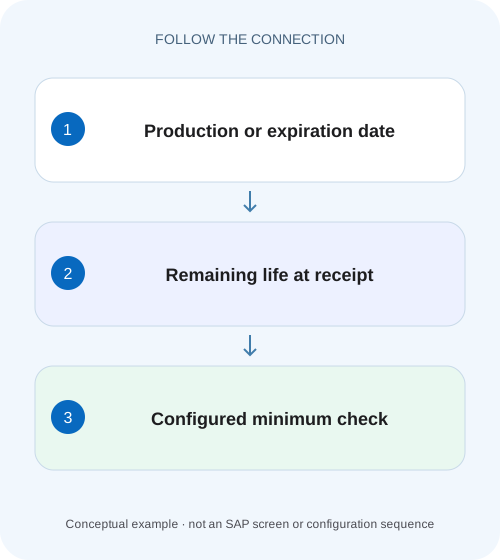
Check dated production materials
A factory receives a dated production material that has not expired, but its remaining life may be shorter than the plant requires at receipt.
Unexpired does not mean acceptable at receipt
A product can still be before its expiration date and fail the minimum remaining shelf-life requirement at receipt.
Scope and information to collect
The mechanism described is Inventory Management shelf-life checking in classic ERP and supported S/4HANA processes.
Understand the three different shelf-life inputs
Total shelf life describes the material’s defined life from production to expiration.
Check dated production materials
A factory receives a dated production material that has not expired, but its remaining life may be shorter than the plant requires at receipt.
Compare the expiration date, receipt date and required remaining life before treating an unexpired delivery as acceptable supply.
| Reader | Business question | Evidence to carry forward |
|---|---|---|
| Plant stores, warehouse and materials teams | Check dated production materials | Compare the expiration date, receipt date and required remaining life before treating an unexpired delivery as acceptable supply. |
01 Unexpired does not mean acceptable at receipt
A product can still be before its expiration date and fail the minimum remaining shelf-life requirement at receipt. The first question is when the product reaches its defined end of life. The second is whether enough life remains for your purchasing and operational requirement. Six days remaining does not satisfy a requirement for ten days, even though the product has not expired.
This tutorial helps receiving, purchasing and quality teams explain such a result without changing dates merely to complete the transaction. You will identify the date inputs, the applicable threshold and activation settings, then separate receipt acceptance from later storage and issue decisions. The worked example is deliberately explicit about which dates and quantities are being compared.
02 Scope and information to collect
The mechanism described is Inventory Management shelf-life checking in classic ERP and supported S/4HANA processes. SAP’s current on-premise documentation describes plant and movement-type activation, material shelf-life data and input-field behavior. Public Cloud configuration and applications have different delivery models; do not infer identical configuration access or defaults from an on-premise example. [1]
Start with the material, plant, purchase-order item, batch if applicable, goods-movement context and exact message. Obtain the actual production date or supplier expiration date, the intended receipt date basis and the minimum required life. Distinguish a planned arrival from the date used by the executed transaction. Display access to the material, purchasing item and batch is usually enough to begin the investigation; a training environment is required for the proposed posting checks.
03 Understand the three different shelf-life inputs
Total shelf life describes the material’s defined life from production to expiration. A production date plus that period can support calculation of the expiration date in the documented process. If no total shelf life is specified, SAP describes entering the expiration date itself. A supplied expiration date and a derived expiration date therefore come from different evidence. [2] [3]
Minimum remaining shelf life describes how much life is required at the relevant receipt check. It is a threshold, not an extra period to add to the expiration date. Maintain its unit and source alongside the value. A threshold expressed in days cannot be interpreted as a percentage merely because a report also displays percentage remaining.
The batch expiration date is persisted business data. A plausible date in a spreadsheet does not prove that the batch master and material document contain that same value. When a receipt involves an existing batch, compare its established date with the incoming evidence before proceeding.
04 Worked case: six days left and ten required
In the fictional case, material FOOD-A has an explicitly supplied expiration date of 20 November 2026. The relevant receipt comparison date is 14 November 2026 and the agreed minimum is ten days. For the simple calendar-day subtraction used by this worksheet, twenty minus fourteen gives six days remaining. This isolates the business distinction; the installed SAP date calculation and boundary treatment still need confirmation. [3]
A quantity of 100 cartons is delivered. All cartons belong to batch B-A and carry the same date. The quantity does not improve the remaining life: every carton is six days from the stated limit. Splitting the 100 cartons into two receipt items also does not create extra shelf life. If only some cartons belong to a later-dated batch, establish that actual physical separation rather than assigning the later date to the full delivery.
The correct investigation statement is “unexpired, but below the stated receipt-life requirement.” It is not “expired,” and it is not proof that the system must always issue a hard error. SAP documents configuration-dependent warning or error behavior.
| Input | Value | Interpretation |
|---|---|---|
| Expiration | 20 November 2026 | Supplier/batch date evidence |
| Comparison date | 14 November 2026 | Illustrative receipt basis |
| Remaining life | 6 calendar days | Simple worksheet subtraction |
| Required minimum | 10 days | Applicable example threshold |
| Delivered quantity | 100 cartons | Does not alter date comparison |
05 Confirm where the requirement came from
Compare the actual purchasing item and material shelf-life data. SAP documents checking the remaining life required in the purchase order or material master. Do not assume that the number a user remembers from a material display is necessarily the effective input for this receipt. Capture the relevant document value, master value and actual message together. [3]
Ask why the business needs ten days. The answer might involve transport to stores, production consumption or customer commitments. This explanation helps route a short-life delivery decision, but it does not justify silently editing the threshold on a live purchasing item. An approved exception should retain the supplier evidence and the reason for the business disposition.
If the requirement is absent, determine whether the process intentionally accepts that case or whether required master/purchasing data is incomplete. “No message appeared” is evidence of an observed outcome, not proof that ten days was actually checked.
06 Check activation and field behavior in order
A shelf-life value in master data does not by itself establish that every goods movement performs the check. The current documentation describes activation for the plant and movement type, with input availability depending on settings. Review the specific movement and installed configuration rather than searching for one universal checkbox. [1]
Identify the exact movement
Record the goods-movement purpose, plant and reference document. Keep a receipt distinct from a later stock transfer or issue.
Expected observation: The check is investigated for the actual transaction.
Inspect the date inputs
Compare supplier production/expiration evidence with what was entered and what already exists for the batch. Check the period unit if calculation is used.
Expected observation: A date typo can be distinguished from genuinely short remaining life.
Compare the threshold and message
Record the applicable material/PO minimum, the calculated remaining life and the message severity. Review activation with authorized configuration display.
Expected observation: The result can be explained by inputs plus the active control.
Verify the recorded result
After any approved correction or disposition, display the resulting receipt and batch dates. Retain the document reference.
Expected observation: The persisted dates agree with the accepted evidence.
07 When production dates and periods cause surprises
For a separate illustration, suppose total life is thirty days and the agreed production date is 1 November. A daily calculation can produce 1 December as the expiration date. Entering 11 November instead would move the derived date by ten days, making an old product appear younger. That is why the physical manufacturing evidence matters more than whether the derived date looks convenient. [2]
Month-, week- and year-based periods and configured rounding can produce boundaries that should not be replicated with casual day arithmetic. SAP documents period indicators and rounding rules. Use the supported system result and installed documentation for those cases, and test month end and leap-year behavior in the approved training environment.
Avoid transferring a spreadsheet’s “days left” value directly into an expiration-date field. One is a duration observed at a time; the other is a date attached to the product or batch. Tomorrow’s remaining duration changes even if the correct expiration date remains the same.
08 Existing batches need date consistency
Suppose B-A already has an expiration date of 20 November and a new delivery for B-A is entered with 30 November. The discrepancy might mean a typing error, an incorrect batch selection or a supplier lot that should not have been combined with the existing batch. Investigate the physical evidence before deciding which date is correct. [3]
SAP documents a consistency check for dates on existing batches and configuration-dependent messages. The documentation also describes circumstances in which posting after a warning can overwrite the prior batch date. Treat this as a data consequence to investigate, rather than assuming a warning is harmless.
Review other stock and documents using that batch. A date change can influence subsequent selections and reports beyond the new receipt. Preserve original and corrected evidence and verify the intended outcome through supported displays.
09 Troubleshooting the actual symptom
Use the following branches to keep date, threshold and control failures distinct. Removing the minimum requirement would conceal all three and make it harder to prove why the original delivery failed.
| Observation | Check first | Useful next action |
|---|---|---|
| Unexpired but short-life message | Remaining life against effective minimum | Confirm requirement and business disposition |
| Derived expiration seems too late | Production date, period and rounding | Reconcile supplier evidence before correction |
| No date field or no check | Plant/movement and input controls | Review exact release-specific configuration |
| Existing batch date differs | Batch selection and previous date | Determine whether evidence belongs to same batch |
| Same goods pass on another date | Actual comparison date and inputs | Repeat with captured transaction context |
| Receipt passes but issue is unsuitable | Later quality/customer selection rules | Review downstream usability separately |
10 Verify ordinary and difficult boundaries
For the positive training check, replace the expiration date with a supported date giving comfortably more than ten days remaining, while retaining the same effective minimum and active check. Confirm the actual message/result and persisted date. This avoids using an equality boundary as the first proof of a working setup.
For the negative check, use the six-versus-ten worksheet case and verify the configured warning/error behavior without falsifying the supplier date. Then test a genuinely expired date and explain how that differs from short but positive remaining life.
For boundary checks, test exactly the configured minimum, the adjacent dates and any month-end rounding in your installed release. The documentation’s wording and the application’s date basis should be checked together; this article intentionally does not promise a universal inclusive/exclusive comparison for every process. Record expected and observed results before accepting the configuration.
11 Keep receipt acceptance and later usability separate
A receipt check establishes one event’s condition. Quality inspection, batch status, storage compliance and customer-specific remaining-life requirements can still prevent later use. For example, a batch received with twenty days left may have only eight days left when a customer order requires twelve. The successful receipt is historical evidence, not a permanent usability approval. [2] [3]
SAP documents batch selection using expiration-related characteristics and recurring inspection possibilities. Review those as separate process designs. A warehouse needs a way to identify stock approaching expiration, determine disposition and prevent inappropriate issue according to its controls. Do not assume that merely storing a date automatically enforces every downstream rule.
12 Questions and a clear handover
Does changing the posting date fix short life? It changes transaction context and potentially accounting timing; it is not a substitute for the real receipt evidence. Use the authorized process and determine which date the check actually uses.
Must every short-life delivery be rejected? The configured system response and approved business disposition decide the supported handling. Preserve the exact message and decision. A warning is not permission to invent a later supplier date.
A useful handover for the example records FOOD-A, B-A, 100 cartons, expiration 20 November, comparison 14 November, ten-day minimum and six-day worksheet result. Add the actual SAP message, configuration basis, receipt reference and quality/purchasing decision. Continue with the batch-identity lesson and stock-category lesson when the remaining question concerns traceability or usability.
Related services and next steps
Primary sources
Found this useful?
Share this guide with your network, or leave a like.
Your like is saved in this browser.