MI01, MI04 and MI07: Separate inventory documents, counts and difference postings
A plant count finds 95 components where SAP records 100, and stores must distinguish entering a count from posting an inventory difference.

Source review:
START HERE · NO PRIOR TOPIC KNOWLEDGE NEEDED
What it is. Why it matters.
Physical inventory compares recorded stock with counted stock. Creating a count document, entering the count and posting an approved difference are different stages of that process.
Completely new to SAP?
Manufacturers use SAP to connect work such as buying components, recording inventory, planning production, shipping equipment and accounting for costs. SAP S/4HANA is an enterprise resource planning system: it connects these activities through shared business data.
Materials Management supports purchasing and inventory. A request, order, goods receipt and supplier invoice describe separate events, each with its own record and status.
A transaction code, or t-code, is a shortcut to a task in classic SAP GUI. Fiori apps provide another way to work. Names and screens depend on the product and release; you do not need a live system to learn the concepts in this guide.

Scope and source-review notes
Scope and evidence
Source review by FAST SAP SOLUTIONS® editorial. This badge describes our editorial review; it does not represent SAP certification or independent endorsement.
MM Inventory Management physical inventory in ERP and supported S/4HANA. Classic MI01/MI04/MI07 availability, combined actions, book-inventory timing, recount, approvals and valuation differ by installed process; WM/EWM are separate.
Reviewed the cited official SAP indexed documentation excerpts on 14 November 2026. Direct Help Portal opens did not consistently expose readable page text. This is documentation-based teaching, not customer-system execution. All document identifiers, quantities and outcomes in the worked case are illustrative; installed release, edition, configuration and authorizations require local verification.
A MANUFACTURING EXAMPLE
Reconcile a component-store count
A count is not an adjustment
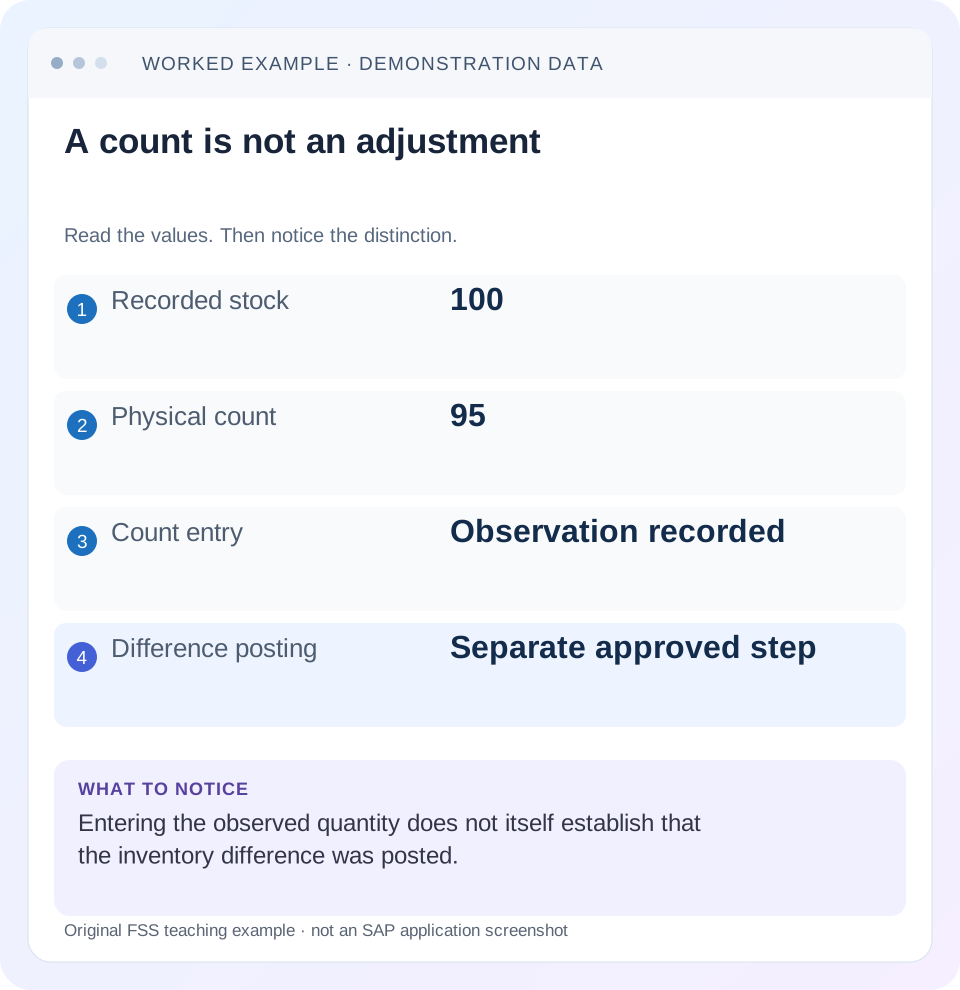
Read the example values
- Recorded stock
- 100
- Physical count
- 95
- Count entry
- Observation recorded
- Difference posting
- Separate approved step
Words you’ll meet in this guide
- Material
- A product or supply item managed in SAP.
- Plant
- An organizational unit for relevant logistics operations.
- Goods receipt
- A recorded receipt of goods in a business process.
- Purchase order
- A purchasing document requesting goods or services from a supplier or supplying plant.
- Invoice
- A supplier’s bill for goods or services.
- HANA
- SAP’s database platform.
- EWM
- Extended Warehouse Management: SAP’s application for warehouse processes.
- WM
- Warehouse Management: the warehouse application or component in the relevant SAP product.
Preview the practical steps
SEE THE CONNECTION
See it in a simple example.
A small example to make the idea concrete.
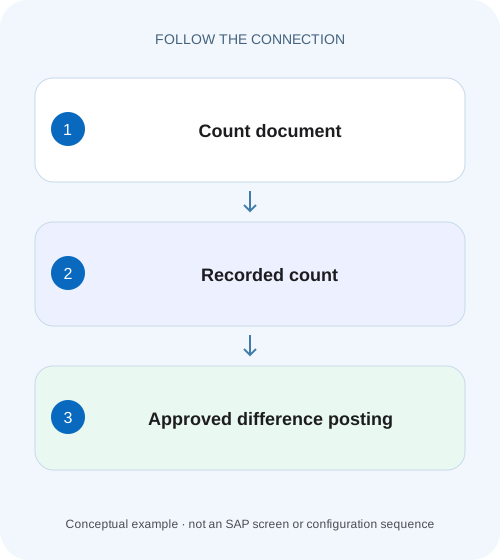
Reconcile a component-store count
A plant count finds 95 components where SAP records 100, and stores must distinguish entering a count from posting an inventory difference.
A count document, a count and an adjustment are separate events
MI01 creates a physical-inventory document in the classic flow, MI04 enters counts and MI07 supports difference processing/posting.
Scope and prerequisites
The scope is MM Inventory Management physical inventory in classic ERP and supported S/4HANA.
Define exactly what is being counted
A count must identify the stock population.
Reconcile a component-store count
A plant count finds 95 components where SAP records 100, and stores must distinguish entering a count from posting an inventory difference.
Follow the inventory document, count and difference-posting stages with the same stock scope before accepting the corrected balance.
| Reader | Business question | Evidence to carry forward |
|---|---|---|
| Plant stores, warehouse and materials teams | Reconcile a component-store count | Follow the inventory document, count and difference-posting stages with the same stock scope before accepting the corrected balance. |
01 A count document, a count and an adjustment are separate events
MI01 creates a physical-inventory document in the classic flow, MI04 enters counts and MI07 supports difference processing/posting. Creating the document does not prove that anyone counted the stock. Saving a measured quantity does not by itself prove that the inventory difference has been reviewed and posted. [1] [2] [4]
The practical goal is a complete count-to-adjustment trail. This tutorial follows book quantity 100 and physical count ninety-five, then introduces an unposted issue that changes the explanation. It teaches why the difference must be investigated rather than automatically treated as five missing units.
02 Scope and prerequisites
The scope is MM Inventory Management physical inventory in classic ERP and supported S/4HANA. EWM and classic WM use their own warehouse counting/reconciliation processes. Do not apply these transaction steps directly to an EWM bin count or assume MM document completion also completes warehouse-system reconciliation. [1]
Obtain the physical-inventory document/year/item, material, plant, storage location, stock category, batch/special-stock context, count date and unit. Understand the approved posting-block or book-inventory-freeze procedure and counting responsibilities. Display access is enough to review; creation, count entry, recount and difference posting require authorized training/operational roles.
Some supported applications combine stages in one action. The underlying distinctions still matter: preparation, observed count and inventory adjustment should each have evidence even if a screen saves more than one stage together.
03 Define exactly what is being counted
A count must identify the stock population. One material can exist in unrestricted, inspection and other contexts at the same storage location. Batches and ownership can further separate the population. Counting every pallet with the same description and comparing it with one selected stock category creates a false difference.
Define the physical boundary and movement timing. If goods move while counting, the approved procedure must explain how the observed quantity relates to the book snapshot used by SAP. A posting block and a freeze-book-inventory design are not casual substitutes; inspect the actual configuration and procedure.
The unit matters equally. Ninety-five pieces and ninety-five boxes are different observations. Record the physical counting basis and the entered unit/conversion so the approved book-versus-count comparison is meaningful.
04 Worked case: one hundred booked, ninety-five counted
Fictional document PI-A item 10 concerns PART-I in P100/S100, one defined stock category, in PC. The relevant book position is 100. The counter physically verifies ninety-five pieces and records the count under the approved procedure. The simple difference is 95 − 100 = −5 PC.
At this stage, negative five is a discrepancy to explain. The count entry preserves the observation; it does not establish that the cause is theft, damage or a valid write-off. The analyst checks timing, unit, location and unposted activity before deciding whether a recount or adjustment is required.
If the five-piece shortage remains confirmed and approved, the supported difference posting adjusts the relevant book quantity. Under the no-other-movements fixture, the resulting position becomes ninety-five. The material/accounting evidence and inventory-document posting status must be verified; the saved count alone is insufficient.
| Stage | Evidence | Quantity meaning |
|---|---|---|
| Preparation | PI-A item 10 | Defines what will be counted |
| Book position | 100 PC | Comparison basis under approved timing |
| Count observation | 95 PC | Actual verified physical quantity |
| Analyzed difference | −5 PC | Requires explanation/review |
| Approved posting | Resulting material/accounting reference | Adjusts relevant book position |
05 Create and prepare the document with the right boundary
Use the supported creation application or MI01 where available to select the material and exact organizational/stock context. Confirm count date and required movement control. A document that includes the wrong batch is not repaired by accurately counting another batch. [2]
Distribute count instructions that make the location, stock identity and unit clear. Follow the organization’s blind-count and independence rules where applicable. Do not copy the expected quantity into the result simply to complete the task.
Record who counted and when through the approved process. This helps resolve movements near the boundary and makes a later recount meaningful. The preparation document is a plan and control object, not proof that the count occurred.
06 Enter the observed count and inspect status
Use MI04 or the supported count application for the identified document. Enter ninety-five pieces only after actual verification. Review the item and unit before saving; entering the correct count on the wrong item creates two problems. [1]
Treat uncounted and confirmed zero separately. An empty shelf can justify zero only after verifying the correct stock population and using the supported zero-count indication/process. A blank entry is not automatically a physical observation of zero.
After saving, inspect count status and item evidence. SAP documents header/item progress indicators that distinguish open, counted, posted, recounted or deleted states. A header can summarize mixed item states, so review the individual item before declaring the entire document complete.
07 Investigate timing before approving a shortage
Now introduce a variation: five pieces were physically issued before the count, but the goods issue was not yet posted at the comparison boundary. Ninety-five physical pieces and 100 book pieces can then be explained by the missing issue event rather than an unexplained loss. Confirm the actual authorization, event timing and supported posting procedure.
Do not both post the legitimate five-piece goods issue and write off another five as an inventory shortage without reconciling the boundary. That would reduce the book quantity twice for one physical event. Conversely, do not invent an issue merely to avoid explaining a real shortage.
If timing cannot explain the difference, check adjacent locations, units, batches and count quality. A recount provides a new controlled observation; it should retain its relationship to the original count rather than replacing evidence silently.
08 Post differences only after the intended review
Use MI07 or the supported difference-processing application with the actual document and approved reason. Review quantity, value impact and organizational context before posting. Authorization and tolerance controls can affect who is allowed to complete the action. [1] [3]
After the authorized training posting, inspect the physical-inventory item’s adjustment status and resulting material document. Where financially relevant, inspect accounting evidence with the appropriate role. The adjustment should explain the approved difference, not merely make a status bar complete.
Keep the count and recount evidence, explanation and posting reference together. SAP documents that difference posting adjusts book quantities/values in the supported process. The audit trail must show why that adjustment represents the verified physical position.
09 Troubleshooting decisions
Choose the branch by stage and evidence. Re-entering a count will not necessarily solve a posting authorization or timing problem.
For a multi-item example, let PI-A item 20 have book quantity ten and confirmed count ten while item 10 retains the five-piece discrepancy. Item 20 has no quantity difference, but its count evidence still matters. If item 10 remains under recount, a header-level impression of progress must not conceal that unresolved item. Compare counted and posted states separately and explain whether the approved procedure permits completion of eligible items before the whole document is finished. This makes a useful training fixture because it tests mixed states without inventing another physical shortage.
| Observation | Question | Next evidence |
|---|---|---|
| Document exists, no count | Was stock physically counted? | Count status and signed/approved observation |
| Count saved, stock unchanged | Were differences actually posted? | Adjustment status and material document |
| Five short after recent issue | Is the movement reflected at the count boundary? | Issue timing and posting reference |
| Zero shown unexpectedly | Confirmed zero or uncounted input? | Zero-count process and item evidence |
| Header incomplete, one item posted | Do other items have different states? | Item-level progress |
| Count differs by packaging factor | Was unit conversion correct? | Physical unit, entry unit and conversion |
10 Common mistakes that duplicate adjustments
Do not use an inventory difference posting to cover an unexamined missing goods receipt or issue. Correct the actual business event through the supported process and reconcile the count boundary. Physical inventory is not a generic replacement for every movement correction.
Do not treat a recount as permission to choose the result that matches book stock. Investigate which observation is valid and why. Preserve the original relationship and approved outcome.
Do not assume a small quantity difference has a small value impact. Five high-value units can be financially significant. Review the actual material valuation and approval thresholds; the tutorial’s count arithmetic does not determine accounting policy.
11 Verification exercises
For the positive worksheet check, retain PI-A, book 100, observed ninety-five and the approved minus-five adjustment, then verify a ninety-five result under the no-other-events assumption. In training, capture actual count and adjustment states and document references.
For the negative check, save only the count and demonstrate why it does not prove the book quantity changed. Separately include the legitimate five-piece unposted issue and explain why an additional five-piece shortage adjustment would double-count the event.
For boundary checks, test an actual zero count, a no-difference count, a recount and a document with one counted and one uncounted item. Include a movement near the approved time boundary. Expected results must reflect the installed movement-control and book-inventory procedure.
12 Questions and the completed count record
Can physical-inventory stages be combined? Supported functions can combine actions, but the preparation, observation and adjustment still need to be understood and verified. Does a count explain its own cause? No. It records physical observation against a defined book context; investigation explains discrepancies.
Does MM completion prove EWM reconciliation? No. Warehouse-managed stock requires the relevant warehouse process and integration evidence. Does a difference posting establish availability? It adjusts the relevant inventory position; stock status and process allocation remain separate questions.
A useful result states PI-A/item, exact stock identity, count date/unit, book 100, verified ninety-five, investigated cause, recount if any and the approved material/accounting posting reference. Continue with cycle counting, movement history and stock overview to connect count frequency, event timing and current position.
Related services and next steps
Primary sources
Found this useful?
Share this guide with your network, or leave a like.
Your like is saved in this browser.