Cycle counting in SAP: Frequent counts still need controlled reconciliation
A manufacturer counts selected component categories frequently while still needing a controlled record of count differences.

Source review:
START HERE · NO PRIOR TOPIC KNOWLEDGE NEEDED
What it is. Why it matters.
Cycle counting checks selected inventory regularly instead of relying only on one large annual count. Count results still need review and the supported difference-posting process.
Completely new to SAP?
Manufacturers use SAP to connect work such as buying components, recording inventory, planning production, shipping equipment and accounting for costs. SAP S/4HANA is an enterprise resource planning system: it connects these activities through shared business data.
Warehouse Management organizes where goods are and how they move. Stock identity, physical location, movement tasks and confirmed execution are separate pieces of the picture.
A transaction code, or t-code, is a shortcut to a task in classic SAP GUI. Fiori apps provide another way to work. Names and screens depend on the product and release; you do not need a live system to learn the concepts in this guide.

Scope and source-review notes
Scope and evidence
Source review by FAST SAP SOLUTIONS® editorial. This badge describes our editorial review; it does not represent SAP certification or independent endorsement.
Main operational scope: classic MM-IM cycle counting with ERP6.0 EHP8 documentation and supported S/4HANA concepts. Calendar, analysis, report/session processing and last-date behavior need installed checks; WM/EWM counting remains a separate process boundary.
Reviewed the cited official SAP indexed documentation excerpts on 14 November 2026. Direct Help Portal opens did not consistently expose readable page text. This is documentation-based teaching, not customer-system execution. All document identifiers, quantities and outcomes in the worked case are illustrative; installed release, edition, configuration and authorizations require local verification.
A MANUFACTURING EXAMPLE
Plan reliable component-store counts
Count, review, then reconcile
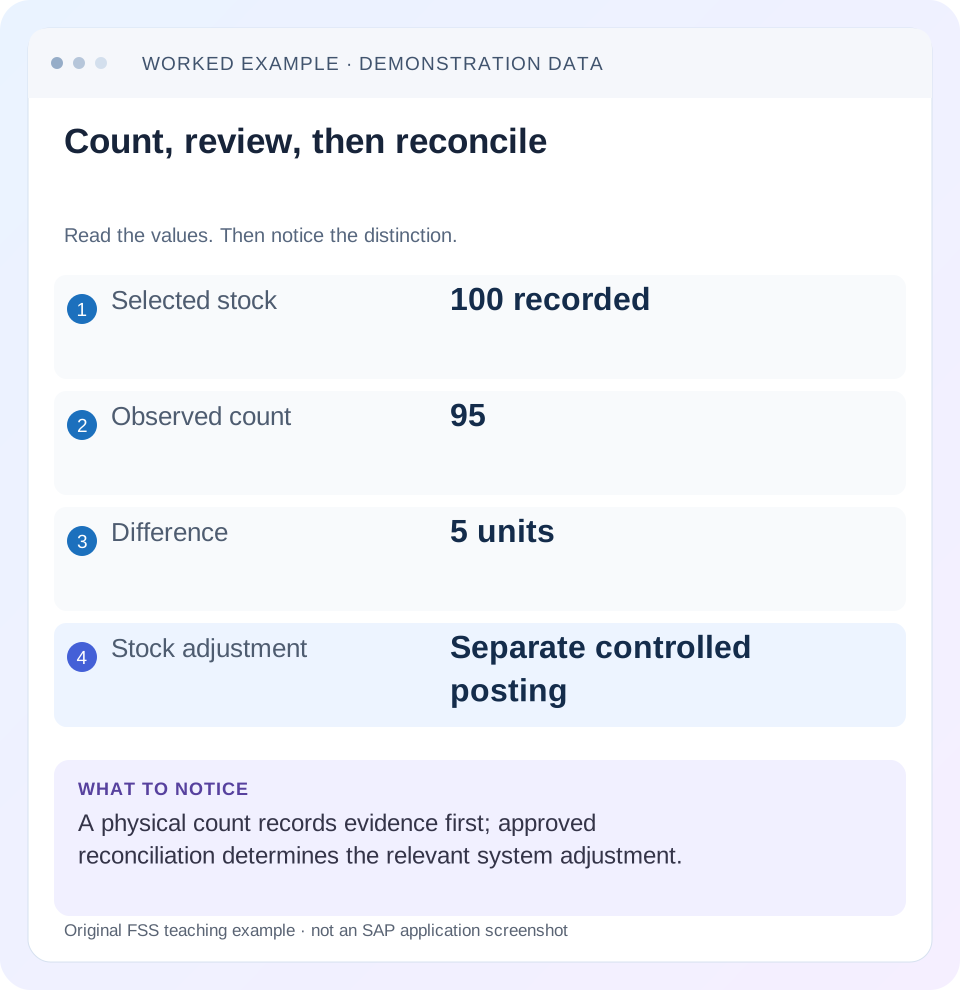
Read the example values
- Selected stock
- 100 recorded
- Observed count
- 95
- Difference
- 5 units
- Stock adjustment
- Separate controlled posting
Words you’ll meet in this guide
- Bin
- A named warehouse storage location.
- Handling unit
- An identified package of goods and packaging.
- Confirmation
- A record that relevant warehouse work was performed.
- Stock
- The goods recorded as held in a given business and location context.
- HANA
- SAP’s database platform.
- EWM
- Extended Warehouse Management: SAP’s application for warehouse processes.
- WM
- Warehouse Management: the warehouse application or component in the relevant SAP product.
Preview the practical steps
SEE THE CONNECTION
See it in a simple example.
A small example to make the idea concrete.
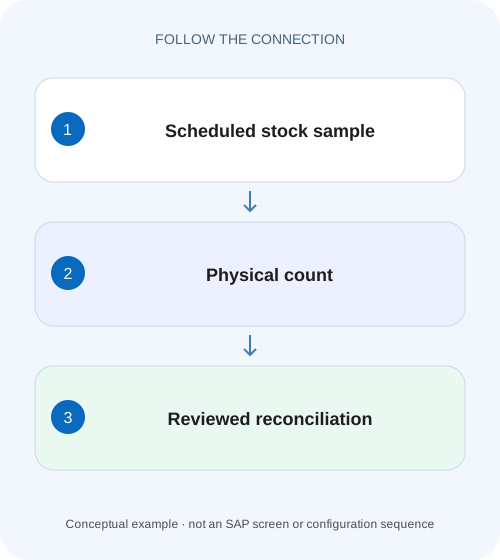
Plan reliable component-store counts
A manufacturer counts selected component categories frequently while still needing a controlled record of count differences.
Cycle counting chooses when to count; reconciliation decides what to post
Cycle counting spreads physical inventory over recurring intervals within a fiscal year.
Scope and prerequisites
The main operational scope is classic MM Inventory Management cycle counting in ERP and supported S/4HANA scenarios.
Understand indicators and due selection
SAP documents cycle-counting categories such as A/B/C/D and configured intervals.
Plan reliable component-store counts
A manufacturer counts selected component categories frequently while still needing a controlled record of count differences.
Separate count scheduling from the reconciliation and posting process before reporting a corrected inventory position.
| Reader | Business question | Evidence to carry forward |
|---|---|---|
| Plant stores, warehouse and materials teams | Plan reliable component-store counts | Separate count scheduling from the reconciliation and posting process before reporting a corrected inventory position. |
01 Cycle counting chooses when to count; reconciliation decides what to post
Cycle counting spreads physical inventory over recurring intervals within a fiscal year. In the documented MM Inventory Management process, the material’s cycle-counting indicator groups it into a category with a configured interval. Frequent selection does not eliminate the need to define stock scope, count correctly, investigate differences and complete the approved posting. [1]
This tutorial follows a frequently counted spare part with book quantity 100 and observed ninety-five. It separates category/interval planning from count-document progress and the five-piece adjustment. The aim is a repeatable control that improves inventory evidence, rather than a schedule that repeatedly generates unresolved count documents.
02 Scope and prerequisites
The main operational scope is classic MM Inventory Management cycle counting in ERP and supported S/4HANA scenarios. WM/EWM warehouse counting and inventory integration have their own objects and configuration. A warehouse-managed bin count should not be processed as an ordinary MM storage-location count without the supported warehouse procedure.
Collect material, plant/storage location, relevant stock category/batch/ownership, CC indicator, configured interval/calendar, last inventory evidence, planned count date and open count documents. Authorized master/configuration and physical-inventory display access is needed. Planning runs, counts and adjustments require the approved training/operational roles.
The category labels and intervals below are illustrative. They are not SAP-delivered defaults or a policy recommendation for every warehouse. The actual inventory-control design decides risk, frequency and approval.
03 Understand indicators and due selection
SAP documents cycle-counting categories such as A/B/C/D and configured intervals. Indicators can be maintained manually or supported through ABC analysis based on consumption or requirements. A high-value item and a fast-moving item can have different risk characteristics; the chosen analysis and business policy must be explicit. [1]
The classic documentation identifies Create physical inventory documents for cycle counting, program RM07ICN1, as checking whether cycle-counting materials are due. It also describes ABC analysis program RMCBIN00. Use the installed report documentation and approved selections rather than treating a remembered transaction code as universal.
Calendar, last-count basis and the stock scope influence due planning. Inspect the actual proposed count date and explain it from the maintained category and inventory history before changing the indicator.
04 Worked planning case: three categories with different intervals
The fictional policy counts category A every five planning days, B every twenty and C every sixty. These are explicitly worksheet intervals; translate actual dates through the installed calendar/configuration. PART-A is a frequently moving spare assigned A, PART-B a lower-frequency item assigned B and PART-C assigned C.
All three have a completed starting inventory at worksheet Day 0. At Day 5, the simple planning illustration expects attention to PART-A, while B and C have not reached their stated intervals. This is a reasoning fixture, not a promise about every SAP report’s buffer, holiday or open-document behavior.
The analyst verifies the actual due proposal rather than editing categories until the desired materials appear. If PART-A is absent, inspect its indicator, last inventory/date basis, selection scope and existing document state. If PART-B appears unexpectedly, compare those same inputs before assuming the interval configuration is defective.
| Material | CC category | Worksheet interval | Day 5 investigation |
|---|---|---|---|
| PART-A | A | 5 planning days | Expected due candidate under stated assumptions |
| PART-B | B | 20 planning days | Not due by simple interval fixture |
| PART-C | C | 60 planning days | Not due by simple interval fixture |
| Actual SAP dates | Installed calendar and controls | Read report proposal | Do not calculate from worksheet alone |
05 Worked count case: one hundred recorded, ninety-five observed
PART-A’s defined count population has book quantity 100 PC at the approved comparison boundary. The counter verifies 95 PC. The difference is minus five, but that number is initially an observation to investigate. It does not identify loss, receipt timing or a unit problem by itself. [2]
Review recent movements and physical boundaries. Goods in another location, an unposted issue, wrong batch/category selection or an inaccurate count can produce a difference without the same corrective action. In this fixture, assume the approved investigation/recount confirms a genuine five-piece shortage with no missing legitimate movement to post.
The supported approved difference posting then records the minus-five adjustment. Under the no-other-events assumption, the relevant book quantity becomes 95. The count result, approval and material/accounting references should remain linked. The scheduling category A did not itself authorize or calculate that financial adjustment.
| Stage | Value | Meaning |
|---|---|---|
| Book boundary | 100 PC | Defined comparison scope |
| Verified count | 95 PC | Physical observation |
| Difference | −5 PC | Requires investigation/review |
| Approved result | 95 PC under stated fixture | Only after supported adjustment |
| Next scheduling basis | Verify completed inventory/date | Count entry alone is not completion proof |
06 Plan, count and reconcile in sequence
The sequence combines cycle-specific due selection with the ordinary inventory lifecycle. Frequency and execution should each have acceptance evidence. [1] [2]
Review category policy
Confirm PART-A’s A indicator, intended five-day worksheet interval and actual installed interval/calendar.
Expected observation: Count frequency reflects the approved risk/usage policy.
Read the due proposal
Run or inspect the supported planning report with defined plant/material/date criteria and existing-document context.
Expected observation: Selected materials have explainable due dates.
Create/verify the count document
Use the supported report/session or application process and inspect actual document/items.
Expected observation: A proposal or batch-input session is not mistaken for a created count document.
Count the exact population
Verify material/location/category/batch/unit and movement timing, then record 95 only after physical evidence.
Expected observation: The observation is independent of the expected 100.
Analyze and post the approved result
Recount or correct legitimate missing events as required; in the confirmed-shortage fixture, post minus five through the supported process.
Expected observation: Adjustment and resulting inventory evidence are documented.
Verify completion and future planning
Inspect count/adjustment status, actual last-inventory date and the next due selection.
Expected observation: The cycle closes operationally and supports the intended next count.
07 Last-count evidence depends on completing the process
The classic cycle-counting documentation states that posting inventory differences records the actual count date as the material’s last physical-inventory date. Therefore saving a count and completing the inventory posting are separate scheduling evidence. [1]
If a material appears to remain due, inspect the current/open inventory document and its adjustment state before generating more work. The old last-date value can reflect unfinished processing; it does not automatically mean the category should be changed.
For a no-difference count, follow the supported completion procedure and verify the actual recorded date/state in the installed release. Do not assume that a zero numerical difference makes every document automatically complete without an observable result.
08 Movements near the count boundary need controlled timing
A five-piece issue physically performed before counting but posted afterward can explain the same 100-versus 95 observation. That case is different from the confirmed-shortage fixture. Reconcile the approved book-inventory/freeze/movement procedure and actual event dates before deciding what to post.
Do not both post the legitimate issue and independently adjust another five for the same physical event without checking the count boundary. The combined effect can reduce recorded stock twice. Conversely, do not invent an issue to avoid explaining an actual shortage.
Fast movement is one reason counting frequently can be useful, but it also makes timing discipline more important. The counting schedule must be compatible with operations so the observation and book snapshot remain comparable.
09 Warehouse-managed stock needs warehouse reconciliation
In WM/EWM, counts can be organized at bin, HU or other warehouse stock levels through the product’s physical-inventory process. Completion there and propagation/reconciliation to Inventory Management can be separate steps. Use the actual warehouse documentation and document references.
A storage-location total of 95 does not prove each bin and batch is correct. A surplus in one bin can offset a shortage in another. The cycle-count design should define whether selection is material-based, location-based or another supported method and how discrepancies are reconciled.
Keep product boundaries explicit in training. The MM program names in this article explain the classic material/indicator flow; they are not instructions to replace EWM’s warehouse inventory tools.
10 Troubleshooting decisions
Distinguish due-selection errors from count-content and posting-progress errors. Changing an interval cannot repair an unresolved physical difference.
| Observation | Question | Next evidence |
|---|---|---|
| Expected material not due | Indicator/date/calendar/selection correct? | Master,interval and proposal inputs |
| Material appears due again | Was prior inventory fully completed? | Open document and last-date evidence |
| Proposal exists,no count document | Was generation/session processing completed? | Report result and actual PI document |
| 100 book,95 count | Is population/timing/measurement comparable? | Movements,units and recount |
| Count saved,book unchanged | Were differences approved/posted? | Adjustment state and resulting material document |
| MM total agrees,bins differ | Is warehouse-level reconciliation unresolved? | WM/EWM PI and stock identities |
11 Improve the policy using real discrepancy causes
Track why differences occur, not only how many counts were performed. Repeated issues with late posting, packaging conversions or misplaced stock point to different operational improvements. Counting more often can reveal those patterns but does not automatically fix them.
Review category assignment when consumption/risk changes using the approved analysis and governance. Do not downgrade a difficult item merely because it generates frequent discrepancies; that can reduce visibility into the underlying process problem.
A useful performance review separates due work, counted work, unresolved recounts and approved postings. A high count-entry total with many unfinished adjustments does not demonstrate a completed inventory-control cycle.
12 Verification exercises and questions
For the positive worksheet check, explain why A reaches its five-day interval before B/C under the stated simple calendar. Trace PART-A100 to verified 95 and the approved minus-five result, then inspect actual completion/last-date evidence in training.
For the negative check, change 95 to 100 merely to remove the difference or shorten the interval while the old count remains unresolved. Explain why neither establishes correct inventory. Test an unposted five-piece issue separately from a genuine shortage.
For boundary checks, use a no-difference count, confirmed zero, holiday/calendar edge, changed indicator and warehouse-managed population. Does frequent counting authorize automatic adjustment? No. Does a saved count complete scheduling evidence? Verify the actual process. A useful handover records policy, selection, exact stock scope, count/recount, reason, posting and next-due basis.
Related services and next steps
Primary sources
Found this useful?
Share this guide with your network, or leave a like.
Your like is saved in this browser.