SAP Gateway OData write fails: Check the CSRF token and client context
A manufacturer's operational app reads data successfully but its write fails when the CSRF token and current client session do not align.

Source review:
START HERE · NO PRIOR TOPIC KNOWLEDGE NEEDED
What it is. Why it matters.
OData exposes business data through web APIs. A CSRF token helps protect supported write requests against unwanted cross-site actions; the token and session context must belong together.
Completely new to SAP?
Manufacturers use SAP to connect work such as buying components, recording inventory, planning production, shipping equipment and accounting for costs. SAP S/4HANA is an enterprise resource planning system: it connects these activities through shared business data.
An API lets one program use another program’s data or operations. OData defines conventions for doing this over HTTP, including reading entities and sending supported updates.
A transaction code, or t-code, is a shortcut to a task in classic SAP GUI. Fiori apps provide another way to work. Names and screens depend on the product and release; you do not need a live system to learn the concepts in this guide.

Scope and source-review notes
Scope and evidence
Source review by FAST SAP SOLUTIONS® editorial. This badge describes our editorial review; it does not represent SAP certification or independent endorsement.
SAP Gateway/ABAP CSRF token exchange with release-dependent cookie/security-session validity; UI5 V2 and application-router responsibilities must be checked for the actual deployed route.
Primary documentation reviewed on 14 November 2026 using readable full text and official indexed excerpts. Both historical ABAP/Gateway pages read in full; UI5 1.120 and application-router indexed excerpts reviewed. No token exchange, SAP write or expiry experiment was executed.
A MANUFACTURING EXAMPLE
Match the session for a plant-app write
Keep token and session together
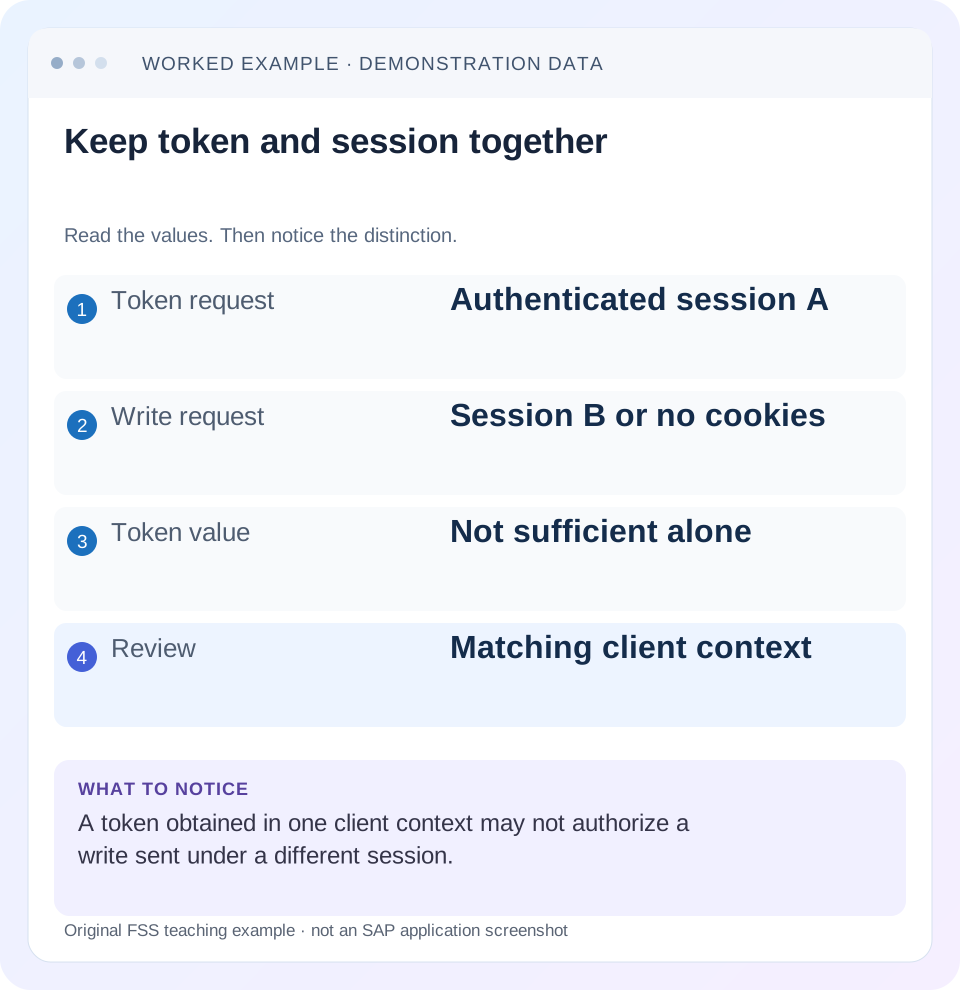
Read the example values
- Token request
- Authenticated session A
- Write request
- Session B or no cookies
- Token value
- Not sufficient alone
- Review
- Matching client context
Words you’ll meet in this guide
- HTTP
- The request-and-response protocol used by web services.
- Entity
- A business-data type or record exposed by a service.
- Status code
- A numeric summary of an HTTP response.
- ABAP
- SAP’s programming language for business applications.
- OData
- A standard for reading and updating data through a web API.
- API
- A defined interface through which programs exchange data or request actions.
- ETag
- A resource-version identifier used in checks that can prevent overwriting a concurrent change.
- CSRF
- Cross-Site Request Forgery. A CSRF token helps a service reject unwanted cross-site write requests.
Preview the practical steps
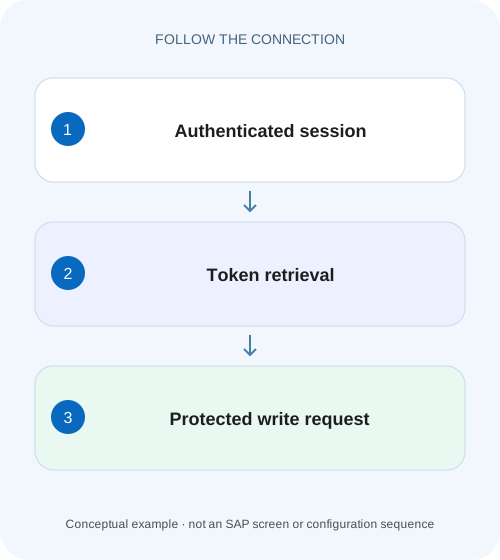
SEE THE CONNECTION
See it in a simple example.
A small example to make the idea concrete.
Match the session for a plant-app write
A manufacturer's operational app reads data successfully but its write fails when the CSRF token and current client session do not align.
Confirm a CSRF rejection, then preserve the client context
When a SAP Gateway write fails, inspect the specific response before diagnosing CSRF.
Scope the Gateway release, route and client framework
The references describe ABAP/Gateway CSRF protection, including historical cookie-based and security-session behavior.
Worked case: session A fetches, session B tries to update
A fictional authorized user reads O100 with Quantity 10 through a single HTTPS service route.
Match the session for a plant-app write
A manufacturer's operational app reads data successfully but its write fails when the CSRF token and current client session do not align.
Trace token retrieval and the actual write context before treating a successful read as permission for an update.
| Reader | Business question | Evidence to carry forward |
|---|---|---|
| SAP developers and application teams supporting manufacturers | Match the session for a plant-app write | Trace token retrieval and the actual write context before treating a successful read as permission for an update. |
01 Confirm a CSRF rejection, then preserve the client context
When a SAP Gateway write fails, inspect the specific response before diagnosing CSRF. A successful GET and a failed update can also result from authorization, validation or concurrency checks. If the response identifies CSRF token validation, compare the authenticated token-fetch request with the modifying request: route, identity, cookies/session and token must belong to the intended flow. [1] [2]
The repair is a supported token exchange with matching client context, not a copied token or disabled protection. This tutorial follows order O100 from quantity 10 to 12, showing how a valid token fetched in one session can fail when an update uses another.
02 Scope the Gateway release, route and client framework
The references describe ABAP/Gateway CSRF protection, including historical cookie-based and security-session behavior. Confirm SAP_BASIS/SAP_GWFND release, security-session configuration and whether an application router or proxy adds another protection layer. There is no universal token lifetime that can safely be copied across these landscapes. [2] [3] [4]
Identify whether the client is a SAPUI5 OData V2 model, another supported SDK or custom HTTP code. V2 already manages token acquisition/sending through its documented behavior; custom manual headers can interfere with that ownership. The request fragments below are illustrative wire-flow observations with placeholder credentials and tokens, not commands tested against a customer system.
03 Worked case: session A fetches, session B tries to update
A fictional authorized user reads O100 with Quantity 10 through a single HTTPS service route. Client session A requests a CSRF token and retains the relevant cookies/session context. It receives an illustrative token T-A. A separate HTTP client then sends the quantity-12 update with T-A but no corresponding session context. The token string alone is insufficient to establish a valid protected write.
The corrected fixture uses the same supported client context and route for fetch and update. Passing CSRF validation allows normal processing to continue; it does not guarantee quantity 12 passes the service's authorization, ETag or business rules. Verify the final operation response and persisted value separately.
| Step | Client context | Expected interpretation |
|---|---|---|
| Authenticated read/fetch | SessionA through routeR | TokenT-A returned with required context |
| Update using only copiedT-A | SessionB/no matching cookies | CSRF rejection is plausible |
| Update with matching context | SessionA through routeR | CSRF can validate; other checks still apply |
| Persisted reread after accepted update | Authorized current read | Quantity 12 must be confirmed |
04 Read the documented token exchange
Send a supported non-modifying request with X-CSRF-Token: Fetch after authentication. The server returns the token in the response header. The subsequent modifying request includes that token while the client preserves the required cookie/session context. The historical Gateway documentation explicitly requires returning cookies and using HTTPS when secure cookies are issued. [1] [2]
A failed modifying request is not a reliable token-fetch response; the Gateway reference states that it does not include a valid token. Fetch through the supported non-modifying flow instead. Do not treat a redirect to a login page with HTTP 200 as a successful service/token response: inspect content and the expected response header. [1]
GET /sap/opu/odata/sap/ZORDER_SRV/
X-CSRF-Token: Fetch
[Authenticated client context A]

HTTP response:
X-CSRF-Token: [token returned for context A]
[Client retains applicable cookies/session context]

MERGE /sap/opu/odata/sap/ZORDER_SRV/Orders('O100')
X-CSRF-Token: [same-context token]
Content-Type: application/json
[Same authenticated client context A]
[Applicable service concurrency header if required]

{"Quantity":12}
05 Diagnose token retrieval separately from token validation
For retrieval, inspect the actual request method/header, final endpoint after redirects, authentication outcome and returned token header. If no token is returned, establish whether the request reached the intended protected service and whether a cache supplied an old response. A readable entity response without a token-fetch header is not evidence that retrieval was attempted correctly.
For validation, inspect the later modifying request and verify that its client context matches the successful fetch. Check the token's presence and context without pasting secret values into a ticket. Distinguish a missing header from an expired session, missing cookie or a request sent to another route. The first successful read does not settle any of those later conditions.
For the fixture, make a two-row comparison worksheet before changing code. The fetch row records external HTTPS host/path, final authenticated response, token-header presence and whether the supported client retained cookies. The write row records the same route/identity and whether the token and required context were sent. Compare header presence and context continuity without publishing the secret values.
If the fetch response came from a cached service document, repeat through the framework's supported uncached token-refresh mechanism and inspect the actual response. If cookies are correctly retained but the write uses another path or destination, fix that routing mismatch rather than repeatedly fetching new tokens. The worksheet turns a vague token problem into a concrete retrieval, retention or validation boundary.
06 Keep route, cookies and transport consistent
A proxy can rewrite host/path, terminate TLS or route to another backend. Trace the external route and its backend target for both fetch and write. Cookie domain/path/Secure behavior and the client library's cookie handling can determine whether required context is returned. Use the platform's supported routing/session configuration rather than manually forging browser Cookie headers. [1]
If an application router also enforces CSRF, identify which layer produced the rejection before using a backend token to address it. The router has its own documented session/protection behavior. A token acquired directly from the backend should not be assumed to satisfy an unrelated router check, and a direct-backend test does not validate the deployed app route. [4]
07 Let the UI5 V2 model own its supported lifecycle
The V2 guide documents token retrieval while reading metadata and automatic inclusion with writes. It also provides refreshSecurityToken to obtain a new token through the service root URL, whose response must not be served from a stale cache. Use the API/callback contract for the installed version and confirm completion before issuing a dependent manual request. [3]
Do not mix a token copied from developer tools, a second model instance and a custom HTTP update without defining context ownership. A model connected to the same textual service URL can still be operating under another session route. Inspect its actual requests. A broad data refresh is not automatically a security-token refresh or a repair for missing session cookies.
08 Treat lifetime as a runtime property, not a fixed constant
The historical ABAP CSRF reference distinguishes older or inactive-security-session behavior from newer security-session-bound validity. In the latter case the configured security-session timeout matters. This is why a statement such as every SAP token lasts 24 hours is misleading without release and configuration scope. [2]
Test the application's supported reauthentication/session-expiry path in a controlled environment. After context changes, fetch a token appropriate to the new context through the client framework. Do not keep retrying a stale token because it was obtained less than a hardcoded number of minutes ago. Preserve the user's unsaved edit and explain session recovery according to the application flow.
09 Classify the rejection before changing protection
Keep CSRF protection enabled while correcting the client exchange. The following distinctions prevent a generic token refresh from concealing another failing layer.
| Observation | Likely investigation | Useful evidence |
|---|---|---|
| 403 with explicit CSRF text | Token/context validation | Fetch/write pair and session continuity |
| 401 or login HTML | Authentication/session establishment | Final response/redirect route |
| Token header absent from fetch response | Retrieval or cached/wrong endpoint | Fetch header, response and route |
| Token present; cookies not retained | Client/session handling | Cookie scope and supported client jar |
| Router rejects; backend test works | External protection layer | Router session/configuration and response |
| 412 precondition response | Concurrency contract | ETag/If-Match and current record |
| Business validation error after CSRF passes | Service rule | Inner operation message and payload |
10 Recover without replaying an uncertain business action
If a confirmed CSRF rejection occurred before normal service processing, correct the context and retry only through the intended supported client flow. If a timeout or lost response leaves the operation outcome uncertain, first reconcile O100 through its authorized read path. The absence of a success message in the browser does not prove the backend stored nothing.
For non-idempotent actions such as creating a posting, use the service's supported business correlation/idempotency strategy rather than an unconditional automatic retry loop. A token refresh can make the next request valid while duplicating an earlier completed operation. Classify the prior outcome and operation semantics before deciding whether another write is appropriate.
11 Verify acceptance, rejection and session boundaries
For a positive test, authenticate, fetch and retain context, update the disposable O100 fixture from 10 to 12, inspect the operation response and reread 12. For a negative test, omit or invalidate the token within the controlled fixture and verify the documented rejection without changing business state.
For boundaries, use a separate fresh client context with the old token, exercise session expiration/reauthentication and compare direct versus deployed proxy routes. Check a valid-CSRF request that deliberately violates a harmless business rule so the app distinguishes security recovery from business correction. Remove tokens/cookies from shared evidence. These are proposed checks; no write or expiry experiment was executed.
12 Frequently asked questions
Is a CSRF token an authorization credential? It participates in request protection; successful validation does not grant business access or bypass service rules.
Can I reuse a token copied from another browser? Do not build an integration around that assumption. Obtain it through the supported client context and preserve required session information.
Does every 403 mean CSRF? No. Read the response and identify the rejecting layer.
Should I disable the check to make Save work? Correct the documented exchange and route/context handling while preserving protection.
What should a support record contain? Release/configuration scope, client/framework, sanitized fetch/write paths and timestamps, header-presence observations, session continuity and the specific rejection. Secret token and cookie values are unnecessary in a normal handoff.
Related services and next steps
Primary sources
Found this useful?
Share this guide with your network, or leave a like.
Your like is saved in this browser.