SAPUI5 Save does nothing? Inspect OData V2 deferred groups and pending changes
A buyer changes a value in a manufacturer's worklist, but pressing Save does not establish a corresponding persisted backend change.

Source review:
START HERE · NO PRIOR TOPIC KNOWLEDGE NEEDED
What it is. Why it matters.
A SAPUI5 OData V2 model can collect edits before submitting them. Deferred groups organize when requests are sent, so pressing Save must actually submit the intended pending changes.
Completely new to SAP?
Manufacturers use SAP to connect work such as buying components, recording inventory, planning production, shipping equipment and accounting for costs. SAP S/4HANA is an enterprise resource planning system: it connects these activities through shared business data.
SAP Fiori is SAP’s design approach for business applications. SAPUI5 is a user-interface toolkit, and Fiori elements uses metadata to generate common application patterns.
A transaction code, or t-code, is a shortcut to a task in classic SAP GUI. Fiori apps provide another way to work. Names and screens depend on the product and release; you do not need a live system to learn the concepts in this guide.

Scope and source-review notes
Scope and evidence
Source review by FAST SAP SOLUTIONS® editorial. This badge describes our editorial review; it does not represent SAP certification or independent endorsement.
sap.ui.model.odata.v2.ODataModel using SAPUI5 1.120 guide behavior; response-tree examples reference historical API and require installed-version checks. OData V4 uses different APIs.
Primary documentation reviewed on 14 November 2026 using official indexed excerpts. Documentation review only; authored examples were not compiled or executed in an SAP system.
A MANUFACTURING EXAMPLE
Explain a plant app's save that sent no update
Local edit versus sent request
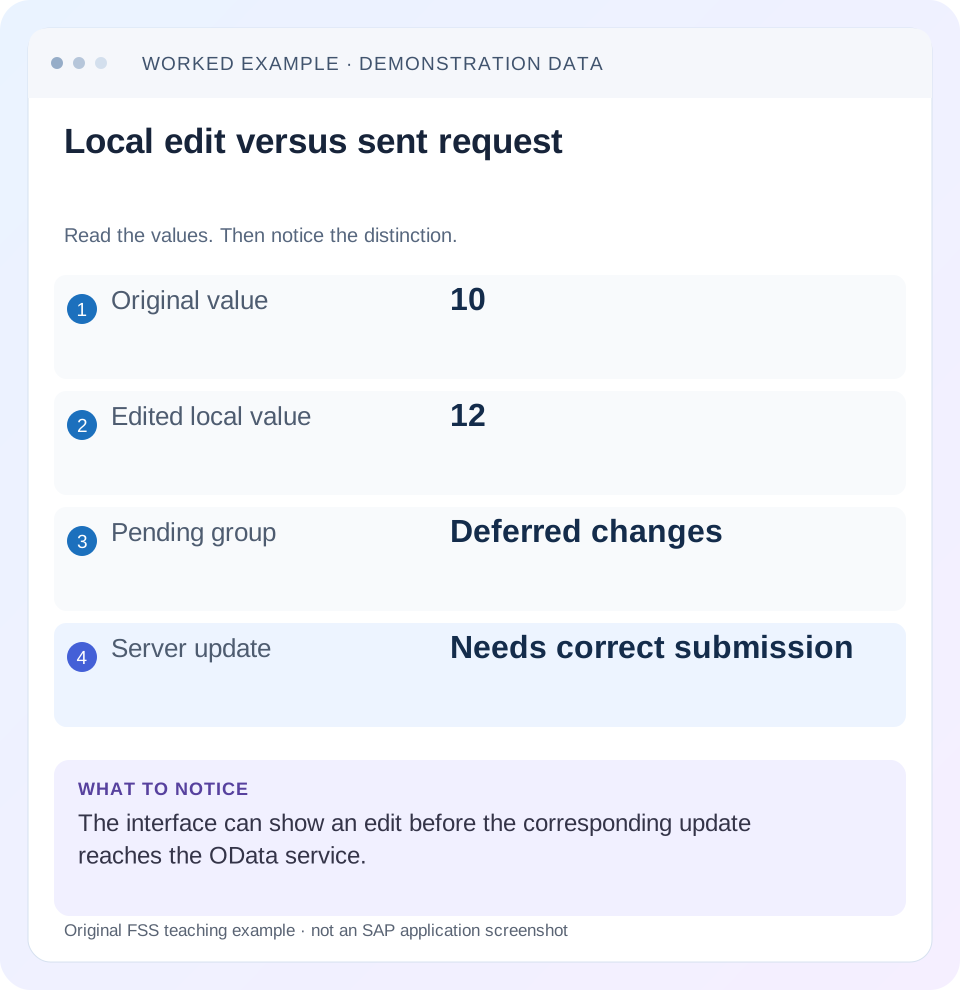
Read the example values
- Original value
- 10
- Edited local value
- 12
- Pending group
- Deferred changes
- Server update
- Needs correct submission
Words you’ll meet in this guide
- Binding
- A connection between a screen control and data.
- Metadata
- Information describing data or how it should be used.
- Service
- A software interface that provides data or operations.
- Backend
- The system or service that provides business processing behind the interface.
- OData
- A standard for reading and updating data through a web API.
- API
- A defined interface through which programs exchange data or request actions.
Preview the practical steps
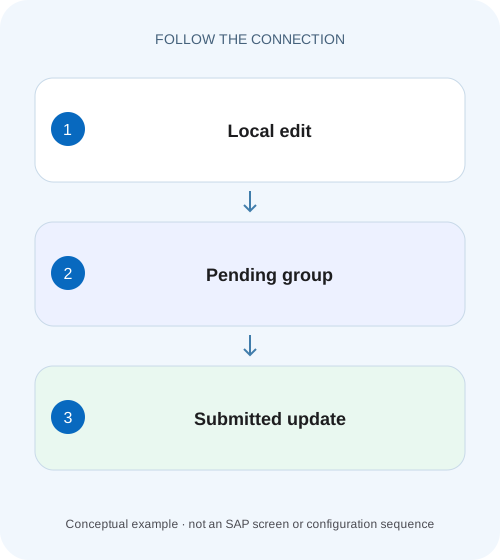
SEE THE CONNECTION
See it in a simple example.
A small example to make the idea concrete.
Explain a plant app's save that sent no update
A buyer changes a value in a manufacturer's worklist, but pressing Save does not establish a corresponding persisted backend change.
A local edit must reach the correct deferred group
In sap.ui.model.odata.v2.ODataModel, a two-way edit can update a local change copy while its request waits in a deferred group.
Scope the model and editing contract
The guide targets OData V2 model behavior documented for SAPUI5 1.120.
Worked case: pending 12 while the server still stores 10
Order O100 starts at Quantity 10.
Explain a plant app's save that sent no update
A buyer changes a value in a manufacturer's worklist, but pressing Save does not establish a corresponding persisted backend change.
Inspect pending changes, deferred groups and the actual request before reporting a completed order update.
| Reader | Business question | Evidence to carry forward |
|---|---|---|
| SAP developers and application teams supporting manufacturers | Explain a plant app's save that sent no update | Inspect pending changes, deferred groups and the actual request before reporting a completed order update. |
01 A local edit must reach the correct deferred group
In sap.ui.model.odata.v2.ODataModel, a two-way edit can update a local change copy while its request waits in a deferred group. Save must submit that same model instance and group, inspect the operation result and leave the user with an accurate persisted or rejected state. A changed input and a Save click are not evidence of a backend update. [1]
The investigation follows accepted field value → model pending change → group assignment → submitted batch → inner response → persisted reread. This tutorial uses quantity 10 changed to 12 and explains no-request, rejected-write and stale-display cases separately.
02 Scope the model and editing contract
The guide targets OData V2 model behavior documented for SAPUI5 1.120. V4 has different batch/update-group APIs; do not apply setDeferredGroups or submitChanges examples unchanged to a V4 model. Confirm the model class, named-model identity, service URL and UI5 version before editing the Save handler. [1]
The fictional Orders entity set has an Order entity type and an editable Quantity property. Its accepted model representation is numeric in this teaching fixture; use the real metadata type for a real service. Ensure parsing/type validation succeeds before investigating persistence. An invalid visible string can coexist with an older accepted model value.
03 Worked case: pending 12 while the server still stores 10
Order O100 starts at Quantity 10. The user enters 12, and the intended orders model now has a pending Quantity change. It is assigned to editOrders. Before submission, the server still holds 10. Calling submitChanges for an unrelated editNotes group cannot be assumed to send this change.
After correct submission, a successful update and confirmed reread should show 12. If a service rule rejects 12 because the permitted maximum is 11, the server remains 10 and the app should explain the rejection while preserving a useful correction path. The local attempted value, operation result and server value are distinct observations.
| Stage | Client observation | Server expectation |
|---|---|---|
| Initial read | Quantity 10; no edit | 10 |
| Accepted input | Quantity 12 pending in editOrders | 10 |
| Wrong group submitted | Order edit still waiting | 10 |
| Valid correct-group write | Inner operation succeeds | 12 after confirmed read |
| Rejected Quantity 12 in max 11 case | Business error to correct | 10 |
04 Configure deferred and change groups before editing
The V2 guide documents deferred groups and change-group mapping by entity type. Preserve existing deferred groups when adding editOrders; replacing the list accidentally can make another group's requests immediate. Configure group ownership at model setup, before pending edits are created, rather than assuming a late mapping change relocates existing queued work. [1]
The illustrative EntityTypeName key Order must match the actual service metadata/API contract; it is not automatically the entity-set name Orders. The code preserves existing change mappings and gives this type its own change set per change. Shared-model applications must review whether changing this type's mapping affects other edit flows.
var aDeferred = oModel.getDeferredGroups();
if (aDeferred.indexOf("editOrders") < 0) {
  oModel.setDeferredGroups(aDeferred.concat(["editOrders"]));
}
var mGroups = oModel.getChangeGroups();
mGroups.Order = {
  groupId: "editOrders",
  single: true
};
oModel.setChangeGroups(mGroups);
// The Save flow later submits this exact model and groupId.
// oModel.submitChanges({groupId: "editOrders", success: ..., error: ...});
05 Inspect accepted changes without mutating model internals
Use the model's supported pending-change APIs and the actual bound entity path to establish that the intended edit exists. Compare the named model used by Quantity with the instance used by Save. A controller can hold another model pointing to the same service while containing none of this screen's pending edits. [1]
Do not modify the object returned by a read/getProperty and expect an update request automatically. Use supported two-way bindings or setProperty. Keep inspection of pending values sanitized and limited to the fixture. Pending changes are client state; their presence does not prove a request has left the browser or that a service has accepted the edit.
06 Make Save a state transition with an observed request
Before submission, complete the relevant input-change processing and blocking validation checks. While the intended submission is in progress, prevent a second equivalent Save from starting another competing flow. Use submitChanges with groupId editOrders and the callbacks appropriate to the installed model/batch configuration. [1] [2]
Inspect the network trace. No relevant request means the first boundary remains client-side: no accepted change, wrong model, wrong group or handler path. If groupId is omitted, the guide says all deferred groups are submitted, which can unintentionally include unrelated edits. An empty Save should have an explicit no-change outcome rather than inventing a successful backend write.
07 Read inner operation responses before announcing success
A batch request is a transport envelope containing changesets and possibly reads. Its transport completion does not establish that every business update succeeded. The historical V2 API describes parsed batch results in __batchResponses, with nested __changeResponses depending on the submitted structure. Inspect the actual response shape in the installed version and surface the service's business messages. [2]
Do not write a result checker that assumes every batch entry has the same nested array. A rejected changeset can be represented differently from a successful set of operation responses, and refresh reads also need separate interpretation. Keep the edit flow open when the intended update is rejected. An authorized persisted reread is the final business-value check.
Outer $batch: transport response received
  Intended Order O100 update: 400 business validation error
  Message: Quantity exceeds permitted maximum 11

Conclusion: attempted Quantity 12 is rejected.
Do not show "Order saved" merely because $batch completed.

Alternative successful case:
  Intended update: successful operation response
  Follow-up authorized read: Quantity 12
08 Distinguish request grouping from atomic changesets
groupId controls which requests are submitted together in a batch. changeSetId and single govern how changes are grouped into changesets. The guide states that single=true gives each change its own changeset; with single=false, changes can share a changeset and changeSetId is considered. A single batch can therefore contain multiple transaction outcomes. [1]
For example, if O100 changes to 12 and O200 changes to an invalid -1 in separate changesets, do not assume O100 rolled back merely because O200 failed. If the business requires all-or-nothing behavior, design a supported atomic service operation/changeset and validate its backend implementation. Changing the UI Save label cannot create atomicity across independent transactions.
09 Refresh and cancellation need clear ownership
The V2 model documents automatic refresh after change and an option to disable it. Check the existing setting and affected bindings before adding a blanket model refresh. A successful write followed by a failed/stale read is a different problem from a rejected write, and the user should not be told the update failed solely because its display refresh failed. [1]
For Cancel, use the supported resetChanges scope for the intended entity paths and separately handle created/transient entries under the relevant API. Resetting every change in a shared model can discard another panel's work. The guide also restricts sorting/filtering while two-way pending changes exist; submit or reset through the intended user flow before changing that list state.
10 Troubleshoot pending, submitted and persisted states
Keep one row identity, model, group and request together. Broad refreshes and repeated submission obscure which boundary actually failed.
| Observation | Inspect | Expected next action |
|---|---|---|
| Input 12; no pending change | Binding mode/type and model | Fix accepted model update |
| Pending edit; no Orders request | Save model/group and queue | Submit the owning deferred group |
| Unexpected request before Save | Deferred-group list/mapping | Restore intended initialization |
| Batch received; update rejected | Inner status and service message | Keep correction flow and rejected value context |
| One order saved; another failed | Changeset boundaries | Reconcile each transaction outcome |
| Server 12; screen 10 | Refresh binding and response timing | Correct display lifecycle |
| Timeout after sending | Outcome uncertain | Reconcile server state before retrying |
11 Verify persistence and recoverable rejection
For the positive case, change O100 from 10 to 12 under a rule that permits it, verify the intended pending group, observe one submission and reread 12. For the negative case, use the maximum-11 rule and verify the inner error, server value 10 and a correction to 11 that can then save successfully.
Test Save with no changes, Cancel before Save, rapid double-clicks and navigation with pending changes. Include two orders in separate changesets to verify that one failure does not mislabel another outcome. Simulate a lost response only in a controlled environment: reconcile the current server value before deciding whether resubmission is appropriate. No such service tests were executed here.
Test group isolation with a second disposable edit flow. Leave an unrelated note change pending in editNotes, then save O100 through editOrders. Verify the Orders update is sent and persisted while the note remains pending and unsent. This catches a Save handler that omits groupId and submits every deferred group. Cancel the note through its own scoped workflow afterward; do not reset the whole shared model merely to clean up the Orders test.
12 Frequently asked questions
Why does Save do nothing? First establish an accepted pending edit in the same model and deferred group that Save submits.
Does submitChanges without groupId submit my group? The documented behavior submits all deferred groups, which can include more work than intended. [1]
Can I declare success in the batch success callback? Review the actual inner operation results and messages first; the callback alone is not the complete business outcome. [2]
Does resetChanges undo a saved backend transaction? It resets supported client pending changes. Persisted business reversal requires its own service operation.
What is a useful completion record? Intended entity/property, old/new value, model/group, sanitized operation result and authorized persisted reread, with any partial or uncertain outcome stated explicitly.
Related services and next steps
Primary sources
Found this useful?
Share this guide with your network, or leave a like.
Your like is saved in this browser.