SAP maintenance-order system status versus user status: Know which control applies
A plant supervisor sees system and user statuses on a maintenance order and needs to understand which control affects the next step.

Source review:
START HERE · NO PRIOR TOPIC KNOWLEDGE NEEDED
What it is. Why it matters.
A system status reflects SAP’s processing state. A user status represents configured business controls; both can affect which maintenance actions are available.
Completely new to SAP?
Manufacturers use SAP to connect work such as buying components, recording inventory, planning production, shipping equipment and accounting for costs. SAP S/4HANA is an enterprise resource planning system: it connects these activities through shared business data.
Plant Maintenance organizes care of technical assets. A notification reports a need; an order plans work; recorded execution and costs explain what was actually done.
A transaction code, or t-code, is a shortcut to a task in classic SAP GUI. Fiori apps provide another way to work. Names and screens depend on the product and release; you do not need a live system to learn the concepts in this guide.

Scope and source-review notes
Scope and evidence
Source review by FAST SAP SOLUTIONS® editorial. This badge describes our editorial review; it does not represent SAP certification or independent endorsement.
General SAP status management applied to maintenance orders in SAP ERP/S/4HANA. Customer status names,profiles,authorizations and maintenance-process phases are installation specific;service-document and planning-bucket statuses are separate objects.
Documentation review on 14 November 2026 used the official SAP sources listed below, including indexed excerpts where full text was unavailable. Scope and availability depend on the stated product, release and configuration. All document references, quantities, dates and outcomes in worked cases are illustrative; no customer SAP system or tenant was accessed and the proposed exercises were not executed.
A MANUFACTURING EXAMPLE
Interpret a machine repair's current status
Check both status layers
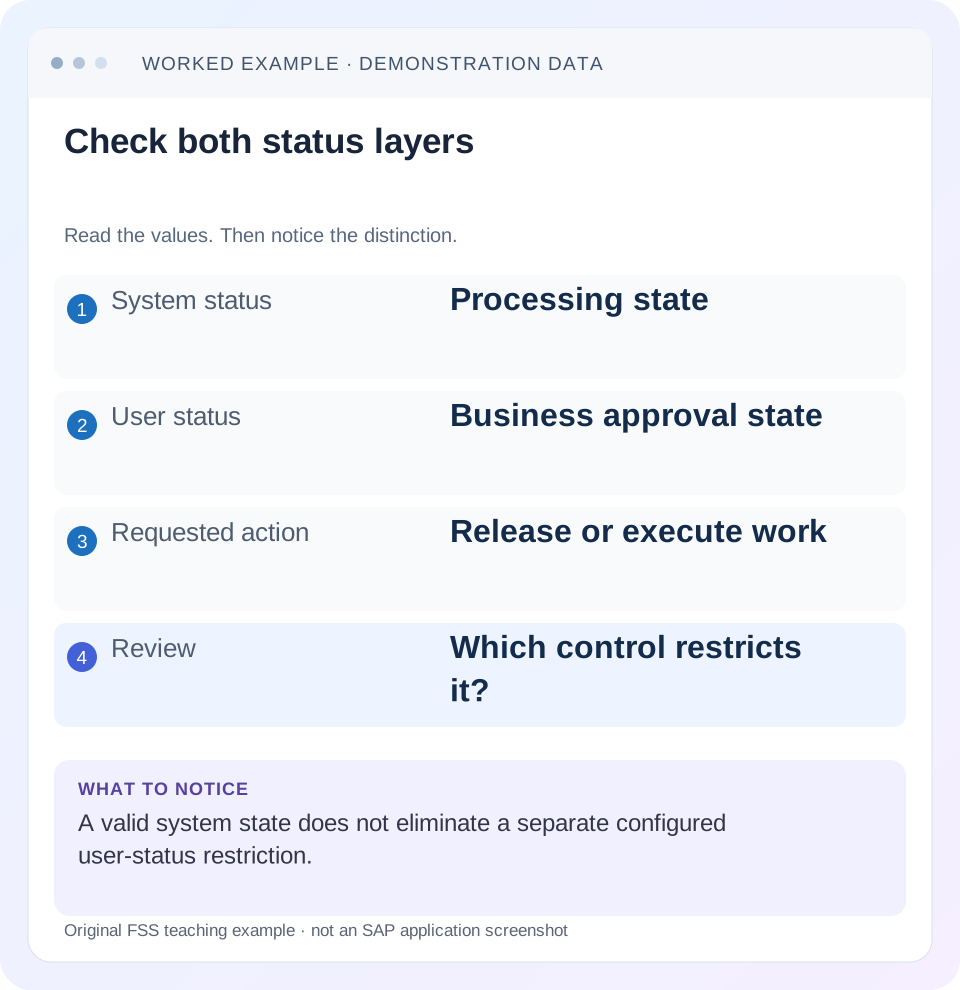
Read the example values
- System status
- Processing state
- User status
- Business approval state
- Requested action
- Release or execute work
- Review
- Which control restricts it?
Words you’ll meet in this guide
- Technical object
- An asset or location maintained in the system.
- Notification
- A report of an issue or maintenance need.
- Settlement
- Transfer of collected costs under accounting rules.
Preview the practical steps
SEE THE CONNECTION
See it in a simple example.
A small example to make the idea concrete.
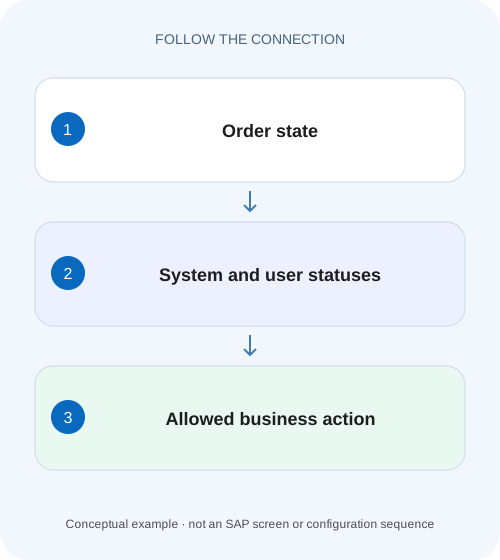
Interpret a machine repair's current status
A plant supervisor sees system and user statuses on a maintenance order and needs to understand which control affects the next step.
A released order can still have a blocked action
System statuses reflect SAP business processing; user statuses add configured business controls.
Understand status as information and control
SAP's general status-management documentation describes status as both a record of processing level and a control on business transactions.
Apply the allow/prohibit logic
SAP documents that at least one active status must allow a business transaction and no active status may prohibit it.
Interpret a machine repair's current status
A plant supervisor sees system and user statuses on a maintenance order and needs to understand which control affects the next step.
Read the documented system state and configured user-status rules separately before changing a status to force processing.
| Reader | Business question | Evidence to carry forward |
|---|---|---|
| Factory quality and maintenance teams | Interpret a machine repair's current status | Read the documented system state and configured user-status rules separately before changing a status to force processing. |
01 A released order can still have a blocked action
System statuses reflect SAP business processing; user statuses add configured business controls. Both can influence whether an action is allowed. An order displaying REL does not establish that confirmation, completion or another requested transaction is permitted under every other active status and authorization.
This guide is for maintenance support analysts and process owners diagnosing unavailable actions. You need the order, exact attempted action, message, all active statuses and assigned user-status profile. The example uses invented approval status names to explain the mechanism; they are not delivered SAP defaults or a recommendation to bypass approvals.
02 Understand status as information and control
SAP's general status-management documentation describes status as both a record of processing level and a control on business transactions. System status changes through the relevant business transaction. User statuses are defined with their rules in a status profile. Reading only the short text loses the control logic that determines the actual result. [1]
The same business label can be configured differently in two customers'profiles. “Approved”might permit one action in one profile and serve only as information in another. Capture the profile identity and transaction control rather than treating the label as a universal SAP rule. Language-dependent short codes/descriptions add another reason to record the underlying context.
03 Apply the allow/prohibit logic
SAP documents that at least one active status must allow a business transaction and no active status may prohibit it. A reassuring status does not override another active prohibition. This is why adding a permissive user status may not resolve an action blocked by another lifecycle state. [1]
For diagnosis, create a small matrix of the requested transaction against active statuses. Distinguish allowed, warning and prohibited where the profile/system control supports them. Then inspect authorization and other application validations separately. A status explanation is strong evidence only when it matches the actual message and transaction.
04 Work a maintenance approval case
Suppose order M200 has system status REL. Its fictional user-status profile has WAIT for approval pending and APPR for approved. WAIT prohibits the relevant execution business transaction in this example, while APPR removes that specific prohibition under the approved workflow. A technician cannot infer permission from REL alone.
The table illustrates customer configuration. It does not assert that a particular SAP standard user status named WAIT exists or that changing it always enables confirmation. In a real incident, replace the invented labels with the actual profile and documented business-transaction control.
| Order context | Active control | Expected interpretation |
|---|---|---|
| REL + WAIT | WAIT prohibits requested execution transaction | Action remains blocked |
| REL + APPR | Approval prohibition removed | Other checks still apply |
| Different lifecycle state + APPR | System control may prohibit action | Approval alone is insufficient |
| Notification completed | Different object's status | Does not establish order permission |
05 Read the full status set, not only the header row
SAP explains that status-row display has limited positions and priority rules, while a list can show all active statuses. If the visible row appears inconsistent with the action, inspect the complete status information. An omitted or lower-priority status can still matter to processing. [1]
Capture active and relevant historical transitions where available. The order may have been released, then technically completed, then partially reopened under an approved process. A single current abbreviation cannot reconstruct that timeline. Use change/status evidence to explain when the action became blocked and whether that aligns with the reported incident.
06 Investigate the exact blocked transaction
“Cannot process the order”is too broad. Record whether the user attempted release, goods issue, confirmation, technical completion or another action, and keep the exact message. Similar-looking toolbar failures can originate in status, authorization, locking or incomplete application data.
Reproduce the specific read context
Record order ID, user role, action and message without making speculative status changes.
Expected observation: The blocked business transaction is identifiable.
Inspect all active statuses
Separate system and user statuses and capture profile identity.
Expected observation: REL is not treated as the entire state.
Compare transaction controls
Review the relevant status/profile rules with the process owner.
Expected observation: A specific prohibition explains the behavior.
Follow the approved transition
Perform the required approval or lifecycle action in a fixture, then retest the same transaction.
Expected observation: The result follows the intended workflow.
07 Understand numbered user-status transitions
SAP describes status numbers and lowest/highest subsequent status-number ranges that can constrain the sequence. A user may therefore be unable to jump directly from planning to final approval even if both statuses exist in the profile. The transition restriction is different from the business transaction that the status later controls. [1]
For a fictional sequence DRAFT10, REVIEW20, APPR30, define and inspect the allowed progression. Do not add every later status manually to force a desired action. If a legitimate correction requires returning to an earlier stage, follow the configured process and retain the reason. Workflow progression and technical status storage are not interchangeable repair tools.
08 Keep linked objects'states independent
A notification, maintenance order and planning bucket can each carry its own status lifecycle. One object's completion does not universally complete every related object. Verify the application-specific relationship rather than borrowing a rule from a service document or another maintenance process.
For M200, a completed notification may mean the reported issue has been administratively handled while order settlement remains outstanding. Conversely, an order can progress while a notification still requires cause coding. Explain these as separate remaining actions rather than forcing all labels to match for visual consistency.
09 Troubleshoot without bypassing controls
Changing database status records directly would disconnect business state from the transactions that should establish it. Use the supported business action and profile maintenance process. A configuration change affects every relevant object using that profile, so it should be tested against the intended workflow rather than applied as an isolated incident workaround.
| Observation | Question | Next evidence |
|---|---|---|
| REL shown, action blocked | Another active prohibition? | Complete status set and message |
| User cannot select APPR | Transition range or authorization? | Profile sequence and role |
| Same label behaves differently | Different profile/control? | Assigned profile and transaction rules |
| Status looks correct, action still fails | Nonstatus validation? | Exact message, lock and application data |
| Notification complete, order open | Separate lifecycle? | Linked object statuses and required actions |
| New profile fixes one case, breaks another | Wider transaction effects? | Regression matrix across intended stages |
10 Verify allowed, denied and transition cases
The positive test reaches the approved state through its intended transition and retries the same requested transaction. The negative test leaves WAIT active and confirms the prohibited action remains blocked. A boundary test attempts an out-of-sequence numbered transition and records the actual supported behavior.
Also verify an unrelated action that should remain permitted, so a profile adjustment does not accidentally block ordinary display or planning. Test with the representative maintenance role rather than a broad administrator alone. These are proposed checks; no status/profile changes were executed for this article.
11 Build a transaction-control matrix from the actual active profile
For the blocked action, write one row per active status and a column for its effect: allows, warns, prohibits or has no relevant control according to the actual system/profile definition. Include the exact requested business transaction and retain the application message. This turns “REL plus WAIT”into a checkable explanation rather than an inference from two labels.
For the invented approval case, suppose REL permits the transaction while WAIT prohibits it. The combined result is prohibited. Replacing WAIT with APPR can remove that user prohibition, but a separate active system state can still prohibit the action. Test that second branch explicitly so the team does not assume approval bypasses the lifecycle. These outcomes apply SAP's documented allow/prohibit principle without inventing a customer profile's delivered defaults. [1]
12 Separate transition rights from the right to execute work
A user might be able to request a status transition but lack authority to approve it, or might be allowed to view an approved order without posting its execution. Record the role/action context for both steps. A test performed solely with a broad configuration identity can hide the ordinary planner's restrictions and make an apparent fix fail in daily use.
Use a fixture with two intended roles: Planner prepares the order for review; Approver performs the permitted approval transition. After approval, Technician retries the previously blocked execution action under that role's own permissions. If approval succeeds but execution still fails, read the new message. It may expose a separate authorization or application-data condition that was masked by the earlier status prohibition.
Also test a prohibited jump from DRAFT10 directly to APPR30 when the configured next range permits only REVIEW20. The error belongs to transition sequencing, whereas the original WAIT block belonged to execution control. Fixing one should not silently widen the other. Review both positive intended progression and negative skip behavior after a profile change.
For handover, record old/new active status sets, transition actor, profile and the retested action outcome. If only the visible status text changed while the intended action remains unavailable, the incident is not resolved. Conversely, if the action works but an unrelated approval restriction disappeared, regression review is still required.
13 Verify the unchanged business actions after profile review
Retest an action intentionally unrelated to approval, such as the permitted display investigation, in the representative role. A profile correction should solve its defined control problem without accidentally disrupting other required work. Retain both the intended blocked case and the ordinary permitted case with their messages so later changes can be compared against the same operational expectations.
14 Questions and handover
Can a user status override every system restriction? No, all applicable controls matter. Does REL mean all execution is authorized? It is one state, not the complete permission result. Why is the desired status unavailable? Inspect transition rules, authorization and actual object/profile assignment.
A useful resolution names order, action, message, active statuses, profile, explaining rule and approved transition. Continue with worklists to understand status-based selection, settlement for financial follow-up, and notification versus order for distinct document lifecycles.
Related services and next steps
Primary sources
Found this useful?
Share this guide with your network, or leave a like.
Your like is saved in this browser.