Production confirmed, but component stock unchanged? Inspect backflush processing
A production supervisor confirms an assembly operation, but stores finds that the expected component stock reduction has not appeared.

Source review:
START HERE · NO PRIOR TOPIC KNOWLEDGE NEEDED
What it is. Why it matters.
A production confirmation records manufacturing progress. Backflush automatically posts configured component consumption at a relevant confirmation step, but failed goods movements need separate attention.
Completely new to SAP?
Manufacturers use SAP to connect work such as buying components, recording inventory, planning production, shipping equipment and accounting for costs. SAP S/4HANA is an enterprise resource planning system: it connects these activities through shared business data.
Production Planning determines what to make or procure and when. Product definitions, supply proposals and execution orders connect demand with factory work.
A transaction code, or t-code, is a shortcut to a task in classic SAP GUI. Fiori apps provide another way to work. Names and screens depend on the product and release; you do not need a live system to learn the concepts in this guide.

Scope and source-review notes
Scope and evidence
Source review by FAST SAP SOLUTIONS® editorial. This badge describes our editorial review; it does not represent SAP certification or independent endorsement.
Discrete production-order backflush troubleshooting in SAP ERP/S/4HANA. The primary goods-movement reference also covers process orders;PP-PI phase/process-message and automatic-receipt specifics are not generalized to every discrete process.
Documentation review on 14 November 2026 used the official SAP sources listed below, including indexed excerpts where full text was unavailable. Scope and availability depend on the stated product, release and configuration. All document references, quantities, dates and outcomes in worked cases are illustrative; no customer SAP system or tenant was accessed and the proposed exercises were not executed.
A MANUFACTURING EXAMPLE
Investigate unconsumed assembly components
Confirming progress is one step
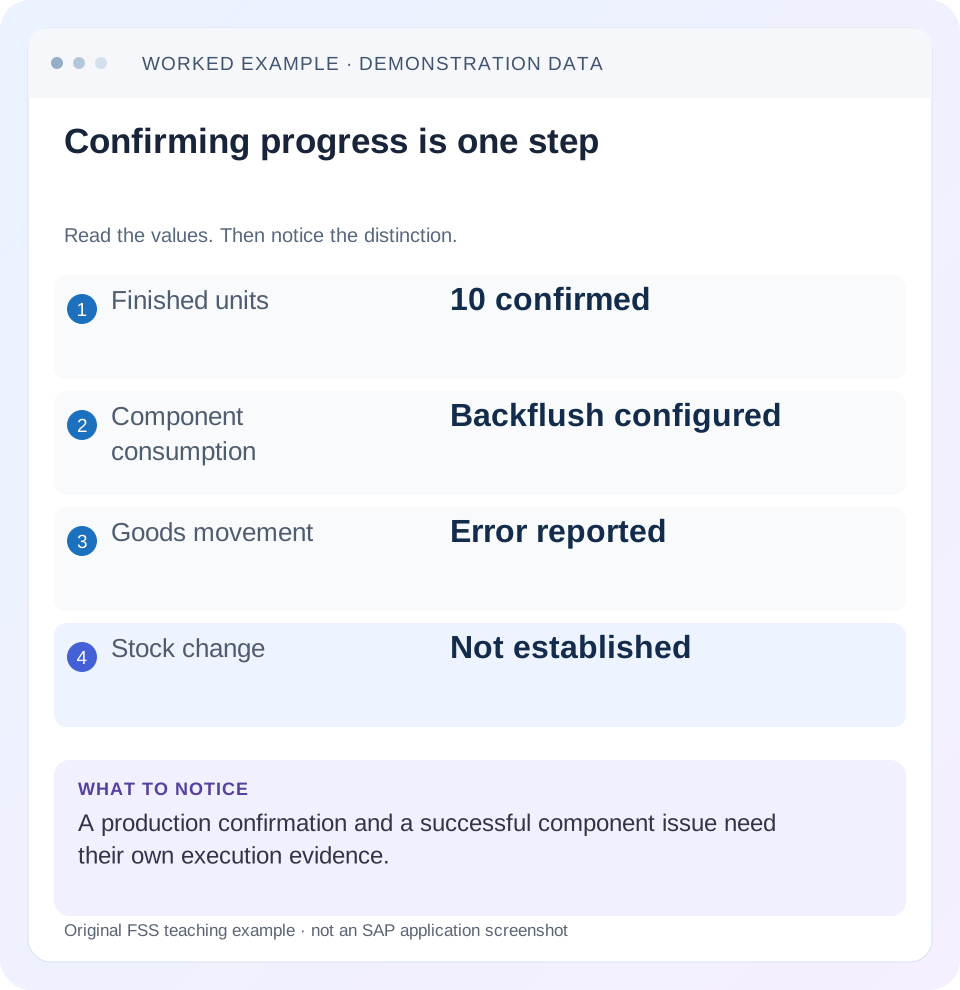
Read the example values
- Finished units
- 10 confirmed
- Component consumption
- Backflush configured
- Goods movement
- Error reported
- Stock change
- Not established
Words you’ll meet in this guide
- BOM
- Bill of materials, the components needed for a product.
- Routing
- A description of manufacturing work operations.
- MRP
- Material requirements planning, which compares demand and supply.
- Confirmation
- A record of relevant production progress or completed work.
- API
- A defined interface through which programs exchange data or request actions.
- HTTP
- The request-and-response protocol used by web applications and APIs.
Preview the practical steps
SEE THE CONNECTION
See it in a simple example.
A small example to make the idea concrete.
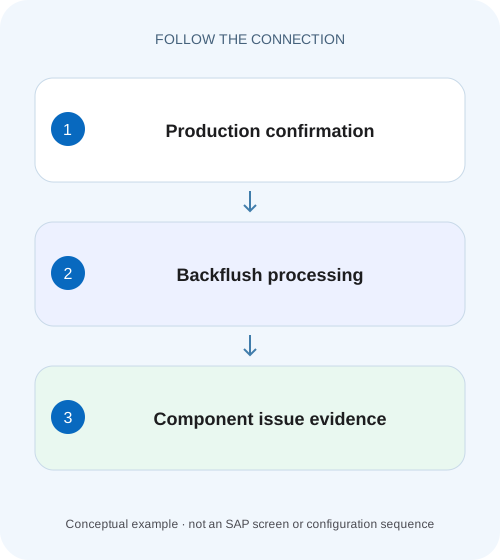
Investigate unconsumed assembly components
A production supervisor confirms an assembly operation, but stores finds that the expected component stock reduction has not appeared.
Confirmation and component consumption are separate evidence
A saved production confirmation records execution progress.
Understand the backflush mechanism
SAP documents automatic goods issue for components marked for backflushing when the relevant order/phase is confirmed in the described process.
Work a partial-confirmation case
Suppose order P700 plans 100 assemblies.
Investigate unconsumed assembly components
A production supervisor confirms an assembly operation, but stores finds that the expected component stock reduction has not appeared.
Compare the confirmation and goods-movement evidence, then investigate the applicable backflush processing rather than assuming confirmation proves consumption.
| Reader | Business question | Evidence to carry forward |
|---|---|---|
| Production planners and shop-floor application teams | Investigate unconsumed assembly components | Compare the confirmation and goods-movement evidence, then investigate the applicable backflush processing rather than assuming confirmation proves consumption. |
01 Confirmation and component consumption are separate evidence
A saved production confirmation records execution progress. It does not alone prove that every expected component goods issue posted. Backflush eligibility, the relevant operation's components, stock/batch data, error handling and configured delayed processing can determine the material outcome. Start with the order, confirmation and component rather than posting an extra issue immediately.
This guide is for production support analysts and inventory planners who can display the order, confirmation and material documents. You need the confirmed yield/scrap, component requirement, backflush indicator, operation assignment and intended issue storage context. The example is fictional; no goods movement was posted or recovered in a customer system.
02 Understand the backflush mechanism
SAP documents automatic goods issue for components marked for backflushing when the relevant order/phase is confirmed in the described process. The useful diagnostic principle is to inspect the actual component and confirmation context. A material-master setting seen today does not prove that the copied order component had the expected indicator when the confirmation was processed. [1]
Backflush also depends on the relationship between component and operation. Confirming an earlier operation may not consume a component allocated to a later step. Read the order component's actual allocation and the confirmation reference. A final-looking quantity at one operation is not universal proof that all operations and all material effects are complete.
03 Work a partial-confirmation case
Suppose order P700 plans 100 assemblies. Each requires 2 PC of component C1, with no scrap or conversion complexity in this fixture. A confirmation for 40 good assemblies has an illustrative proportional consumption expectation of 80 PC, assuming the actual confirmation and component settings use that basis. Starting stock is 500 PC in the intended issue context.
If stock still shows 500, do not conclude that confirmation failed. Find whether an 80-PC goods issue exists, failed or is pending. If it exists against another batch/storage location, the displayed 500 may belong to a different stock segment. Reconcile document identity and stock context before using a plant-level total as the explanation.
| Evidence | Quantity | Meaning |
|---|---|---|
| Order quantity | 100 assemblies | Full planned scope |
| C1 requirement | 200 PC | 2 per assembly |
| Confirmed good quantity | 40 assemblies | Partial progress |
| Expected C1 issue | 80 PC | Under stated proportional assumption |
| Expected remaining stock | 420 PC | 500 less 80, if no other movements |
04 Inspect planned versus actual goods movements
SAP distinguishes planned goods movements, unplanned movements and incorrect movements during confirmation processing. A material overview can show the relevant proposed movements under configured selection behavior. Review what was actually proposed or posted rather than assuming the BOM's full requirement equals the issue for this partial confirmation. [1]
For C1, record order item/operation, required quantity, withdrawn quantity, backflush flag, batch, unit and issue location. Then inspect the confirmation's material-document references and any reversal. A posted issue later reversed produces a different net stock effect from an issue that never existed. Keep those branches separate.
05 Diagnose errors and decoupled processing
SAP describes goods-movement errors such as insufficient stock and correction in confirmation processing or later reworking. It also documents configuration that temporarily stores planned movements for background processing. A saved confirmation can therefore coexist with a failed or not-yet-processed movement in applicable configurations. [1]
Do not assume delayed processing merely because stock has not changed. Find the configured processing mode and the actual pending/error evidence. The primary reference includes PP-PI-specific details, so verify the installed discrete-production recovery monitor before naming a job or transaction as universal. Record the actual message and pending movement identity.
06 Follow the investigation sequence
Begin with display evidence and preserve references. If a pending movement exists, coordinate its recovery before posting a manual substitute; otherwise a later successful retry can consume the component twice.
Read the confirmation
Confirm P700, operation, yield 40, unit and cancellation status.
Expected observation: The actual execution event is known.
Read C1 in the order
Compare backflush indicator, operation allocation, issue context and withdrawn quantity.
Expected observation: The 80-PC expectation is justified or revised.
Trace material evidence
Find posted/reversed document references or retained/pending errors.
Expected observation: Saved confirmation is separated from posted issue.
Correct the demonstrated cause
Resolve stock, batch, location or configuration through the appropriate process.
Expected observation: Recovery scope is one known movement, not another confirmation.
Reconcile net consumption
Check the resulting 80-PC net issue and relevant stock 420.
Expected observation: No duplicate issue remains pending.
07 Troubleshoot the observed pattern
A zero withdrawal and a wrong withdrawal are different incidents. Quantity disagreement can arise from units, scrap, component quantity changes or the confirmation basis; absence can arise from eligibility, errors or processing delay.
| Observation | Next question | Evidence |
|---|---|---|
| No movement proposed | Was C1 eligible at this operation? | Order flag and allocation |
| Movement failed | What exact validation failed? | Error message and stock/batch context |
| Movement pending | Is processing decoupled? | Actual configuration and pending entry |
| Issue posted, stock unchanged | Same stock segment/time? | Material document, location, batch and reversals |
| 160 PC consumed | Duplicate or different basis? | Both confirmations/movement references |
| Only one component missing | Component-specific data? | C1 versus correctly processed component |
08 Avoid duplicate recovery
Suppose an operator posts 80 PC manually while the original 80-PC backflush remains pending. When the pending movement later succeeds, net consumption becomes 160 and stock 340 instead of 420. The confirmation may still look perfectly valid, so inspect both movement paths before intervening.
If a manual correction is required, coordinate the disposition of the original pending/error item through the supported process and retain both references. Do not delete evidence simply to clean a queue. Also distinguish correcting the underlying stock/master-data cause from recovering the existing movement; future confirmations can repeat the issue if only one historical row is addressed.
09 Verify positive, negative and partial cases
The positive fixture confirms 40 and reconciles 80 PC consumption under the stated assumptions. A negative test lacks sufficient stock in the intended segment and inspects the actual configured error behavior. The system may block, retain or defer according to configuration; record what it does rather than asserting one universal outcome.
For the boundary case, confirm a further 10 assemblies and predict 20 PC additional consumption, then inspect cumulative confirmation 50 and net consumption 100. Include a reversal/cancellation case using the approved training procedure and reconcile resulting documents. These checks must verify quantity and identity, not only a green confirmation status.
10 Use COGI to inspect the failed movement before retrying it
SAP's current discrete-production guidance names Reprocess Goods Movements COGI. Its documented sequence is to enter selection criteria, execute, select the affected movement, and choose Display Errors. Start there for a retained confirmation-related failure instead of generating another confirmation. Record order, component, quantity, unit, storage location, batch where relevant, and the detailed message. [2]
The procedure permits specific corrections and saving to restart the movement. For example, it documents replacing a storage location. Such a correction must match the actual material availability and intended issue context; choosing any location with stock can misrepresent where consumption occurred. After saving, inspect the new material document and the residual error population rather than assuming a vanished row proves the intended 80-PC issue. [2]
The documentation also warns that deleting incorrect movements does not automatically adjust reservations. Deleting an error row is therefore different from successfully posting consumption. If the business deliberately abandons the pending movement, review reservation/open-component consequences and preserve the decision. A clean error list is not a stock reconciliation. [2]
11 Verify an integration response at the material-document boundary
SAP's production-order confirmation API documentation explicitly allows a confirmation to succeed while material-document creation fails, and describes HTTP success responses even when goods-movement reprocessing is needed. This is an API-specific documented reason to inspect inventory evidence after a successful interface response. It should not be generalized into a claim that every confirmation channel always commits through identical logical units.
For an illustrative integration event CONF_40, retain the external reference, backend confirmation and any material-document/error references. The expected business state is one 40-unit confirmation and one 80-PC net C1 issue. If the confirmation exists and the movement failed, retrying the whole business event can duplicate confirmation progress. Route recovery to the failed movement under the implemented interface/reprocessing contract.
Add a controlled negative test with a permitted fixture containing a missing issue location or insufficient stock. Observe confirmation response, backend confirmation, retained movement and later recovery independently. After resolving the cause, verify that the original confirmation quantity remains 40 while net component issue becomes 80. A final stock 420 plus an extra queued 80 is still unsafe because the apparent correct balance can change when that queue later runs.
For a boundary test, post a legitimate later 10-unit confirmation with its own source identity and expected 20-PC issue. Reusing the value 40 or the same component material is not enough to identify a duplicate; document identity and business event scope decide which movements are new.
12 Verify reservation context after an abandoned error
If a failed 80-PC movement is deliberately removed rather than posted, inspect the order component's open reservation and withdrawn quantity afterward. The documented deletion caveat means the error queue alone cannot establish that demand was reduced. Record whether the 80 PC remain expected, were replaced through another supported document, or were formally abandoned. Compare an unchanged component as a control so cleanup does not silently alter unrelated requirements.
13 Questions and related lessons
Does confirmation always issue every BOM component? No, actual flags, allocation and processing matter. Does plant stock prove stock was available in the selected batch/location? No, check the movement's segment. Should the order be confirmed again to fix goods issue? That can duplicate execution evidence; recover the demonstrated material issue instead.
Close with order, operation, confirmation, component, expected/net quantity, stock context, error/pending reference and recovery document. Continue with CO03 for order evidence, BOM/routing for operation allocation, and COOIS for a component-oriented worklist.
Related services and next steps
Primary sources
Found this useful?
Share this guide with your network, or leave a like.
Your like is saved in this browser.