SAP CO03: Read production-order status, components and execution evidence
A planner, supervisor and stores analyst describe the same production order differently because they are looking at status, components and confirmations.

Source review:
START HERE · NO PRIOR TOPIC KNOWLEDGE NEEDED
What it is. Why it matters.
A production order organizes the manufacture of a quantity of a product. CO03 displays it in classic SAP so learners can connect planned components, operations and execution status.
Completely new to SAP?
Manufacturers use SAP to connect work such as buying components, recording inventory, planning production, shipping equipment and accounting for costs. SAP S/4HANA is an enterprise resource planning system: it connects these activities through shared business data.
Production Planning determines what to make or procure and when. Product definitions, supply proposals and execution orders connect demand with factory work.
A transaction code, or t-code, is a shortcut to a task in classic SAP GUI. Fiori apps provide another way to work. Names and screens depend on the product and release; you do not need a live system to learn the concepts in this guide.

Scope and source-review notes
Scope and evidence
Source review by FAST SAP SOLUTIONS® editorial. This badge describes our editorial review; it does not represent SAP certification or independent endorsement.
SAP ERP/S/4HANA discrete production-order display CO03 and documented operation/component/sequence overviews. Availability,price visibility and navigation depend on edition,role and release.
Documentation review on 14 November 2026 used the official SAP sources listed below, including indexed excerpts where full text was unavailable. Scope and availability depend on the stated product, release and configuration. All document references, quantities, dates and outcomes in worked cases are illustrative; no customer SAP system or tenant was accessed and the proposed exercises were not executed.
A MANUFACTURING EXAMPLE
Read an assembly order before escalation
Read separate execution evidence
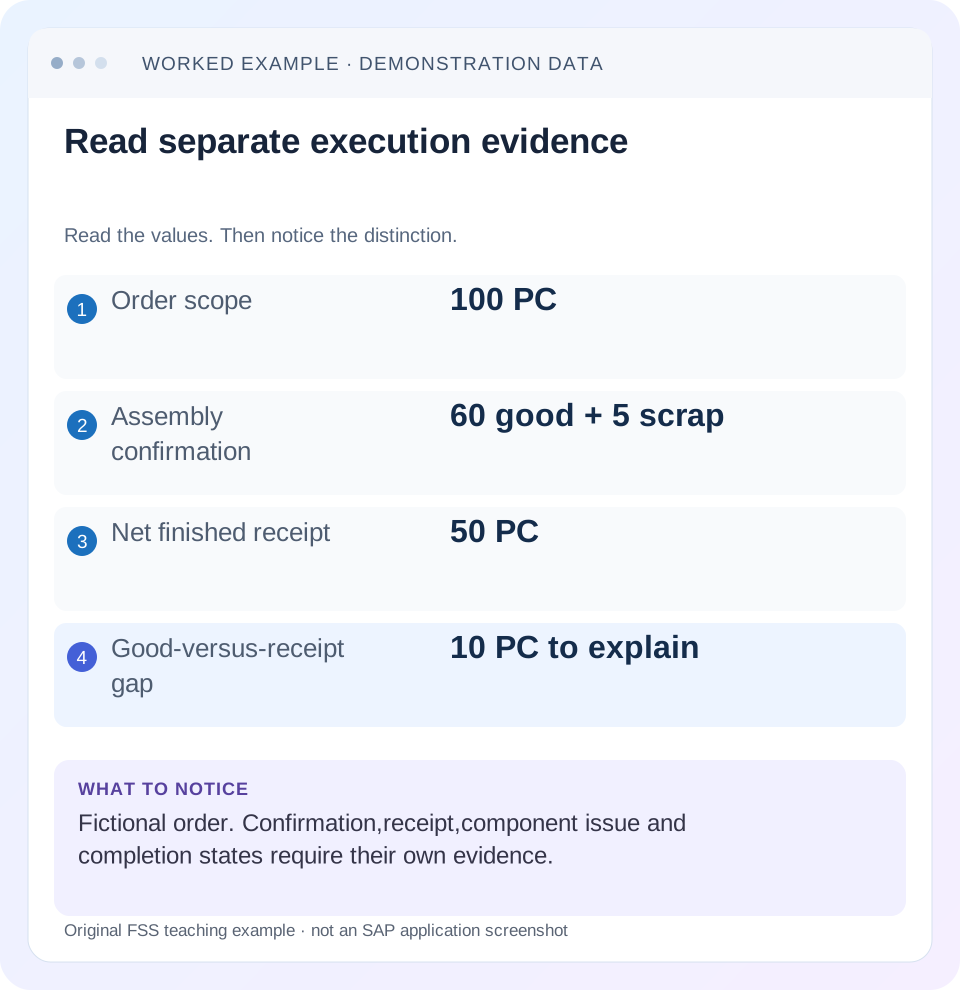
Read the example values
- Order scope
- 100 PC
- Assembly confirmation
- 60 good + 5 scrap
- Net finished receipt
- 50 PC
- Good-versus-receipt gap
- 10 PC to explain
Words you’ll meet in this guide
- BOM
- Bill of materials, the components needed for a product.
- Routing
- A description of manufacturing work operations.
- MRP
- Material requirements planning, which compares demand and supply.
- Confirmation
- A record of relevant production progress or completed work.
- TECO
- Technical completion: a processing status used for relevant orders.
Preview the practical steps
SEE THE CONNECTION
See it in a simple example.
A small example to make the idea concrete.
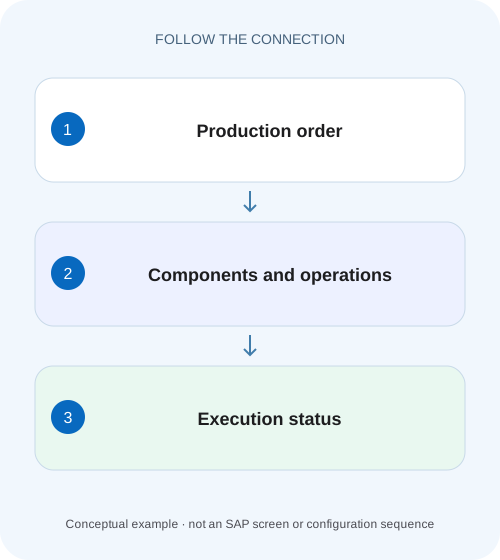
Read an assembly order before escalation
A planner, supervisor and stores analyst describe the same production order differently because they are looking at status, components and confirmations.
Read the order as connected evidence
CO03 displays a production order's planned scope and processing state.
Start with the header identity
SAP's Display Production Order documentation identifies header quantities, dates and scheduling as display capabilities.
Read all relevant statuses
The documented app allows inspection of order and business-process statuses.
Read an assembly order before escalation
A planner, supervisor and stores analyst describe the same production order differently because they are looking at status, components and confirmations.
Build one order-level evidence trail before deciding whether the issue concerns planning, execution or a goods movement.
| Reader | Business question | Evidence to carry forward |
|---|---|---|
| Production planners and shop-floor application teams | Read an assembly order before escalation | Build one order-level evidence trail before deciding whether the issue concerns planning, execution or a goods movement. |
01 Read the order as connected evidence
CO03 displays a production order's planned scope and processing state. Use it to connect material, plant, quantity, dates, status, operations and components. A released order is not proof of production; a confirmation is not automatically a goods receipt; technical completion is not proof of financial settlement. Each business question needs its own evidence.
This guide is for production support analysts and planners with display access to a known order. You need the expected material, plant, quantity and incident question. The example is a fictional 100-PC assembly order. It is a reading exercise; no order was changed or executed in a customer system.
02 Start with the header identity
SAP's Display Production Order documentation identifies header quantities, dates and scheduling as display capabilities. Confirm the order number, material, plant and order quantity before interpreting totals. Similar material descriptions or copied order text can make the wrong order appear plausible. [1]
Record units and relevant basic/production dates as actually labeled in your system. A 100-PC order and a 100-KG order are different scopes. Planned finish is a scheduling result, not evidence that production finished on that date. Use actual execution references to support progress claims.
03 Read all relevant statuses
The documented app allows inspection of order and business-process statuses. Read the complete relevant set rather than one convenient abbreviation. Release indicates a lifecycle step; partial/final confirmation, delivery and technical completion describe other aspects. User-status controls can add customer workflow restrictions. [1]
If an action is unavailable, record the attempted transaction and message. A display label cannot explain every authorization, lock or validation. Conversely, an order may be operationally complete while still carrying financial follow-up. Keep each claim tied to the status or document that actually supports it.
04 Work a partially executed order
Suppose P800 plans 100 PC. Its assembly operation records 60 PC good yield and 5 PC scrap under the fixture's reporting rules. Material receipt documents show 50 PC received, while component C1 has a net issue of 120 PC. The user says,“the order is 60% complete, so stock should have increased by 60.”That conclusion skips the receipt evidence.
The 10-PC difference may reflect timing, posting errors or the actual manufacturing process. Do not create another receipt merely to make quantities equal. First inspect existing material documents, reversals and any configured automatic/delayed movement processing. The order can contain different valid quantities at different stages.
| Object/evidence | Quantity | What it supports |
|---|---|---|
| Header order scope | 100 PC | Planned production |
| Assembly confirmation | 60 good +5 scrap | Recorded operation progress |
| Finished-material receipt | 50 PC | Actual posted receipt in this fixture |
| C1 net issue | 120 PC | Component consumption evidence |
| Difference good versus receipt | 10 PC | Requires receipt/process review |
05 Use Operation Overview for execution detail
SAP documents Operation Overview for operation status, components, resources/tools and related details. Identify which operation was confirmed and whether later work remains. A confirmation at assembly may not establish that final inspection or packing occurred. [1]
Compare operation quantity, confirmed values, dates and work-center context. If several sequences are used, inspect the actual standard, parallel or alternative sequence rather than assuming every displayed operation is part of one simple serial path. The sequence overview helps explain the selected execution structure without flattening it into an inaccurate list.
06 Use Component Overview for material scope
Component Overview displays the required components and their status/details. For C1, read required and withdrawn quantities, unit, operation allocation and issue context as available. A reservation or planned requirement is not an actual goods issue. Trace the associated material documents for the consumption claim. [1]
If current BOM data differs from P800, do not assume CO03 is wrong. The order may contain a copied earlier definition or an authorized order-specific change. Compare selection date, production version and change history. Existing execution evidence belongs to that order's actual state, not whichever master-data version happens to be current today.
07 Follow a repeatable read sequence
Write the business question before opening many screens. If the question is missing stock, prioritize receipt evidence after identifying the order. If it is missing components, prioritize component allocation and movement history. A consistent sequence keeps the investigation understandable.
Confirm header and question
Record P800, material, plant,100 PC and expected business event.
Expected observation: The scope is unambiguous.
Read statuses and operations
Compare actual operation progress and remaining work.
Expected observation: 60 good is recognized as confirmation evidence.
Read components and material references
Reconcile C1 consumption and finished receipt/reversal documents.
Expected observation: 120 issue and 50 receipt are independently supported.
State the unresolved difference
Identify the 10-PC good-versus-receipt gap and next process check.
Expected observation: The handover avoids claiming missing stock from status alone.
08 Troubleshoot mismatched evidence
A wrong date, a missing component and an invisible price can have entirely different causes. SAP's app documentation also notes authorization restrictions on price information, so absent cost details do not automatically mean the order has no costs.
| Observation | Question | Next evidence |
|---|---|---|
| Order not found | Correct identity/system/access? | Order reference and organizational context |
| REL but no execution | Has any operation been confirmed? | Confirmation evidence |
| Good yield exceeds receipt | Has receipt posted or been reversed? | Material documents and movement errors |
| Required component, zero withdrawal | Planned versus actual consumption? | Backflush/manual issue path |
| Current BOM differs | Which definition was copied? | Version, date and order changes |
| Price information absent | Visibility restricted? | Role/restriction context |
09 Verify with a controlled evidence matrix
The positive check reproduces the header 100, confirmation 60 good/5 scrap, receipt 50 and C1 issue 120. The negative check ensures that an unposted reservation is not counted as an actual issue. For a boundary case, include a receipt reversal and recalculate net receipt rather than summing positive lines only.
Also inspect one operation not yet confirmed. It should remain visible as outstanding work where the process requires it, even if an earlier operation is final-confirmed. Record the actual status interpretation for the installed order type. These are proposed learning checks and do not certify the order's physical progress.
10 Write a handover that another planner can reproduce
A useful note says:“P800 plans 100 PC; assembly records 60 good and 5 scrap; net finished receipt 50; C1 net issue 120; 10 good PC are not yet explained by receipt evidence.”Include document references, units and observation time. That is stronger than “order incomplete”or “SAP stock wrong.”
For recurring questions, use COOIS to find the affected population and CO03 to explain representative orders in detail. Preserve the worklist's filters with the individual investigation so users understand why these orders were selected.
11 Reconcile confirmation, receipt and component evidence in one worksheet
Build three separate quantity ledgers for P800: operation confirmation, finished-material receipts and component consumption. Include original and cancellation/reversal references with signed effects. A 60-PC confirmation later cancelled and replaced by 55 is not 115 current good output. A 50-PC receipt followed by a 10-PC reversal is 40 net receipt, not 60 positive activity.
For the revised fixture, hold confirmed good 60 and scrap 5, then add the 10-PC receipt reversal. Net finished receipt is 40, so the good-versus-receipt difference becomes 20. That change is explained by a material-document event; it does not require changing the recorded operation yield. Inspect why the reversal occurred and whether a replacement receipt is still due under the actual process.
For C1, retain issue 120 and add a 20-PC issue reversal as another independent variant. Net component consumption becomes 100. Do not combine that return/reversal into the finished-material ledger. The worksheets should preserve material identity, unit, document and business category so each net result can be traced.
12 Use a second operation to test the meaning of progress
Suppose P800 has assembly 0010 and final inspection 0020. Assembly records 60 good, but final inspection has processed only 50. A header-level completion percentage derived from assembly cannot prove 50 passed final inspection or 60 are ready for inventory. Read each operation's actual confirmation and quality context.
Inspect Operation Overview for the selected operation's status, component allocation and resource/tool details documented by SAP. Then compare whether the remaining process requires another operation, an inspection lot or a receipt step. When the gap is a missing material movement, follow its document/error path rather than adding a fictitious final-inspection confirmation.
Test the sequence with one operation complete and the next deliberately open. The expected support conclusion should name the remaining step and quantity, not simply label the whole order “finished”because one operation shows final confirmation. Also inspect any alternative/parallel sequence selected in the actual order; operation number alone does not establish a universal serial process.
For escalation, attach the order header and the three small ledgers with observation time. A planner can then decide whether the 20-PC receipt gap, unprocessed final inspection or component return needs action. The evidence remains useful even when the issue belongs to another team, because it names the precise document boundary instead of asking them to investigate the entire order.
13 Verify stock context after tracing the receipt
For the 50-PC receipt, record the actual finished-material stock category, batch and storage location. A user viewing unrestricted stock in another location may not see that receipt even when its material document is correct. Compare the posted destination with the business expectation before claiming an order quantity gap. If quality inspection is involved, follow the lot and disposition evidence separately from the production confirmation.
14 Questions and next lessons
Does CO03 change the order? It is a display entry point; actions and navigation depend on role/application. Does final confirmation mean final receipt? They are different business evidence. Does TECO mean no accounting work remains? Inspect settlement and financial closure separately.
Continue with backflush for missing component issues, COOIS for object-level worklists, and the TECO decision lesson for logistical completion. Those topics build on the same discipline: identify the business event, then verify its own document chain.
Related services and next steps
Primary sources
Found this useful?
Share this guide with your network, or leave a like.
Your like is saved in this browser.