Planned order versus production order: Proposal and execution
A planner sees a planned order for an assembly while the production supervisor asks which executable order authorizes the work.

Source review:
START HERE · NO PRIOR TOPIC KNOWLEDGE NEEDED
What it is. Why it matters.
A planned order is a planning proposal for supply. A production order organizes manufacturing execution, so a proposal’s existence does not mean that production has started.
Completely new to SAP?
Manufacturers use SAP to connect work such as buying components, recording inventory, planning production, shipping equipment and accounting for costs. SAP S/4HANA is an enterprise resource planning system: it connects these activities through shared business data.
Production Planning determines what to make or procure and when. Product definitions, supply proposals and execution orders connect demand with factory work.
A transaction code, or t-code, is a shortcut to a task in classic SAP GUI. Fiori apps provide another way to work. Names and screens depend on the product and release; you do not need a live system to learn the concepts in this guide.

Scope and source-review notes
Scope and evidence
Source review by FAST SAP SOLUTIONS® editorial. This badge describes our editorial review; it does not represent SAP certification or independent endorsement.
SAP ERP/S/4HANA classic PP-SFC planned-order conversion for discrete in-house production. The documented retained-remainder,firming and original-quantity production-version rules are scoped to that partial-conversion flow;specialized Production Control Workbench and other implementations require their own guidance.
Documentation review on 14 November 2026 used the official SAP sources listed below, including indexed excerpts where full text was unavailable. Scope and availability depend on the stated product, release and configuration. All document references, quantities, dates and outcomes in worked cases are illustrative; no customer SAP system or tenant was accessed and the proposed exercises were not executed.
A MANUFACTURING EXAMPLE
Separate a proposal from shop-floor execution
Reconcile partial conversion quantities
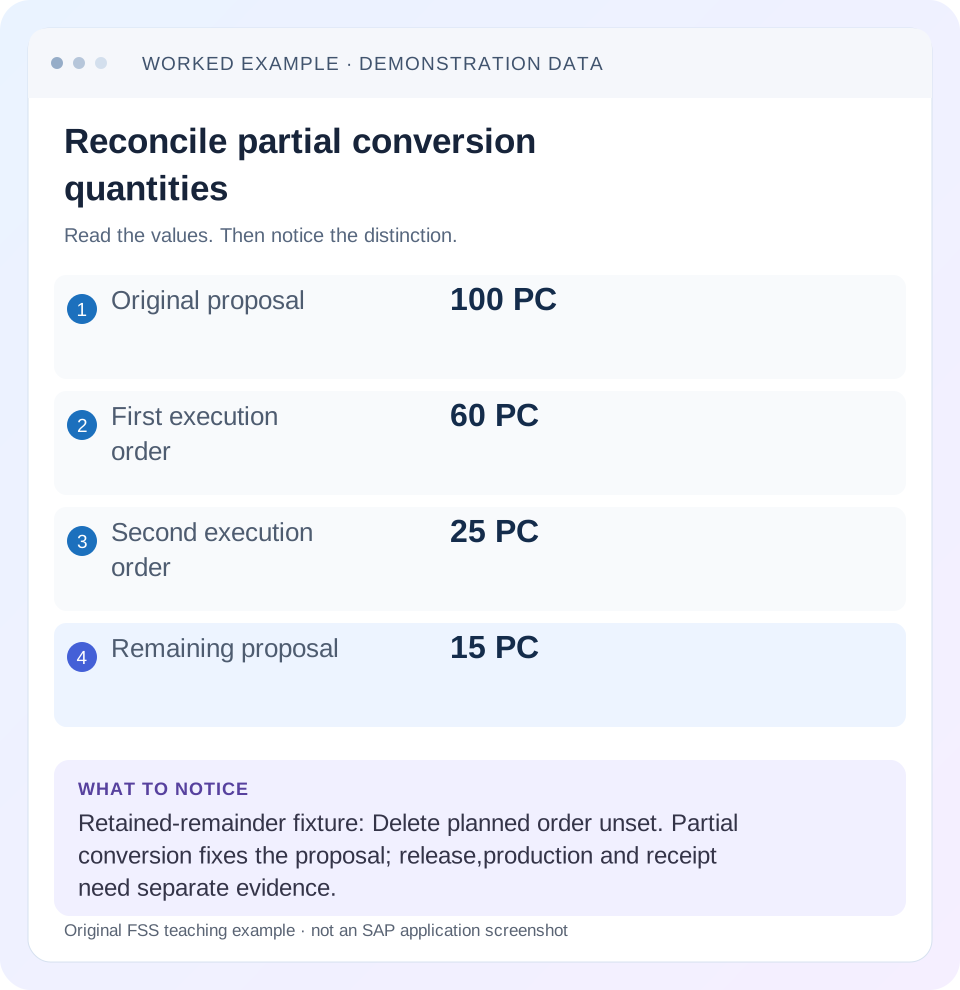
Read the example values
- Original proposal
- 100 PC
- First execution order
- 60 PC
- Second execution order
- 25 PC
- Remaining proposal
- 15 PC
Words you’ll meet in this guide
- BOM
- Bill of materials, the components needed for a product.
- Routing
- A description of manufacturing work operations.
- MRP
- Material requirements planning, which compares demand and supply.
- Confirmation
- A record of relevant production progress or completed work.
Preview the practical steps
SEE THE CONNECTION
See it in a simple example.
A small example to make the idea concrete.
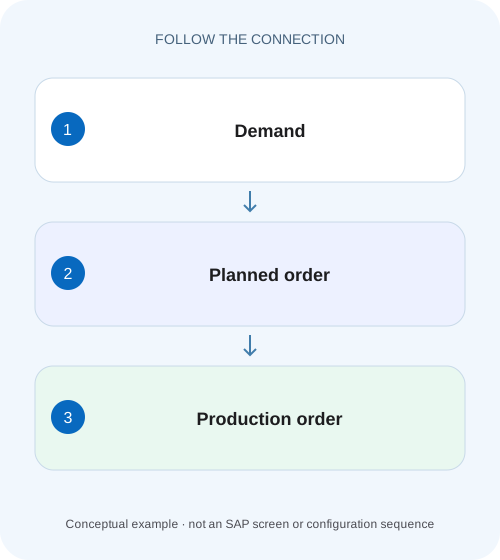
Separate a proposal from shop-floor execution
A planner sees a planned order for an assembly while the production supervisor asks which executable order authorizes the work.
A planning proposal is not an execution event
A planned order proposes supply to cover requirements.
Understand the conversion choices
SAP documents individual, collective and partial conversion.
Work a 100-PC partial conversion
Suppose planned order PL100 proposes 100 PC.
Separate a proposal from shop-floor execution
A planner sees a planned order for an assembly while the production supervisor asks which executable order authorizes the work.
Trace the planning proposal and production-order state separately before communicating that manufacturing has started.
| Reader | Business question | Evidence to carry forward |
|---|---|---|
| Production planners and shop-floor application teams | Separate a proposal from shop-floor execution | Trace the planning proposal and production-order state separately before communicating that manufacturing has started. |
01 A planning proposal is not an execution event
A planned order proposes supply to cover requirements. A production order organizes manufacturing execution, resources, components and costs. Conversion moves quantity into an execution document, but release, confirmation, goods issue, goods receipt and completion remain distinct evidence. Do not report factory progress solely from a planned order's existence.
This guide is for production planners and support analysts tracing conversion quantities. You need planned-order identity, material, plant, quantity, dates and follow-on order references. The case uses 100 PC of a fictional assembly with a simple 2-PC component ratio. No conversion or manufacturing transaction was executed for this article.
02 Understand the conversion choices
SAP documents individual, collective and partial conversion. In partial conversion, a planned order is reduced in portions into several production orders. An analyst must therefore reconcile remaining planned quantity and all resulting execution orders, not search for a mandatory one-to-one relationship. [1]
A collective action applies to a selected population; it does not make every resulting order one combined job. Preserve each planned-order and production-order reference. If a client response is unclear after conversion, inspect those identities before retrying. A second submission can create duplicate execution scope even when the first response was lost.
In the documented classic PP-SFC partial-conversion flow, the retained partly converted planned order is fixed against changes by a planning run, and dependent requirements are reduced for the converted quantity. The Delete planned order indicator controls retention: it can remove the proposal when no further conversion is wanted even if quantity remains. Deliberate deletion of unused remainder is therefore different from full conversion. [2]
03 Work a 100-PC partial conversion
Suppose planned order PL100 proposes 100 PC. The planner converts 60 into production order PR200, leaving 40 in the proposal under the supported partial-conversion flow. Later,25 are converted into PR201, leaving 15. The total represented supply remains 100 before other changes: 60+25+15. This retained-remainder fixture leaves Delete planned order unset while the 40-PC and later 15-PC remainder is required. SAP's execution procedure conditions quantity reduction/retention on that indicator and describes deletion when converted quantities cover the remainder. [3]
Do not add the original 100 to the follow-on 60 and call it 160 current supply. The original quantity is historical context; the current remaining quantity is 40 after the first conversion in this fixture. Read the actual supported display state rather than preserving an old screenshot as if it were the live remainder.
| Stage | Production-order quantities | Remaining planned quantity | Total represented |
|---|---|---|---|
| Before conversion | 0 | 100 PC | 100 PC |
| After first partial conversion | PR200: 60 PC | 40 PC | 100 PC |
| After second partial conversion | PR200 (60 PC) +PR201 (25 PC) | 15 PC | 100 PC |
| Incorrect duplicate retry | Extra 60 PC created | Unreconciled | Investigate overlap before further action |
04 Inspect which data transfers to the production order
The cited classic conversion documentation explains that planned-order components are copied and dependent requirements become reservations, while operation/resource-tool data is selected from the routing in the described process. It also states that the BOM is not freshly exploded in that documented conversion path. Check current release/process behavior before assuming every conversion recreates today's BOM. [1]
That distinction matters when the BOM changed after PL100 was created. PR200 can contain components consistent with the planned proposal rather than the latest display. If the business requires a newer method, determine the supported replanning/reread procedure instead of treating conversion as an automatic master-data refresh.
05 Reconcile component quantities across partial orders
With a simple 2-PC C1 requirement per assembly, PL100 initially represents 200 PC of C1. After converting 60, PR200 represents 120 PC and the 40-PC remainder represents 80 PC. After converting another 25, PR201 represents 50 PC and the 15-PC remainder 30 PC. The total remains 200 PC under the stated proportional assumptions.
Actual scrap, fixed quantities, alternative items or changed conversion quantities can alter those relationships. Read the order and remaining proposal rather than forcing every component through a simple ratio. The fixture's purpose is to teach quantity conservation and document relationships, not to assert universal component-splitting behavior.
06 Inspect conversion and execution in sequence
Start by finding existing follow-on documents. Then compare quantities, components and dates. Only after the execution document is understood should you discuss release or progress.
Read the current planned order
Record PL100's material, plant, dates, quantity and firming context. Inspect the Delete planned order indicator and the fixed state of a retained partly converted proposal.
Expected observation: Current remainder is distinguished from original 100.
Find resulting production orders
Trace PR200/PR201 and compare creation/conversion references.
Expected observation: 60 and 25 are accounted for once.
Reconcile supply and components
Compare 60+25+15=100 and illustrative 120+50+30=200 C1.
Expected observation: Conversion did not create unexplained overlap.
Read actual execution states
Inspect release, confirmations and material documents separately.
Expected observation: Conversion is not presented as production completion.
07 Keep release separate even when automated
Some configured processes may release an order automatically during creation/conversion; others leave a created order for review. Inspect the actual status rather than saying conversion always releases or never releases. Automatic release does not itself prove material availability, capacity feasibility or completed work.
For PR200, the planner should verify selected method, dates, components and operational readiness under the local process. If quantity or finish date changes during conversion, subsequent planning may need to account for the revised scope. Preserve the change and resulting planning evidence instead of assuming the original proposal remains authoritative.
08 Troubleshoot missing or duplicate supply
A missing planned order after full conversion can be an expected lifecycle result. An unchanged screenshot can be stale. A new production order without clear client acknowledgement can mean the backend committed successfully. Use document identities and current state to choose the next action.
| Observation | Main question | Next evidence |
|---|---|---|
| PL100 no longer visible | Fully converted or filtered? | Follow-on order references and current scope |
| PR200 exists, client showed timeout | Did first conversion commit? | Backend order and quantity |
| Remaining quantity unexpected | Partial conversion/change? | All converted portions and current remainder |
| Components differ from current BOM | Copied proposal state? | Planned components and conversion rules |
| Production not started | Created versus released/executed? | Status and actual documents |
| Supply overstated | Original plus remainder double counted? | Current document quantities and identity |
09 Verify positive, negative and final-portion cases
The positive test converts 60 with Delete planned order unset and reconciles 60+40=100; inspect the retained proposal's fixed state and reduced dependent requirements. A separate deliberate-deletion test removes an unused remainder only through the approved decision. The final-portion test converts the last 15 and verifies the documented deletion/completed-conversion outcome and existing order references rather than expecting a normal zero-quantity proposal to remain. [2] [3]
Also test an unclear response in an integration fixture by reconciling backend documents before retrying, without deliberately duplicating productive orders. Verify both quantities and dates; the right 100 units due too late can still fail the business requirement. Record actual observed behavior under the installed conversion application.
10 Preserve the planning-to-execution handover
A useful handover names PL100, PR200, PR201, converted quantities, remaining quantity, selected method and current execution statuses. It should let shop-floor support know which document to execute and let MRP support know what supply remains proposed.
Avoid replacing the planned-order reference with only the production-order short text. Later questions about component selection, conversion timing or a changed requirement depend on the original relationship. Keep the source and resulting documents traceable even after the proposal's lifecycle ends.
11 Use current quantities to distinguish conversion from new demand
After PR200 (60 PC) and PR201 (25 PC) are created, PL100's illustrative remainder is 15. Now suppose valid demand increases by 20. Do not assume the existing proposal should simply return to 35 without inspecting planning state. Existing production orders, firming, dates and MRP policy determine the supported response. The reconciliation begins with 85 execution units plus 15 proposed before accounting for the new need.
Build a supply ledger with document category, identity, quantity, date and state. Keep original 100 as a historical baseline column rather than a current receipt. This avoids the common double count 100+60+25=185. The live represented supply in the unchanged fixture is 60+25+15=100. If a new proposal 20 appears for the additional demand, the total becomes 120 under those simplified assumptions.
Also compare dates. PR200 (60 PC) due next week and PL100 (15 PC) due next month are not interchangeable coverage for tomorrow's requirement, even though the aggregate totals 100. Conversion changes document category and commitment level; it does not make every quantity available at every date.
12 Verify component copy and routing selection after a method change
Keep original proposal quantity and converted quantity as separate selection inputs. In classic PP-SFC, when BOM/routing selection is controlled by a production version, the documented partial-conversion flow uses the version valid for the original planned-order quantity. For an original 100-PC proposal converted in a 60-PC portion, do not assume that 60 alone switches selection to the 1–99-PC small-lot version. Preserve original 100, partial 60 and actual selected version in the ledger. This rule is not generalized to specialized Production Control Workbench or other conversion paths. [2]
Suppose PL100 was created with component OLD at 2 PC per assembly, and current BOM later changes to NEW at 1.5. Under the cited classic conversion path that copies planned components without re-explosion, PR200 can legitimately carry 120 OLD for 60 assemblies. A new direct order or another supported replanned proposal may use a different definition. Compare the actual path and selected method before calling either result wrong.
At the same time, the routing data is selected under the conversion rules described by SAP. That can create a method-consistency question if planning and execution master data changed independently. Read the actual production version, BOM components and task-list selection rather than assuming conversion refreshed every object uniformly.
For a controlled test, retain a planned order before the approved master-data revision, then convert a partial quantity through the documented process. Compare its components with the current BOM display and inspect operations. Record exactly which data was copied and which was selected. A second newly planned case after the revision provides the comparison without rewriting the earlier proposal's history.
If the intended business requirement is to adopt the new method for remaining work, define the supported proposal/order update before conversion. Do not manually substitute NEW in one execution order while leaving the 15-PC remainder and other converted portions unexplained. The full 100-unit population must remain coherent across planning and execution.
Finish by checking references, quantities, dates, component units and actual release states on every resulting order. A conversion count of two is not enough: two documents of the wrong quantities or method can still satisfy that count. The practical goal is a traceable, nonoverlapping handover from proposal to execution with any remaining planning need explicit.
13 Questions and related lessons
Can one planned order create several production orders? Partial conversion supports that documented pattern. Does conversion re-explode every BOM universally? The cited classic path copies components; verify your process. Does a production order prove stock was received? Follow actual receipt documents.
Continue with production versions for selected manufacturing method, CO03 for execution evidence, and planning time fence for why an existing proposal may remain stable before conversion.
Related services and next steps
Primary sources
Found this useful?
Share this guide with your network, or leave a like.
Your like is saved in this browser.