BOM versus routing: What to make and how to make it
A component manufacturer plans an assembly quantity and must distinguish the parts it needs from the operations used to make the product.

Source review:
START HERE · NO PRIOR TOPIC KNOWLEDGE NEEDED
What it is. Why it matters.
A bill of materials, or BOM, lists the components needed for a product. A routing describes the work operations, so ingredients and manufacturing instructions answer different questions.
Completely new to SAP?
Manufacturers use SAP to connect work such as buying components, recording inventory, planning production, shipping equipment and accounting for costs. SAP S/4HANA is an enterprise resource planning system: it connects these activities through shared business data.
Production Planning determines what to make or procure and when. Product definitions, supply proposals and execution orders connect demand with factory work.
A transaction code, or t-code, is a shortcut to a task in classic SAP GUI. Fiori apps provide another way to work. Names and screens depend on the product and release; you do not need a live system to learn the concepts in this guide.

Scope and source-review notes
Scope and evidence
Source review by FAST SAP SOLUTIONS® editorial. This badge describes our editorial review; it does not represent SAP certification or independent endorsement.
Classic discrete-manufacturing BOM/routing concepts in SAP ERP/S/4HANA. Production versions,change management and order-specific modifications determine the actual selected/copied definition;PP-PI recipes and PEO shop-floor routings have different structures.
Documentation review on 14 November 2026 used the official SAP sources listed below, including indexed excerpts where full text was unavailable. Scope and availability depend on the stated product, release and configuration. All document references, quantities, dates and outcomes in worked cases are illustrative; no customer SAP system or tenant was accessed and the proposed exercises were not executed.
A MANUFACTURING EXAMPLE
Connect assembly composition and work
Scale composition and work separately
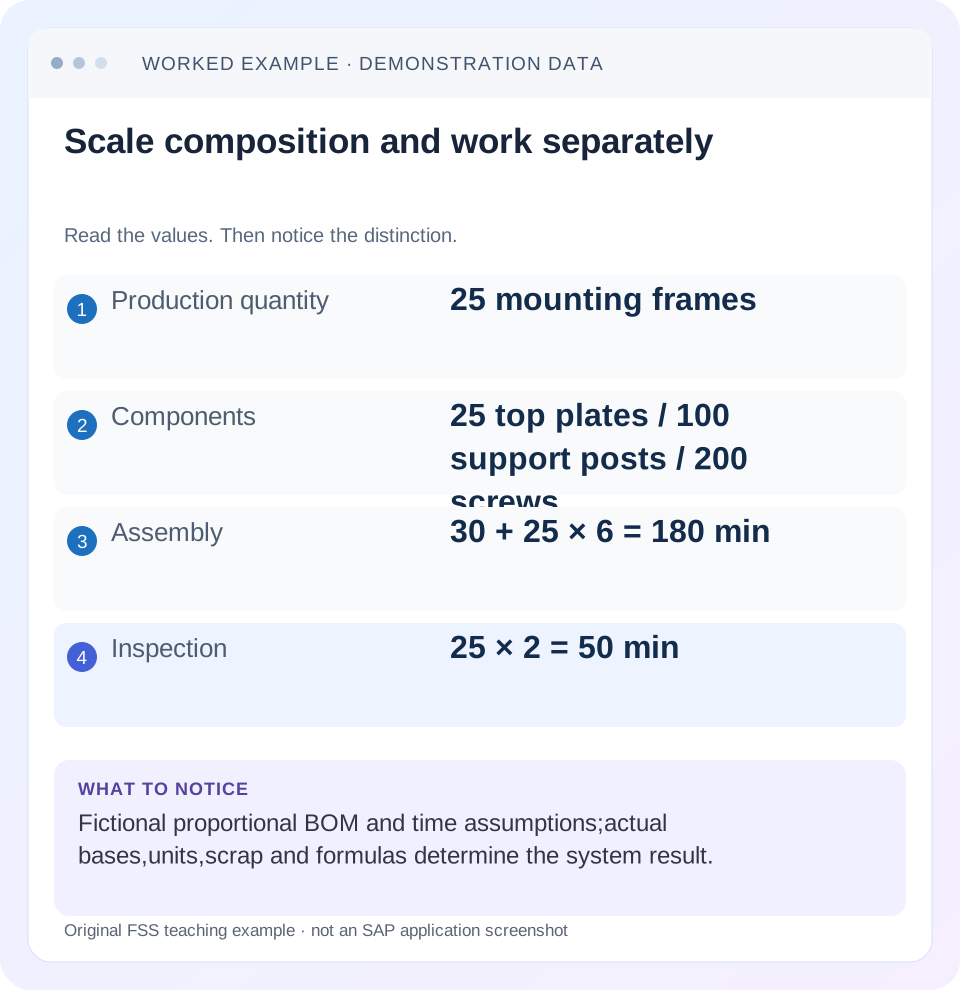
Read the example values
- Production quantity
- 25 mounting frames
- Components
- 25 top plates / 100 support posts / 200 screws
- Assembly
- 30 + 25 × 6 = 180 min
- Inspection
- 25 × 2 = 50 min
Words you’ll meet in this guide
- BOM
- Bill of materials, the components needed for a product.
- Routing
- A description of manufacturing work operations.
- MRP
- Material requirements planning, which compares demand and supply.
- Confirmation
- A record of relevant production progress or completed work.
Preview the practical steps
SEE THE CONNECTION
See it in a simple example.
A small example to make the idea concrete.
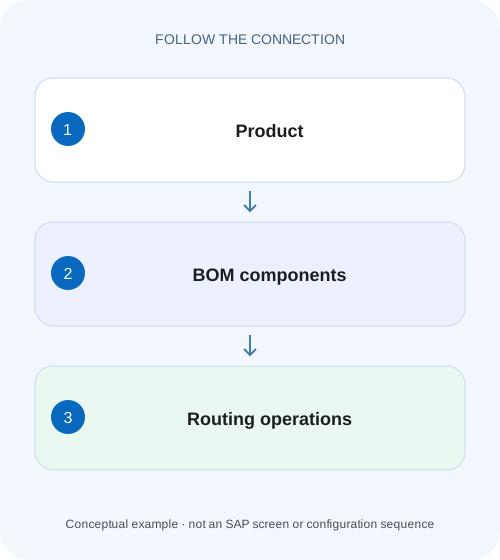
Connect assembly composition and work
A component manufacturer plans an assembly quantity and must distinguish the parts it needs from the operations used to make the product.
A BOM describes composition; a routing describes production work
A bill of material defines the components required for an assembly at a stated base quantity.
Read the BOM base quantity before scaling
Suppose FRAME_A's BOM base quantity is 1 PC.
Read the routing's work definition
A routing can contain assembly and inspection operations, work-center assignments, control data and standard values.
Connect assembly composition and work
A component manufacturer plans an assembly quantity and must distinguish the parts it needs from the operations used to make the product.
Read BOM quantities and routing operations with their own bases and validity; do not turn a component list into a capacity promise.
| Reader | Business question | Evidence to carry forward |
|---|---|---|
| Production planners and shop-floor application teams | Connect assembly composition and work | Read BOM quantities and routing operations with their own bases and validity; do not turn a component list into a capacity promise. |
01 A BOM describes composition; a routing describes production work
A bill of material defines the components required for an assembly at a stated base quantity. A routing defines production operations and their resource/time context. Their relationship determines both what is needed and when work and material requirements arise. A correct component list alone cannot establish a feasible manufacturing method.
This tutorial is for production planners and master-data analysts who can display BOMs, routings and a representative production order. You need material, plant, quantity, selection date and production version where applicable. The example is a fictional mounting frame assembly and uses simple proportional quantities without scrap, alternative items or unit-conversion complications.
02 Read the BOM base quantity before scaling
Suppose FRAME_A's BOM base quantity is 1 PC. It requires 1 top plate,4 support posts and 8 screws. An order for 25 mounting frames therefore requires 25 top plates,100 support posts and 200 screws before any other configured factors. If the BOM instead states those component quantities per 10 mounting frames, the same visible numbers mean a different recipe for composition.
Always record component unit and item context. A kilogram quantity cannot be multiplied as though it were pieces, and a fixed-quantity item does not necessarily scale like an ordinary proportional item. Diagnose the actual item semantics before blaming the routing for a component quantity that is already incorrect in the BOM.
03 Read the routing's work definition
A routing can contain assembly and inspection operations, work-center assignments, control data and standard values. The operation tells the planning process where and how work is intended to occur. Standard values have their own base quantity and formula interpretation;“six minutes”may mean per mounting frame, per routing base quantity or another configured basis.
For the fixture, use assembly operation 0010 at WC_ASSY with 30 minutes setup plus 6 minutes per mounting frame. Inspection operation 0020 uses 2 minutes per mounting frame. For 25 mounting frames, the illustrative operation times are 180 minutes assembly and 50 minutes inspection. These arithmetic assumptions are authored for teaching, not delivered SAP work-center formulas.
04 Work the material-and-operation relationship
Allocate top plates, support posts and screws to assembly 0010. The final inspection at 0020 checks the completed product and has no additional proportional components in this fixture. The order needs both composition and execution method to make this relationship understandable.
The 230 total illustrative operation minutes are not automatically an elapsed completion promise. Operations may use different resources, overlap or wait according to the actual scheduling design. Keep quantity calculation, capacity requirement and schedule dates as separate outputs to verify.
| Object | Calculation | Result |
|---|---|---|
| Seats | 25×1 PC | 25 PC |
| Legs | 25×4 PC | 100 PC |
| Screws | 25×8 PC | 200 PC |
| Assembly 0010 | 30 min +25×6 min | 180 min |
| Inspection 0020 | 25×2 min | 50 min |
05 Understand component allocation to operations
SAP's BOM documentation explains assigning items to routing operations and describes the effect on component availability timing. It also documents first-operation assignment when components are not explicitly allocated in the described standard process. Review actual order allocation rather than relying on that fallback as intentional process design. [1]
If a finishing component belongs at a later operation, allocating it there can make the material timeline reflect the production sequence. Putting every item at the first operation can make all components appear needed too early. The allocation can also be relevant when investigating which confirmation should consume a backflushed component. Inspect the copied order, not only current master data.
06 Inspect selected definitions before changing either object
The material may have alternative BOMs, routing group counters or production versions for different methods. Display the combination actually selected for the order's quantity/date. Editing BOM alternative 1 cannot repair an order that correctly selected alternative 2 for another production method.
Establish selection context
Record FRAME_A, plant,25 PC, relevant date and selected production version.
Expected observation: The method being investigated is explicit.
Review BOM identity and base
Compare usage, alternative, base quantity, component quantities and units.
Expected observation: 25/100/200 is reproducible.
Review routing identity and operations
Compare group/counter, validity, work centers and standard-value bases.
Expected observation: 180/50 minutes follows stated inputs.
Review allocations and order copy
Match components to operations in the actual order.
Expected observation: Composition and execution remain connected.
07 Diagnose quantity versus timing defects
If the order contains 400 screws rather than 200, the first question is quantity/base/unit/scrap or copied-order change. If 200 screws are needed at the wrong date, the first question is operation allocation and scheduling. These are different defects even when users describe both as “the BOM is wrong.”
| Observation | Main branch | Next evidence |
|---|---|---|
| Component quantity multiplied | Base/unit/item semantics | BOM item and order requirement |
| Correct components, wrong method | Selection context | Production version and alternative |
| Components due too early | Operation allocation | Routing/order assignment |
| Capacity hours unexpected | Standard-value formula/base | Operation values and work center |
| Current BOM correct, old order different | Copied state/change history | Order creation and master-data validity |
| Operation missing | Routing selection/sequence | Group, counter and order operations |
08 Keep master-data revisions and existing orders distinct
A production order contains execution data selected/copied under its creation or later supported reread process. Changing today's BOM or routing does not establish that an already released order automatically changed. Inspect its actual components and operations and identify any deliberate order-specific modifications.
When a new method is approved, define effective dates and representative quantities, then verify the next order selection. If existing open orders also need revision, handle that as a separate controlled execution-data change. Otherwise technicians may receive work instructions inconsistent with the components already staged or consumed.
09 Verify the combined method
The positive fixture creates or analyzes 25 mounting frames and reproduces 25 top plates,100 support posts,200 screws and the illustrative 180/50 operation minutes. A negative test selects another BOM alternative intentionally and confirms that the resulting component difference is explained by selection, not silently corrected with ad hoc quantities.
For a boundary test, change the order quantity to 26 and predict 26 top plates,104 support posts,208 screws,186 assembly minutes and 52 inspection minutes under the same simple assumptions. Also test a later component allocation and inspect requirement timing. These are proposed checks; no manufacturing order was executed for this article.
10 Avoid using one object to compensate for another
Increasing a routing time cannot fix an incorrect component quantity. Doubling a BOM quantity cannot legitimately create missing labor capacity. A report formula that halves every component requirement may conceal an incorrect BOM base quantity but fail on fixed items. Correct the demonstrated semantic cause and verify related outputs.
For FRAME_A, document base quantities, units, operation bases and selection context in the resolution. That gives the next planner enough information to reproduce the calculations rather than copying unexplained numbers from a screenshot.
11 Test fixed setup and proportional run time at two quantities
For 25 mounting frames, the fixture assembly operation needs 30 setup minutes plus 150 processing minutes. For 50 mounting frames, the same assumptions yield 30+300=330 minutes, not 360. Doubling the entire 180-minute 25-frame result would incorrectly double setup. Keep setup and proportional processing as separate inputs when comparing routing values and work-center formulas.
Now split 50 mounting frames into two separately set-up 25-frame orders. The illustrative total assembly load becomes 180+180=360 minutes because setup is incurred twice. A planner can therefore obtain different capacity requirements for the same total output depending on lot/order structure without either routing calculation being arithmetically wrong. Confirm whether the real operation uses fixed setup and how splits are handled before adopting this fixture.
The material quantities remain 50 top plates,200 support posts and 400 screws under the stated proportional BOM. This comparison teaches why material scaling and resource scaling cannot be assumed identical. A capacity report showing extra setup does not justify adding extra proportional component requirements.
12 Trace a later-operation component without confusing need and consumption
Extend the mounting frame method with a label applied at packing operation 0030. Suppose one label per mounting frame is required, so 25 labels belong to the 25-frame scope. Allocating labels to packing gives the planner a process explanation for their later need date. It does not prove those labels were physically issued or automatically consumed when assembly 0010 was confirmed.
Read the selected order's component allocation and its actual movement evidence. If all labels appear at 0010 because no explicit later allocation was maintained in the applicable process, the cause is assignment/timing. If labels are allocated correctly to 0030 but quantity is 50, the cause is quantity/base/item semantics or an order-specific change. Those two defects should not be compensated by altering the same unrelated BOM value.
For verification, retain top plates/support posts/screws at 0010 and labels at 0030, then inspect requirement dates and confirmation-related issue behavior in an authorized fixture. Test one order created before an allocation revision and another afterward. Explain any difference through the copied order definition and supported reread behavior rather than assuming current routing display describes both orders.
A useful method handover names the production version, BOM base, component ratios, routing standard-value bases, setup/run assumptions and operation allocations. With those inputs, another planner can reproduce both the 25-frame material list and the effect of two setups versus one. Without them, a screenshot of total hours hides the production design.
13 Check a component base-unit conversion explicitly
For an illustrative screw purchasing unit of a box containing 100 PC, the 25-frame requirement 200 PC corresponds to 2 boxes. The BOM still expresses 200 PC under the fixture; the packaging conversion does not change its per-frame ratio. Verify which unit appears in each display before interpreting a two-versus-two-hundred discrepancy. A routing-time correction cannot repair a wrong material-unit conversion.
14 Questions and related lessons
Can one product have several BOM/routing combinations? Yes, production versions can represent applicable methods. Does a routing replace a BOM? No, their composition and execution roles complement one another. Does correct master data prove an existing order uses it? Inspect the order's selected/copied state.
Continue with production versions for method selection, CS03/CA03 for validity-date investigation, and work-center capacity for the difference between calculated load and a feasible schedule.
Related services and next steps
Primary sources
Found this useful?
Share this guide with your network, or leave a like.
Your like is saved in this browser.