SAP inspection lot accepted, but stock has not moved? Check the posting separately
Quality has recorded an acceptable decision for a component lot, but the assembly planner still cannot see the expected stock state.

Source review:
START HERE · NO PRIOR TOPIC KNOWLEDGE NEEDED
What it is. Why it matters.
A usage decision records the inspection conclusion for a quality lot. The related stock posting is a separate piece of evidence, so an accepted inspection does not justify guessing the inventory result.
Completely new to SAP?
Manufacturers use SAP to connect work such as buying components, recording inventory, planning production, shipping equipment and accounting for costs. SAP S/4HANA is an enterprise resource planning system: it connects these activities through shared business data.
Quality Management defines and records inspections. The planned check, the measured result and the final decision serve different purposes, and any stock movement needs its own evidence.
A transaction code, or t-code, is a shortcut to a task in classic SAP GUI. Fiori apps provide another way to work. Names and screens depend on the product and release; you do not need a live system to learn the concepts in this guide.

Scope and source-review notes
Scope and evidence
Source review by FAST SAP SOLUTIONS® editorial. This badge describes our editorial review; it does not represent SAP certification or independent endorsement.
SAP ERP/S/4HANA core QM usage-decision stock posting for stock-relevant inspection lots. Warehouse integration,serial numbers,automatic-posting proposals and special stocks require their own applicable release controls.
Documentation review on 14 November 2026 used the official SAP sources listed below, including indexed excerpts where full text was unavailable. Scope and availability depend on the stated product, release and configuration. All document references, quantities, dates and outcomes in worked cases are illustrative; no customer SAP system or tenant was accessed and the proposed exercises were not executed.
A MANUFACTURING EXAMPLE
Investigate accepted stock still under inspection
Reconcile decision and stock quantities
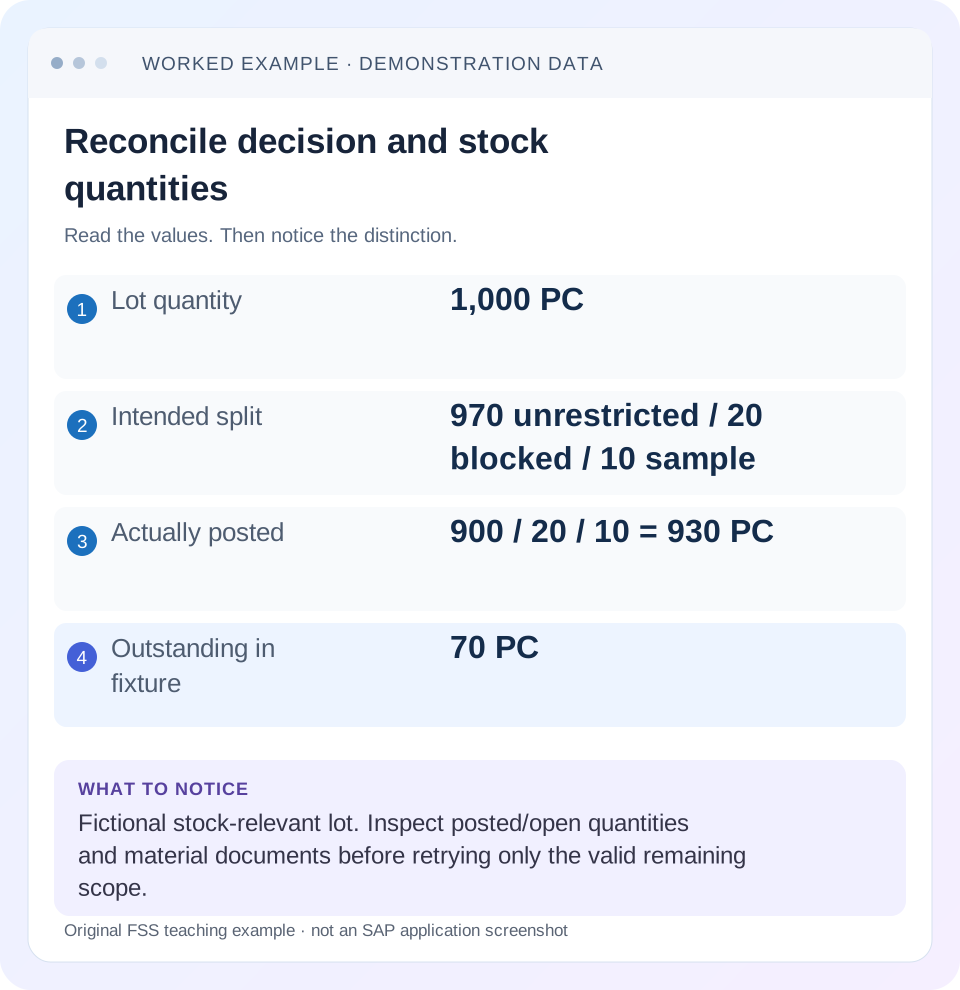
Read the example values
- Lot quantity
- 1,000 PC
- Intended split
- 970 unrestricted / 20 blocked / 10 sample
- Actually posted
- 900 / 20 / 10 = 930 PC
- Outstanding in fixture
- 70 PC
Words you’ll meet in this guide
- Inspection lot
- A record grouping a quality inspection task.
- Characteristic
- Something to inspect, such as length or color.
- Usage decision
- The recorded conclusion about an inspection lot.
- Stock posting
- A recorded inventory change under a supported goods-movement process.
Preview the practical steps
SEE THE CONNECTION
See it in a simple example.
A small example to make the idea concrete.
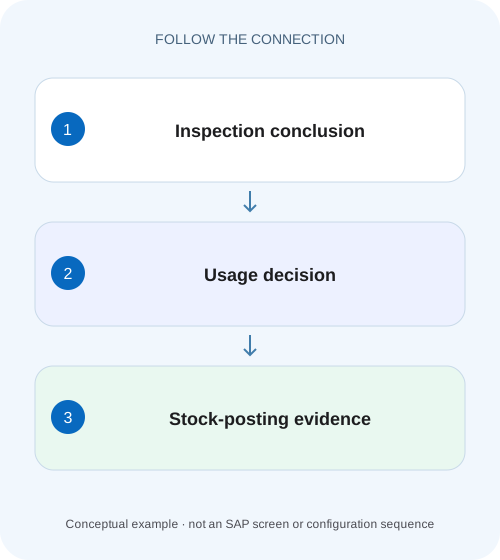
Investigate accepted stock still under inspection
Quality has recorded an acceptable decision for a component lot, but the assembly planner still cannot see the expected stock state.
Acceptance and inventory movement need separate evidence
A usage decision records the quality disposition.
Establish whether the lot is stock-relevant
SAP states that stock-relevant lots can have stock postings through usage-decision functions, with corresponding material documents.
Separate proposed, to-be-posted and posted quantities
A proposal is an intended allocation.
Investigate accepted stock still under inspection
Quality has recorded an acceptable decision for a component lot, but the assembly planner still cannot see the expected stock state.
Check the usage decision and stock-posting evidence separately before promising the material to production.
| Reader | Business question | Evidence to carry forward |
|---|---|---|
| Factory quality and maintenance teams | Investigate accepted stock still under inspection | Check the usage decision and stock-posting evidence separately before promising the material to production. |
01 Acceptance and inventory movement need separate evidence
A usage decision records the quality disposition. The stock posting records where the relevant quantity actually moved. An accepted lot does not prove that all stock became unrestricted. Inspect stock relevance, posted and outstanding quantities, target categories and material documents before repeating a movement.
This guide is for quality and inventory support analysts with display access to the lot, usage decision and stock/material documents. You need material, plant, batch/location, quantity, unit and intended disposition. The fixture uses a stock-relevant 1,000-PC receipt lot with a split allocation. No usage decision or stock movement was executed for this article.
02 Establish whether the lot is stock-relevant
SAP states that stock-relevant lots can have stock postings through usage-decision functions, with corresponding material documents. Nonstock-relevant lots do not support that same posting path; the documentation gives manually created lots and lots not arising from goods movements as examples. Identify the actual lot relationship before expecting an inventory effect. [1]
A manual inspection record can be valuable quality evidence without controlling the receipt stock the user is watching. Do not create another manual lot as a substitute for a missing stock-relevant process and then assume acceptance will release the original inventory. Trace the receipt and lot relationship first.
03 Separate proposed, to-be-posted and posted quantities
A proposal is an intended allocation. A quantity entered for posting is not yet proof of a successful posted movement. Read the actual posted totals and material references after saving. Errors, partial processing or a different category can explain why the expected stock screen did not change as anticipated.
SAP's post-decision procedure documents Change Usage Decision QA12 for a single lot and inspection-lot-stock information showing Quantity Posted after saving. Use the release-appropriate permitted display/change path and verify the resulting state. Entering another quantity is a business posting action, not a diagnostic refresh. [2]
04 Work a split-disposition case
Suppose lot L900 contains 1,000 PC. The approved illustrative disposition allocates 970 to unrestricted use,20 to blocked stock and 10 to sample consumption. The usage decision exists, but actual posting evidence shows only 900 unrestricted,20 blocked and 10 sample. Posted total is 930; 70 PC remain to be reconciled.
The approved quality disposition is not contradicted simply because 70 remain unposted. It may mean inventory follow-up is incomplete. Conversely, if all 970 were posted but the user views another batch/location, the issue is display scope rather than missing movement. Reconcile the same stock identity and observation time.
| Category | Intended quantity | Actually posted | Difference |
|---|---|---|---|
| Unrestricted use | 970 PC | 900 PC | 70 PC not yet explained |
| Blocked stock | 20 PC | 20 PC | 0 |
| Sample consumption | 10 PC | 10 PC | 0 |
| Total | 1,000 PC | 930 PC | 70 PC open in fixture |
| Remaining lot quantity | 0 intended | 70 PC outstanding | Investigate before another movement |
05 Inspect material documents and reversals
Trace the lot's stock-posting documents and source receipt. Record movement category, quantity, unit, batch/location, date and any reversal relationship as available. A posted quantity later reversed needs net reconciliation; adding only positive documents can overstate released stock.
If a warehouse process is involved, establish which posting and follow-on warehouse activity are expected. Inventory category change and physical warehouse execution can have separate evidence. Do not declare a duplicate receipt or issue necessary merely because one warehouse display has not yet reflected the expected state.
06 Use the documented post-decision path carefully
SAP's procedure allows stock posting after the usage decision for one or several lots and names QA12 for the single-lot flow, with Manage Usage Decisions as an alternative in its documented context. Start by inspecting posted/open quantities and messages. The fact that the decision already exists does not automatically prohibit all remaining posting work. [2]
For L900, the task is to explain the 70-PC remainder, not re-enter 970 unrestricted. If the remaining quantity is validly available and the approved process calls for its posting, use the appropriate action and verify the resulting material document. If it is already posted through another path, resolve the display/reconciliation cause instead.
07 Investigate the gap in sequence
Keep the quality decision and inventory evidence in separate columns until reconciled. That makes it clear which part of the process actually remains unfinished.
Capture lot and decision
Record L900,1,000 PC, stock relevance, decision and intended 970/20/10 allocation.
Expected observation: Accepted does not imply a single unrestricted category.
Read posted/open quantities
Compare 930 posted and 70 remaining under the fixture.
Expected observation: The recovery scope is bounded.
Trace documents and messages
Inspect original postings, reversals, batch/location and any failure text.
Expected observation: Missing versus mislocated/already-posted quantity is distinguished.
Apply the demonstrated correction
Use the actual permitted post-decision/inventory process for the 70 remainder if appropriate.
Expected observation: Existing 930 are not posted again.
Reconcile final state
Check 1,000 total disposition, zero remaining where intended, and category-specific documents.
Expected observation: The result is supported beyond the decision code.
08 Check automatic posting assumptions
Automatic proposals/postings depend on the configured usage-decision code and process. Do not assume every acceptance code means“all quantity unrestricted.”The split fixture deliberately includes blocked and sample categories to show why an accepted conclusion cannot replace quantity allocation evidence.
Before changing a code's posting behavior, identify its consumers and test representative accepted, rejected, split and serialized cases where relevant. A shared code change can alter future lots broadly. Repairing one lot's outstanding quantity and redesigning automatic posting are different scopes with different evidence.
09 Troubleshoot the stock that did not move
Use open quantity and document evidence to select the branch. Repeating a movement without those checks can duplicate the intended release or create a new discrepancy.
| Observation | Main question | Next evidence |
|---|---|---|
| Decision accepted, all quantity open | Manual/posting step still due? | Stock relevance, proposal and messages |
| Only 70 open | Partial posting? | Category totals and failed items |
| Posted total correct, stock screen differs | Same identity/time? | Batch, location, stock category and reversals |
| No stock-posting fields | Nonstock-relevant lot? | Lot origin/source relationship |
| Warehouse status still pending | Follow-on warehouse step? | Integration reference and activity |
| Changing decision did not undo stock | Separate posting lifecycle? | Actual documents and supported correction path |
10 Avoid treating a changed decision as a stock reversal
A changed quality conclusion and an inventory reversal are distinct events. Inspect the supported behavior before assuming one automatically undoes the other. If stock already moved, follow the governed inventory/quality correction with original document references and business disposition.
Preserve any sample/destructive consumption separately. Quantity no longer physically available for release should not be counted as unrestricted merely to balance the lot total. Reconcile the full population with its actual categories and approved disposition rather than forcing every unit into one stock bucket.
11 Verify positive, negative and partial cases
The positive fixture completes the valid 70-PC remainder and reconciles 970 unrestricted,20 blocked and 10 sample, total 1,000. The negative control uses a nonstock-relevant training lot and verifies why its decision does not provide the same inventory posting path. A boundary test begins with zero outstanding quantity and checks existing documents before any attempted retry.
Include one reversal and recalculate net category effects under the actual process. These are proposed checks, no customer inventory was changed. Verify document identities and category balances as well as the lot's remaining quantity; zero remaining alone does not prove the stock reached the intended destination.
12 Use QA12 to read posted quantities before entering another allocation
The documented single-lot post-decision flow opens Change Usage Decision QA12, enters the lot and works with the remaining posting quantities. For an investigation, first read the lot-stock view and posted totals under the permitted access. The Quantity Posted column after saving provides one checkpoint, but material documents and actual stock identity still establish where the quantity went. [2]
For L900, write intended 970/20/10, actual 900/20/10 and outstanding 70 as separate columns. If a user types 970 again because that was the intended unrestricted total, they have confused a cumulative target with an incremental remaining quantity. Review the screen's actual field meaning and open quantity before any posting; the desired final unrestricted total is 970, but the missing increment in this fixture is 70.
After approved recovery, reopen the same lot-stock context and compare posted 970/20/10, total 1,000, remaining 0. Then trace the new 70-PC material document and verify that the earlier 930-PC effects remain exactly once. This is stronger than checking only that the usage-decision code still says accepted.
13 Distinguish quantity completion from a different stock display
Suppose the lot already shows 970 unrestricted,20 blocked and 10 sample, total 1,000, with no open quantity, but a stock display shows only 900 unrestricted. First align material, plant, batch, storage location, stock category and observation time. Another legitimate 70-PC issue after release would reduce current unrestricted stock without making the original quality posting incomplete.
Build a short post-release ledger: opening unrestricted 0, quality release 970, later issue 70, current unrestricted 900. That reconciles the stock screen while preserving the completed lot posting. Posting another 70 from the lot would be the wrong response because the discrepancy came from a later consumption event.
For a negative control, use the same material in another batch or location and show why its 900-PC balance does not prove anything about L900's destination. For a warehouse-integrated boundary, follow the actual material posting and required warehouse activity separately with their references. The quality decision, inventory category and physical warehouse task can each be correct at different stages.
If the posting itself failed, retain the exact error and source quantity before correction. If a later material movement explains the balance, no quality posting repair is needed. A useful closure names which branch was demonstrated and includes category totals, remaining lot quantity, document references and any later stock effects rather than treating every accepted-lot stock question as the same incident.
14 Questions and handover
Does accepted mean all unrestricted? Only the actual disposition/posting design can establish that. Can stock be posted after the decision? SAP documents applicable post-decision paths. Should the full lot be posted again if 70 remain? Reconcile and address the remaining scope. Does warehouse completion follow instantly? Verify its own evidence.
Close with lot, decision, stock relevance, quantity/unit, category allocations, posted/open totals, material references and remaining warehouse work. Continue with QA32 for the follow-up queue, inspection origin/type for source context, and results/defects for the evidence supporting disposition.
Related services and next steps
Primary sources
Found this useful?
Share this guide with your network, or leave a like.
Your like is saved in this browser.