SAP inspection origin versus inspection type: Find the control that creates the lot
A component receipt produces an inspection lot, and the quality analyst needs to distinguish the business origin from the inspection-type controls.

Source review:
START HERE · NO PRIOR TOPIC KNOWLEDGE NEEDED
What it is. Why it matters.
An inspection lot groups a quality inspection task. Its origin describes what triggered it, while the inspection type supplies relevant processing controls.
Completely new to SAP?
Manufacturers use SAP to connect work such as buying components, recording inventory, planning production, shipping equipment and accounting for costs. SAP S/4HANA is an enterprise resource planning system: it connects these activities through shared business data.
Quality Management defines and records inspections. The planned check, the measured result and the final decision serve different purposes, and any stock movement needs its own evidence.
A transaction code, or t-code, is a shortcut to a task in classic SAP GUI. Fiori apps provide another way to work. Names and screens depend on the product and release; you do not need a live system to learn the concepts in this guide.

Scope and source-review notes
Scope and evidence
Source review by FAST SAP SOLUTIONS® editorial. This badge describes our editorial review; it does not represent SAP certification or independent endorsement.
SAP ERP/S/4HANA QM inspection-lot origins/types and automatic/manual creation. Standard origin numbers illustrate documented categories;customer inspection types and edition-specific selection rules must be checked.
Documentation review on 14 November 2026 used the official SAP sources listed below, including indexed excerpts where full text was unavailable. Scope and availability depend on the stated product, release and configuration. All document references, quantities, dates and outcomes in worked cases are illustrative; no customer SAP system or tenant was accessed and the proposed exercises were not executed.
A MANUFACTURING EXAMPLE
Find the control behind an incoming lot
Trigger versus processing control
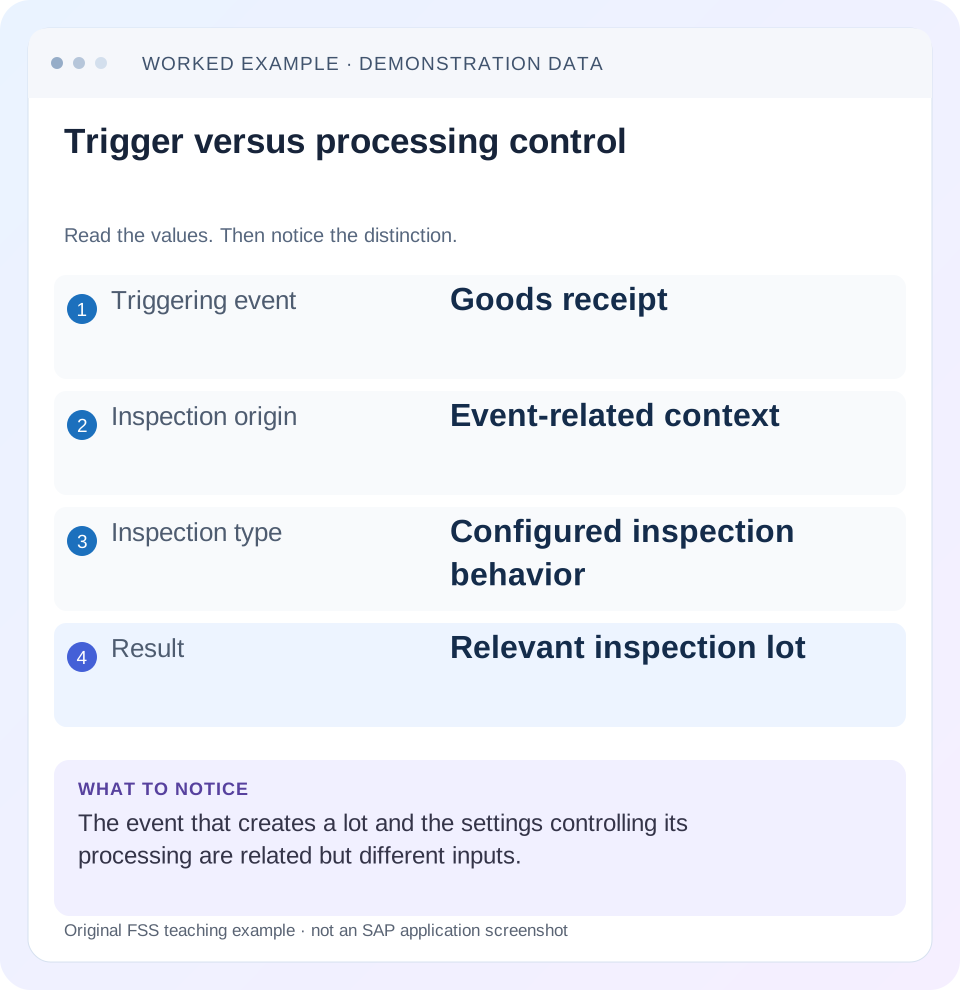
Read the example values
- Triggering event
- Goods receipt
- Inspection origin
- Event-related context
- Inspection type
- Configured inspection behavior
- Result
- Relevant inspection lot
Words you’ll meet in this guide
- Inspection lot
- A record grouping a quality inspection task.
- Characteristic
- Something to inspect, such as length or color.
- Usage decision
- The recorded conclusion about an inspection lot.
- Stock posting
- A recorded inventory change under a supported goods-movement process.
- API
- A defined interface through which programs exchange data or request actions.
- EWM
- Extended Warehouse Management: SAP’s application for warehouse processes.
Preview the practical steps
SEE THE CONNECTION
See it in a simple example.
A small example to make the idea concrete.
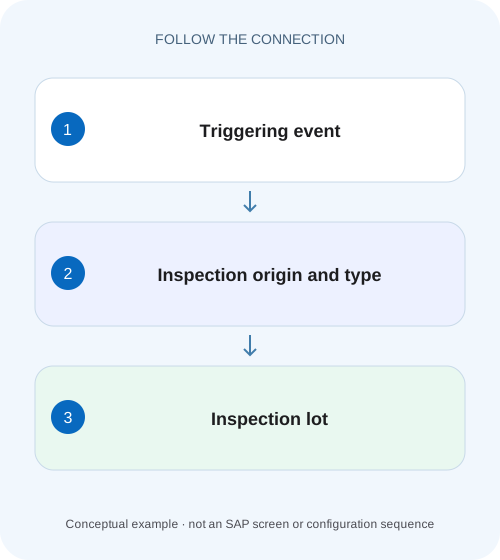
Find the control behind an incoming lot
A component receipt produces an inspection lot, and the quality analyst needs to distinguish the business origin from the inspection-type controls.
Origin identifies context; type controls inspection processing
The inspection lot origin classifies the business context that creates or requires inspection.
Read the origin as the event family
SAP's inspection-type documentation lists standard origins such as 01 for purchase-order goods receipt,03 for in-process production inspection and 04 for production goods receipt.
Read the type and material setup together
SAP documents that several inspection types can belong to one origin and that additional types can be defined.
Find the control behind an incoming lot
A component receipt produces an inspection lot, and the quality analyst needs to distinguish the business origin from the inspection-type controls.
Trace the lot origin and configured inspection context before changing material settings or expecting another receipt to behave identically.
| Reader | Business question | Evidence to carry forward |
|---|---|---|
| Factory quality and maintenance teams | Find the control behind an incoming lot | Trace the lot origin and configured inspection context before changing material settings or expecting another receipt to behave identically. |
01 Origin identifies context; type controls inspection processing
The inspection lot origin classifies the business context that creates or requires inspection. An inspection type assigned to that origin controls how the inspection is processed under the configured material setup. Similar-looking codes do not make them the same object. Start with the real business event when a lot is missing or uses unexpected processing.
This guide is for QM planners and logistics support analysts. You need material, plant, triggering receipt/order/delivery reference, expected origin, type and lot evidence. It discusses classic QM inspection lots, not a universal API for every origin or an EWM inspection document treated as interchangeable with an ERP lot.
02 Read the origin as the event family
SAP's inspection-type documentation lists standard origins such as 01 for purchase-order goods receipt,03 for in-process production inspection and 04 for production goods receipt. The event family matters: releasing a production order and receiving its finished material are different triggers and can support different inspection purposes. [1]
Avoid deciding solely from the material's description. The same material can be purchased, produced or transferred, so its relevant inspection setup depends on the process event. A type active for one origin does not prove that another event should create the same lot. Read the actual posting/order context.
03 Read the type and material setup together
SAP documents that several inspection types can belong to one origin and that additional types can be defined. The type can influence planning usage, results-recording defaults, usage-decision proposals and other controls. Its familiar standard number is therefore not a substitute for the actual configured type definition. [1]
The material's QM inspection setup determines which relevant types are active and how the material participates. A type defined in configuration but inactive for the material can explain missing expected behavior. Conversely, activating a type without understanding its downstream inspection and stock consequences is a process change, not a harmless display fix.
04 Work a purchased-versus-produced material case
Suppose component M1 at plant 1000 can arrive through a purchase-order receipt or a production receipt. In an illustrative setup, the purchase receipt is associated with origin 01 and type 01, while the production receipt uses origin 04 and its active configured type. A separate in-process production inspection uses origin 03 at its applicable order trigger.
If the analyst filters QA32 to 01, an existing 04 lot can be invisible while the inspection flow is correct. Creating another 01 lot to make the list look right would confuse procurement and production history. Establish origin/type from the lot/event rather than imposing the worklist's current filter on the business process.
| Business event | Standard origin context | Investigation focus |
|---|---|---|
| PO receipt for M1 | 01 | Receipt reference and active GR inspection setup |
| Production-order in-process inspection | 03 | Order/release context and inspection characteristics |
| Finished production receipt | 04 | Production receipt and relevant material setup |
| Manual miscellaneous inspection | 89 | Explicit supported manual context |
| No lot found in worklist | Not yet established | Trace event before guessing origin |
05 Understand automatic and manual creation limits
SAP describes automatic lot triggers including goods movements, order creation/release, batch deadline monitoring and deliveries when the relevant settings exist. It also documents manual-creation restrictions for certain origins. Do not assume every missing automatic lot can be replaced with a freely created manual lot of any origin. [2]
An API can have an even narrower scope than the classic UI. For example, the reviewed current inspection-lot creation API documentation limits its create operation to origin 89. That restriction belongs to that API/version; it is not a claim that all QM lots in SAP are miscellaneous or that manual creation is universally unrestricted.
06 Trace a missing lot in sequence
Begin with proof that the triggering event occurred. A purchase order alone is not a goods receipt, and a planned production order is not necessarily a released execution event. Then compare configuration and material setup before inspecting plan/sample preparation.
Confirm the business document
Record the actual receipt/order event, material, plant, date and quantity.
Expected observation: The expected trigger is real.
Identify expected origin/type
Compare the event family with configured type assignment and active material setup.
Expected observation: 01 and 04 are not confused.
Search the actual lot population
Use appropriate plant/material/date/status scope, including the correct origin.
Expected observation: A filtered-out lot is separated from no lot.
Inspect creation/preparation messages
Determine whether creation failed or later specification/sample preparation is incomplete.
Expected observation: The first failing stage is identified.
Verify the corrected flow
Use one authorized representative event and trace its resulting lot.
Expected observation: Trigger, type and processing agree.
07 Separate lot creation from specification readiness
SAP's lot-creation process distinguishes creation, inspection-specification assignment, sample calculation and instructions. A lot number existing does not prove all preparation steps succeeded. If results recording is unavailable, inspect plan assignment, status and sample determination instead of activating another inspection type blindly. [2]
For M1, an 04 lot may exist but lack an eligible inspection plan for its date/quantity. That is a planning-selection problem after creation. The remedy belongs to the plan/specification context, not the origin number. Keep the lot and its creation messages so the boundary is clear.
08 Troubleshoot the right control layer
A business event can be valid while inspection setup is missing; an active type can exist while a worklist excludes the lot; an existing lot can lack a usable specification. Use the observed stage to choose the next check.
| Observation | Main question | Next evidence |
|---|---|---|
| No lot after expected receipt | Trigger/setup eligible? | Posted receipt, type activation and messages |
| Lot exists under different origin | Different event family? | Source document and lot header |
| Type exists but not used | Active/selected for material? | Material QM setup and type assignment |
| Lot exists, no characteristics | Specification assignment? | Plan usage, status, validity and lot data |
| Manual/API creation rejected | Supported origin/path? | Current UI/API scope |
| QA32 empty, lot known | Filter mismatch? | Origin, plant, date and status selection |
09 Avoid duplicate or retroactive inspection assumptions
Changing inspection setup today does not prove a prior receipt was automatically reprocessed. Determine the supported follow-up for existing stock/documents under the actual QM process. Do not post another receipt or create an unrelated manual lot merely to produce a visible number.
Likewise, a stock-relevant receipt lot and a nonstock-relevant manual lot can have different downstream posting behavior. A manually created quality record does not inherently move the original receipt stock. Preserve the distinction between quality evidence and inventory relationship throughout recovery.
10 Verify event, selection and boundary cases
The positive test posts a supported training event for M1 and traces the expected origin/type. The negative control uses another origin filter and confirms why the lot is absent from that queue. A boundary test activates or changes setup only under the approved test design and compares a new event with an earlier existing document.
Inspect lot quantity, source document, specification and processing state, not only the number. These are proposed checks, no material setup or receipt was changed. Record exact messages for unsupported origins rather than inventing a universal error code.
11 Read the material inspection-setup fields that control the next event
SAP's Editing the Inspection Setup procedure starts in the material master's Quality Management view with Inspection Setup. It distinguishes assigning an inspection type from activating it. In the documented process, the Active indicator is required for the material/type combination to create lots. Read the actual combination at the relevant plant rather than proving only that the type exists in Customizing. [4]
The same guidance names fields such as Preferred Inspection Type, Post to Inspection Stock, inspection with task list/material specification and automatic assignment. These control different aspects. An active type can create a lot without the inventory destination a user assumed; an automatic assignment setting cannot make an invalid plan eligible. Record the specific field/value related to the symptom rather than toggling several controls at once. [4]
The documentation states that inspection-setup changes affect new lots, not existing ones. That gives a concrete historical boundary: after correcting setup, verify a new representative business event and inspect the earlier lot separately. A newly correct receipt does not prove the original lot or stock relationship was retroactively repaired. [4]
12 Reconcile lot creation and stock destination with the same receipt
Use a fictional PO receipt of 100 PC for M1. Capture its material-document reference, lot reference, actual origin/type and stock destination. The quality investigation should distinguish four observations: no lot, lot with incomplete specification, lot with intended inspection stock, and lot with another configured stock destination. Those observations are not interchangeable descriptions of “QM did not work.”
If the lot exists but the stock is unrestricted, inspect the actual relevant inspection-stock control and event configuration before changing the type. If no lot exists, inspect activation and trigger eligibility first. If the lot is present but cannot proceed, inspect specification/sample preparation. Each branch follows a different first failing condition and therefore avoids an unnecessary duplicate receipt or manual lot.
For a negative control, repeat the display investigation for a production receipt and confirm its origin context differs from the purchase receipt. Keep the material and quantity the same so the event family is the deliberate variable. If both events use a customer-defined type with similar text, read its assigned origin and actual processing rather than assuming the name establishes equivalence.
For a setup-change boundary, retain the 100-PC earlier receipt and process a separate authorized test event after the reviewed correction. Compare new-lot behavior and record what remains unresolved for the earlier event. This is a practical acceptance record: the future control is demonstrated, the old document chain remains traceable, and any stock/quality recovery has its own explicit scope.
13 Questions and related lessons
Can an origin have several types? Yes, the documented model supports that. Does type 01 everywhere mean identical settings? Customer configuration matters. Does a lot number prove results can be recorded? Check preparation. Can an 89 API create every business-origin lot? The reviewed API has its own restricted create scope.
Close with event, origin, type, material setup, lot and first failing preparation step. Continue with QA32 for selection, QP03 for specification eligibility, and usage-decision stock posting for the lot's inventory relationship.
Related services and next steps
Primary sources
Found this useful?
Share this guide with your network, or leave a like.
Your like is saved in this browser.