SAP SNOTE: Check a Note’s applicability before implementing it
A manufacturer's support team finds an SAP Note describing a familiar operational symptom, but affected systems have different software levels.

Source review:
START HERE · NO PRIOR TOPIC KNOWLEDGE NEEDED
What it is. Why it matters.
An SAP Note describes a known issue, correction or instruction. SNOTE is the Note Assistant in applicable systems; a Note must fit the installed component and version before it is used.
Completely new to SAP?
Manufacturers use SAP to connect work such as buying components, recording inventory, planning production, shipping equipment and accounting for costs. SAP S/4HANA is an enterprise resource planning system: it connects these activities through shared business data.
SAP Basis work keeps relevant SAP systems running. Logs, background jobs and connection tools help explain what happened to a task at a particular time.
A transaction code, or t-code, is a shortcut to a task in classic SAP GUI. Fiori apps provide another way to work. Names and screens depend on the product and release; you do not need a live system to learn the concepts in this guide.

Scope and source-review notes
Scope and evidence
Source review by FAST SAP SOLUTIONS® editorial. This badge describes our editorial review; it does not represent SAP certification or independent endorsement.
For ABAP developers and Basis change owners using classic Note Assistant. Public SAP documentation supports the concepts; no restricted current SAP Note or attachment was accessed. The exact Note version, installed components and authorized support instructions govern any implementation.
Documentation review on 14 November 2026 used the available official SAP indexed excerpts; several SAP Help pages returned no readable full text. The worked case and proposed checks are original illustrative teaching material, not execution evidence from a customer SAP system. Exact fields, permitted actions and behavior must be confirmed against the installed product, release and configuration.
A MANUFACTURING EXAMPLE
Check a proposed fix for a plant incident
Match the note to the system
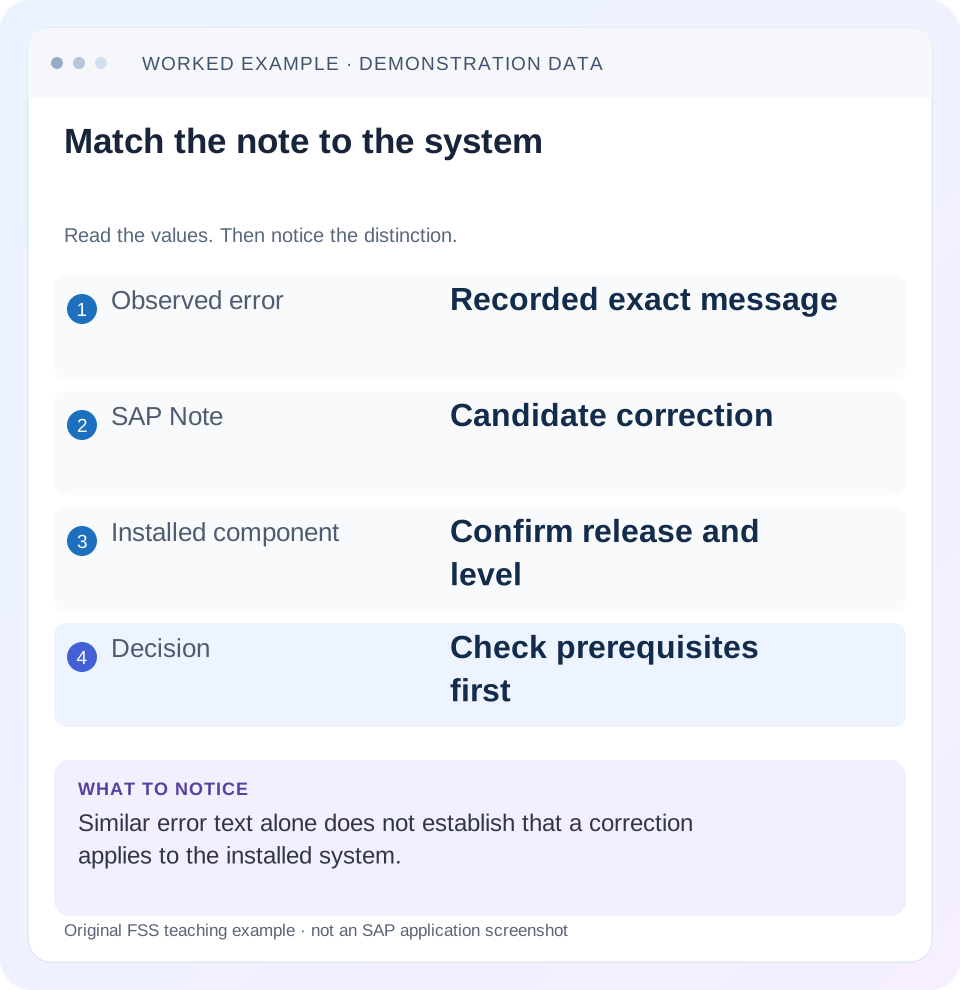
Read the example values
- Observed error
- Recorded exact message
- SAP Note
- Candidate correction
- Installed component
- Confirm release and level
- Decision
- Check prerequisites first
Words you’ll meet in this guide
- Instance
- A running SAP application-server environment.
- Client
- A logically separate data and configuration context in an ABAP system.
- Log
- A recorded sequence of events and messages.
- ABAP
- SAP’s programming language for business applications.
Preview the practical steps
SEE THE CONNECTION
See it in a simple example.
A small example to make the idea concrete.
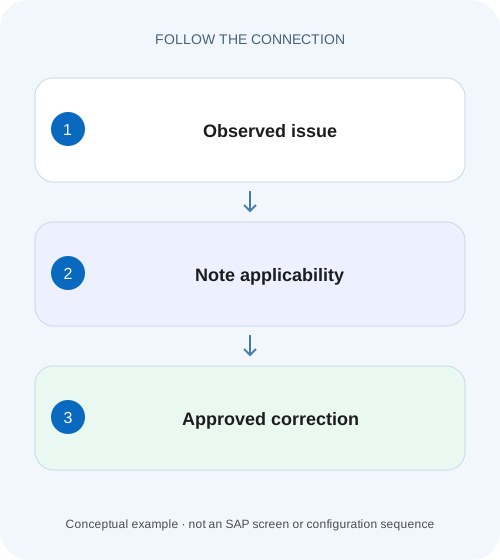
Check a proposed fix for a plant incident
A manufacturer's support team finds an SAP Note describing a familiar operational symptom, but affected systems have different software levels.
Applicability comes before implementation
A similar error message is a reason to investigate an SAP Note, not proof that its correction belongs in your system.
Prerequisites and limits of this tutorial
This lesson is for Basis change owners and ABAP developers maintaining systems where Note Assistant is supported.
Worked case: the same symptom on two package levels
Imagine fictional component DEMO_COMP release 1.0.
Check a proposed fix for a plant incident
A manufacturer's support team finds an SAP Note describing a familiar operational symptom, but affected systems have different software levels.
Verify applicability and prerequisites against the actual component level before implementing the correction and planning regression checks.
| Reader | Business question | Evidence to carry forward |
|---|---|---|
| SAP developers and application teams supporting manufacturers | Check a proposed fix for a plant incident | Verify applicability and prerequisites against the actual component level before implementing the correction and planning regression checks. |
01 Applicability comes before implementation
A similar error message is a reason to investigate an SAP Note, not proof that its correction belongs in your system. Match the actual symptom, product component, release and Support Package state, then read the current Note and its correction instructions through authorized access.
SNOTE is Note Assistant, a tool for managing and implementing supported correction instructions. SAP documents release and Support Package validity ranges, prerequisites and checks. Those mechanisms help decide technical applicability; they do not replace reading the Note's functional conditions, manual activities or your organization's testing and change process. [1] [2]
02 Prerequisites and limits of this tutorial
This lesson is for Basis change owners and ABAP developers maintaining systems where Note Assistant is supported. You need the installed software-component levels, symptom evidence and authorized access to the actual Note. Use a development or approved test environment for implementation planning and tests.
The public examples here are illustrative. No real Note number is proposed, and no restricted Note text has been reviewed. Classical source corrections and transport-based correction instructions can have different preparation requirements. Use the exact Note and current release-specific documentation rather than assuming every Note is a small automatic source edit.
03 Worked case: the same symptom on two package levels
Imagine fictional component DEMO_COMP release 1.0. A candidate correction instruction is valid for Support Packages 01 through 04 and is delivered by Support Package 05. Development is on SP04, while another environment is on SP05. These invented levels teach the validity decision; they are not an SAP component recommendation.
Both environments show a similar error during a training report. On SP04, the instruction may be technically applicable if its other conditions match. On SP05, the same correction may already be included, so the repeated symptom needs another explanation. Copying the SP04 conclusion into SP05 would confuse a symptom match with a missing-code diagnosis.
| Environment | Installed level | Instruction assessment |
|---|---|---|
| Development | DEMO_COMP 1.0 SP04 | Inside illustrative SP01–04 range |
| Quality | DEMO_COMP 1.0 SP05 | Correction illustrated as already delivered |
| Both | Similar visible error | Symptom alone does not settle applicability |
04 Record the installed state precisely
Capture the relevant software component, release and Support Package level from the supported system information. Include relevant add-ons or other components named in the Note's restrictions. The business product name alone can be too broad: different components and package levels can coexist within the same landscape.
Record the Note number and version reviewed, review time and the exact symptom conditions. A title copied from a search result is insufficient because instructions can change between versions. Compare the installed state for each target system instead of assuming the landscape is perfectly aligned. Temporary level differences can alter both applicability and test expectations.
05 Read validity and exclusion conditions
SAP describes correction-instruction validity as the release and Support Package range in which implementation is allowed. Its documentation also describes exclusion criteria involving other installed software components. Therefore, “within the package range” is necessary in some cases but may not be the whole applicability decision. [2]
For the worked case, make a small matrix for development SP04 and quality SP05. Mark the current instruction's validity separately from the functional symptom. If SNOTE reports that the correction is not relevant or is already delivered, inspect that status and the actual instruction rather than attempting to force source changes manually.
06 Resolve prerequisite corrections as a dependency graph
A correction can depend on earlier instructions because of changes to the same code or semantic dependencies. SAP documents Note Assistant checking prerequisite corrections. The correct implementation unit may therefore be a sequence of Notes, not one isolated download. [3]
Read each prerequisite's applicability and completion state. A prerequisite delivered by a Support Package is different from one still missing. Keep a dependency list with Note version, technical state and remaining manual work. If one prerequisite changes a shared object with local modifications, the effort and test scope can become substantially larger than the headline Note suggests.
07 Inspect affected objects and local conflicts
Review the objects that the applicable instructions will change and whether those objects have local modifications, enhancements or active parallel work. A source conflict is not merely a mechanical inconvenience: choosing the wrong merge can reintroduce the original defect or discard an intentional customer change.
Use the supported adjustment procedure with the responsible developer. Compare the semantic purpose of both changes and preserve testable behavior. Do not paste code from an online excerpt to bypass an applicability or conflict message. The actual instruction set, object versions and local implementation context must determine the resolution.
08 Plan manual activities explicitly
Some Notes require work outside automatic correction processing. Distinguish prerequisites, implementation-time manual activities and follow-up activities, and identify the environment in which each must occur. A checkbox saying that manual work is complete needs supporting evidence of what was actually done.
SAP's correction-instruction documentation warns that incomplete manual-activity handling can affect follow-on systems. Build an implementation checklist from the actual Note, preserving sequence and conditions. Include activities that are transported and those that require supported target-system execution. Do not assume that a development implementation status means every target-side requirement has traveled automatically. [2]
09 Define a regression fixture around the mechanism
For the fictional training report, specify one input that reproduces the described symptom and one related input that previously worked. Record expected object identities, output and business effect before the change. Add a boundary case relevant to the Note, such as an empty selection or a particular document state, if the real instructions identify it.
A positive test should demonstrate that the original failing condition now behaves as intended. A negative test should preserve the appropriate rejection or exclusion behavior. A regression test should exercise nearby functionality touched by the changed objects. Syntax activation and a green implementation status are useful technical checks, but they do not establish those functional outcomes.
10 Review transport and target implementation evidence
Connect the change record to the exact Note version, applicable instructions, prerequisite work, affected objects, tests and transports. Check the supported implementation route for the Note type. The import sequence must satisfy dependencies, and the target's component state must be reviewed independently.
After import, inspect the target implementation/log evidence and verify remaining manual activities. Then repeat the agreed functional checks in the intended environment. If the target has SP05 while development has SP04, investigate whether the correction is already delivered there and whether an object-version difference changes the transport plan. Do not treat an import return code as proof of business acceptance.
11 Troubleshoot statuses without overriding their meaning
If a Note appears inapplicable, compare component validity and exclusions. If it is already implemented or delivered, inspect the version and included correction state. If implementation is incomplete, inspect prerequisites, manual activities and conflicts. If the tool reports completion but the symptom remains, return to the exact reproduction conditions and runtime code path.
A remaining symptom may indicate a different cause, incomplete target work, an older Note version or a test that never executed the changed branch. Collect evidence for those possibilities rather than repeatedly implementing the same instruction. De-implementation is also a governed correction decision with dependencies and testing implications, not a harmless reset button.
| Observation | Review before proceeding |
|---|---|
| Not relevant | Component range and exclusions |
| Prerequisite required | Dependency state and Note version |
| Object conflict | Local modification and semantic merge |
| Manual work outstanding | Actual Note checklist and target evidence |
| Implemented; symptom persists | Runtime branch and reproduction conditions |
12 Build the applicability worksheet before implementation
For the fictional SP04/SP05 landscape, the worksheet must distinguish symptom similarity from correction delivery. Complete the component inventory and dependency states before planning object changes, then give manual activities and target checks explicit owners.
Add a version checkpoint when the Note review and implementation occur on different days. Compare the currently authorized Note version with the reviewed change package, and determine whether new prerequisites or manual activities affect the approved scope. A completed implementation of an older instruction set is historical evidence, not proof that a newly revised Note’s entire guidance has been satisfied. Preserve both versions and explain which one the test fixture covers. If the newer version changes the described symptom conditions, revise the reproduction and regression questions before treating the old positive test as current acceptance.
Inventory each environment
Write one row for development, quality and the intended target with component release, Support Package and relevant add-ons. Mark unknown values as unknown until verified through supported system information.
Expected observation: A landscape label is not used as a substitute for component evidence.
Map the actual instruction
Record the reviewed Note version, correction-instruction range, exclusions and prerequisite states. Separate a prerequisite already delivered by a package from one requiring implementation.
Expected observation: The planned dependency sequence has no unexplained missing step.
Assign every remaining activity
List automatic object corrections, conflict adjustment, manual actions, transport responsibilities and functional checks from the actual Note. Give target-side activities their own evidence field.
Expected observation: Technical completion and symptom verification are independently reviewable.
13 Questions before approving the change
Can a Note be relevant without an automatic correction? Yes; the actual Note may provide guidance or manual instructions, so read its full current content. Does a Note delivered by a Support Package need the same correction applied again? The instruction status and installed state must establish that; do not infer missing code from a repeated symptom alone.
Can this tutorial certify a specific Note's applicability? No. It teaches the decision process using public documentation and invented levels. A useful approval package names the installed state, reviewed Note version, applicability rationale, dependencies, object conflicts, manual activities and actual test results. Continue with the transport and incident lessons to connect that technical decision to the controlled operational outcome.
Related services and next steps
Primary sources
Found this useful?
Share this guide with your network, or leave a like.
Your like is saved in this browser.