SAP STRUST: Choose the right SSL client or server PSE before adding trust
A manufacturer's HTTPS integration still fails after a certificate was imported into a trust context that may not serve the failing connection.

Source review:
START HERE · NO PRIOR TOPIC KNOWLEDGE NEEDED
What it is. Why it matters.
A Personal Security Environment, or PSE, holds cryptographic identity and trust information. STRUST distinguishes PSE purposes, including SSL client and SSL server communication roles.
Completely new to SAP?
Manufacturers use SAP to connect work such as buying components, recording inventory, planning production, shipping equipment and accounting for costs. SAP S/4HANA is an enterprise resource planning system: it connects these activities through shared business data.
SAP Basis work keeps relevant SAP systems running. Logs, background jobs and connection tools help explain what happened to a task at a particular time.
A transaction code, or t-code, is a shortcut to a task in classic SAP GUI. Fiori apps provide another way to work. Names and screens depend on the product and release; you do not need a live system to learn the concepts in this guide.

Scope and source-review notes
Scope and evidence
Source review by FAST SAP SOLUTIONS® editorial. This badge describes our editorial review; it does not represent SAP certification or independent endorsement.
Classic AS ABAP Trust Manager concepts for Basis, security and integration teams. Historical SSL labels are retained where they identify PSEs; actual TLS behavior depends on kernel, cryptographic library, release and consumer configuration. No current cipher policy is prescribed.
Documentation review on 14 November 2026 used the available official SAP indexed excerpts; several SAP Help pages returned no readable full text. The worked case and proposed checks are original illustrative teaching material, not execution evidence from a customer SAP system. Exact fields, permitted actions and behavior must be confirmed against the installed product, release and configuration.
A MANUFACTURING EXAMPLE
Check the trust role used by a factory integration
Check the PSE used by the call
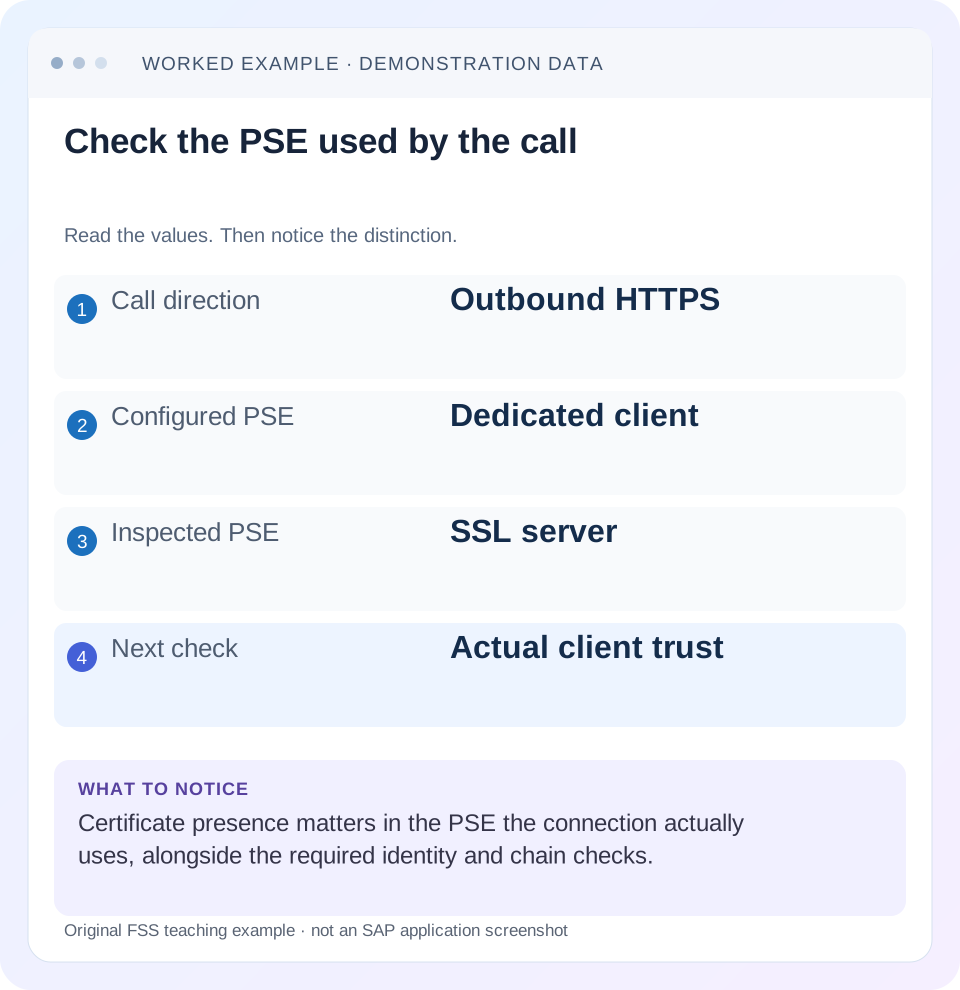
Read the example values
- Call direction
- Outbound HTTPS
- Configured PSE
- Dedicated client
- Inspected PSE
- SSL server
- Next check
- Actual client trust
Words you’ll meet in this guide
- Instance
- A running SAP application-server environment.
- Client
- A logically separate data and configuration context in an ABAP system.
- Log
- A recorded sequence of events and messages.
- ABAP
- SAP’s programming language for business applications.
- HTTP
- The request-and-response protocol used by web applications and APIs.
Preview the practical steps
SEE THE CONNECTION
See it in a simple example.
A small example to make the idea concrete.
Check the trust role used by a factory integration
A manufacturer's HTTPS integration still fails after a certificate was imported into a trust context that may not serve the failing connection.
Start with the connection direction
Choose the PSE used by the failed connection, not the first certificate folder that looks relevant.
Prerequisites and scope
This lesson is for permitted Basis, security and integration analysts.
What a PSE represents
A Personal Security Environment holds security material used for a defined purpose.
Check the trust role used by a factory integration
A manufacturer's HTTPS integration still fails after a certificate was imported into a trust context that may not serve the failing connection.
Identify the client or server role and actual certificate chain before repeating imports in unrelated PSEs.
| Reader | Business question | Evidence to carry forward |
|---|---|---|
| SAP developers and application teams supporting manufacturers | Check the trust role used by a factory integration | Identify the client or server role and actual certificate chain before repeating imports in unrelated PSEs. |
01 Start with the connection direction
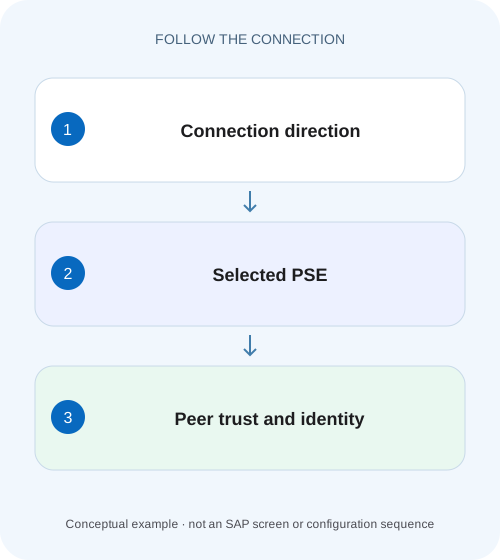
Choose the PSE used by the failed connection, not the first certificate folder that looks relevant. When ABAP initiates an HTTPS call, it acts as a TLS client for that connection. When another party connects to ABAP's HTTPS endpoint, ABAP is the server. One system can occupy both roles on different connections.
STRUST distinguishes SSL client and server PSEs. A certificate visible somewhere in its tree does not prove that the failing runtime uses it. First draw caller, endpoint, TLS termination and selected consumer configuration. Then inspect the correct trust or identity material for that specific relationship. [1]
02 Prerequisites and scope
This lesson is for permitted Basis, security and integration analysts. Obtain the failing endpoint hostname, direction, sanitized TLS error, request time and actual destination/runtime configuration. You need display access to the relevant PSE and an approved certificate-management procedure for any eventual change.
SAP's classic documentation uses SSL terminology in PSE names. The modern protocol in use and certificate checks depend on installed software and configuration. A product guide that names SSL Client Standard for one integration is not a universal selection rule for all integrations. This tutorial does not prescribe protocol versions, cipher suites or a productive trust change.
03 What a PSE represents
A Personal Security Environment holds security material used for a defined purpose. Distinguish the system's own identity material from the certificates used to establish trust in peers or issuing authorities. Importing a public certificate into a trust list is different from replacing an own certificate and its associated private key. [3]
SAP's Trust Manager documentation separates the selected PSE maintenance area from the certificate display area. The latter can display imported or selected certificate information independently. Therefore, seeing a certificate in the lower display is not proof that it was added to the intended PSE's list, saved or made available to the runtime. [1]
04 Worked case: trust was added to the wrong role
In our fictional QAS system, destination Z_TRACKING_HTTPS calls tracking.example.invalid. Its approved configuration selects a dedicated client PSE named TRACKING. The interface reports a peer-trust failure. An analyst finds the peer's issuing CA certificate in SSL server Standard and assumes trust is configured.
The observation is insufficient because the outbound connection uses client PSE TRACKING. The server PSE serves another role. This mismatch identifies the next check, not an automatic import decision: inspect TRACKING's trust list and the actual peer chain, then confirm the expected CA through the approved source. The hostname and PSE name are illustrative.
| Connection | ABAP role | Relevant context |
|---|---|---|
| Browser to ABAP HTTPS | Server | Configured server PSE |
| ABAP to tracking endpoint | Client | Destination-selected TRACKING PSE |
| Mutual TLS on outbound call | Client identity also presented | Own certificate and peer requirements |
05 Distinguish trust in the peer from identity presented to the peer
For server-authenticated HTTPS, the client must validate the server according to the configured trust and hostname rules. With mutual TLS, the server also validates a client certificate presented by the caller. Those are two directions of validation within the same connection.
A valid trust list does not guarantee that the caller presents the required client identity. Conversely, a valid own certificate does not automatically establish trust in the remote server's issuer. If the peer rejects the client certificate, importing the peer's CA into an unrelated local trust list will not necessarily change the identity the peer receives.
06 Confirm the consumer's PSE selection
Inspect the actual destination or runtime settings using the supported product procedure. Record the PSE identifier and effective endpoint. A manually tested URL may use another destination, proxy or identity from the business application. Resolve those differences before comparing certificate results.
For Z_TRACKING_HTTPS, the expected selection is TRACKING. If the call instead uses a standard client context, investigate why the interface selected it. Do not copy certificates into every PSE to cover unknown routing. That broadens trust and obscures which configuration controls the call, making future renewal and incident work harder.
07 Inspect the peer chain and certificate properties
Using the supported diagnostic procedure, compare the actual peer certificate and chain with the intended endpoint and approved CA information. Check validity dates, issuer relationships and the relevant hostname identity. A certificate can be within its validity period yet fail another check; a trusted issuer cannot make a wrong endpoint name correct.
Also verify whether a proxy or load balancer terminates TLS and presents its own certificate. The ABAP caller validates the peer on its actual connection, which may differ from an application's internal server certificate. Preserve the exact route and peer evidence. Avoid downloading a certificate from an unverified source and treating it as trustworthy merely because it removes an error.
08 Review the selected PSE in STRUST carefully
Select the intended PSE and inspect its own-certificate context and certificate list. Select individual certificates explicitly to view their details. Compare fingerprints or other approved identifiers through the organization's certificate-exchange process. Do not share private keys, PSE passwords or credential-bearing files in incident channels. [1] [2]
If a reviewed trust update is required, follow the exact product/release procedure for adding, saving and distributing the material. Merely importing into the certificate display area is insufficient evidence of a completed change. Record the target PSE and the resulting list entry so the change can be reviewed and later renewed without guesswork.
09 Check instance coverage when behavior is intermittent
A landscape can have several application servers and runtime contexts. SAP's Trust Manager shows per-server status for applicable PSEs. Where a distribution issue is plausible, inspect the relevant instance status and the consumer's actual execution placement instead of assuming a successful test on A covers B. [1]
Do not infer that every PSE behaves identically or that every change requires an ICM restart. Follow the installed product's documented activation/distribution procedure. If tests alternate success and failure, correlate them with instance, route and peer chain. An expired certificate on one proxy node can resemble a local PSE problem until the actual peer is recorded.
10 Troubleshoot by the failed validation direction
If ABAP rejects the peer, inspect the selected client context, peer chain, validity and hostname relationship. If the peer rejects ABAP's client identity, inspect the presented own certificate, supported mapping and peer-side trust requirements. If TLS succeeds but HTTP returns a business denial, continue with authentication/application authorization rather than adding more CAs.
If the certificate appears visible but behavior is unchanged, confirm the selected PSE, saved list entry, instance coverage and actual runtime path. If the chain changes between attempts, investigate the endpoint/proxy nodes. The aim is to explain one failed validation, not to accumulate certificates until the error happens to disappear.
| Observation | Next check |
|---|---|
| Trust failure outbound | Selected client PSE and actual peer chain |
| Peer rejects caller certificate | Presented identity and peer-side mapping/trust |
| Certificate visible, unchanged result | Saved list, actual PSE and instance |
| Intermittent TLS failure | Instance, proxy node and peer-chain differences |
| TLS passes, business denied | HTTP identity and application authorization |
11 Verify through the original application route
After an approved correction, perform a harmless supported request through Z_TRACKING_HTTPS and the intended application identity. Confirm the TLS result, then inspect the application response separately. A successful handshake establishes neither permission for every business operation nor successful posting.
For a positive training check, use the expected peer and correct PSE. For a negative check, an approved fixture with an untrusted issuer should remain rejected. For a boundary check, examine an expired or wrong-hostname fixture on paper or in a controlled lab. Expected failures come from the configured policy; never weaken verification to make the exercise pass.
12 Plan renewal as a relationship, not a file replacement
Record certificate purpose, selected PSE, issuing authority, validity, owner, affected consumers and the verification request. A renewal can involve a new chain or identity material, so preserve which side must trust which issuer and whether the peer maps an exact client certificate.
Before retiring old material, identify all consumers sharing that PSE and the documented rollover process. A successful test for tracking does not establish that other interfaces using the same security context still work. Include a representative unaffected consumer where the change scope warrants it and keep rollback/recovery evidence tied to the approved procedure.
Create a certificate worksheet with separate rows for local own identity, accepted peer issuers and the peer certificate actually observed. For each row, record its role, selected PSE or endpoint, approved identifier and validity. This prevents a public CA certificate from being mistaken for a local client identity and makes renewal responsibilities explicit. Do not place private-key material in the worksheet.
In the fictional case, compare the approved TRACKING PSE list with the observed tracking endpoint chain. If the necessary issuer is already present, investigate hostname, validity, actual PSE selection and peer-chain differences before adding anything. If the endpoint presents a different certificate on one load-balancer node, preserve both peer observations so the remote owner can correct the inconsistency.
For a renewal comparison, preserve approved public identifiers for the old and new peer chains and the period in which each can appear. If one endpoint node presents the old chain and another presents the renewed chain, success can alternate even with an unchanged local destination. Correlate the actual peer chain with each failed or successful request rather than assuming time alone proves all nodes changed together. The security owner can then review the intended trust/renewal relationship. This is a concrete reason to test the consumer’s real route and retain peer evidence instead of importing the same file repeatedly.
13 Questions and a clear diagnostic statement
Does the server PSE fix every outbound HTTPS call? No; identify the actual client context. Is an imported public certificate the same as an own identity with a private key? No. Does a green certificate date establish complete trust? No; chain, purpose, hostname, route and runtime selection still matter.
A useful conclusion for the illustration says: “Z_TRACKING_HTTPS is outbound and selects TRACKING; peer CA found only in server PSE, not yet established in TRACKING. Actual peer chain and approved CA verification pending.” That statement makes the next investigation concrete without claiming an untested certificate change will solve the whole interface.
Related services and next steps
Primary sources
Found this useful?
Share this guide with your network, or leave a like.
Your like is saved in this browser.