SAP BW DTP error stack: Correct rejected records before rerunning everything
A manufacturer finds rejected records in a reporting load and needs to correct them without blindly repeating already processed work.

Source review:
START HERE · NO PRIOR TOPIC KNOWLEDGE NEEDED
What it is. Why it matters.
A Data Transfer Process, or DTP, moves data within SAP BW. An error stack holds records needing correction so recovery can address those records deliberately.
Completely new to SAP?
Manufacturers use SAP to connect work such as buying components, recording inventory, planning production, shipping equipment and accounting for costs. SAP S/4HANA is an enterprise resource planning system: it connects these activities through shared business data.
Analytics organizes business data into useful comparisons. Planning adds proposed future values. Learn what the numbers represent before comparing totals or changing a forecast.
A transaction code, or t-code, is a shortcut to a task in classic SAP GUI. Fiori apps provide another way to work. Names and screens depend on the product and release; you do not need a live system to learn the concepts in this guide.

Scope and source-review notes
Scope and evidence
Source review by FAST SAP SOLUTIONS® editorial. This badge describes our editorial review; it does not represent SAP certification or independent endorsement.
SAP BW/4HANA DTP error handling and Data Transfer Intermediate Storage (DTIS), contrasted with classic BW error-stack terminology. Settings, HANA execution restrictions and correction interfaces depend on release.
Documentation review on 14 November 2026 used the official SAP sources listed below, including indexed excerpts where full text was unavailable. Scope and availability depend on the stated product, release and configuration. All document references, quantities, dates and outcomes in worked cases are illustrative; no customer SAP system or tenant was accessed and the proposed exercises were not executed.
A MANUFACTURING EXAMPLE
Recover rejected plant-reporting records
Recover only the retained business scope
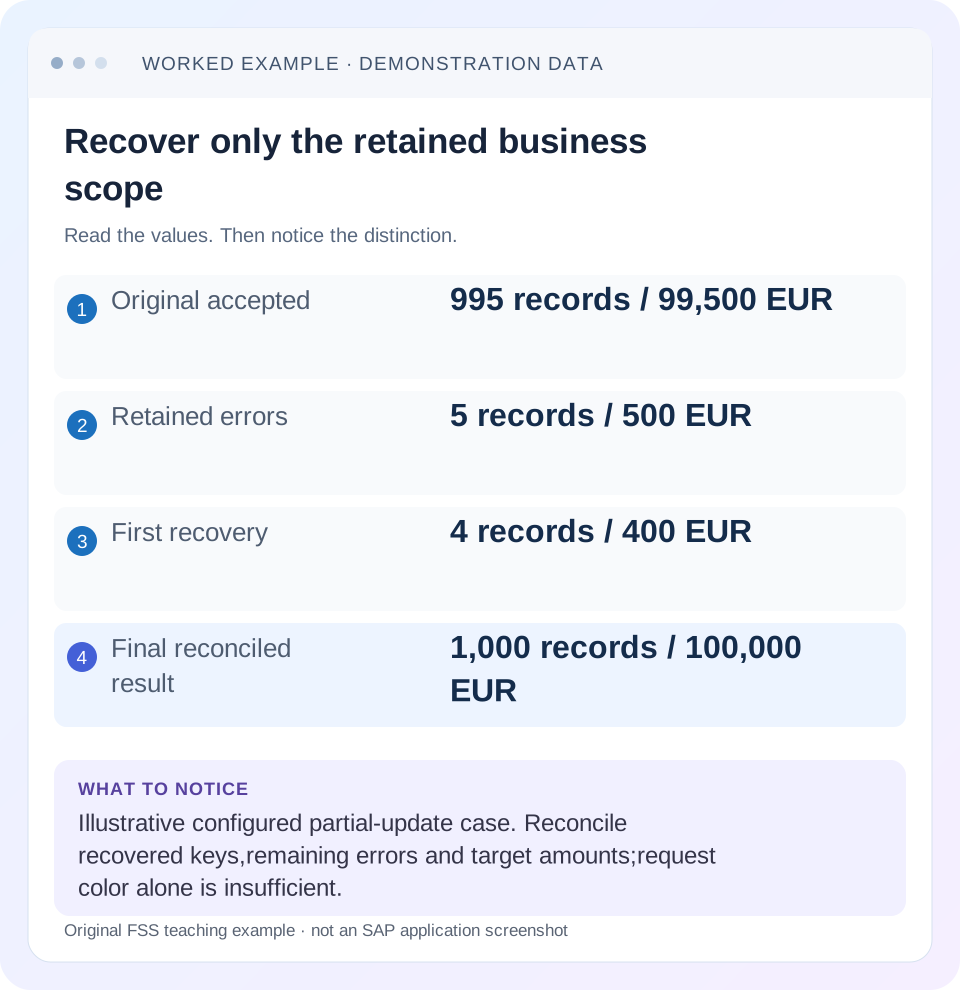
Read the example values
- Original accepted
- 995 records / 99,500 EUR
- Retained errors
- 5 records / 500 EUR
- First recovery
- 4 records / 400 EUR
- Final reconciled result
- 1,000 records / 100,000 EUR
Words you’ll meet in this guide
- Dimension
- A way to group data, such as month or product.
- Measure
- A numeric value, such as revenue or quantity.
- Model
- A defined organization of data and calculation rules.
- HANA
- SAP’s database platform.
- aDSO
- Advanced DataStore object: a SAP BW/4HANA object that stores and organizes data.
- DTP
- Data Transfer Process: a configured process that moves data in SAP BW.
Preview the practical steps
SEE THE CONNECTION
See it in a simple example.
A small example to make the idea concrete.
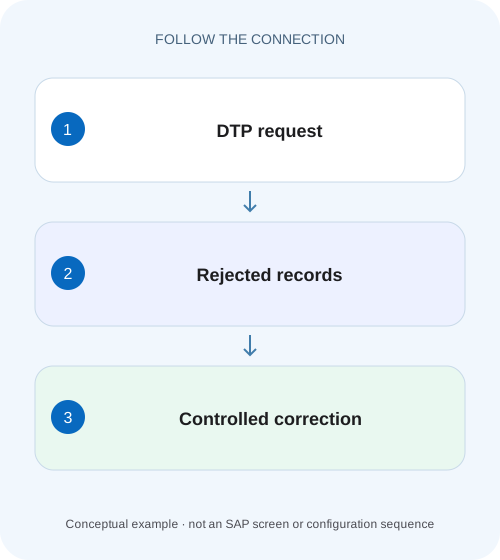
Recover rejected plant-reporting records
A manufacturer finds rejected records in a reporting load and needs to correct them without blindly repeating already processed work.
Recover the rejected scope, after establishing what committed
A DTP failure does not mean every incoming record failed in the same way.
Understand error persistence and the error DTP
SAP BW/4HANA documentation calls its error-handling persistence Data Transfer Intermediate Storage, or DTIS.
Separate an invalid record from the underlying defect
A rejected plant code may originate in source data, a mapping table, a transformation routine or unavailable master data.
Recover rejected plant-reporting records
A manufacturer finds rejected records in a reporting load and needs to correct them without blindly repeating already processed work.
Follow the DTP error context and supported recovery process before declaring the manufacturing report complete.
| Reader | Business question | Evidence to carry forward |
|---|---|---|
| SAP developers and application teams supporting manufacturers | Recover rejected plant-reporting records | Follow the DTP error context and supported recovery process before declaring the manufacturing report complete. |
01 Recover the rejected scope, after establishing what committed
A DTP failure does not mean every incoming record failed in the same way. Depending on configured error handling and processing behavior, valid records may already have reached the target while erroneous records remain available for controlled correction. Establish the request's accepted, rejected and committed scope before deciding whether to repeat extraction, repair a transformation or run an error DTP.
This tutorial is for BW operators and modelers who can inspect DTP request messages, source keys, transformations and target data. You need authorization for the appropriate monitoring and correction functions. The worked quantities are fictional. No record correction was executed in a customer system, and the article does not assume that a particular setting permits partial updates in every DTP execution mode.
02 Understand error persistence and the error DTP
SAP BW/4HANA documentation calls its error-handling persistence Data Transfer Intermediate Storage, or DTIS. When error handling is activated, erroneous records can be retained there, and an error DTP can transfer them to the original target. Classic BW documentation often calls the corresponding concept an error stack. Identify the actual release and persistence instead of searching for an older screen label that your system does not use. [1]
The error DTP is created for the active original DTP and uses full update mode to read the retained error data. “Full” here describes the error-DTP extraction from its error persistence, not an instruction to reload the original source population. Keeping these scopes separate prevents an operator from recovering five records by unnecessarily sending another thousand source records to an additive target. [1]
03 Separate an invalid record from the underlying defect
A rejected plant code may originate in source data, a mapping table, a transformation routine or unavailable master data. Editing the retained row can recover that row, but it does not necessarily fix the source of future errors. Conversely, repairing a mapping can leave older retained records waiting for their own supported reprocessing.
SAP lists transformation checks such as invalid characters, conversion errors, currency translation errors and missing master-data values. Use the actual message and processing step to select the branch. An invalid-character message does not justify changing a financial amount; a missing-master-data error does not automatically prove the source key was wrong. Preserve the original value and its business meaning before applying an approved correction. [1]
04 Build a reconciliation for one production feed
Suppose a fictional manufacturing-cost DTP receives 1,000 records. Its configured processing allows 995 records to be accepted and retains five rejected records because plant code X100 cannot map to the intended reporting plant 1000. For this illustration, the accepted records total 99,500 EUR, and each rejected record carries 100 EUR. The desired complete amount is 100,000 EUR once all five are validly recovered.
After the first recovery the expected target amount is 99,900 EUR and the unresolved amount is 100 EUR. The record that remains rejected has an additional invalid cost-center value. Correcting the plant mapping therefore solves four records without proving that every error had the same cause. Count the residual errors explicitly instead of assuming that the first successful correction completed the incident.
| Population | Records | Amount |
|---|---|---|
| Accepted in original request | 995 | 99,500 EUR |
| Retained rejected records | 5 | 500 EUR |
| Recovered in first error run | 4 | 400 EUR |
| Still rejected after first run | 1 | 100 EUR |
| Complete business result after final recovery | 1,000 | 100,000 EUR |
05 Inspect grouping and sequence before editing rows
Classic error-stack documentation describes retaining subsequent records with the same relevant key to preserve their processing relationship. The details depend on semantic grouping and the DTP configuration. A displayed retained row is therefore not always an isolated business event that can safely be corrected independently. [2]
For an order with an original value and a later correction, processing the later row before the earlier one can produce a wrong current state in an overwrite scenario. Inspect the semantic grouping fields, source-record modes and sequence before choosing recovery scope. Reconcile the whole relevant business key, particularly when multiple rows represent changes to one order. Never reorder retained records merely to make the error display easier to read.
06 Follow a controlled recovery sequence
Start from the original DTP request and its messages. Save the request reference, affected keys, field values and accepted-target evidence. The objective is a narrow, explainable repair with a reproducible result, rather than simply turning the request indicator green.
Locate the failing processing step
Compare transformation messages and intermediate data available for the request. Identify the exact field and validation involved.
Expected observation: The cause is more specific than “DTP failed.”
Confirm the intended business correction
Resolve X100 against source ownership or approved mapping data, preserving the original and corrected value.
Expected observation: Plant 1000 is justified by evidence.
Correct cause and retained scope
Apply the supported transformation/master-data or record-maintenance correction, accounting for grouping.
Expected observation: Future data and retained records have deliberate treatment.
Run the error-DTP path
Execute the appropriate error DTP for the retained scope and inspect its own request/messages.
Expected observation: Recovered records and remaining errors are separately visible.
Reconcile the target
Compare business keys, record counts and amounts with the original accepted population.
Expected observation: The first pass totals 99,900 EUR with one unresolved 100-EUR record.
07 Choose the next check from the observed failure
A correction should reduce the specific defect it addresses. If all five records fail again with the same plant message, verify that the corrected mapping is actually used at runtime and that the retained representation is being processed through the expected path. Do not keep changing unrelated values.
| Observation | Interpretation to test | Next evidence |
|---|---|---|
| No retained errors available | Handling not active or different failure scope | Original settings and request log |
| Same record fails repeatedly | Cause remains or wrong correction context | Field value at failing step |
| Four recover, one remains | Multiple validation failures | Remaining record's current message |
| Target amount too high | Accepted rows replayed or duplicate events | Request scopes and business identities |
| Target count correct, amount wrong | Transformation or record semantics | Key-level amount and record-mode comparison |
| New loads repeat the same error | Symptom corrected but source defect remains | Source mapping and future-data test |
08 Avoid losing the recovery audit trail
Retain the original rejected value, reason for correction, approver or change reference where required, error-DTP request and final business outcome. An audit note that merely says “fixed data” cannot explain whether a plant key was mapped, a master-data dependency was loaded or an amount was changed.
Do not delete retained errors solely to make the monitor clean. Removal can discard the remaining recovery population without updating the target. If a record is deliberately excluded under the business process, document that decision and reconcile the resulting target scope; five excluded records and five successfully recovered records are materially different outcomes even if neither leaves a visible queue.
09 Verify the proposed repair with controlled checks
The positive test recovers four validly corrected records and reaches 99,900 EUR, then recovers the fifth after its separate cost-center issue is resolved, reaching 100,000 EUR. The negative test deliberately leaves an invalid cost center and expects it to remain rejected under the configured handling. It must not silently become a different valid cost center merely to pass validation.
For the boundary case, include two related changes to one order and verify that the final state follows the intended sequence. Also confirm that the 995 previously accepted records are unchanged by the narrow recovery. Perform these checks against an authorized fixture with known keys; a grand total alone can hide an overstatement on one order offset by an omission on another.
10 Decide when a wider reload is justified
A larger replay may be needed when a transformation defect affected accepted data as well as rejected data. In that case, error-DTP recovery alone cannot repair the whole business result. Identify the affected timeframe and keys, define target reversal/replacement behavior, and coordinate downstream consumers before executing the supported reconstruction.
A source re-extraction can also be appropriate when the retained data cannot satisfy the corrected source contract. That is a separate recovery design, not a default reaction to five invalid rows. The plan must state how old accepted effects are treated and how duplicate movements or overwritten corrections will be prevented.
11 Inspect the actual DTP editor choices and record trace
The BW/4HANA2023 modeling guide locates error handling on the DTP Update tab and temporary-storage settings on Runtime Properties. It describes the request monitor's Data-column button for inspecting temporary data at processing steps. Record the actual configured handling and trace level before assuming that all intermediate rows are available. An absent detailed trace is a diagnostic limitation, not evidence that a transformation step had no data. [3]
For the five rejected plant records, compare the source-stage plant value with the value after the relevant transformation. If X100 becomes 1000 there but the failure names cost center, the plant mapping is no longer the failing condition. If the transformation still presents X100, verify that the corrected mapping belongs to the active transformation/version used by this request. This observation determines whether record maintenance, master-data recovery or a transformation change is needed.
12 Compare classic error settings without confusing them with DTIS
The reviewed classic NetWeaver procedure names Extraction → Semantic Groups for overwrite-related error keys and Update → Error Handling for request-red/request-green variants that write an error stack while updating valid records. It also asks for an acceptable invalid-record threshold. Those exact classic labels explain why request color and business completeness can differ, but they are not a promise that a BW/4HANA HANA-runtime DTP exposes identical controls. Inspect the equivalent installed settings and release restrictions. [4]
In the illustrative 995/5 case, a request that is configured to finish green while retaining errors still leaves 500 EUR unrecovered. The success color cannot replace the retained-population reconciliation. In an overwrite-history variant, one bad order record can also retain later records for the same relevant key to preserve sequence. The error population can therefore be larger than the count of independently invalid field values.
After the first error DTP, reconcile three independent facts: four recovered keys reached the target, their 400 EUR were applied once, and one 100-EUR key remains in the unresolved population. After the final recovery, confirm zero remaining relevant errors and 1,000 expected business records/100,000 EUR. Retained-record lifecycle and target-state verification belong together; clearing an error display is insufficient if its business effects were never posted.
13 Questions to close before handing over
Does a green error DTP mean the original dataset is complete? Only after reconciling the retained population and the target. Can every field be edited freely? No; supported maintenance, business approval, grouping and source semantics constrain correction. Should the original DTP simply be rerun? First determine what already committed and whether replay is safe for that target.
For this case, a complete handover states: original request accepted 995 records; five records worth 500 EUR were retained; plant mapping recovered four; the remaining cost-center error was separately corrected; final keys and amount reconcile to 1,000 records and 100,000 EUR. Follow the ADSO lesson to verify activation and the process-chain lesson if a downstream consumer is still waiting.
Related services and next steps
Primary sources
Found this useful?
Share this guide with your network, or leave a like.
Your like is saved in this browser.