SAP asset value date: Why posting date alone does not explain depreciation
A factory capitalizes production equipment and needs to explain why its asset value date matters alongside the posting date.

Source review:
START HERE · NO PRIOR TOPIC KNOWLEDGE NEEDED
What it is. Why it matters.
An asset is something a company uses over time, such as a machine. Depreciation spreads its cost across periods; the asset value date helps determine when an asset transaction affects that calculation.
Completely new to SAP?
Manufacturers use SAP to connect work such as buying components, recording inventory, planning production, shipping equipment and accounting for costs. SAP S/4HANA is an enterprise resource planning system: it connects these activities through shared business data.
Financial Accounting records business events as accounting documents. An account groups relevant amounts; individual entries explain how the total arose.
A transaction code, or t-code, is a shortcut to a task in classic SAP GUI. Fiori apps provide another way to work. Names and screens depend on the product and release; you do not need a live system to learn the concepts in this guide.

Scope and source-review notes
Scope and evidence
Source review by FAST SAP SOLUTIONS® editorial. This badge describes our editorial review; it does not represent SAP certification or independent endorsement.
SAP Asset Accounting date and period-control concepts using current S/4HANA Cloud and classic ERP references. Depreciation areas, keys and transaction types affect calculations.
Reviewed relevant official SAP indexed documentation excerpts on 14 November 2026. Examples, identifiers, amounts and expected observations are illustrative; no customer SAP execution was performed. Date documentation reviewed includes S/4HANA Cloud 2608 and classic ERP references; do not assume identical defaulting in every edition. Depreciation conventions and amounts are illustrative, not statutory rules or tested SAP output.
A MANUFACTURING EXAMPLE
Explain depreciation on new equipment
Do not compare dates by label alone
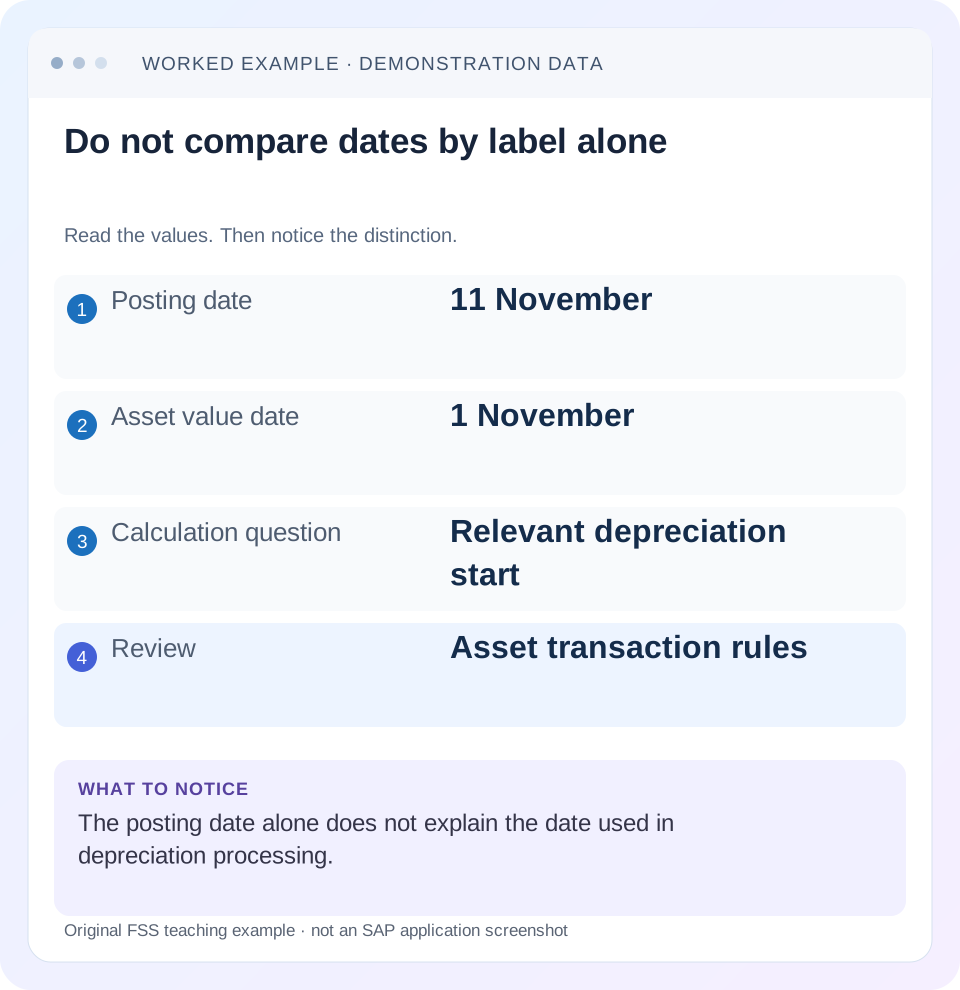
Read the example values
- Posting date
- 11 November
- Asset value date
- 1 November
- Calculation question
- Relevant depreciation start
- Review
- Asset transaction rules
Words you’ll meet in this guide
- Posting
- Recording a financial entry.
- General ledger
- The main collection of financial accounts.
- Open item
- An accounting entry still needing matching or settlement.
- Company code
- An organizational unit used for separate financial accounts.
- Accounting document
- A record of a financial entry with a header and individual account lines.
- HANA
- SAP’s database platform.
Preview the practical steps
SEE THE CONNECTION
See it in a simple example.
A small example to make the idea concrete.
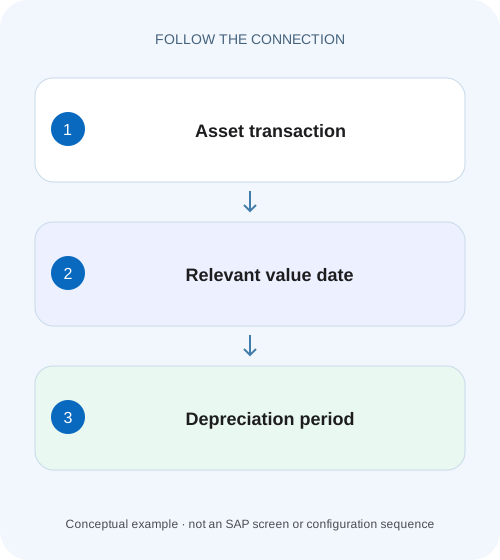
Explain depreciation on new equipment
A factory capitalizes production equipment and needs to explain why its asset value date matters alongside the posting date.
Posting date does not determine every depreciation result
The asset value date identifies the timing of an asset transaction for Asset Accounting.
Capture the complete date and valuation context
Before recalculating anything, record company code, asset/subnumber, transaction category or type, fiscal year, depreciation area and depreciation key.
Understand defaulting separately from calculation
SAP’s date documentation describes transaction-specific proposals and automatic value-date determination.
Explain depreciation on new equipment
A factory capitalizes production equipment and needs to explain why its asset value date matters alongside the posting date.
Compare the documented valuation and depreciation context before attributing the start of depreciation to the posting date alone.
| Reader | Business question | Evidence to carry forward |
|---|---|---|
| Manufacturing finance, controlling and purchasing teams | Explain depreciation on new equipment | Compare the documented valuation and depreciation context before attributing the start of depreciation to the posting date alone. |
01 Posting date does not determine every depreciation result
The asset value date identifies the timing of an asset transaction for Asset Accounting. SAP determines the relevant depreciation start or end using that value date together with the period control in the depreciation key. The posting date assigns the accounting posting to its financial period; the document date describes the source document. These dates can coincide, but treating them as interchangeable makes a depreciation investigation unreliable. [1] [2]
This tutorial is for asset accountants and support analysts using SAP ERP or S/4HANA Asset Accounting. The reviewed date documentation includes S/4HANA Cloud version 2608, while the period-control reference describes classic ERP. Verify your installed release and transaction category. Examples use declared monthly conventions and simple arithmetic; they are neither statutory depreciation advice nor a claim about a delivered SAP depreciation key.
02 Capture the complete date and valuation context
Before recalculating anything, record company code, asset/subnumber, transaction category or type, fiscal year, depreciation area and depreciation key. Then capture document date, posting date, asset value date, capitalization context and displayed depreciation start. Also record useful life, depreciation base and any prior postings relevant to the selected area. A start date without its transaction and rule context cannot establish an error.
If a source process sets the asset value date automatically, record that source relationship. A manually entered initial acquisition, a valuated goods receipt and a later invoice difference are not necessarily governed by the same date default. Reusing a screenshot from a different source process can explain why a supposedly identical posting behaves differently.
03 Understand defaulting separately from calculation
SAP’s date documentation describes transaction-specific proposals and automatic value-date determination. For example, an initial acquisition can use an existing capitalization date or date logic involving document and posting dates. Other processes use different relationships. The existence of a proposal is not evidence that it matches the intended business event; inspect the actual saved transaction. [1]
Use two questions in order: “Why was this asset value date proposed or saved?” and “How did the configured period control transform that date?” If the saved date is correct but the start period surprises you, changing the entry date can conceal a rule issue. If the saved date is wrong, changing the depreciation key can conceal a transaction-entry issue. The correction should follow the source of the discrepancy.
04 Read period control as a transformation of a date
The period-control method provides rules for transaction categories such as acquisition and retirement. It converts the asset transaction’s value date into the applicable depreciation start or end. A convention might use the beginning of the current month or the next month; other supported conventions exist. Inspect the actual assigned rule, rather than assuming a period number from a training example is universal. [2] [3]
The rule must be interpreted with the fiscal calendar. A calendar date remains a date even when the fiscal year differs from January–December, and the relevant fiscal period must be derived consistently. Do not call 15 November “period 11” until the company’s fiscal-year definition supports that statement. The accounting posting period and the depreciation-start period serve different purposes.
05 Worked case: the same posting date can produce two starts
A fictional machine costs 12,000 and has an assumed five-year useful life, no residual value and an even monthly straight-line basis. Its source document is dated 20 October, it is posted on 11 November and the saved asset value date is 20 October. The simplified annual depreciation is 2,400 and monthly amount 200. Assume a calendar fiscal year and no other movements.
Under the declared current-month convention, the start is 1 October and the simple October–December amount is 600. Under the declared next-month convention, the start is 1 November and the November–December amount is 400. Both use the same 11 November posting date. The 200 difference follows from the convention and value date, not a spontaneous change in acquisition value.
| Input or result | Current-month assumption | Next-month assumption |
|---|---|---|
| Posting date | 11 November | 11 November |
| Saved asset value date | 20 October | 20 October |
| Derived start | 1 October | 1 November |
| Assumed monthly depreciation | 200 | 200 |
| Simple year-end amount | 3 × 200 = 600 | 2 × 200 = 400 |
06 Do not confuse planned depreciation with posting timing
The calculation of planned depreciation and the posting of depreciation to accounting are connected but distinct stages. A recalculated plan may include earlier periods while the actual posting treatment depends on the supported depreciation-posting process and configuration. SAP documents catch-up and smoothing approaches in relevant classic settings; do not assume that a backdated value date always creates one particular posting pattern. [4]
For the example, 600 is an illustrative calculation over three assumed months. It is not a prediction that an 11 November transaction immediately creates three separate monthly G/L documents. Inspect the plan, posted periods and run evidence independently. If the incident concerns the general ledger, a changed plan in Asset Explorer is not sufficient proof that the financial postings have been corrected.
07 Investigate from the saved document outward
Use Asset Explorer or the supported asset-value application to inspect transactions and depreciation by area. Use the authorized master display for the actual depreciation parameters. Begin with evidence that already exists before proposing any maintenance.
Find the acquisition or other triggering transaction
Match asset/subnumber and source reference. Read saved posting date, document date and asset value date.
Expected observation: The relevant date is observed rather than inferred from an email.
Confirm the transaction category
Identify whether the event is an acquisition, transfer, retirement or another supported category.
Expected observation: The correct period-control branch is being examined.
Read the applicable key and period rule
Inspect the selected depreciation area and the rule used for that category, with fiscal calendar context.
Expected observation: The derived start/end can be explained from a specific rule.
Reconstruct the expected plan
Use declared base, useful life and period assumptions. Compare with the supported calculation details.
Expected observation: Any remaining difference has a defined parameter or movement to investigate.
Separate the posting question
Inspect posted depreciation and the relevant run/documents after evaluating the plan.
Expected observation: Calculation correctness and posting completion are established separately.
08 Troubleshoot dates without moving the problem elsewhere
Choose the branch based on the first incorrect input. The same visible month difference can arise from a wrong asset, a different area, a source-derived date or a legitimate convention. A date correction should not be used as a general-purpose balancing tool.
| Observation | Check first | Reason |
|---|---|---|
| Start precedes posting month | Value date and period convention | Calculation timing can differ from accounting entry timing |
| Date field cannot be entered | Source transaction’s automatic logic | Some source processes determine the value date |
| Two areas differ | Area keys and parameters | Different valuations may intentionally use different rules |
| Plan changes but G/L does not | Posted periods and run evidence | Recalculation does not itself establish posting |
| Unexpected year boundary | Fiscal calendar and date default | Calendar dates and fiscal years must align |
| Later acquisition starts differently | Initial/subsequent transaction context | Date determination may depend on transaction history |
09 Treat corrections as a complete accounting change
When the saved date is wrong, identify the supported correction path for the source transaction and its downstream effects. A logistics-origin acquisition may require attention to the logistics document, whereas a purely financial posting has a different correction chain. Retain the original transaction and any reversal or replacement relationships. Do not bypass a source process with a manual G/L offset merely to obtain a preferred net value.
When the rule is wrong, evaluate its scope before changing configuration or copying another depreciation key. A shared key can affect more assets and future movements than the incident under review. Use an authorized test or documented simulation where available and compare the full relevant period range, including year-end and subsequent-year effects. The question is whether the calculation follows approved policy, not whether one screenshot becomes familiar.
10 Verify positive, negative and boundary cases
For a positive worksheet test, use 20 October value date and the current-month assumption: a 1 October start with 600 over three months. For a negative comparison, hold value date and rule constant while changing only posting date from 11 to 12 November. The simplified depreciation-start reasoning should remain unchanged; if actual behavior differs, investigate another changed input or source rule.
For a boundary test, move the value date to the final day of a month and compare the declared current-month and next-month conventions. Then cross a fiscal-year boundary and inspect actual supported defaulting and fiscal periods. Finally, change the transaction category from acquisition to retirement in a separate training case and read its own end rule. These exercises are proposed learning checks, not instructions to alter production assets or claims of execution.
11 Write an explanation with both dates and the rule
A useful incident explanation reads: “The acquisition was posted on 11 November with asset value date 20 October. In the selected area, the reviewed current-month convention derives 1 October. Under the simplified five-year basis, three months at 200 give 600 planned year-end depreciation. Posted depreciation must be checked separately.” Each sentence identifies its basis and avoids treating the plan as a payment or G/L document.
If the issue remains unresolved, include the exact asset, area, transaction reference, saved dates, key, expected start and observed start. Avoid sending only an unexplained net book value. The next reviewer should be able to locate the same transaction and determine whether the disagreement concerns date determination, period control, calculation parameters or posting execution.
12 Frequently asked questions
Is capitalization date always identical to asset value date? No. They are related in particular defaulting and initial-acquisition scenarios, but read the actual transaction and release documentation. Can I use the invoice date alone to explain depreciation? No; establish the saved asset value date and the relevant period control.
Why did depreciation change after a later addition? The addition creates another asset transaction with its own value-date and calculation context; reconstruct it with the existing history. Why does AW01N differ from a G/L report? Align area, year, currency and planned/posted scope before diagnosing. Use the asset-display guide for that comparison and the document-reversal guide when the approved resolution requires a preserved correction trail.
Related services and next steps
Primary sources
Found this useful?
Share this guide with your network, or leave a like.
Your like is saved in this browser.