SAP posting period closed? Check the date and period controls before reopening
A manufacturing finance team cannot post an adjustment even though one period-control view appears open.

Source review:
START HERE · NO PRIOR TOPIC KNOWLEDGE NEEDED
What it is. Why it matters.
A posting period defines an accounting time window. Period controls restrict which dated postings can be accepted, protecting financial processing and closing procedures.
Completely new to SAP?
Manufacturers use SAP to connect work such as buying components, recording inventory, planning production, shipping equipment and accounting for costs. SAP S/4HANA is an enterprise resource planning system: it connects these activities through shared business data.
Financial Accounting records business events as accounting documents. An account groups relevant amounts; individual entries explain how the total arose.
A transaction code, or t-code, is a shortcut to a task in classic SAP GUI. Fiori apps provide another way to work. Names and screens depend on the product and release; you do not need a live system to learn the concepts in this guide.

Scope and source-review notes
Scope and evidence
Source review by FAST SAP SOLUTIONS® editorial. This badge describes our editorial review; it does not represent SAP certification or independent endorsement.
General Ledger posting-period concepts for SAP ERP and SAP S/4HANA. Confirm your release, ledger configuration and authorized period-management process; FI-CA and other subledgers can have additional controls.
Reviewed relevant official SAP indexed documentation excerpts on 14 November 2026. Examples, identifiers, amounts and expected observations are illustrative; no customer SAP execution was performed. Transaction availability, labels and results depend on the installed release, deployment and local configuration.
A MANUFACTURING EXAMPLE
Investigate a blocked plant posting
Compare the posting date
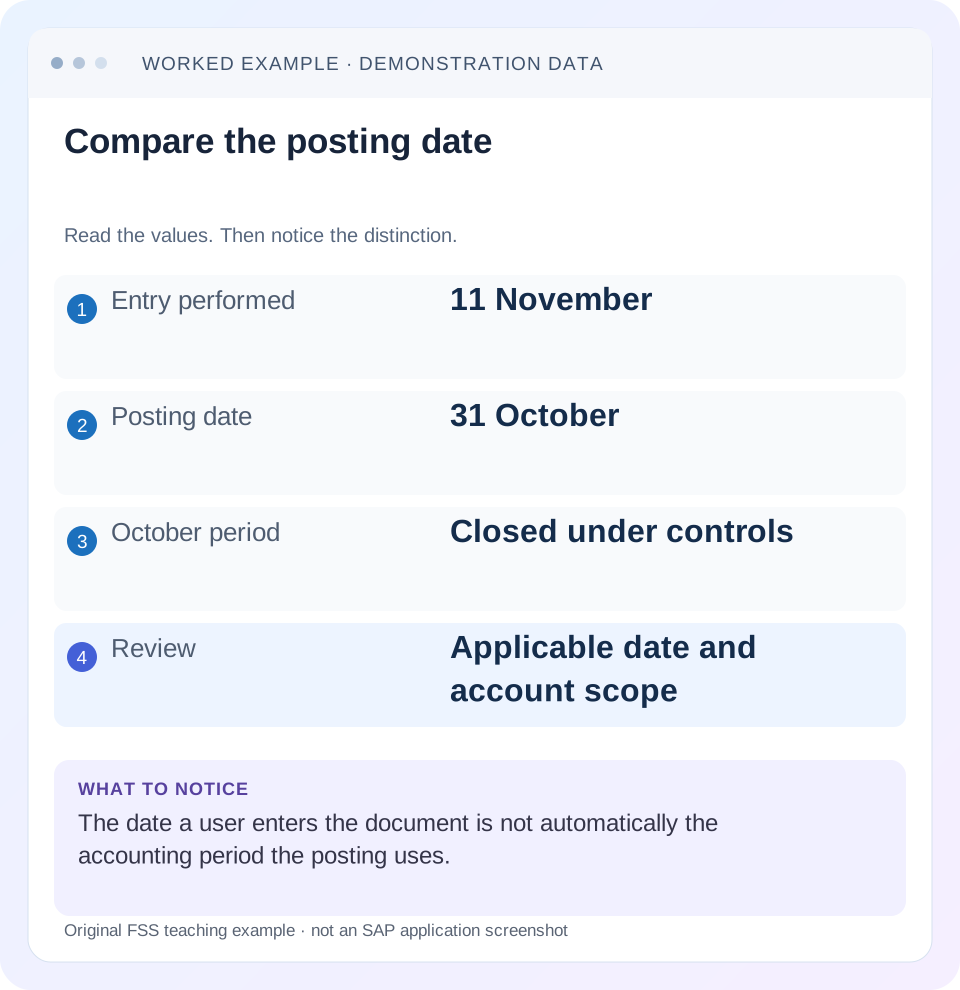
Read the example values
- Entry performed
- 11 November
- Posting date
- 31 October
- October period
- Closed under controls
- Review
- Applicable date and account scope
Words you’ll meet in this guide
- Posting
- Recording a financial entry.
- General ledger
- The main collection of financial accounts.
- Open item
- An accounting entry still needing matching or settlement.
- Company code
- An organizational unit used for separate financial accounts.
- Accounting document
- A record of a financial entry with a header and individual account lines.
- HANA
- SAP’s database platform.
- FI
- Financial Accounting: the SAP area for financial postings and reporting.
Preview the practical steps
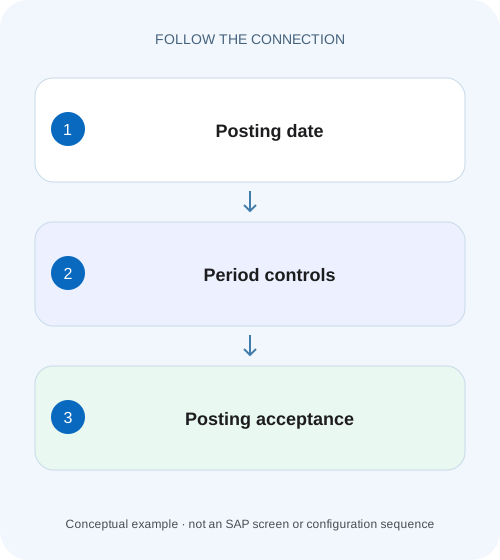
SEE THE CONNECTION
See it in a simple example.
A small example to make the idea concrete.
Investigate a blocked plant posting
A manufacturing finance team cannot post an adjustment even though one period-control view appears open.
Start with the attempted posting date and exact account context
A posting-period error concerns the accounting period derived from the attempted posting date and the applicable controls.
Understand date-to-period determination
SAP documents determination of posting period from the posting date and the fiscal-year definition, with ledger context in relevant accounting designs.
Posting-period variants define shared control scope
A posting-period variant can be assigned to several company codes, so changing its intervals can affect more than the company named in one incident.
Investigate a blocked plant posting
A manufacturing finance team cannot post an adjustment even though one period-control view appears open.
Compare posting date, company scope and the relevant account restrictions before requesting that a period be reopened.
| Reader | Business question | Evidence to carry forward |
|---|---|---|
| Manufacturing finance, controlling and purchasing teams | Investigate a blocked plant posting | Compare posting date, company scope and the relevant account restrictions before requesting that a period be reopened. |
01 Start with the attempted posting date and exact account context
A posting-period error concerns the accounting period derived from the attempted posting date and the applicable controls. Today’s date, the invoice document date and the time the user entered the transaction can differ from that posting date. Capture the actual input and message before asking anyone to reopen a period. [1] [2]
This guide is for FI accountants and functional support in SAP ERP or supported S/4HANA G/L processes. Ledger-specific fiscal settings, CO integration and source components can add controls. You need authorized display of the transaction inputs, fiscal mapping, company-code posting-period variant and relevant period settings. The fictional configuration is a diagnostic example, not an instruction to open an old period or grant additional access.
02 Understand date-to-period determination
SAP documents determination of posting period from the posting date and the fiscal-year definition, with ledger context in relevant accounting designs. In a calendar fiscal year, 31 October may map to period 10; in a noncalendar design, that relationship must be read from configuration. Do not assume month number equals fiscal-period number. [1]
After successful posting, the entry and general-ledger displays can expose period information for their relevant ledger contexts. A correct date in one field does not establish the saved accounting period in every view. Record both intended date and expected fiscal year/period so the final result can be checked.
03 Posting-period variants define shared control scope
A posting-period variant can be assigned to several company codes, so changing its intervals can affect more than the company named in one incident. Inspect the actual assignment before proposing maintenance. A company-code number is not necessarily its variant number, and another company’s successful posting does not prove that the same settings apply. [2]
SAP’s period guidance describes intervals with lower/upper periods and fiscal years, account-type differentiation and account intervals. Read the complete matching settings rather than one line that looks open. A period can be generally available while a specific account context remains restricted.
04 Worked case: the header scope is open but the account is restricted
Fictional company 1000 uses variant V100 and a calendar fiscal year. A user enters a document on 14 November 2026 with posting date 31 October 2026. Assume the general “+” entry covers the required October/November window, but the applicable G/L account rule for expense 500100 permits only November operational postings. The attempted October expense is therefore not established as permitted merely by the broad entry.
The support task is to confirm whether31 October is the intended approved accounting date and whether a scoped closing exception exists. Changing the date to 14 November would change the accounting period. Opening October broadly would change controls. Neither should happen simply to make the message disappear.
| Input/control | Observed value | Interpretation |
|---|---|---|
| Entry date | 14 November 2026 | When preparation occurred |
| Posting date | 31 October 2026 | Requested accounting date |
| Declared fiscal mapping | Period10/FY2026 | Calendar-year example only |
| General variant entry | Required window included | Header-level availability is not whole-line proof |
| Applicable account scope | November only | Expense500100 October requires further review |
| Desired outcome | Approved dated posting | Technical success must match accounting intent |
05 Check account types and reconciliation-account intervals
The reviewed guidance describes account type “+” as the general minimum entry and additional account-type controls for lines. It also explains that customer/supplier account intervals use the relevant reconciliation-account numbers rather than the customer/supplier master numbers in the documented configuration. This distinction matters when an AP/AR posting is rejected. [2] [3]
If supplier S100 fails, do not search only for S100 in an interval intended for its G/L reconciliation context. Display the actual account assignment and matching control. A supplier posting and a G/L-only journal can therefore differ even on the same date and company. Preserve account category and reconciliation relationship with the support evidence.
06 An authorization restriction can look like a closed-period issue
SAP documents authorization groups for permitted posting periods and the F_BKPF_BUP object in the reviewed classic setting, with interval-specific behavior. A restricted closing window can be available to an authorized closing user while ordinary users remain excluded. Do not conclude that the entire period is closed because one user cannot post. [2]
Compare the actual message and period setup with the intended user’s approved task. If the issue is access to a restricted close interval, use the security process to evaluate the narrow business need. Granting broad accounting or administrator access is not a valid diagnosis. If the date is wrong, a role change would address the wrong cause.
07 CO-to-FI and source-component controls form separate branches
The reviewed period guidance describes a separate interval for CO-to-FI postings in applicable designs. That interval is not a universal opening for ordinary operational FI postings. A cost allocation succeeding in a prior period does not prove that a manually entered supplier invoice should succeed there. [2]
Likewise, inventory, asset, payroll or other source processes can have their own period/state prerequisites. Capture the originating application and exact error. If the source rejects a movement before FI posting, changing a G/L interval may not resolve it. The investigation should identify which layer issued the message rather than treating every date-related error as the same configuration object.
08 Investigate in a controlled practical sequence
Work from observed input to matching controls, then to the approved accounting decision. Keep the proposed resolution separate until the cause is clear.
Capture the attempt
Record system/client, app, company, posting/document dates, account category and exact message.
Expected observation: The period request is reproducible.
Derive the fiscal period
Use the actual fiscal-year/ledger mapping rather than calendar assumptions.
Expected observation: 31 October maps to the observed fiscal period.
Read the assigned variant
Inspect company-to-variant assignment and the complete relevant intervals.
Expected observation: The control scope, including other assigned companies, is known.
Inspect line and user restrictions
Compare account type, G/L/reconciliation interval and authorized close group where applicable.
Expected observation: A specific restricting layer explains the failure.
Review the approved treatment
Determine whether the input date should change or a scoped permitted window is required. Verify resulting document after authorized action.
Expected observation: The final journal is in the intended period, not merely accepted.
09 Troubleshoot date, control and access differences separately
A comparison with another user or company helps only when the actual dimensions match. “It works for my colleague” is a prompt to compare evidence, not a reason to copy permissions or intervals.
| Observation | Inspect | Likely branch |
|---|---|---|
| Current month entry rejected | Actual posting date | A prior date may still be entered |
| Header accepted; line fails | Account-type/interval rules | Line-specific restriction |
| Supplier fails, G/L succeeds | Reconciliation-account context | Different account category |
| Colleague succeeds | Close authorization and identical input | Restricted interval access |
| Other company succeeds | Assigned variant | Different configuration scope |
| CO allocation succeeds; invoice fails | CO-FI versus operational interval | Different posting process |
10 Use special periods only for their intended closing purpose
Special periods subdivide the last regular period for closing activity; they are not a general workaround for any closed month. SAP requires the posting date to be within the final regular period and the special period to be entered explicitly in the relevant FI process. Confirm the variant actually provides the requested bucket. [4]
An October operational invoice in the declared calendar design cannot be made a year-end adjustment merely by entering13. If the business requires a year-end accrual instead of the original invoice posting, that is a different accounting event and decision. Preserve the source and adjustment relationship rather than using period selection to disguise the original timing question.
11 Verify positive, negative and boundary outcomes
A positive training check uses an approved current-period posting and verifies the saved fiscal year/period and accounts after execution. For the worked prior-period case, verify the actual restricting rule and the approved outcome: corrected input date or a scoped authorized close posting. A disappeared error alone is not the acceptance criterion.
A negative test intentionally uses a prior posting date while the account remains current-period-only and confirms rejection through a safe validation process. A boundary test posts on the final day of a fiscal period and the first day of the next, checking actual mapping. Another compares an authorized closing user with an ordinary user under identical input and records the documented restriction. These are proposed tests; no period configuration or role was changed for this article.
12 Reconcile uncertain attempts before retrying
If the user saw a timeout or ambiguous response, inspect whether any document posted before another attempt. A previous period error may have been resolved or a backend posting may have completed after the visible response failed. Use complete document identity and business reference to reconcile the actual state.
If the document exists, display its saved dates, period, accounts and source relationship. If it does not, preserve the failure evidence and continue diagnosis. Creating a duplicate current-period document can turn a simple date/control question into a duplicate-liability correction. A valid period is one prerequisite, not a complete proof that the business event should be reposted.
13 Keep a scoped period-change receipt
If the approved resolution changes an interval, record the actual variant, affected account scope, permitted dates/periods, authorization condition and planned closing time. Recheck other company codes assigned to that variant through the responsible control process.
After the allowed posting, inspect its saved period and restore the intended close state where required by the approved procedure. A temporary exception left open indefinitely changes the accounting-control scope beyond the original incident. The receipt should explain both why this document was allowed and how the normal boundary was preserved.
14 Frequently asked questions
Why is October closed when I am entering in November? The posting date can still request October. Why can a closing accountant post while I cannot? A restricted interval and authorization can apply; inspect the actual setup and approved role. Can one variant affect several companies? Yes, confirm assignments before maintenance.
Can I move the date without telling finance? The accounting period changes, so the intended treatment must be explicit. Does opening a period fix every source error? No; identify the issuing component and remaining prerequisites. Use special-period guidance for year-end buckets and FB03/balance guidance to verify the actual dated posting after resolution.
Related services and next steps
Primary sources
Found this useful?
Share this guide with your network, or leave a like.
Your like is saved in this browser.