FBL1N, FBL5N and FBL3N: Choose the correct SAP line-item view
Accounts payable, customer finance and G/L accounting investigate different aspects of a manufacturer's purchasing and sales cycle.

Source review:
START HERE · NO PRIOR TOPIC KNOWLEDGE NEEDED
What it is. Why it matters.
A line-item report lists individual accounting entries. FBL1N focuses on suppliers, FBL5N on customers and FBL3N on general-ledger accounts in relevant classic systems.
Completely new to SAP?
Manufacturers use SAP to connect work such as buying components, recording inventory, planning production, shipping equipment and accounting for costs. SAP S/4HANA is an enterprise resource planning system: it connects these activities through shared business data.
Financial Accounting records business events as accounting documents. An account groups relevant amounts; individual entries explain how the total arose.
A transaction code, or t-code, is a shortcut to a task in classic SAP GUI. Fiori apps provide another way to work. Names and screens depend on the product and release; you do not need a live system to learn the concepts in this guide.

Scope and source-review notes
Scope and evidence
Source review by FAST SAP SOLUTIONS® editorial. This badge describes our editorial review; it does not represent SAP certification or independent endorsement.
Classic FI FBL1N/FBL5N/FBL3N entry points and line-item selection concepts. New G/L and S/4HANA ledger-aware applications require their own scope checks.
Reviewed relevant official SAP indexed documentation excerpts on 14 November 2026. Examples, identifiers, amounts and expected observations are illustrative; no customer SAP execution was performed. Transaction availability, labels and results depend on the installed release, deployment and local configuration.
A MANUFACTURING EXAMPLE
Choose the right factory finance worklist
Select the correct account family
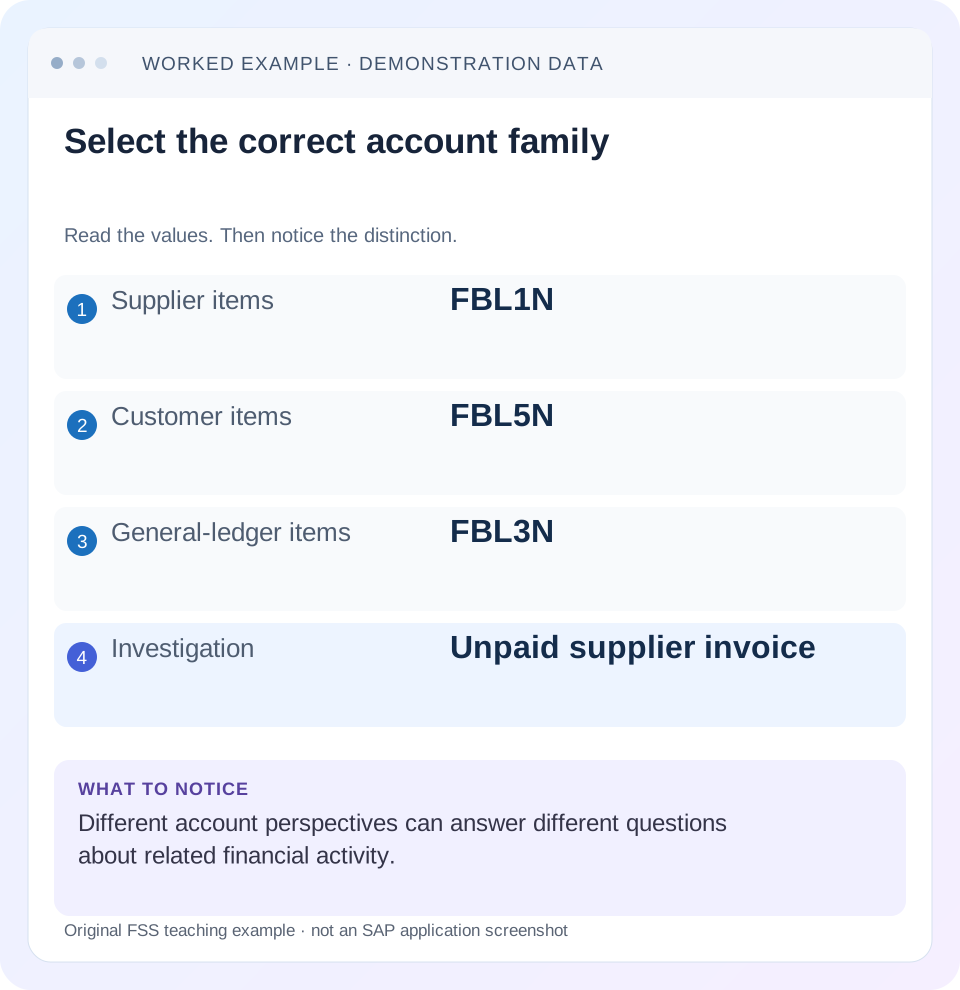
Read the example values
- Supplier items
- FBL1N
- Customer items
- FBL5N
- General-ledger items
- FBL3N
- Investigation
- Unpaid supplier invoice
Words you’ll meet in this guide
- Posting
- Recording a financial entry.
- General ledger
- The main collection of financial accounts.
- Open item
- An accounting entry still needing matching or settlement.
- Company code
- An organizational unit used for separate financial accounts.
- Accounting document
- A record of a financial entry with a header and individual account lines.
- HANA
- SAP’s database platform.
- FI
- Financial Accounting: the SAP area for financial postings and reporting.
Preview the practical steps
SEE THE CONNECTION
See it in a simple example.
A small example to make the idea concrete.
Choose the right factory finance worklist
Accounts payable, customer finance and G/L accounting investigate different aspects of a manufacturer's purchasing and sales cycle.
Choose the account family that owns the item
Use FBL1N for supplier/vendor line items, FBL5N for customer line items and FBL3N for the relevant classic G/L line-item view.
Define the question before running a broad list
“Which supplier invoices are open at 31 October?” is different from “Which invoices were posted during October?” The first asks for a state at a key date; the second asks for events in a posting interval.
Understand open, cleared and all-item selections
SAP’s line-item guidance supports status selections such as open, cleared and parked items and relevant date restrictions.
Choose the right factory finance worklist
Accounts payable, customer finance and G/L accounting investigate different aspects of a manufacturer's purchasing and sales cycle.
Choose the supplier, customer or G/L line-item scope that matches the question before comparing open and cleared items.
| Reader | Business question | Evidence to carry forward |
|---|---|---|
| Manufacturing finance, controlling and purchasing teams | Choose the right factory finance worklist | Choose the supplier, customer or G/L line-item scope that matches the question before comparing open and cleared items. |
01 Choose the account family that owns the item
Use FBL1N for supplier/vendor line items, FBL5N for customer line items and FBL3N for the relevant classic G/L line-item view. The first choice is the accounting perspective, not the transaction name you remember. An unpaid supplier invoice belongs to a supplier-account investigation; a bank clearing difference belongs to its G/L context. [1] [2]
This tutorial is for FI learners, finance operations and support analysts in classic ERP or supported S/4HANA landscapes. New G/L and S/4HANA ledger-aware applications can expose different populations and views. You need authorized display access to the relevant accounts and documents. The fictional timeline teaches key-date and status reasoning; application-specific selections and archive/aging behavior must be checked in the installed release.
02 Define the question before running a broad list
“Which supplier invoices are open at 31 October?” is different from “Which invoices were posted during October?” The first asks for a state at a key date; the second asks for events in a posting interval. An invoice posted in September can belong to October’s open exposure even though it is not an October posting.
Write the account or account range, company code, item category, status and relevant date basis. Preserve currency and any ledger/view context where applicable. This small definition prevents the common mistake of comparing an open-item snapshot with a period’s gross activity and treating the difference as missing accounting.
03 Understand open, cleared and all-item selections
SAP’s line-item guidance supports status selections such as open, cleared and parked items and relevant date restrictions. Its function documentation explains that an item can be open at a specified key date if posted by that date and cleared later. Current status and historical status are therefore different questions. [2] [3]
A currently cleared invoice can correctly appear in a past-date open-item list. Conversely, a document posted after the key date should not be treated as existing exposure at that earlier date merely because it is open today. Read the posting and clearing dates together, then check the actual report selection semantics.
04 Worked case: one invoice changes status across dates
Fictional supplier S100 has invoice I1 for 1,000 EUR posted on 20 October and cleared on 5 November. Invoice I2 for 300 EUR is posted on 2 November and remains open on 14 November. Assume ordinary posted items, one company code and no reversals. The signs are expressed as liability amounts for this timeline, not a universal display convention.
At 31 October, I1 contributes 1,000 of open exposure and I2 does not yet exist in the posting timeline. At 14 November, I1 is cleared and I2 contributes 300 open. An October-posting list can still contain I1 when run after clearing because posting activity and current open status are different selections.
| Selection question | I1: 1,000 | I2: 300 | Open exposure in this dataset |
|---|---|---|---|
| Open at 31 October | Included: cleared later | Excluded: posted later | 1,000 |
| Open at 14 November | Excluded: cleared 5 November | Included: still open | 300 |
| Posted during October, all statuses | Included | Excluded | Activity list, not an open-exposure total |
| Cleared in November | Included | Excluded | Cleared population, not new cash proof |
05 Keep supplier items distinct from a reconciliation-account view
A supplier item and its G/L reconciliation effect are related accounting perspectives. FBL1N focuses on supplier accounts; a G/L report focuses on the selected G/L account and its supported item representation. Comparing one supplier with an all-supplier reconciliation-account total does not compare equal populations.
For a reconciliation, establish which suppliers, company codes, periods, currencies and special transactions belong in the G/L amount. Then trace representative items. Do not add the supplier liability to the reconciliation-account liability as if two independent debts exist. The subledger connection explains why the same economic event appears in both reporting contexts.
06 Separate selection, list filters and layout
Initial selection determines the population retrieved. List filters can further restrict displayed rows. A layout controls columns, sorting and totals, and can make important fields invisible without changing the underlying business event. SAP documents these as distinct functions. Two users can obtain different-looking lists because their variants or layouts differ. [2] [3]
When a document seems missing, inspect the actual selection variant, active list filters, maximum-item limit and status/date settings. When a field seems missing, inspect the layout and supported special-field availability. Exporting a larger list does not resolve an incorrectly interpreted date, and adding a clearing-date column does not change which rows were selected.
07 Reconstruct one item before reconciling the total
Choose I1 and navigate to the accounting document through the supported display. Record complete identity, posting date, currency, amount, account and clearing reference/date. Then explain why I1 belongs or does not belong in the selected list. This validates the selection logic against an observed item.
If the item behaves as expected, expand to the complete population. If it does not, investigate date interpretation, account identity, special-item scope, document state and report view. A headline balance difference should eventually resolve into identified items or a clearly stated scope difference. A screenshot with one unexplained total is not a reproducible reconciliation.
08 A practical line-item investigation
Use the same account and date definition before comparing two users or reports. Avoid changing several selection dimensions at once.
Name the account perspective
Choose supplier S100/FBL1N for the example, customer/FBL5N or classic G/L/FBL3N for other questions.
Expected observation: The selected account family matches the business issue.
Set the status and date question
For historical exposure, use the supported open-at-key-date selection and record 31 October.
Expected observation: The result is a state snapshot rather than just October postings.
Expose explanatory columns
Display document identity, amount/currency, posting date and clearing date/reference where supported.
Expected observation: I1’s later clearing can explain its historical inclusion.
Inspect variants and filters
Compare initial criteria, list filters, layout and item limits.
Expected observation: A hidden or omitted row has a specific selection explanation.
Trace and reconcile
Open I1’s document and reconstruct 1,000 historical versus 300 current open exposure.
Expected observation: The difference is explained without changing a posting.
09 Troubleshoot empty, different or misleading lists
An empty list can be correct for its selected status/date. A large list can still be incomplete for the business question. Treat the selection as evidence to inspect.
| Observation | Check | Explanation to test |
|---|---|---|
| Supplier invoice absent in FBL5N | Account family | Customer view cannot answer supplier account question |
| Cleared invoice appears at past key date | Posting and clearing dates | It was open at that historical date |
| Two users show different totals | Variants, filters and currency | Different populations or bases |
| Column missing | Layout and supported fields | Display issue rather than missing accounting |
| List unexpectedly short | Maximum items and selection | Retrieval may stop at a configured limit |
| G/L and one supplier differ | Aggregation and view | Different account populations |
10 Use currencies and signs consistently
Keep document, local and other displayed currencies in separate columns and totals. Equal numeric values in different currencies cannot be combined without a defined conversion basis. If the report translates into a display currency, preserve that setting and rate context rather than comparing it directly with original document amounts.
Also document the sign convention. A supplier invoice may be shown as a credit or negative amount; an operational exposure table might show a positive liability. The same item can therefore look opposite in two exports without an accounting reversal. Reconcile debit/credit direction first, then map it to the business statement you intend to communicate.
11 Verify historical and current interpretations
For the positive exercise, use I1’s 20 October posting and 5 November clearing to explain inclusion at 31 October and exclusion from current open exposure at 14 November. Verify I2’s 2 November posting separately. The expected totals are 1,000 and 300 in the declared dataset.
For a negative test, use an October posting-range selection and reject the claim that its total necessarily equals open exposure at month-end. For a boundary test, place a clearing exactly on the key date and inspect the report’s documented rule and actual result. Another hides the clearing-date column: explain why removing a column cannot change the underlying item lifecycle. These are proposed learning checks, not executed SAP reports.
12 Explain the difference between open and overdue
Open means the item has not been cleared under the relevant key-date rule. Overdue concerns due-date or cash-discount timing under the report’s supported calculation. An open invoice posted yesterday can be not yet due; an overdue invoice may subsequently be cleared. These are separate classifications, so an open-item list does not automatically equal a collection list. [3]
For an extension of the example, assume I2 for 300 has a declared net due date of 30 November. It remains open on 14 November but is not yet overdue on that stated basis. I1 was open at 31 October; whether it was overdue then requires its own payment-term and baseline-date evidence. Do not infer due dates solely from posting dates. Display the relevant due-date fields and inspect the actual source/master terms before telling collections that an open amount is late. The reviewed function documentation distinguishes status symbols from due-date/deadline symbols.
13 Retain the observation time
Record when the list was run as well as its key date. Later clearing, reversal or additional postings can change a fresh extraction, even when users choose similar labels. A dated selection record lets the next analyst distinguish a new business event from a reproducibility problem.
14 Frequently asked questions
Can FBL3N reproduce every S/4HANA ledger report? Do not assume that; identify supported ledger-aware applications and their entry or reporting view. Does an invoice disappearing from open items prove cash payment? It proves neither cause nor bank settlement without related evidence; inspect clearing composition. Can I change a layout to retrieve excluded documents? A layout is not a replacement for selection criteria.
What should a support handover contain? Account family, account/company scope, exact date/status selection, currency/view, filters and a representative document explaining inclusion. Use the balance-display lesson for movement versus cumulative totals and the open-item lesson to distinguish a zero balance from actual item clearing.
Related services and next steps
Primary sources
Found this useful?
Share this guide with your network, or leave a like.
Your like is saved in this browser.