Integration Suite splitter and gather: Plan ordering and failure handling
A manufacturer's integration splits a supplier payload into several items and needs to understand which branch failed and what the gathered result represents.

Source review:
START HERE · NO PRIOR TOPIC KNOWLEDGE NEEDED
What it is. Why it matters.
A splitter divides one integration message into smaller messages. A gather step combines results; error handling determines what happens when only one part fails.
Completely new to SAP?
Manufacturers use SAP to connect work such as buying components, recording inventory, planning production, shipping equipment and accounting for costs. SAP S/4HANA is an enterprise resource planning system: it connects these activities through shared business data.
SAP Business Technology Platform, or BTP, provides cloud services for applications, data and integration. A connection needs a route, an identity and permission to perform the intended task.
A transaction code, or t-code, is a shortcut to a task in classic SAP GUI. Fiori apps provide another way to work. Names and screens depend on the product and release; you do not need a live system to learn the concepts in this guide.

Scope and source-review notes
Scope and evidence
Source review by FAST SAP SOLUTIONS® editorial. This badge describes our editorial review; it does not represent SAP certification or independent endorsement.
SAP Cloud Integration splitter/gather error-handling patterns. Stop-on-exception and exception-subprocess behavior must be checked for the specific flow and runtime.
Documentation review on 14 November 2026 using official SAP sources and indexed official excerpts where full Help text was unavailable. Scope and service or release differences are explained in the lesson. All datasets, requests and checks are illustrative; no customer SAP runtime execution or measured results are claimed.
A MANUFACTURING EXAMPLE
Keep partial supplier-message failures visible
One part fails, others differ
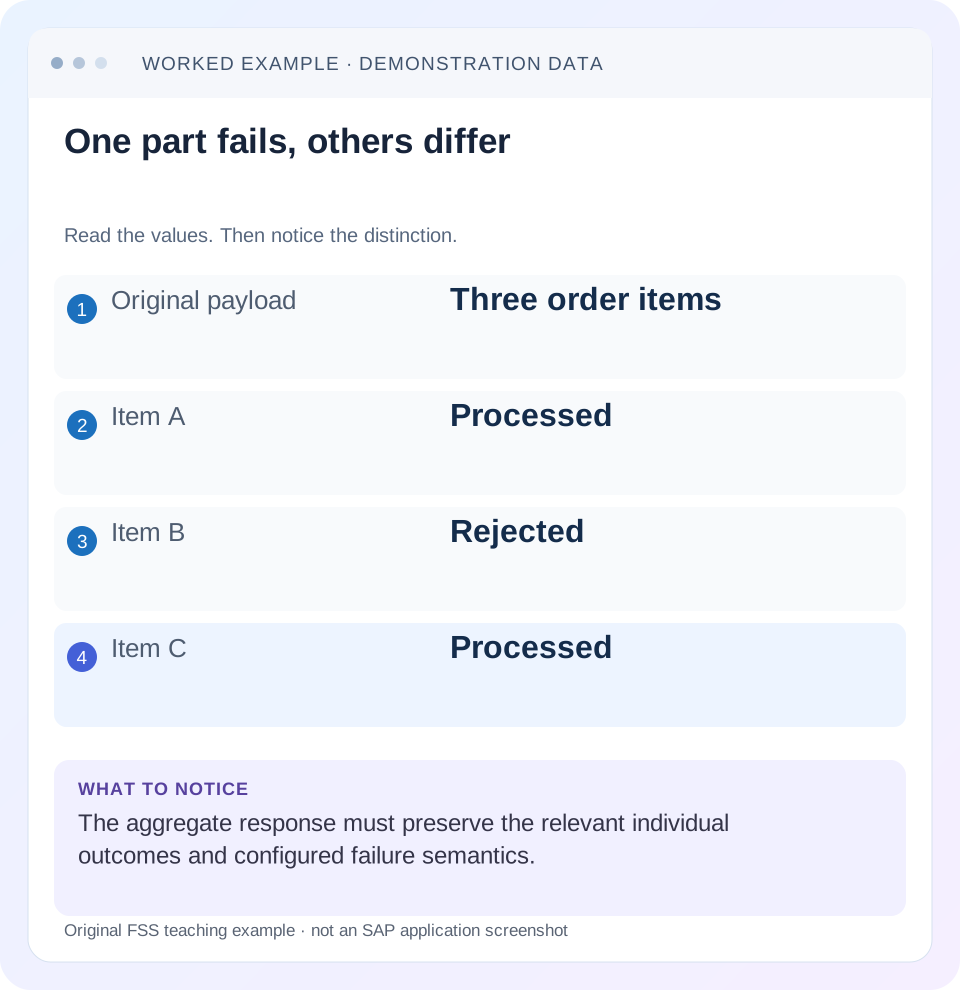
Read the example values
- Original payload
- Three order items
- Item A
- Processed
- Item B
- Rejected
- Item C
- Processed
Words you’ll meet in this guide
- Backend
- The service or system doing the work behind an interface.
- Destination
- Named connection settings for another service.
- Credential
- Access information used to prove an identity.
- Subaccount
- A BTP scope for applications, services and access settings.
- XML
- A format that organizes data into named, nested elements.
Preview the practical steps
SEE THE CONNECTION
See it in a simple example.
A small example to make the idea concrete.
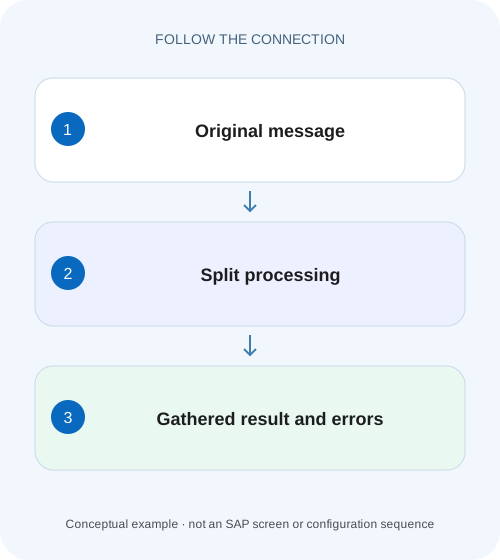
Keep partial supplier-message failures visible
A manufacturer's integration splits a supplier payload into several items and needs to understand which branch failed and what the gathered result represents.
Define the bulk outcome before configuring the splitter
A splitter turns one composite message into smaller processing units; Gather combines their results.
Treat item identity, execution order and output order separately
Every item needs a stable identity within its parent.
Worked case: three price lines, one invalid value
Imagine purchase order PO-900 with items 10, 20 and 30.
Keep partial supplier-message failures visible
A manufacturer's integration splits a supplier payload into several items and needs to understand which branch failed and what the gathered result represents.
Inspect splitter, exception and gather behavior before reporting success for every original item.
| Reader | Business question | Evidence to carry forward |
|---|---|---|
| SAP developers and application teams supporting manufacturers | Keep partial supplier-message failures visible | Inspect splitter, exception and gather behavior before reporting success for every original item. |
01 Define the bulk outcome before configuring the splitter
A splitter turns one composite message into smaller processing units; Gather combines their results. The important design choice is what a failed part means for the whole request. Decide whether the business contract requires all items, permits partial results or sends failed items to a separate recovery process. Then configure Stop on Exception, local exception handling and gathered output consistently with that contract. [1]
This tutorial is for Cloud Integration developers using XML splitter/gather patterns and a Local Integration Process. You need an authorized development flow, the exact splitter and Gather versions and a small fixture. General and Iterating Splitters preserve different surrounding content, so inspect the resulting split payload rather than assuming either creates the same shape. Parallel execution and external side effects require additional verification.
02 Treat item identity, execution order and output order separately
Every item needs a stable identity within its parent. A line number or business item key lets you reconcile it after splitting, mapping and gathering. Execution order describes when processing starts; completion order describes when processing finishes; output order describes how the final message presents results. Those are different facts, especially when parts perform independent remote calls.
If the receiver needs item sequence, include an explicit item key or sequence field and verify the final contract. Do not infer it from log arrival order. Likewise, a bulk exchange ending Failed does not prove no external side effect happened before the failure. Stop on Exception is a processing-control choice, not a universal rollback across remote systems.
03 Worked case: three price lines, one invalid value
Imagine purchase order PO-900 with items 10, 20 and 30. Their quantities and unit prices are 2 × 10.00, 3 × INVALID and 1 × 5.00 in EUR. Items 10 and 30 can be transformed into line totals 20.00 and 5.00. Item 20 cannot be numerically converted. The expected successful full-order total is undefined until that price is corrected; reporting 25.00 as the complete order total would silently omit item 20.
Use the following authored XML as a design fixture. It is deliberately small enough to inspect. The namespace on PurchaseOrder is explicit, while the unprefixed child elements below have no default namespace. Adapt the actual XPath and namespace mapping to your payload rather than copying a sample path without checking the document.
<p:PurchaseOrder xmlns:p="urn:fss:orders" id="PO-900">
  <Items>
    <Item id="10"><Qty>2</Qty><Price>10.00</Price></Item>
    <Item id="20"><Qty>3</Qty><Price>INVALID</Price></Item>
    <Item id="30"><Qty>1</Qty><Price>5.00</Price></Item>
  </Items>
</p:PurchaseOrder>
04 Design the all-items-required branch
For an all-items-required transformation, select Stop on Exception and follow the documented exception pattern. SAP recommends no exception subprocess or an exception subprocess ending in Error End when stopping is intended. Encapsulating item processing in a Local Integration Process gives the item error its own handling scope. Record the failed parent and item identity before propagating the error. [1] [2]
Under the illustrated sequential case, item 10 transforms, item 20 raises the numeric error and item 30 is not processed after that failure. The final receiver should not be sent a payload presented as a complete PO-900. Verify the actual runtime sequence and any configured parallel behavior. Do not generalize the sequential next-item observation into a promise that already running parallel work is undone.
05 Design partial results as an explicit business contract
If partial processing is allowed, SAP documents a contrasting pattern without Stop on Exception and with local exception handling ending in Message End. The exception path must return content suitable for the configured Gather. In the official same-format XML example, it creates valid XML; returning a plain error string can cause Gather itself to fail. [1] [3]
For the original PO-900 teaching design, define a result vocabulary with success and failure outcomes. Items 10 and 30 carry their mapped values. Item 20 carries a machine-readable failure with its item identity and a safe error code, or is persisted for a separate recovery flow with an explicit summary reference. The final consumer must know it received a partial outcome. Do not copy an empty placeholder into a business order and assume the receiver understands its significance.
06 Choose Gather format and result shape together
Gather supports different incoming formats and combination strategies. Compare those settings with the output of both the normal and exception paths. The input to Gather is the payload at that moment, not the original schema remembered from the sender. A mapping failure can leave a response body or partial intermediate representation that is unsuitable for XML combination. [4]
Use a fixture to inspect each part before Gather. Check whether the splitter duplicates parent header data, whether a filter removes duplicated wrappers and how the final Content Modifier or mapping builds the target document. The source order number should remain once in the intended target location, and item identity should remain associated with each result. Counting three chunks does not prove the final XML is valid or semantically complete.
For the three-item fixture, check cardinality explicitly. Before splitting there is one parent with three items. After item processing there should be three accounted-for outcomes under the partial contract, even if only two are successful. After gathering, the parent summary must still account for all original identities. A result with two Item nodes and no error reference fails this reconciliation even when the XML is well formed.
07 A result ledger makes partial success reviewable
Write the expected ledger before executing the flow. In the all-items-required case, the accepted business result is no complete outbound order until correction. In the partial case, the accepted result explicitly reports two successes and one failed item. The valid subtotal of 25.00 describes only successful lines; label it accordingly and keep the full-order total unavailable.
| Item | Transformation | Partial contract result |
|---|---|---|
| 10 | 2 × 10.00 = 20.00 EUR | Success with item identity |
| 20 | 3 × INVALID cannot be calculated | Failure PRICE_INVALID; recovery owned |
| 30 | 1 × 5.00 = 5.00 EUR | Success if the chosen flow continues |
| Parent PO-900 | Two valid lines, one unresolved | Partial status; full total unavailable |
08 Control side effects before choosing the replay scope
If split processing calls a receiver for each item, a failure in item 20 can leave item 10 already posted. A later retry of the full parent may submit item 10 again. Define idempotency using stable parent/item business identities or a supported receiver operation that recognizes repeats. A new integration message ID does not distinguish a repeated business instruction safely.
Where the business requires a whole-order transaction, consider whether transformation can complete and validate all items before the single receiver call. That can reduce partial external effects, but only the receiver’s transaction contract establishes atomic posting. Do not claim that gathering parts creates a distributed transaction. If the receiver itself partially accepts a bulk message, reconcile that separate result too.
09 Troubleshoot failure at the item boundary and the gather boundary
A Failed status can represent the intended propagation of an item error or an unintended second error in Gather. Preserve the first item error and then inspect what the exception path returned. Fixing only the final XML parser exception can hide the original invalid price.
| Observation | Question | Next check |
|---|---|---|
| Middle item fails and later item absent | Is stopping the intended contract? | Stop on Exception and exception end event |
| Flow Completed but item missing | Was failure handled as partial success? | Failed-item ledger and recovery record |
| Gather reports invalid XML | What body did exception path produce? | Valid same-format output before Gather |
| Duplicate parent headers in result | What context did splitting preserve? | Split payload, filter and final assembly |
| Retry creates duplicate receiver items | What already committed? | Parent/item identities and receiver reconciliation |
| Output sequence differs | Is order explicit in the contract? | Sequence keys and final payload verification |
10 Test positive, negative and boundary inputs
For the positive case, replace INVALID with 7.00. The expected totals are 20.00, 21.00 and 5.00, with a complete order total of 46.00 EUR if that total is part of the target contract. Verify all three item identities, quantity/price association and the final parent identifier. XML validity alone cannot catch a price attached to the wrong item.
For the negative case, retain the middle failure and verify both supported contracts separately. The all-items-required branch should fail visibly without presenting a complete outbound order. The partial branch should preserve the item-20 failure and return or persist a reviewable partial outcome. Confirm that an exception subprocess has not merely suppressed the error.
For boundaries, test an empty item collection, exactly one item, a missing item identity and two invalid items. Define whether an empty parent is valid rather than assuming Gather creates the desired empty result. If parallel processing is enabled, use deliberately varied response times and verify identity association, output contract and receiver capacity. These are proposed checks until run on the actual configured flow.
11 Recover the business work, not merely the monitoring status
Correcting item 20 to 7.00 does not automatically define the replay scope. If the first run only transformed data and never called the receiver, replaying PO-900 may be appropriate. If items 10 and 30 posted individually, replay only the supported unresolved work or rely on a verified idempotent receiver contract. Keep the original failure and replacement relationship visible.
Can a Completed message contain a failed item? Yes, the documented continue-processing pattern handles errors and can end Completed. Interpret status together with the designed result and recovery records. Can Stop on Exception guarantee rollback? No universal claim follows for remote side effects; establish the actual transaction scope.
What belongs in the design review? Include the three-item fixture, chosen failure contract, splitter settings, local exception end event, both normal and error result shapes, Gather settings and replay identity. The related lessons cover namespace matching, idempotency and the meaning of Completed in more detail.
Related services and next steps
Primary sources
Found this useful?
Share this guide with your network, or leave a like.
Your like is saved in this browser.